Weave ContextAuthor repository-based Markdown knowledge in VS Code with deterministic wikilink navigation, filesystem-backed identity, and documentation continuity. Installation Launch VS Code Quick Open ( Ctrl+P), paste the following command, and press enter.Copied to clipboard |

Weave Context
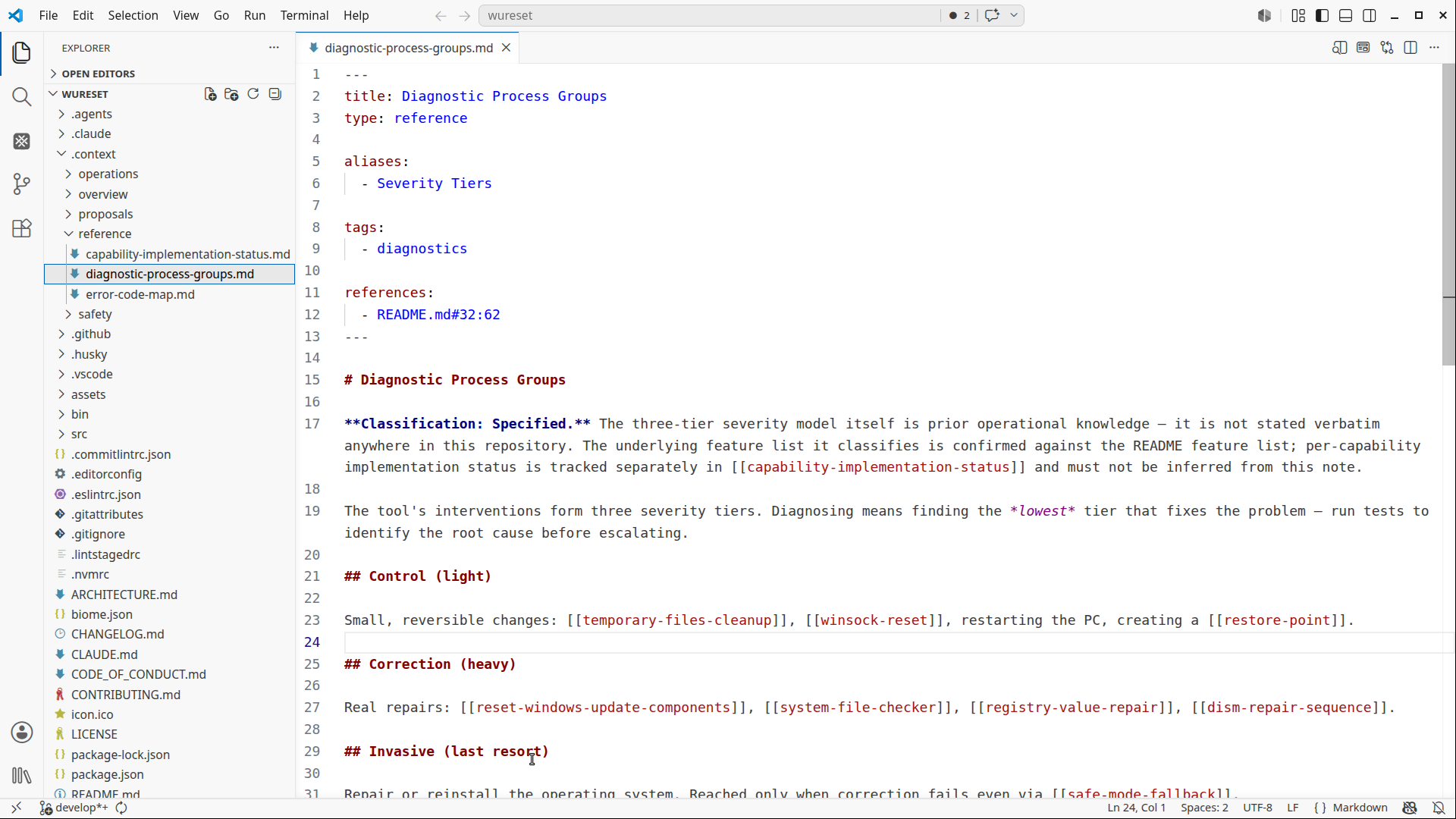
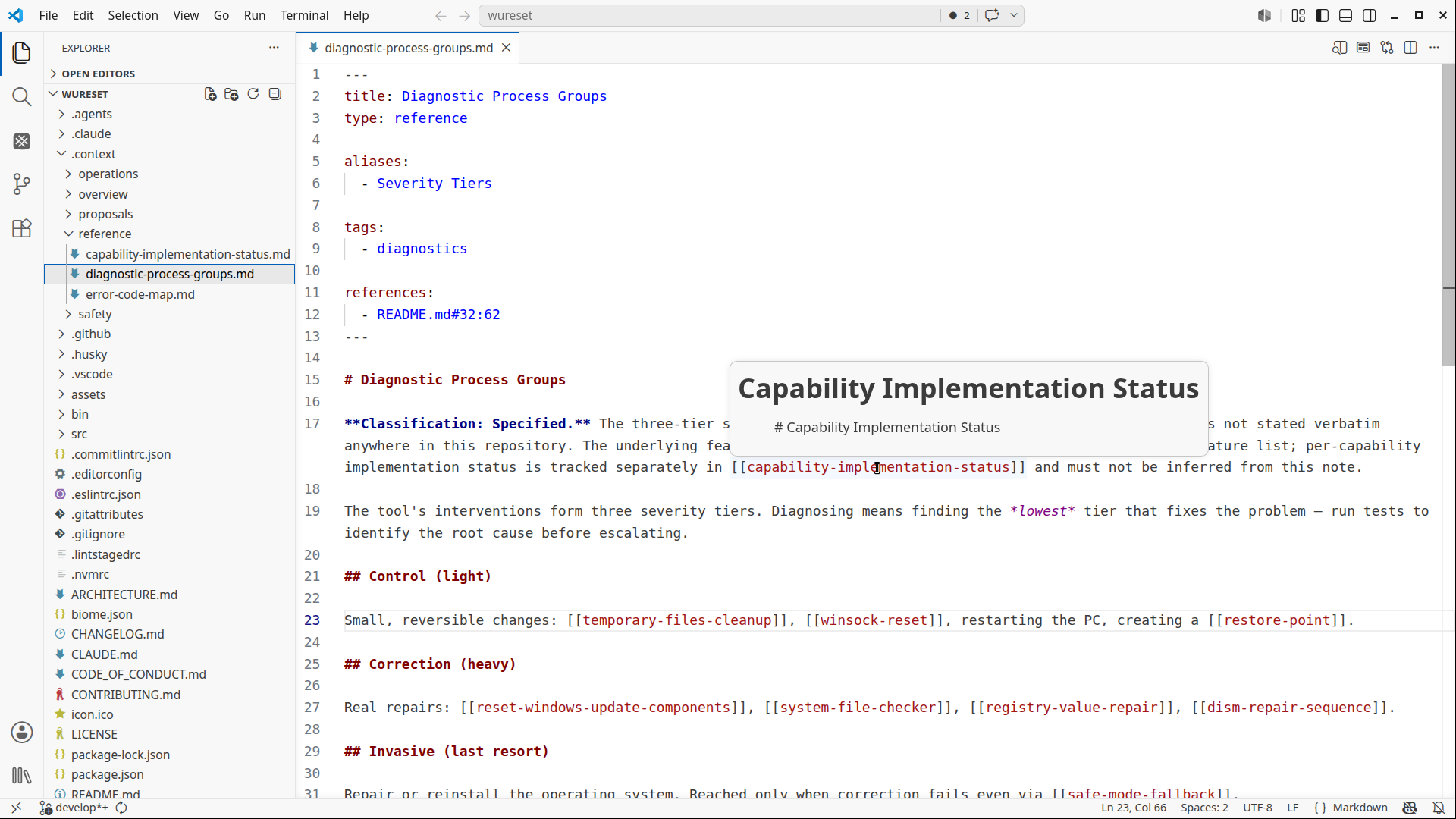
Weave Context is a native VS Code authoring experience for repository-based knowledge. It is a developer-first, repository-native tool for creating, navigating, and maintaining engineering knowledge alongside source code. Instead of treating knowledge documents as isolated files, Weave Context treats explicit Markdown references as navigable editor symbols. That means you can:
across connected knowledge documents. Your knowledge remains in plain Markdown files. Your repository knowledge becomes navigable. Knowledge documents can live beside source code, configuration, and project history. Weave Context gives that repository-based knowledge the same deterministic authoring experience developers expect from code. Repository-Based Knowledge for DevelopersSoftware repositories evolve quickly. The knowledge around them often does not. Source code records how a system works. Repository documentation, maintained as Documentation-as-Code, records why it works that way and how it evolves. Architecture decisions, implementation documentation, debugging trails, trade-offs, and technical reasoning become scattered across:
The repository becomes the durable place where this knowledge should be written, linked, and maintained. The problem is finding and evolving it without leaving the editor:
Weave Context keeps repository-native knowledge navigable and maintainable directly inside VS Code. What Makes It DifferentRepository knowledge needs more than readable files. It needs: Weave Context makes explicit Markdown references behave like editor primitives. This enables:
Mental ModelWeave Context is built around a small set of principles. Knowledge lives in ordinary Markdown filesFiles are the source of identity. Each knowledge document is identified by its repository path. That path is its canonical identity. Not by:
Wikilinks create relationshipsRelationships are created explicitly: No relationship exists unless a reference exists. Relationships come from referencesWeave Context does not infer connections. It does not use:
Relationships come only from explicit references. Aliases help resolutionAliases provide alternate entry points for navigation. They do not create new knowledge documents. They do not create new relationships. They simply help multiple names resolve to the same destination. Navigation and maintenance share the same modelThe same identity model powers:
There are no parallel identity or relationship systems. Everything builds on the same reference model. Filesystem-Backed IdentityWeave Context uses the filesystem as the canonical identity layer. This makes navigation:
No hidden databases are required. No proprietary file formats are required. Markdown remains standard Markdown. The repository remains readable, diffable, portable, and tool-independent. Knowledge Repository RootRepository-based knowledge can be organized in many ways, including OKF-compatible repositories, LLM Wiki repositories, project documentation, or custom Markdown knowledge repositories. Weave Context works with any configured Knowledge Repository Root. Existing OKF-compatible repositories can be opened directly by configuring Weave Context provides deterministic navigation and documentation continuity within the configured repository root. It does not require or enforce a specific repository format. The repository is the primary artifact. The folder name is only the boundary Weave Context uses to locate and maintain its Markdown knowledge documents. The default root is: The root is configurable through PhilosophyWeave Context is not:
Weave Context is: The goal is simple: Navigation Workflows
Weave Context integrates directly into native VS Code workflows. Go to DefinitionUse: or on a wikilink: to jump directly to the referenced knowledge document. Find ReferencesUse: to discover every reference to a knowledge document across your workspace. This makes Markdown navigation behave more like source code navigation. Rename SymbolUse: to safely rename references across the workspace. Weave Context updates connected wikilinks while preserving navigation continuity. This allows documentation structures to evolve without breaking references. CompletionStart typing: to receive completion suggestions from:
Multiple names can resolve to the same knowledge document while preserving deterministic navigation. Insert WikilinksUse: from the Command Palette. Select a knowledge document and insert a wikilink at every active cursor location. Examples: or depending on the document's configuration. WikilinksWeave Context supports multiple forms of navigation-friendly wikilinks. All forms participate in:
while resolving to the same knowledge document. Wikilinks are the native authoring experience of Weave Context and remain widely used across wiki-based documentation tools. While OKF generally recommends standard Markdown links for interoperability, this is a difference in authoring syntax rather than repository structure. Existing OKF-compatible repositories can be opened by configuring FrontmatterFrontmatter is optional. It supports navigation and readability; it does not define identity or establish a required repository schema. Example: Weave Context does not treat Markdown as a database. Metadata remains lightweight and portable. Title
It improves:
Titles do not define identity. Filesystem identity remains authoritative. Type
It supports:
AliasesAliases provide alternate navigation entry points for knowledge documents. Example: can resolve to the same knowledge document as: Aliases:
They do not create additional knowledge documents or relationships. Context ViewWeave Context also includes a local context visualization. The Context View is not a global knowledge graph. Its purpose is to visualize the immediate context around a knowledge document using the same reference model that powers:
The graph is derived entirely from explicit wikilinks. Every visible connection corresponds to an explicit reference in your repository. No inferred relationships are introduced. Visualization is a consumer of the navigation model, never its authority. Workspace Explorer
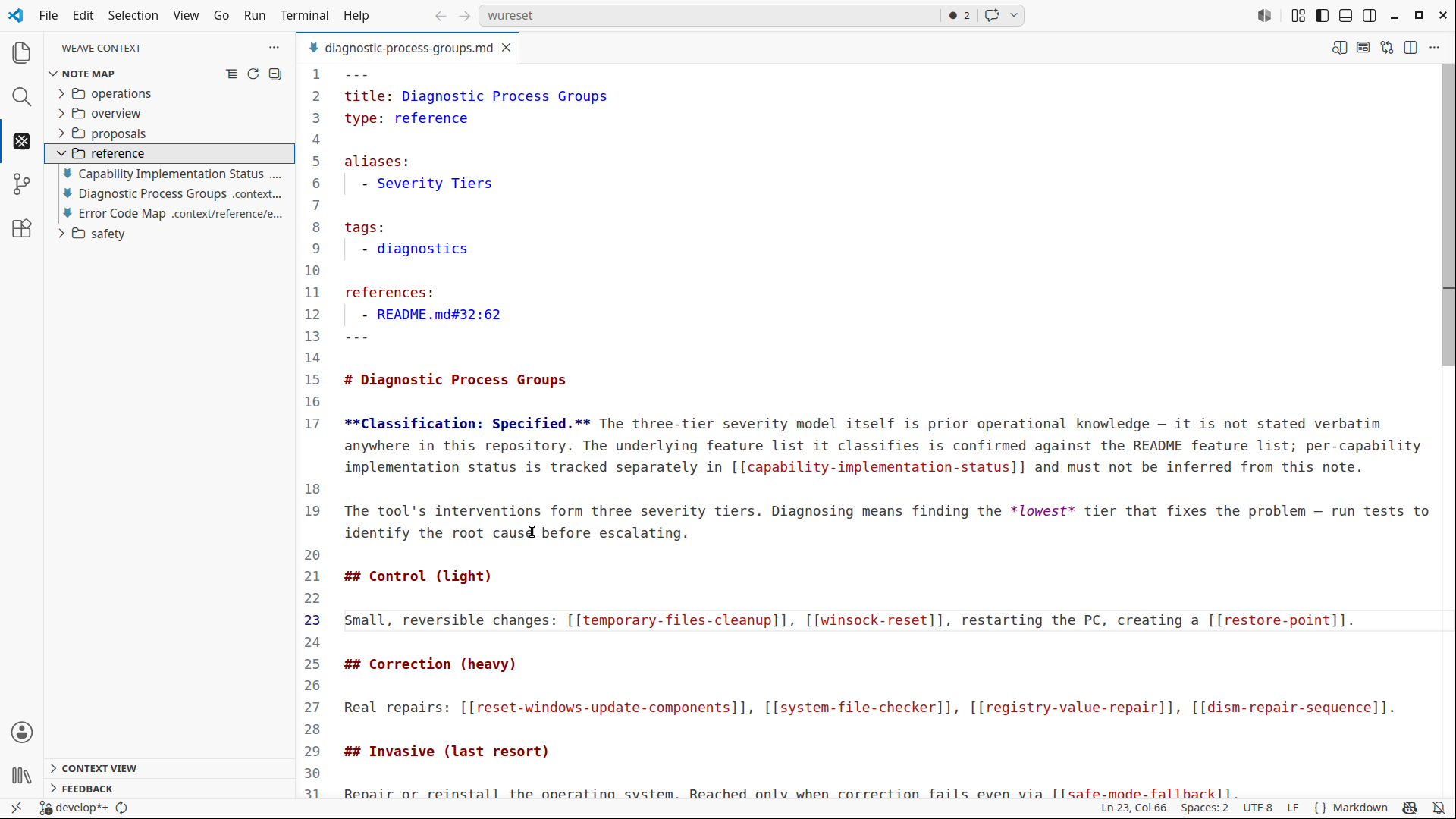
Weave Context includes a lightweight navigation-oriented explorer integrated into the VS Code sidebar. The explorer helps you navigate knowledge documents using repository projections. Its purpose is:
Not:
Available projections:
Projections are deterministic and derived from your knowledge documents and metadata. InstallationInstall Weave Context from the VS Code Marketplace. Search: inside the Extensions view. Getting StartedCreate or open a Knowledge Repository for engineering documentation alongside your source code. Use the same repository for architecture documentation, ADRs, implementation details, developer guides, and other project knowledge: Add references: Then use native editor workflows:
to navigate and maintain connected repository knowledge directly inside VS Code. Design PrinciplesNative editor workflows firstNavigation should feel like working with code. Deterministic behaviorIdentity and resolution must remain predictable and inspectable. Lightweight metadataMetadata should support navigation, not become a management system. Portable MarkdownKnowledge documents remain readable, diffable, repository-friendly, and editor-independent. Philosophy RecapWeave Context does not try to replace Markdown. It does not try to replace your editor. It does not try to become a workflow platform. The goal is simpler: AI Skills & Contextual WorkflowsWeave Context works independently as a deterministic navigation layer for repository-based Markdown knowledge inside VS Code. For developers using AI-assisted workflows, optional companion skills are available for tools such as:
Developers and optional AI tools can consume the same repository-based knowledge. These skills help agents follow:
while preserving the same filesystem-first and deterministic design principles used by Weave Context itself. Skills are completely optional and designed to complement native editor workflows rather than replace them. Repository: ContributingWeave Context is open-source and welcomes community contributions:
Before contributing, please review the Contribution Guidelines for coding standards, testing, and commit message conventions. Open an Issue if you find a bug or want to request a new feature. Code of ConductWe are committed to providing a friendly, safe, and welcoming environment for all, regardless of gender, sexual orientation, disability, ethnicity, religion, or other personal characteristic. Please review our Code of Conduct before participating in our community. ChangelogFor a complete list of changes, see the CHANGELOG.md. Authors
See also the list of contributors who participated in this project. Follow Me
Other Extensions
Recommended Browser ExtensionFor developers who work with
LicenseThis project is licensed under the MIT License. See the LICENSE file for details. |