Python File Generator
Generate Python files and project structures using reusable templates.
Includes FastAPI features, CLI tools, and multi-file generation.
This extension helps you move faster when you need FastAPI scaffolding, CLI tools, scripts, or project-specific files without rewriting the same boilerplate every time.
- Supports multi-file generation for FastAPI features
- Prioritizes relevant options with Smart Generate, but keeps every command visible
- Lets you extend the generator with your own templates






Why this extension?
This is more practical than snippets and lighter than a full framework generator.
- Multi-file generation for built-in FastAPI features, not just single files
- Template-based output instead of hardcoded snippets
- Smart Generate prioritizes relevant options from workspace context, but does not hide the rest
- Custom templates are plain configuration, so the system stays transparent and easy to extend
Features
- Python file generation for scripts, modules, services, repositories, DTOs, tests, and logger setup
- CLI tool scaffolding with argparse
- FastAPI route generation and FastAPI feature scaffolding
- Django model generation when a Django context is detected
- Custom templates defined in settings
- Multi-root workspace support with
Python File Generator: Change Workspace
- Generates clean Python code following PEP 8 conventions
- Includes basic validation and error handling by default where it makes sense
- Uses logging instead of print in non-CLI contexts
- Produces readable and maintainable file structures
Code Quality
Generated files follow common Python best practices:
- PEP 8 compliant structure
- Clear naming and readable code
- Basic input validation where it makes sense
- Minimal and explicit error handling
- No unnecessary complexity or hidden logic
The goal is to generate code that is simple, readable, and easy to adapt - not over-engineered or framework-heavy.
What can you generate?
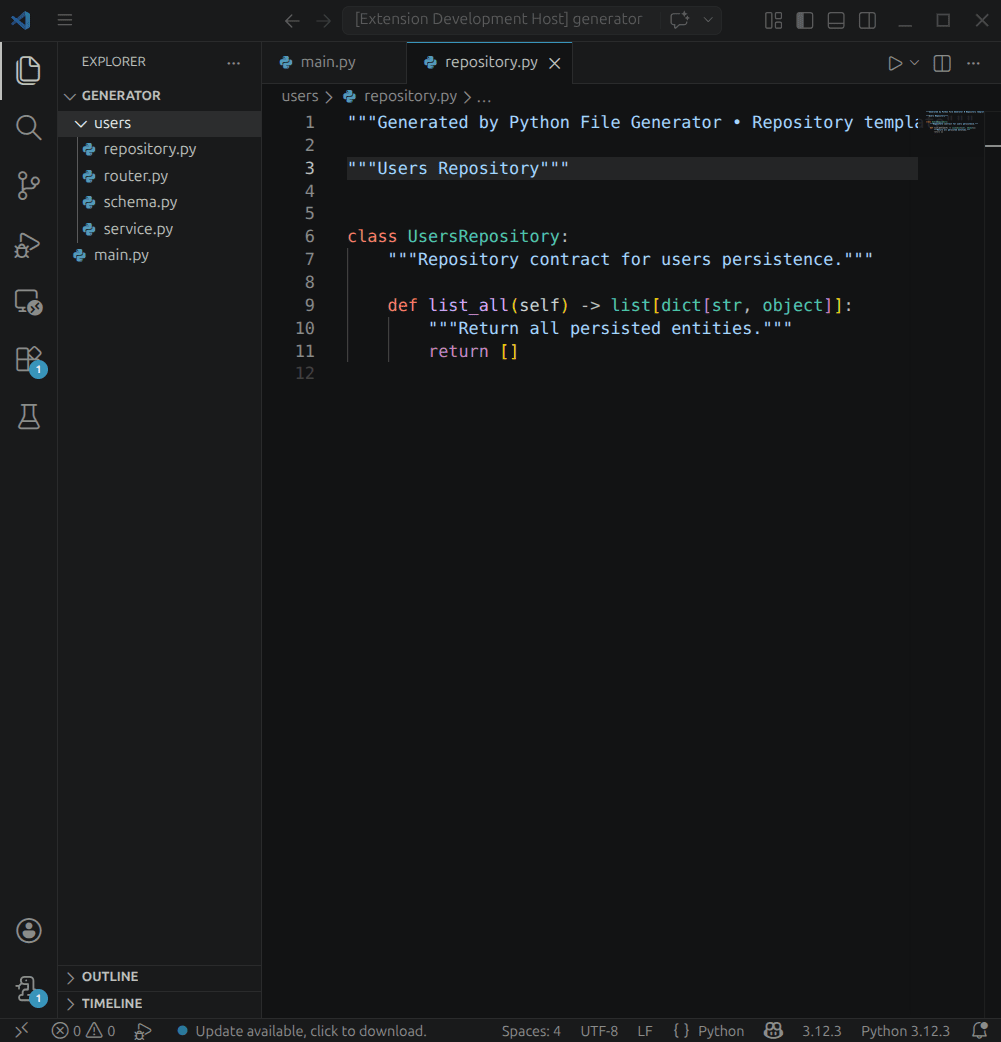
Example: FastAPI Feature
Creates:
router.pyservice.pyschema.pyrepository.py
Example: FastAPI Route
Creates:
router.py for a single route module
Creates:
cli.py with argparse setup- clear docstrings and a simple
main() flow
- explicit input parsing with readable variable names
Example: Script
Creates:
script.py ready to run- module docstring, basic typing, and explicit
main() entrypoint
- logging for normal flow and unexpected errors
Example: Python Module
Creates:
module.py with a reusable class structure
Example: Service, Repository, DTO, Test, Logger, Django Model
Creates focused Python files for common backend work:
service.pyrepository.pydto.pytest_*.pylogger.pymodel.py
How it works
Templates -> normalized -> generated.
Templates are designed to be:
- predictable
- readable
- easy to modify
Templates are loaded, validated, normalized, and then generated.
In simple terms:
- The extension reads built-in or custom templates.
- It validates the template shape and multi-file references.
- It normalizes metadata so minimal templates still work.
- It renders the final files in your workspace.
That keeps the system predictable and lets small templates work without extra boilerplate.
Quick Start
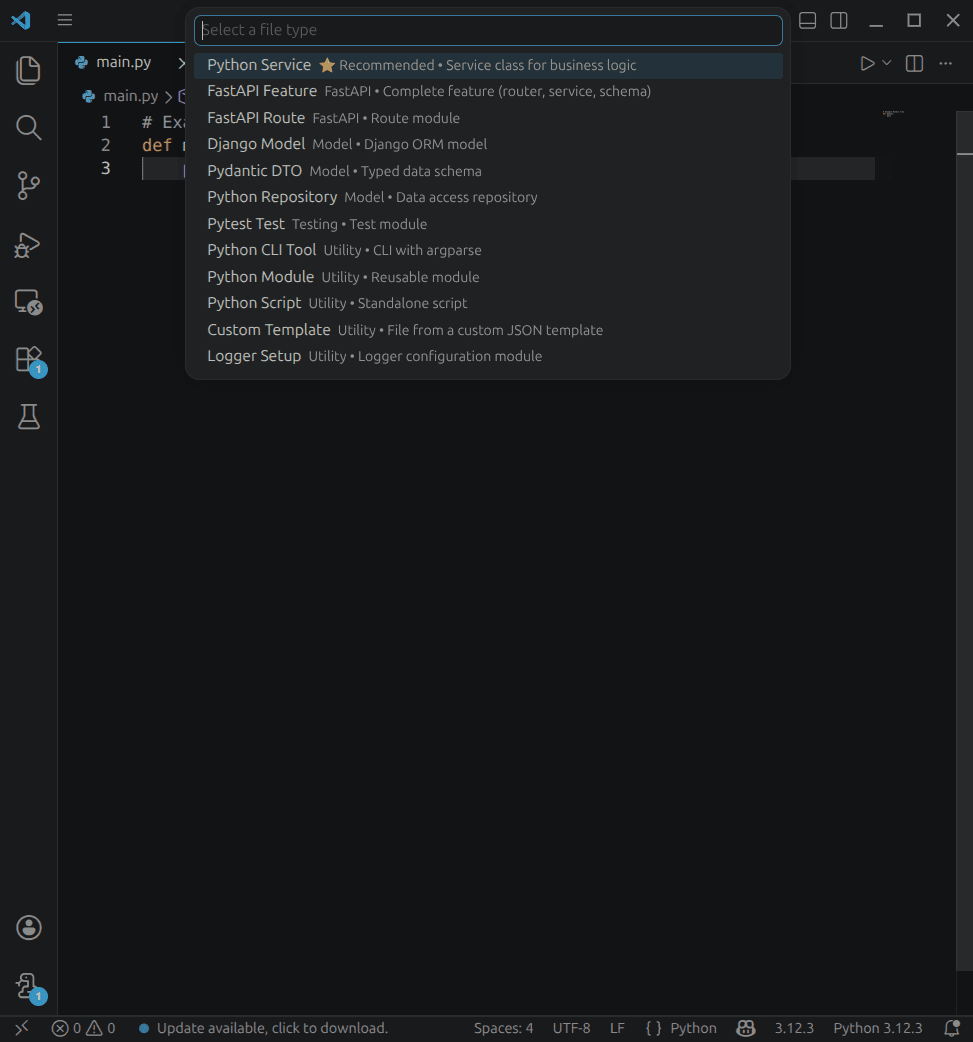
- Open the Command Palette.
- Run
Python File Generator: Generate.
- Select a file type.
If needed, enter the file name and destination folder to finish generation.
If you work in a multi-root workspace, use Python File Generator: Change Workspace to switch the active folder.
Smart Generate
Smart Generate helps you choose faster without taking control away from you.
- It prioritizes options that fit the current workspace context.
- It keeps all available commands visible.
- It highlights one recommended option only when the signal is strong enough.
- It uses clear labels and descriptions so you can see what each choice creates.
The extension provides clear descriptions and guidance when selecting what to generate, reducing guesswork during the process.
Custom Templates
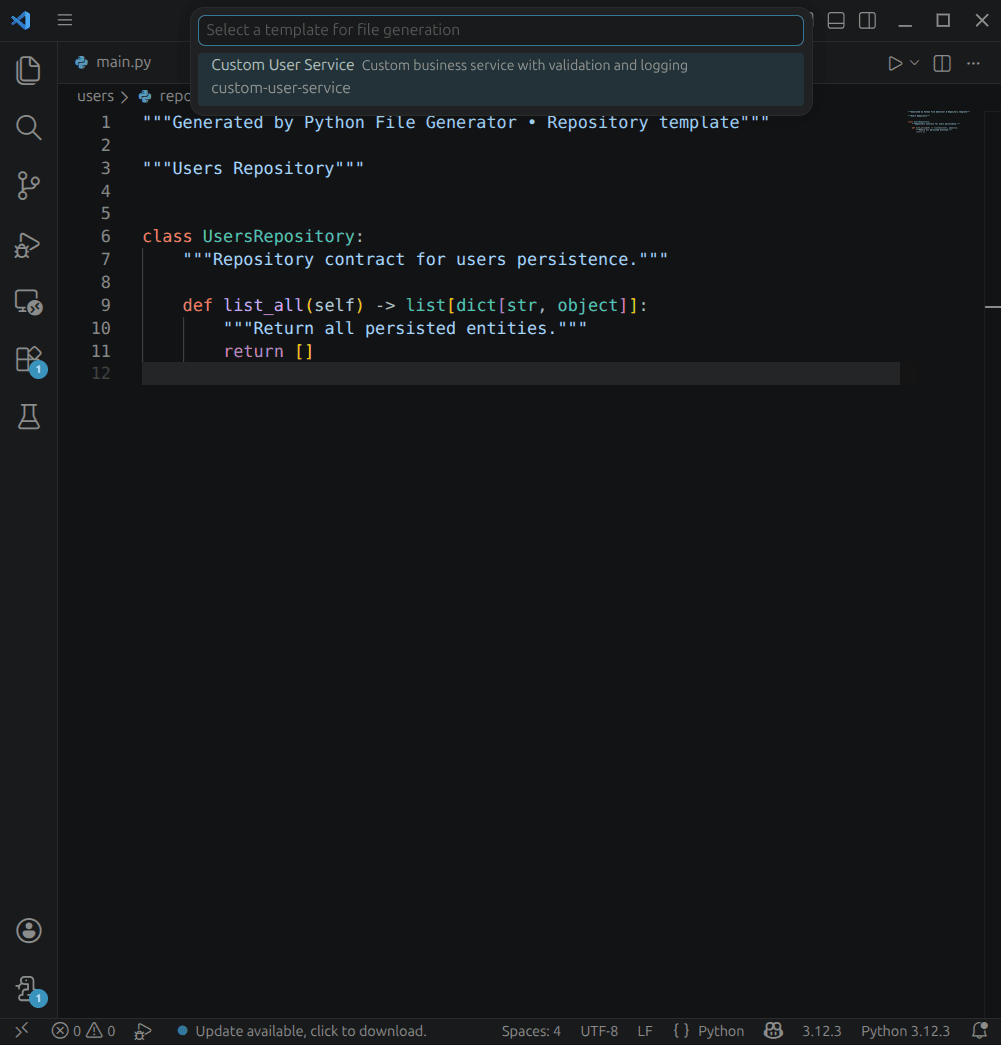
Define custom templates in settings under pythonGenerator.templates.customTemplates.
Minimal example:
{
  "id": "script",
  "template": ["print('hello')"]
}
That is enough to start. The extension fills in the remaining metadata when it can.
You can also add fields like:
namedescriptiontypekindfilesoutput
Project Philosophy
Everything is visible and easy to review.
- Templates are plain JSON files.
- There is no hidden generation logic.
- Validation happens before rendering.
- Multi-file templates reference other templates explicitly.
All templates are plain JSON and fully visible in the repository.
You can review, modify, or extend them easily.
That keeps the system simple enough to trust and flexible enough to extend.
Open Source Advantage
Because the project is open source, you can:
- inspect every template
- adapt the behavior to your own workflow
- add project-specific templates
- review how generation decisions are made
Limitations
- This is a file generator, not a full application framework.
- It helps with scaffolding, but it does not design your architecture for you.
- The built-in templates are intentionally focused on common backend workflows.
When to use this
- Creating backend files faster
- Bootstrapping FastAPI feature folders
- Generating CLI tools and scripts with consistent structure
- Reducing repetitive boilerplate across Python projects
Real Examples
FastAPI Feature output
Creates:
router.pyservice.pyschema.pyrepository.py
Creates:
cli.py with argparse setup
Script output
Creates:
Screenshots
Add screenshots in the images/ folder.
Suggested captures:
- Command Palette with Smart Generate
- FastAPI Feature output
- Custom template example
Configuration
Default settings are safe for new projects:
{
  "pythonGenerator.files.skipFolderConfirmation": true,
  "pythonGenerator.files.includeTypeInFileName": false
}
Troubleshooting
Generation canceled – no files created
If you cancel the QuickPick or input prompt, no files are written. Try again from the Command Palette.
Invalid folder path
If the selected folder doesn't exist or isn't accessible, generation stops with a clear message. Check folder permissions and path validity.
No workspace folder available
If VS Code doesn't detect a workspace, the extension asks you to select one explicitly. Multi-root workspaces require Python File Generator: Change Workspace if needed.
Template validation error
If a custom template is invalid or references nonexistent files, validation fails with details. Check the template structure in settings.
Generation takes longer than expected
Large templates with many files may take a moment. Check your disk space and system resources.
Template Variables
| Variable |
Description |
Example Value |
{{fileName}} |
Original file name |
myNewFile |
{{fileNameCamelCase}} |
CamelCase |
myNewFile |
{{fileNamePascalCase}} |
PascalCase |
MyNewFile |
{{fileNameKebabCase}} |
kebab-case |
my-new-file |
{{fileNameSnakeCase}} |
snake_case |
my_new_file |
{{fileNameConstantCase}} |
CONSTANT_CASE |
MY_NEW_FILE |
{{fileNameDotCase}} |
dot.case |
my.new.file |
{{fileNamePathCase}} |
path/case |
my/new/file |
{{fileNameSentenceCase}} |
Sentence case |
My new file |
{{fileNameLowerCase}} |
Lowercase |
my new file |
{{fileNameTitleCase}} |
Title Case |
My New File |
{{fileNamePluralCase}} |
Pluralized |
myNewFiles |
{{fileNameSingularCase}} |
Singularized |
myNewFile |
{{fileNameWithTypeAndExtension}} |
File name + type + extension |
myNewFile.component.ts |
{{fileNameWithType}} |
File name + type |
myNewFile.component |
{{fileNameWithExtension}} |
File name + extension |
myNewFile.ts |
{{folderName}} |
Parent folder name |
src/components |
{{fileType}} |
File type (component, service, etc.) |
component |
{{fileTypeName}} |
File type in Title Case |
Service |
{{fileTypeNameCamelCase}} |
File type in camelCase |
service |
{{fileTypeNamePascalCase}} |
File type in PascalCase |
Service |
{{fileTypeNameKebabCase}} |
File type in kebab-case |
service |
{{fileTypeNameSnakeCase}} |
File type in snake_case |
service |
{{fileTypeNameConstantCase}} |
File type in CONSTANT_CASE |
SERVICE |
{{fileTypeNameDotCase}} |
File type in dot.case |
service |
{{fileTypeNamePathCase}} |
File type in path/case |
service |
{{fileTypeNameSentenceCase}} |
File type in Sentence case |
Service |
{{fileTypeNameLowerCase}} |
File type in lowercase |
service |
{{fileTypeNameUpperCase}} |
File type in uppercase |
SERVICE |
{{fileTypeNamePlural}} |
File type plural |
services |
{{fileTypeNameSingular}} |
File type singular |
service |
{{fileTypeWithExtension}} |
File type + extension |
service.ts |
{{fileExtension}} |
File extension |
ts |
{{date}} |
Current date |
2025-01-31 |
{{year}} |
Current year |
2025 |
{{time}} |
Current time |
12:34:56 |
{{timestamp}} |
Unix timestamp |
1672531199 |
{{timestampISO}} |
ISO timestamp |
2025-01-31T12:34:56Z |
{{author}} |
Project author |
Jane Doe |
{{owner}} |
Project owner |
Jane Doe |
{{maintainers}} |
Project maintainers |
Jane Doe, John Doe |
{{license}} |
Project license |
MIT |
{{version}} |
Project version |
1.0.0 |
Installation
- Open your VSCode-based editor (VSCode, VSCodium, WindSurf, Cursor).
- Go to Extensions (
Ctrl+Shift+X / Cmd+Shift+X).
- Search for "Python File Generator" (author: Manuel Gil).
- Click Install.
- (Optional) Clone or download the repo and open it to test the latest dev version.
Resources
Contributing
Python File Generator is open-source and welcomes community contributions:
Fork the GitHub repository.
Create a new branch:
git checkout -b feature/your-feature
Make your changes, commit them, and push to your fork.
Submit a Pull Request against the main branch.
Before contributing, please review the Contribution Guidelines for coding standards, testing, and commit message conventions. Open an Issue if you find a bug or want to request a new feature.
Code of Conduct
We are committed to providing a friendly, safe, and welcoming environment for all, regardless of gender, sexual orientation, disability, ethnicity, religion, or other personal characteristic. Please review our Code of Conduct before participating in our community.
Changelog
For a complete list of changes, see the CHANGELOG.md.
Authors
For a complete list of contributors, please refer to the contributors page.
Follow Me
Other Extensions
Auto Barrel
Automatically generates and maintains barrel (index.ts) files for your TypeScript projects.
Angular File Generator
Generates boilerplate and navigates your Angular (9→20+) project from within the editor, with commands for components, services, directives, modules, pipes, guards, reactive snippets, and JSON2TS transformations.
NestJS File Generator
Simplifies creation of controllers, services, modules, and more for NestJS projects, with custom commands and Swagger snippets.
NestJS Snippets
Ready-to-use code patterns for creating controllers, services, modules, DTOs, filters, interceptors, and more in NestJS.
T3 Stack / NextJS / ReactJS File Generator
Automates file creation (components, pages, hooks, API routes, etc.) in T3 Stack (Next.js, React) projects and can start your dev server from VSCode.
Drizzle ORM Snippets
Collection of code snippets to speed up Drizzle ORM usage, defines schemas, migrations, and common database operations in TypeScript/JavaScript.
CodeIgniter 4 Spark
Scaffolds controllers, models, migrations, libraries, and CLI commands in CodeIgniter 4 projects using Spark, directly from the editor.
CodeIgniter 4 Snippets
Snippets for accelerating development with CodeIgniter 4, including controllers, models, validations, and more.
CodeIgniter 4 Shield Snippets
Snippets tailored to CodeIgniter 4 Shield for faster authentication and security-related code.
Mustache Template Engine - Snippets & Autocomplete
Snippets and autocomplete support for Mustache templates, making HTML templating faster and more reliable.
Recommended Browser Extension
For developers who work with .vsix files for offline installations or distribution, the complementary One-Click VSIX extension is recommended, available for both Chrome and Firefox.
One-Click VSIX integrates a direct "Download Extension" button into each VSCode Marketplace page, ensuring the file is saved with the .vsix extension, even if the server provides a .zip archive. This simplifies the process of installing or sharing extensions offline by eliminating the need for manual file renaming.
License
This project is licensed under the MIT License. See the LICENSE file for details.

