
CodeContext+ - Navigate context directly from your codeSee where context exists in your code and open related notes directly from any file or line. Installation Launch VS Code Quick Open ( Ctrl+P), paste the following command, and press enter.Copied to clipboard |

CodeContext+
Code states what the system does. It rarely states why it does it that way, what was tried before, or which constraint made the obvious solution impossible. That understanding exists. It is simply somewhere you are not looking while you work. CodeContext+ makes it visible at the place it applies: the file open in front of you, and the line your cursor is on. 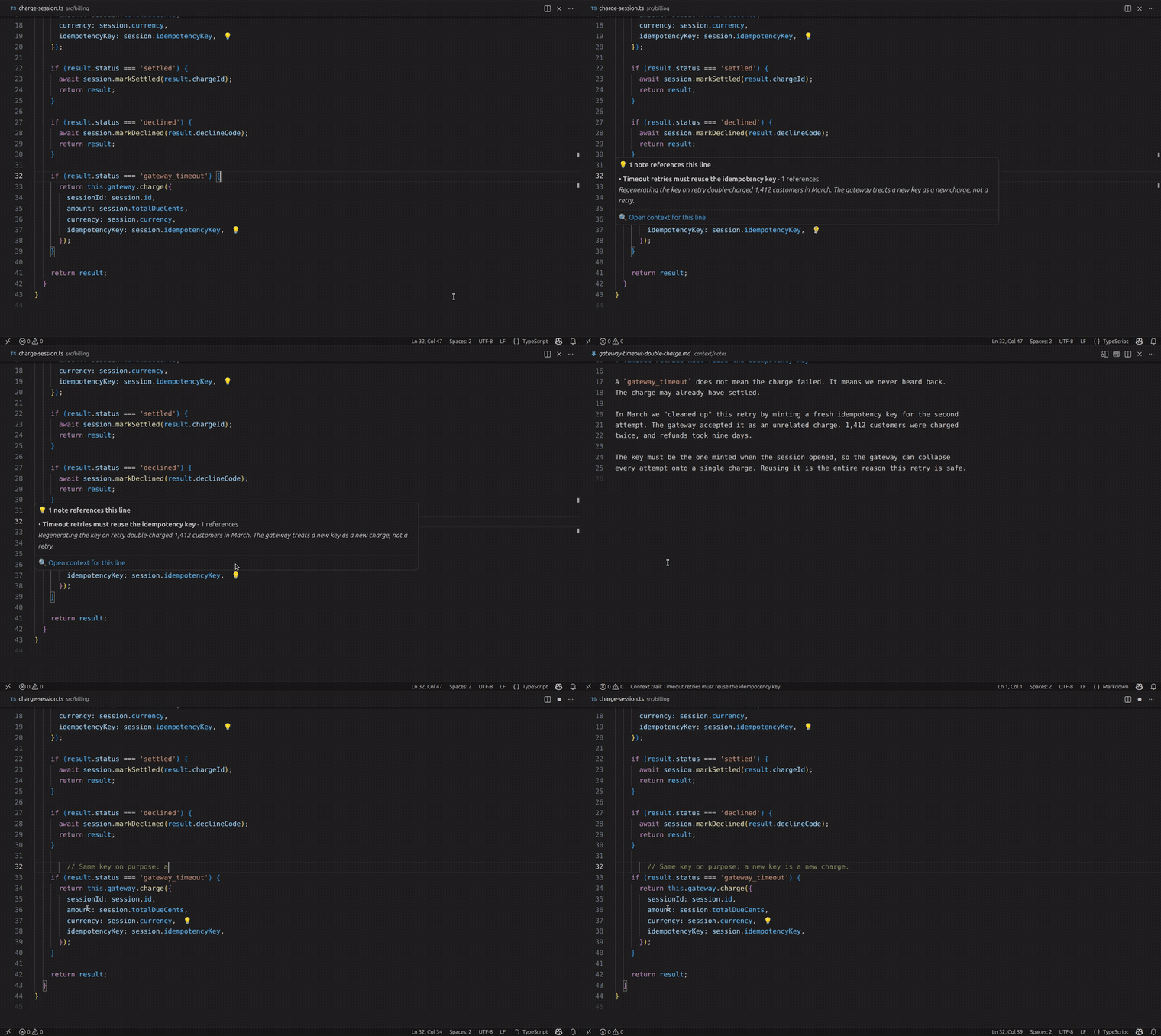
Twenty-two seconds, no narration: a developer is about to tidy up a retry, discovers the incident that made it necessary, and carries on, informed. (full-resolution clip) Context Disappears Faster Than CodeA single line may carry a bug investigation, a rejected refactor, an architectural decision, and a failed experiment behind it. While the work is happening, that reasoning is obvious to everyone involved. Once the work ships, it scatters:
Nothing is lost, exactly. It is just no longer reachable at the moment it would change a decision. So the next person to touch that line - often you, months later - re-derives what was already known. They re-open the investigation that already concluded. They re-attempt the approach that already failed. The code survived. The understanding did not. Visibility, Not StorageMost tools respond to this by offering somewhere better to put the knowledge. But the knowledge usually already exists. It was written down, in a commit message, a design document, a thread, a runbook. The failure is not that it was never recorded. The failure is that nothing surfaced it while the code was being read. Storage answers where does this live? Development needs an answer to a different question: That is the entire purpose of this extension:
Everything it does follows from that sentence. If context is recorded but invisible, it has already failed. If it is visible but unrelated to the code you are reading, it is noise. What CodeContext+ ProtectsIt protects the reasoning that never fits in the code itself:
It protects that reasoning by keeping it attached to a location, and by projecting it back into the editor whenever you arrive at that location. Equally important is what it does not attempt. CodeContext+ does not try to understand your repository. It never infers a relationship, guesses at similarity, or ranks your codebase by relevance. It has no model of your project. It surfaces exactly what someone stated applies here, and nothing else. The scope is deliberately narrow - the file you are reading, the line you are editing, what connects to them, and where you have just been. That narrowness is what keeps the extension quiet enough to leave switched on. How Context Becomes VisibleWhile you read codeLines that carry context get a small 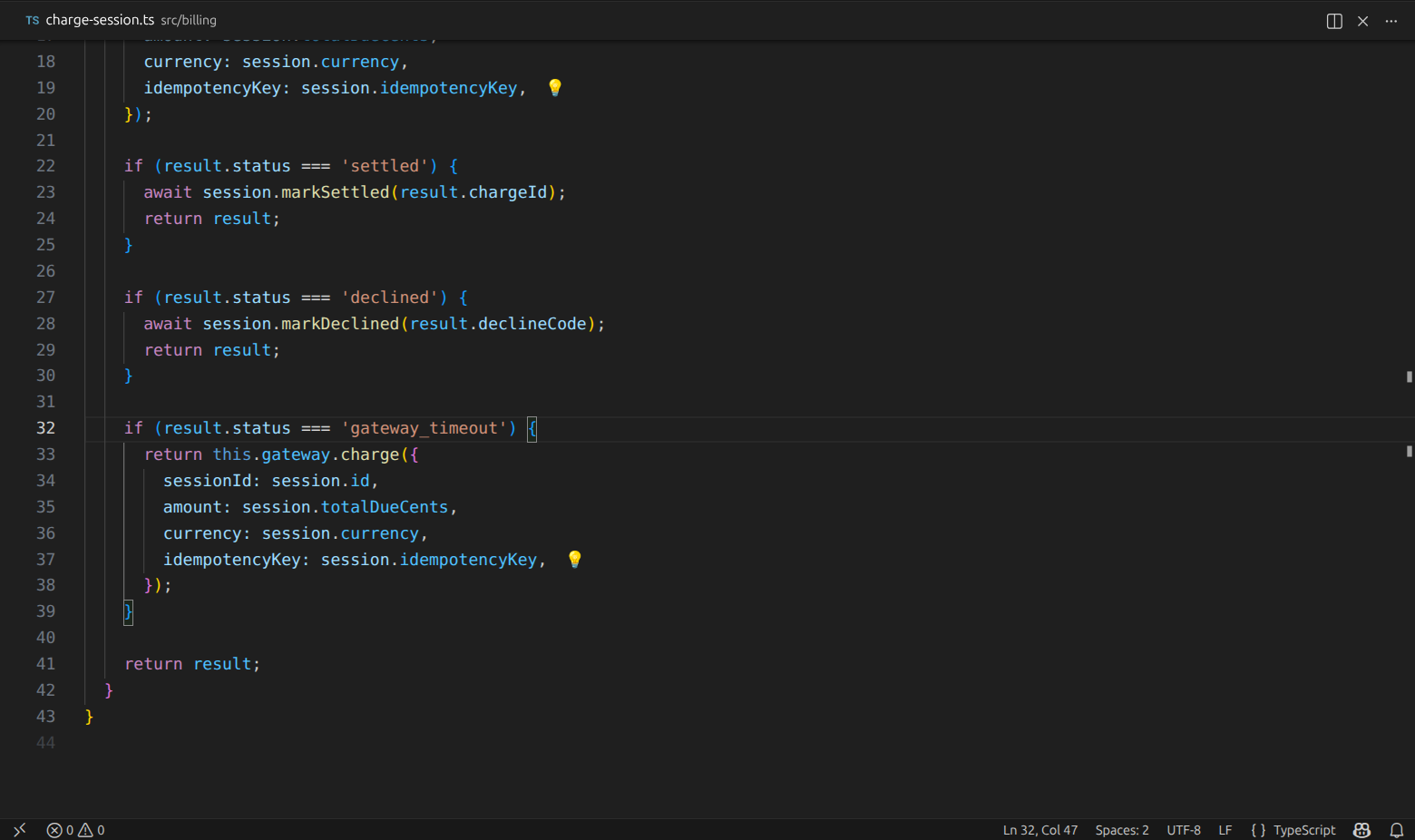
Nothing above announces itself. A developer skimming this retry has no reason to suspect it is load-bearing - except that two lines are marked as already carrying context. Hover the marker and the context comes to you: what it is, its summary, how many places in the codebase it covers, and a link that opens everything attached to that line. 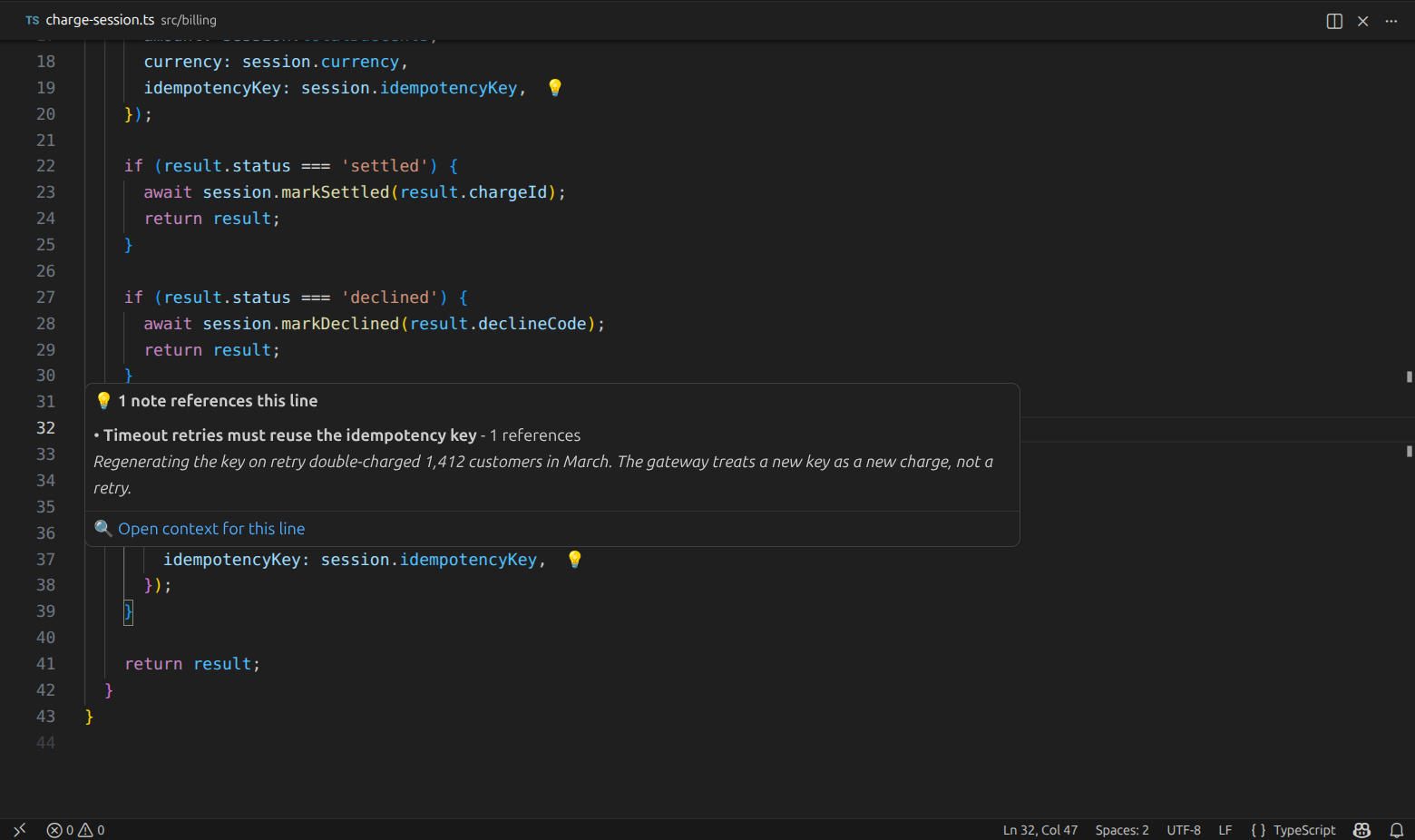
That answers the question the code cannot: the key is reused deliberately, because regenerating it once double-charged 1,412 customers. No search, no ticket archaeology, no colleague to interrupt - and a refactor that would have shipped an outage quietly does not happen. Markers stay unobtrusive on purpose. When a file carries a lot of context, at most thirty markers are shown at once - the ones nearest your cursor - and a hover lists up to five entries, then tells you how many more exist. Density is capped so a heavily documented file stays readable. While you need everything attached to a fileShow context for current file and Show context for this line collect everything that applies and let you pick. When only one thing applies, they skip the picker and take you straight there. 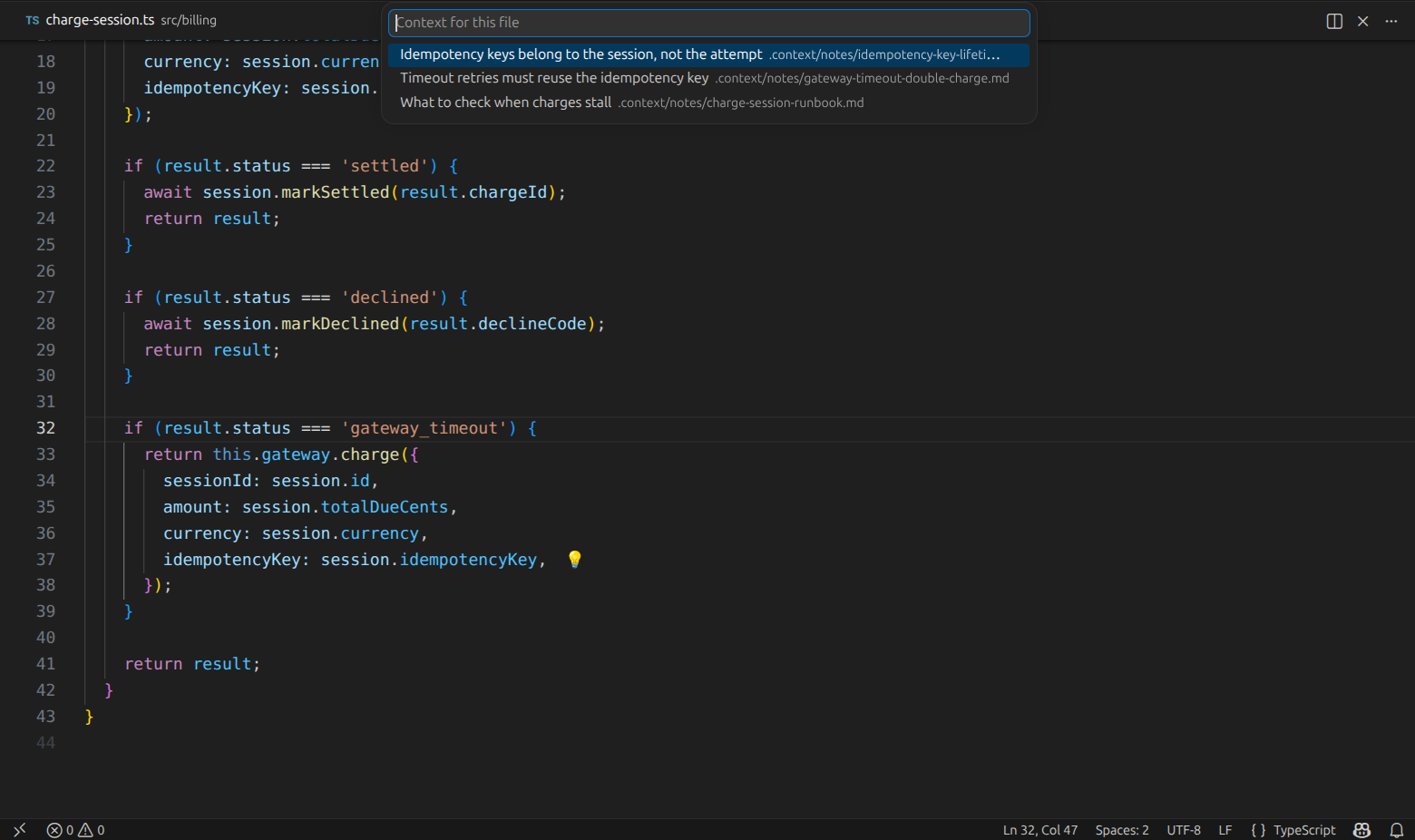
Three different kinds of understanding apply to this one file - an incident, a decision, and a runbook - and all three are one keystroke away instead of scattered across three systems. While you follow a threadUnderstanding rarely stands alone. An investigation leads to a decision, which leads to the migration that caused it. Open linked note follows a connection outward, Open backlinks follows connections back to whatever points here, and Open related notes shows both directions at once. Open code reference returns you to code, jumping to the exact line the context describes. Nothing here is inferred. Every connection you can follow is one that somebody stated explicitly. 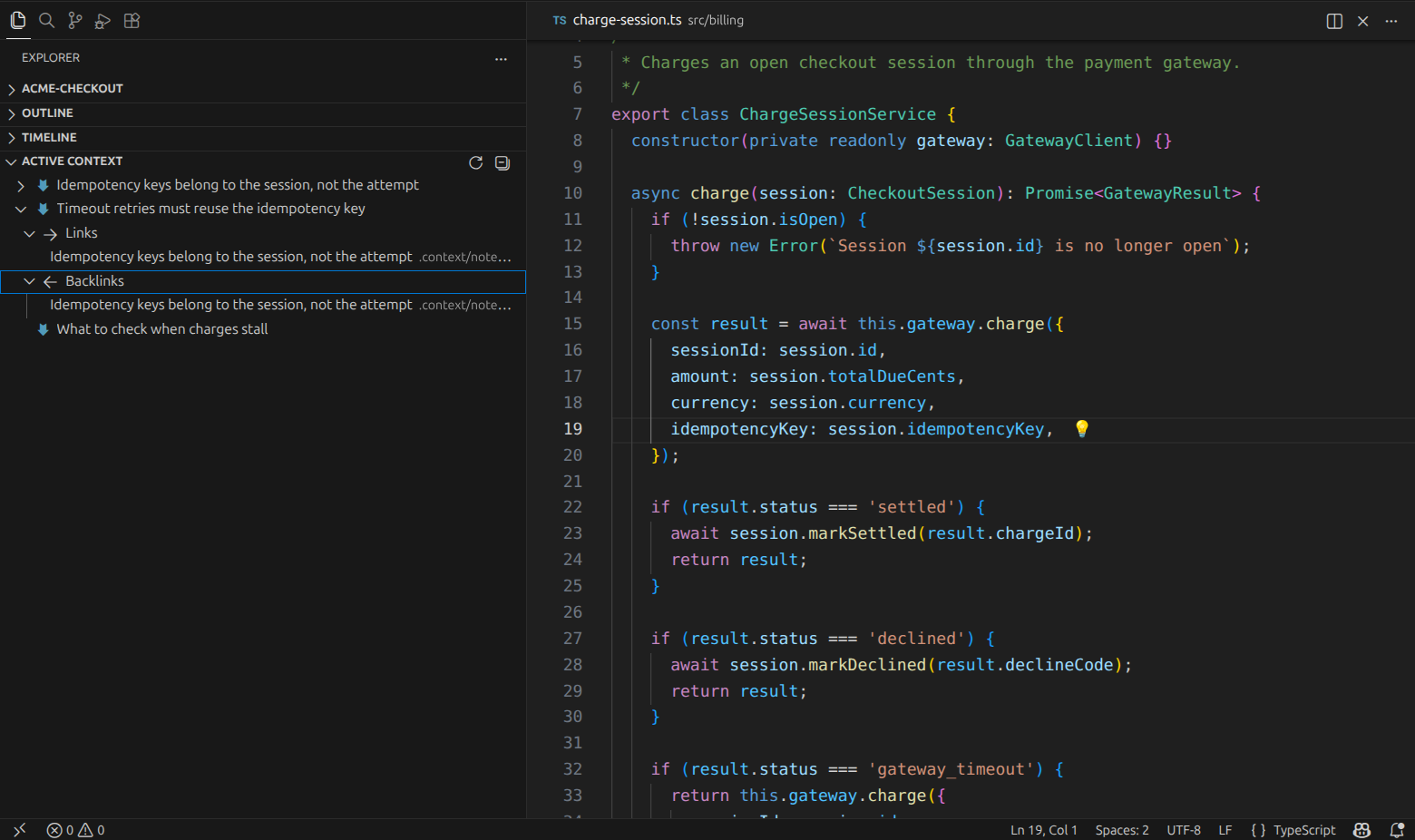
The incident points at the decision it produced, and the decision points back at the incident that forced it. Only entries with real connections open - the runbook at the bottom has none, so it stays a leaf. While you move aroundFollowing context is only useful if you can keep your bearings. As you open context, CodeContext+ remembers the path you took through it during this session, and shows that trail briefly in the status bar so you can see how you arrived where you are. 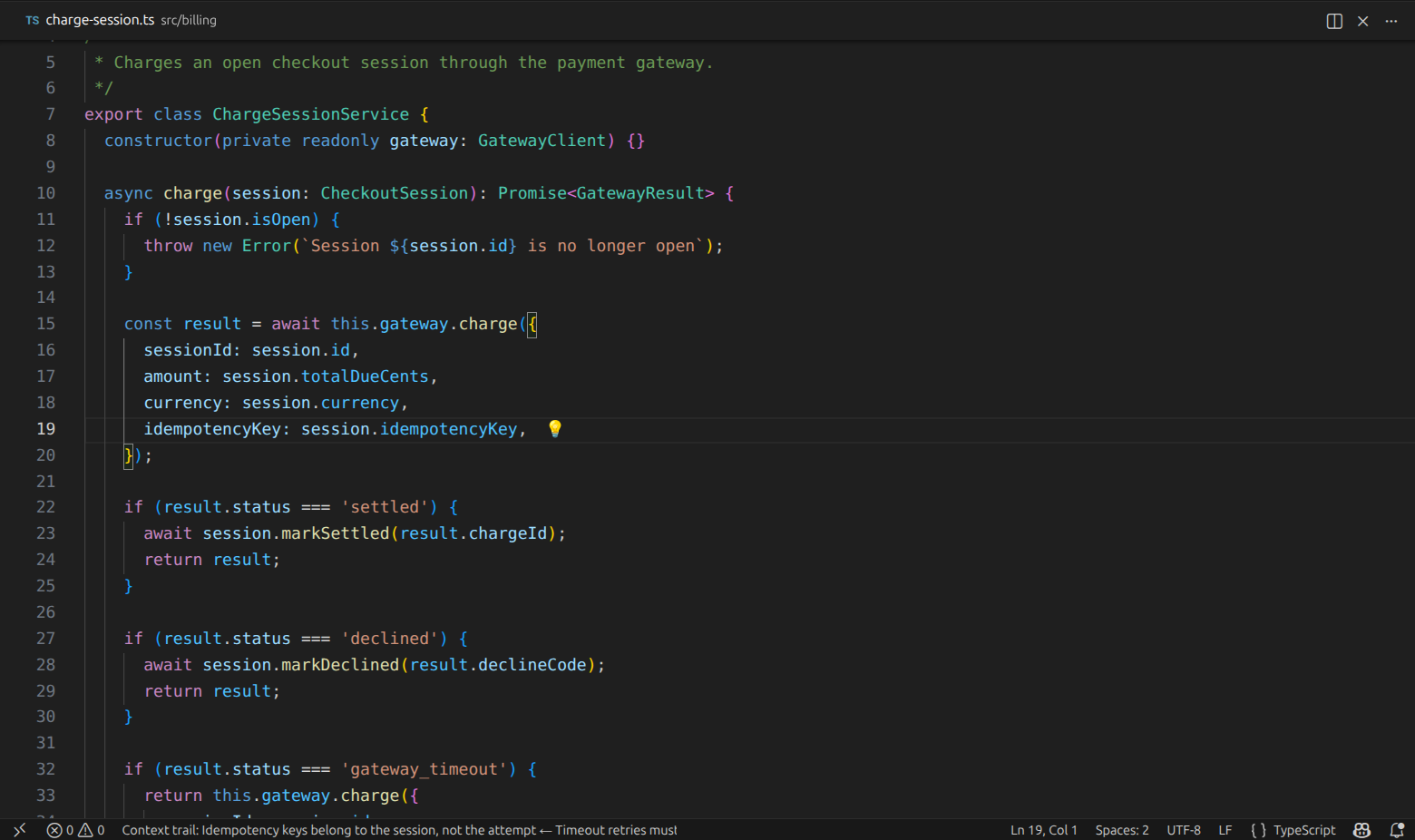
It also uses that path to decide ordering: what you looked at most recently, and the kind of context you were last working with, surfaces first in hovers. The memory is session-scoped and bounded - it disappears when the window closes, and never becomes a second thing to maintain. While you look for something specificThe Active Context view in the Explorer lists everything the workspace has, and expands only where real connections exist. Selecting an entry opens it. Go to note by ID jumps straight to a known identifier, and Refresh notes list rebuilds the view on demand. Why It Works This WayVisibility is the productRecording context is a solved problem; every team already does it somewhere. Surfacing it at the moment of relevance is the part that fails, so that is the only part this extension is responsible for. Nothing is inferredContext appears because someone explicitly stated it applies to a location. There is no AI inference, no embeddings, no similarity scoring, no probabilistic matching, no hidden relationships. What you see, someone meant. Locality beats indexingThe extension resolves context for the file in front of you, on demand, by reading the files under your context folder. There is no repository-wide index and no model of your project to build, warm up or maintain. Determinism over convenienceWhat appears follows only from what was declared, so the same declarations always project the same context and there is no ranking you cannot predict. When something is genuinely ambiguous, the extension says so instead of guessing: duplicate identifiers are reported rather than silently resolved, and a connection pointing at something that does not exist is shown as broken rather than quietly dropped. A visible problem is worth more than a convenient guess. Bounded semanticsThe vocabulary stays small on purpose. Every concept the extension understands must earn its place by making context visible; nothing exists to build a richer metadata model for its own sake. What CodeContext+ Is NotThe boundary matters as much as the feature set, because a tool that drifts across it stops being usable while you code.
What belongs to CodeContext+ is narrow: taking context that already exists and keeping it visible where the work happens. How This Works TodayEverything above is the product. This is the mechanism that currently delivers it - plain files in your repository, versioned and diffable with the code they describe. Where context livesContext is stored as Markdown files under a folder in your workspace, Each file opens with YAML frontmatter.
Attaching context to code
The same reference can be written in expanded form. Both are read into the same model, so the choice is purely one of taste: Paths are resolved relative to the workspace folder, and absolute paths are accepted as well. A reference with a line marks that line; a reference without one applies to the file as a whole and surfaces at its first line. You do not have to write references by hand. Put the cursor on the line that needs context, run Add reference for current location, and pick where it should be recorded - selecting several destinations at once if the same line matters in more than one place. Entries that already exist are reported rather than duplicated. Connecting related context
Backlinks are derived from those declarations, so a connection written once is navigable from both ends and nothing has to be kept in sync by hand. Add related note appends links from a picker, several at a time. Identity is the only thing holding this together, which is why the extension refuses to improvise when identity is unclear. If two files claim the same CommandsAll commands live under the CodeContext+ category in the Command Palette:
Settings
Both are resource-scoped, so each folder of a multi-root workspace can be configured independently. Getting Started
From then on the context is part of the repository: it travels with clones, shows up in diffs, and is reviewed like any other change. ContributingCodeContext+ is open-source and welcomes community contributions:
Before contributing, please review the Contribution Guidelines for coding standards, testing, and commit message conventions. Open an Issue if you find a bug or want to request a new feature. Code of ConductWe are committed to providing a friendly, safe, and welcoming environment for all, regardless of gender, sexual orientation, disability, ethnicity, religion, or other personal characteristic. Please review our Code of Conduct before participating in our community. ChangelogFor a complete list of changes, see the CHANGELOG.md. Authors
See also the list of contributors who participated in this project. Follow Me
Other Extensions
Recommended Browser ExtensionFor developers who work with
LicenseThis project is licensed under the MIT License. See the LICENSE file for details. |




