Nifty Pull Requests
Review and merge pull requests from GitLab, Bitbucket and Azure DevOps in VS Code: diffs, comment threads on any line, approvals, pipelines, checkout and create.
Maintained. No sign-in. No telemetry. Works in VS Code, Cursor, Windsurf, VSCodium and other editors that use Open VSX.
Features
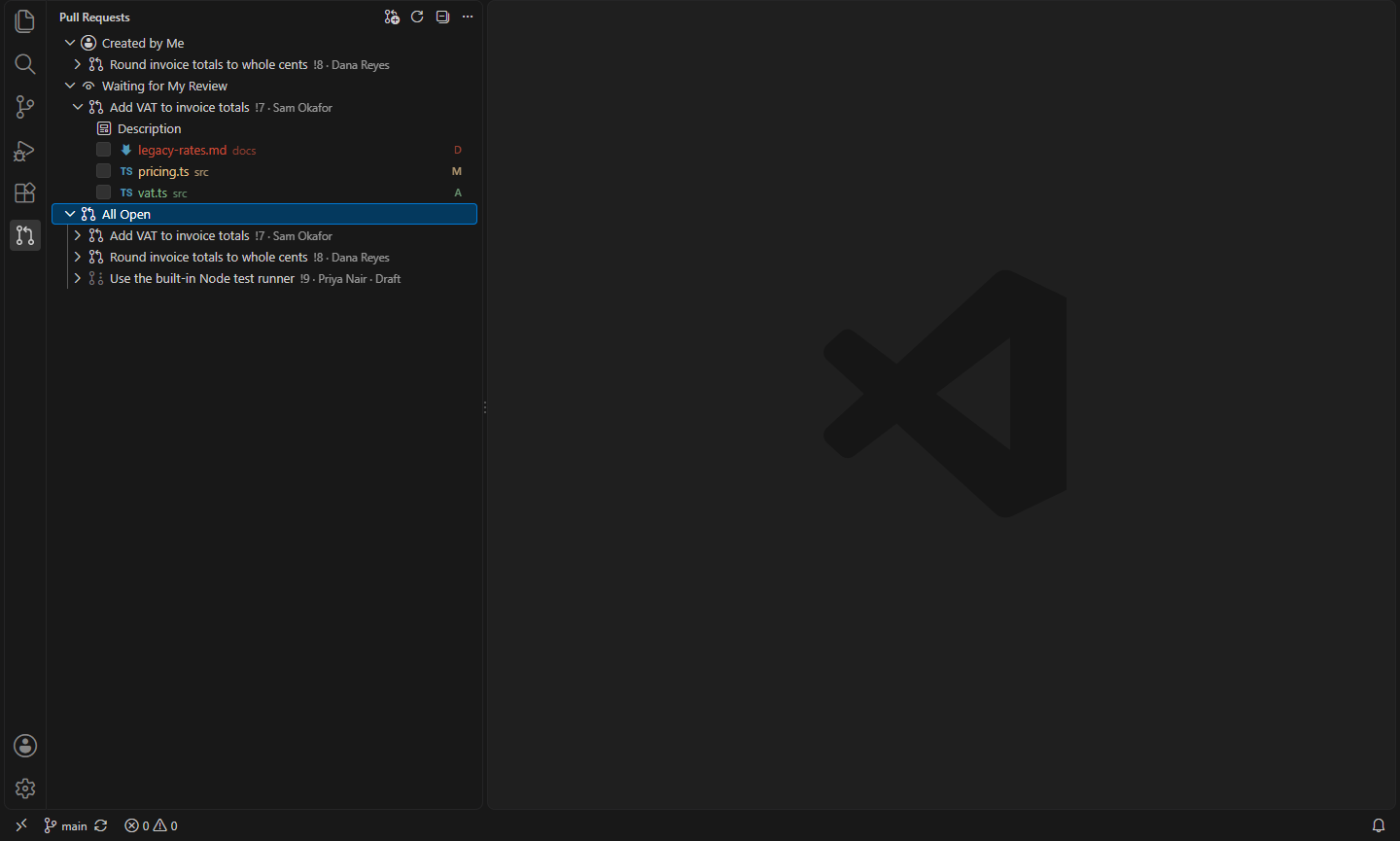
- GitLab, Bitbucket and Azure DevOps. gitlab.com and self-managed GitLab (REST v4), Bitbucket Cloud, Bitbucket Data Center / Server, Azure DevOps Services and Azure DevOps Server (TFS). The project is found from your git remotes; a repository with several remotes shows each one.
- Pull Requests view. Per repository: Created by Me, Waiting for My Review and All Open. Expand one for its description and changed files, each with a Viewed checkbox.
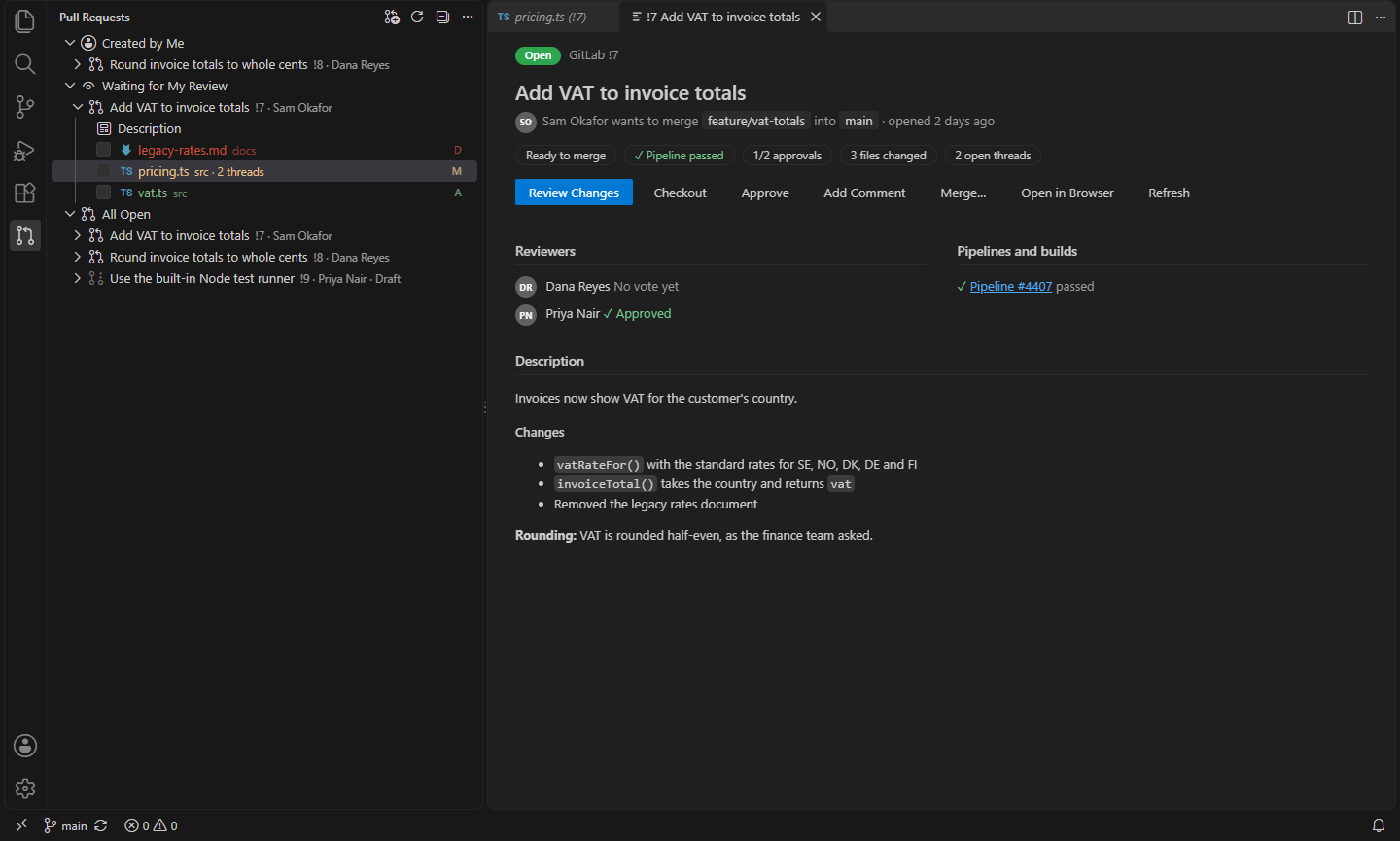
- Details panel. The description rendered as Markdown, reviewers and their votes, approvals needed, pipelines and builds, whether it can be merged, and buttons for everything below.
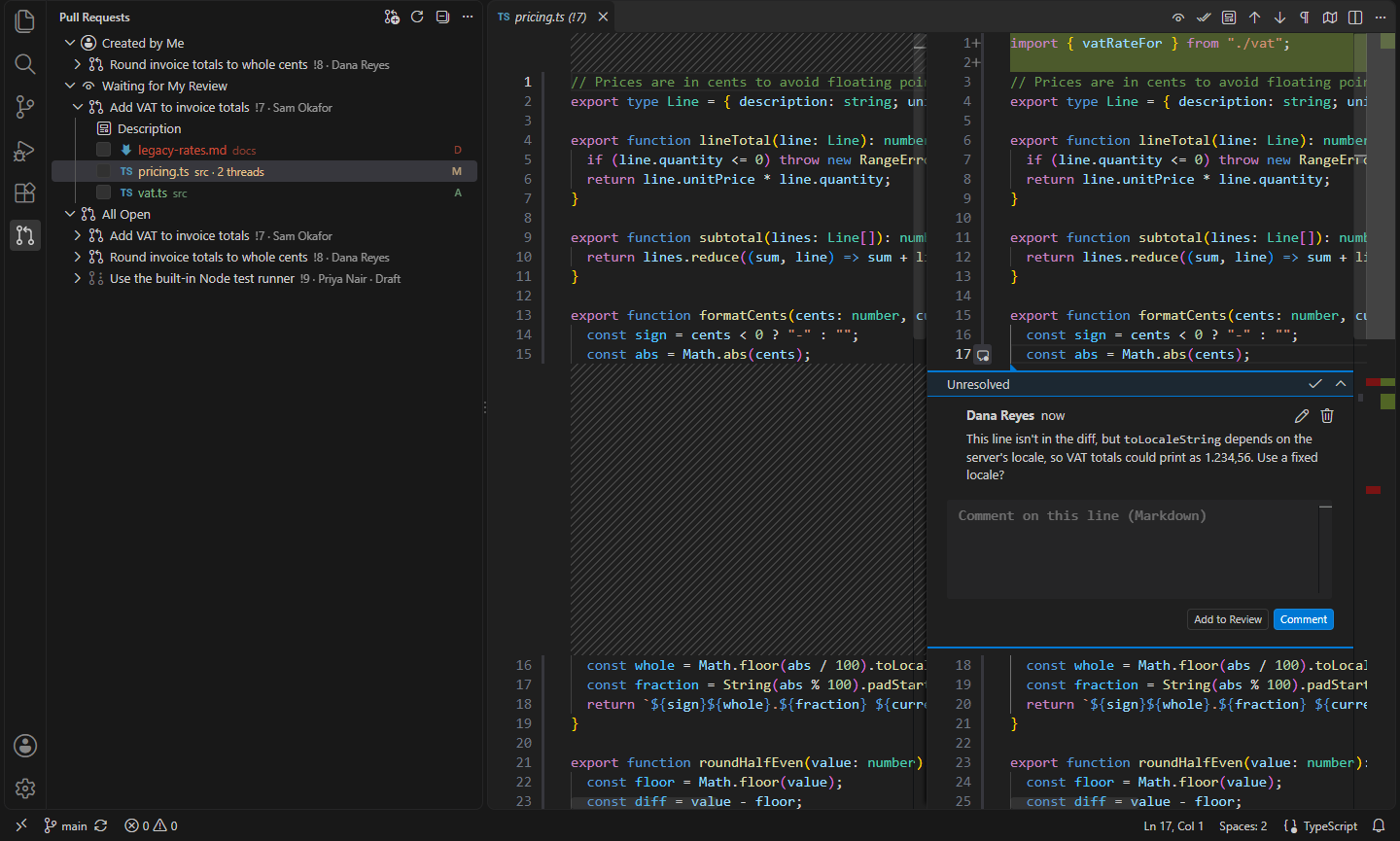
- Review in the editor. Changed files open as side-by-side diffs. Existing comment threads show on their lines, and you can comment on any line of either side, including unchanged lines outside the diff (each service's position rules are handled for you). Reply, edit or delete your comments, resolve and reopen threads, and suggest a change the author can apply.
- Pending reviews. Click Add to Review instead of Comment to collect comments and send them together with Submit Review, optionally approving or requesting changes. GitLab keeps them as draft notes on the server; for Bitbucket and Azure DevOps they wait on your computer.
- Approve, request changes, merge. Approve, take an approval back, or request changes (Bitbucket, Bitbucket Data Center, Azure DevOps). Merge with a merge commit or squash, and delete the source branch.
- Checkout. Check out a pull request's branch, tracking the remote one, through VS Code's Git support; branches from forks are fetched too.
- Create pull requests from the current branch: pick the target branch, and the title and description come from your commits.
- Status bar. The checked-out branch's pull request with its state, approvals and pipeline; click for the details.
Signing in
Each service needs a token, entered once per server in a password box and kept in VS Code's secret storage (never in settings or logs):
| Service |
Token |
| GitLab |
A personal access token with the api scope |
| Bitbucket Cloud |
An API token or app password plus your user name or email (pull requests and repositories: read and write), or a repository or workspace access token |
| Bitbucket Data Center / Server |
An HTTP access token with repository write permission |
| Azure DevOps |
A personal access token with Code: Read & write |
The sign-in box has a button that opens the page where you create one.
Commands
| Command |
What it does |
Nifty Pull Requests: Sign In… / Sign Out… |
Store or forget the token for a server |
Nifty Pull Requests: Refresh |
Look at remotes and pull requests again |
Nifty Pull Requests: Open Details |
The details panel of a pull request |
Nifty Pull Requests: Review Changes |
Open the first changed file not yet viewed as a diff |
Nifty Pull Requests: Open Changed File… |
Pick a changed file to open as a diff |
Nifty Pull Requests: Checkout |
Check out the pull request's branch |
Nifty Pull Requests: Approve / Revoke Approval / Request Changes |
Vote |
Nifty Pull Requests: Add Comment… |
A general comment on the pull request |
Nifty Pull Requests: Submit Review… / Discard Pending Review… |
Send or drop the pending review |
Nifty Pull Requests: Mark File as Viewed / Not Viewed |
Tick off files as you go |
Nifty Pull Requests: Merge… |
Merge, with squash and branch deletion options |
Nifty Pull Requests: Create Pull Request… |
From the current branch |
Nifty Pull Requests: Open in Browser |
The pull request on the service's website |
Settings
| Setting |
Default |
What it does |
nifty.pr-review.hosts |
{} |
Self-hosted servers whose name doesn't say what they run, e.g. { "git.example.com": "gitlab" }, or { "provider": "gitlab", "api": "https://git.example.com/gitlab/api/v4" } when the API lives elsewhere |
nifty.pr-review.statusBar |
true |
Show the current branch's pull request in the status bar |
nifty.pr-review.statusBarRefreshMinutes |
5 |
How often the status bar checks for news (0: only when the branch changes) |
nifty.pr-review.diffSource |
auto |
Read file versions from local git when the commits are there, else from the server; api always asks the server |
nifty.pr-review.azureApiVersion |
"" |
Azure DevOps REST API version (default 7.1 for Services, 7.0 for Server; 6.0 for Server 2020) |
GitHub isn't covered: use GitHub's own pull request extension for it. Needs git and a desktop editor (not vscode.dev).
Install
- VS Code: search for "Nifty Pull Requests" in the Extensions view, or install from the Visual Studio Marketplace.
- Cursor, Windsurf, VSCodium, Kiro, Antigravity: install from Open VSX.
Privacy
This extension collects no telemetry and needs no account of ours. It talks only to the GitLab, Bitbucket or Azure DevOps servers your git remotes point at, with the tokens you give it.
Not affiliated with GitLab, Atlassian or Microsoft. GitLab, Bitbucket and Azure DevOps are trademarks of their owners.
- Nifty Git Links: Open in GitHub, GitLab & Bitbucket: Open or copy links to files, lines, commits and pull requests on GitHub, GitLab, Bitbucket, Azure DevOps and Gitea. (Open VSX)
- Nifty AI Review: Review AI Agent Changes: Review what an AI agent changed, hunk by hunk: checkpoints before it runs, accept or reject each change, leave comments, and send your feedback back to the agent. (Open VSX)
- Nifty Git Graph: Git History & Branch Graph: See your git history as a graph: branches, merges and tags, commit details and diffs, and checkout, merge, rebase, cherry-pick and more from a right-click. No sign-in. (Open VSX)
- Nifty Branches: Clean Up Merged Git Branches: Safely clean up merged, squash-merged, gone and stale git branches, with a preview and one-click restore. (Open VSX)
- Nifty Changelists: JetBrains-Style Git Changelists: Group uncommitted files into named changelists and commit each one separately, like JetBrains IDEs, and reword old commit messages without an interactive rebase. (Open VSX)
- Nifty Git Pack: 6 Nifty extensions for working with Git: Branches, Git Graph, Git Links, Changelists, AI Review, Pre-commit. (Open VSX)
See all 100+ Nifty extensions and web tools at https://getnifty.dev
| |

