Nifty Paired Notebooks
Keep Jupyter notebooks paired with plain Python (percent format) or Markdown files: readable git diffs, edit either side, outputs kept, and open any .py script as a notebook.
Maintained. No sign-in. No telemetry. Works in VS Code, Cursor, Windsurf, VSCodium and other editors that use Open VSX.
Features
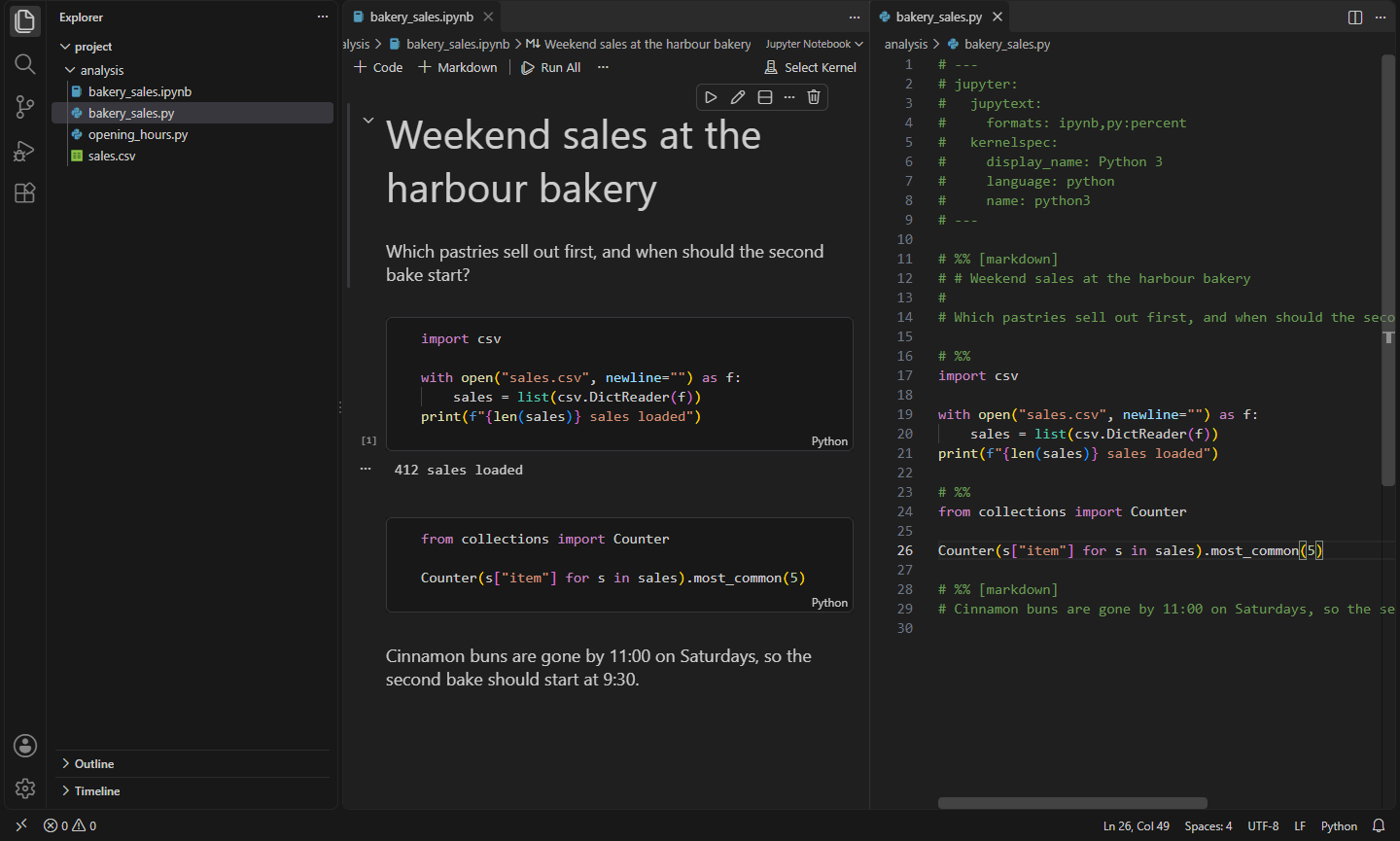

- Notebooks you can diff. Pair a Jupyter notebook with a plain
.py script (percent format, # %% cells) or a Markdown file next to it. Commit the script and code reviews show readable changes instead of JSON and base64 images.
- Edit either side. Save the notebook and the script is rewritten. Save the script, in VS Code or anywhere else (git pull, another editor, an AI agent), and the notebook's cells are updated. Outputs of cells whose code didn't change are kept.
- Open any script as a notebook. Right-click a
.py file with # %% cells (or a Markdown file with code blocks) and choose Open as Notebook. A paired .ipynb is created next to it, ready to run with your Jupyter kernel.
- Jupytext-compatible. Pairing is stored in the notebook's metadata (
jupytext.formats), and scripts use the same percent format and header. Teammates using Jupytext in JupyterLab or the command line stay in sync.
- Bulk update. Update All Paired Files rewrites every paired script in the workspace, e.g. after cloning. Or set
pairAllNotebooks to pair every notebook you save.
- Pair from the notebook toolbar, the Explorer's right-click menu or the Command Palette. No Python packages needed.
- Works in the browser on vscode.dev and github.dev.
Commands
| Command |
What it does |
Nifty Paired Notebooks: Pair Notebook with Script or Markdown |
Pair the notebook and write the paired file |
Nifty Paired Notebooks: Unpair Notebook |
Stop pairing (the paired file is kept) |
Nifty Paired Notebooks: Open as Notebook |
Open a .py or .md file as a notebook |
Nifty Paired Notebooks: Update All Paired Files |
Rewrite the paired files of every paired notebook |
Settings
| Setting |
Default |
What it does |
nifty.paired.defaultFormat |
py:percent |
Format for new pairings: py:percent or md |
nifty.paired.pairAllNotebooks |
false |
Pair every notebook you save |
nifty.paired.syncExternalChanges |
true |
Update notebooks when their paired file changes outside VS Code |
nifty.paired.showOpenButton |
false |
Show an Open as Notebook button on Python files |
Install
- VS Code: search for "Nifty Paired Notebooks" in the Extensions view, or install from the Visual Studio Marketplace.
- Cursor, Windsurf, VSCodium, Kiro, Antigravity: install from Open VSX.
Privacy
This extension collects no telemetry and needs no account.
- Nifty Notebook Servers: Kernels, Sessions & Files: Manage Jupyter servers from the side bar: see kernels and sessions, shut down, restart or interrupt kernels, and browse, open and edit the server's files directly. (Open VSX)
- Nifty Spreadsheet Viewer: XLSX, XLS & ODS: Open Excel, OpenDocument and other spreadsheets in a fast read-only grid with sheet tabs, formulas, search and CSV export, and compare two workbooks as a diff. (Open VSX)
- Nifty Branches: Clean Up Merged Git Branches: Safely clean up merged, squash-merged, gone and stale git branches, with a preview and one-click restore. (Open VSX)
- Nifty C# Scratchpad: Run C# Snippets & NuGet: Run C# snippets instantly with NuGet packages and rich Dump() output, a LINQPad-style scratchpad and Polyglot Notebooks replacement. (Open VSX)
- Nifty Data Viewer: CSV & Parquet Viewer with SQL: Open CSV, Parquet and JSON files as a fast table and query them with SQL, powered by DuckDB. Sort, page through millions of rows, and export to CSV, Parquet or JSON. (Open VSX)
- Nifty Diagrams: PlantUML, Graphviz & D2 Preview: PlantUML, Graphviz (DOT) and D2 diagrams rendered on your machine: live preview beside the editor, SVG and PNG export, diagrams in the Markdown preview, errors in Problems. No server needed. (Open VSX)
See all 100+ Nifty extensions and web tools at https://getnifty.dev
| |

