Nifty Dev Container Launcher
Start, rebuild, stop and open shells in dev containers with the open-source devcontainer CLI, in any VS Code fork. Lists your devcontainer.json configs with their state and checks them for mistakes.
Maintained. No sign-in. No telemetry. Works in VS Code, Cursor, Windsurf, VSCodium and other editors that use Open VSX.
Features


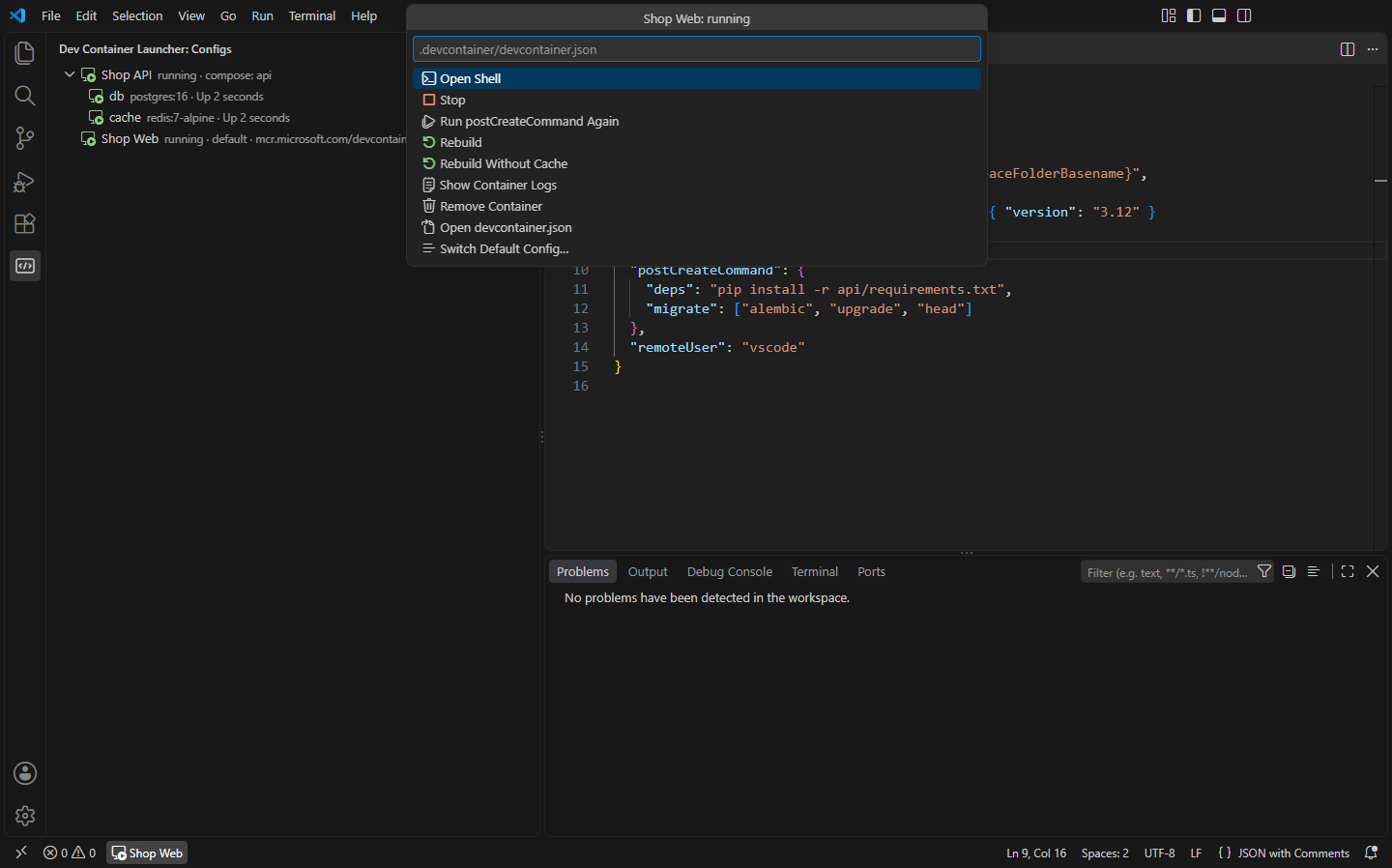
Dev containers are defined by an open specification, and the reference devcontainer CLI (@devcontainers/cli) can build and run them anywhere. This extension puts that CLI in your editor, so you can work with devcontainer.json in editors that can't install Microsoft's Dev Containers extension, like VSCodium, or when you'd rather run containers without it.
- Every config at a glance. The Dev Container Launcher view lists each
devcontainer.json in the workspace (.devcontainer/devcontainer.json, .devcontainer/<name>/devcontainer.json and .devcontainer.json) with whether its container is running, stopped or not created yet, found through the labels the CLI puts on containers. Docker Compose configs list their other services too, like the database and cache.
- Up, Rebuild, Stop, Remove. Up and Rebuild run
devcontainer up (Rebuild removes the old container first, optionally without the build cache), with progress in a notification and the full output in the Dev Container CLI channel. Stop and Remove act on the whole Compose project: Remove runs docker compose down (or podman compose down), so its network goes too.
- Open Shell runs
devcontainer exec in a terminal, as the config's remote user, with bash if the image has it.
- Run postCreateCommand Again after changing it, without rebuilding. Show Container Logs follows a container's logs in a terminal.
- Status bar. The default config's state is in the status bar; click it for its actions. With several configs, pick the default with Use as Default Config or
nifty.devcontainer.defaultConfig.
- Docker or Podman. Set
nifty.devcontainer.dockerPath to podman and it's used for listing containers and passed to the CLI as --docker-path.
- devcontainer.json checks as you type: unknown properties with a "did you mean" quick fix, feature ids that aren't valid (and old short ids), a Dockerfile, compose file, build context or local feature that isn't there, a
service that isn't in the compose file, and using both image and a Dockerfile. VS Code already checks property names against the Dev Container schema when it can download it; then that check is left to it, and the quick fix works on its warnings too. Completion suggests properties with snippets, build options and common features.
Opening the editor inside a container
This extension runs your dev containers and gives you shells in them; it doesn't move the editor itself into the container. That needs a remote extension that can attach VS Code to a container, like Microsoft's Dev Containers in VS Code. When one is installed, Reopen Folder in Container appears in the view and after Up, and hands the folder over to it.
Requirements
- The devcontainer CLI:
npm install -g @devcontainers/cli, or set nifty.devcontainer.cliPath.
- Docker (or Podman) on this computer.
Commands
| Command |
What it does |
Nifty Dev Container Launcher: Start Dev Container (Up) |
devcontainer up for the default config (or pick one) |
Nifty Dev Container Launcher: Rebuild Dev Container |
Remove the container and create it again |
Nifty Dev Container Launcher: Rebuild Dev Container Without Cache |
The same, building without the cache |
Nifty Dev Container Launcher: Stop Dev Container |
Stop its containers |
Nifty Dev Container Launcher: Remove Dev Container |
Remove its containers |
Nifty Dev Container Launcher: Open Shell in Dev Container |
A terminal inside the container |
Nifty Dev Container Launcher: Run postCreateCommand Again |
Run the config's postCreateCommand in the running container |
Nifty Dev Container Launcher: Show Container Logs |
Follow the container's logs |
Nifty Dev Container Launcher: Dev Container Actions… |
Everything above for one config |
Nifty Dev Container Launcher: Create devcontainer.json |
Start a .devcontainer/devcontainer.json |
Settings
| Setting |
Default |
What it does |
nifty.devcontainer.cliPath |
|
The devcontainer command, if it isn't on the PATH |
nifty.devcontainer.dockerPath |
docker |
docker or podman (or a full path) |
nifty.devcontainer.defaultConfig |
|
The config commands use, e.g. .devcontainer/api/devcontainer.json |
nifty.devcontainer.refreshSeconds |
10 |
How often states refresh while the view is visible (0 = by hand) |
nifty.devcontainer.statusBar |
true |
Show the default config in the status bar |
nifty.devcontainer.validate |
true |
Check devcontainer.json files |
Install
- VS Code: search for "Nifty Dev Container Launcher" in the Extensions view, or install from the Visual Studio Marketplace.
- Cursor, Windsurf, VSCodium, Kiro, Antigravity: install from Open VSX.
In the browser (vscode.dev, github.dev) there are no containers to run, so only the devcontainer.json checks and completion are there.
Privacy
This extension collects no telemetry and needs no account. It runs the devcontainer CLI and Docker on your computer and doesn't go online itself (the CLI and Docker pull images and features as your config asks).
- Nifty Containers: Podman, Docker & Apple Container: One container view for Podman, Docker, nerdctl and Apple's container CLI: start, stop and remove containers, follow logs, open a shell, inspect, and clean up images. (Open VSX)
- Nifty .NET Explorer: Solution & Test Explorer: A solution explorer and test explorer for .NET in VS Code, Cursor, Windsurf and VSCodium: projects, references and files from .sln/.slnx, and xUnit, NUnit and MSTest tests in the Testing view. (Open VSX)
- Nifty Settings Sync: Sync via GitHub Gist: Sync settings, keybindings, snippets and extensions between VSCodium, Cursor, Windsurf and VS Code through a private GitHub Gist, with a diff before anything is overwritten. (Open VSX)
- Nifty Actions: Workflow Checks, SHA Pinning & act: GitHub Actions workflows without sign-in: completion and go to definition for local and reusable actions, actionlint checks, pin actions to commit SHAs, and run jobs locally with act. (Open VSX)
- Nifty Agent Config: AGENTS.md, Rules & MCP Files: See which AGENTS.md, CLAUDE.md, Cursor, Copilot, Windsurf and Gemini rules apply to the file you are editing. Lint rule and MCP files for hidden text, secrets and broken links, and keep them in sync. (Open VSX)
- Nifty AI Review: Review AI Agent Changes: Review what an AI agent changed, hunk by hunk: checkpoints before it runs, accept or reject each change, leave comments, and send your feedback back to the agent. (Open VSX)
See all 100+ Nifty extensions and web tools at https://getnifty.dev
| |

