Nifty Actions: Workflow Checks, SHA Pinning & act
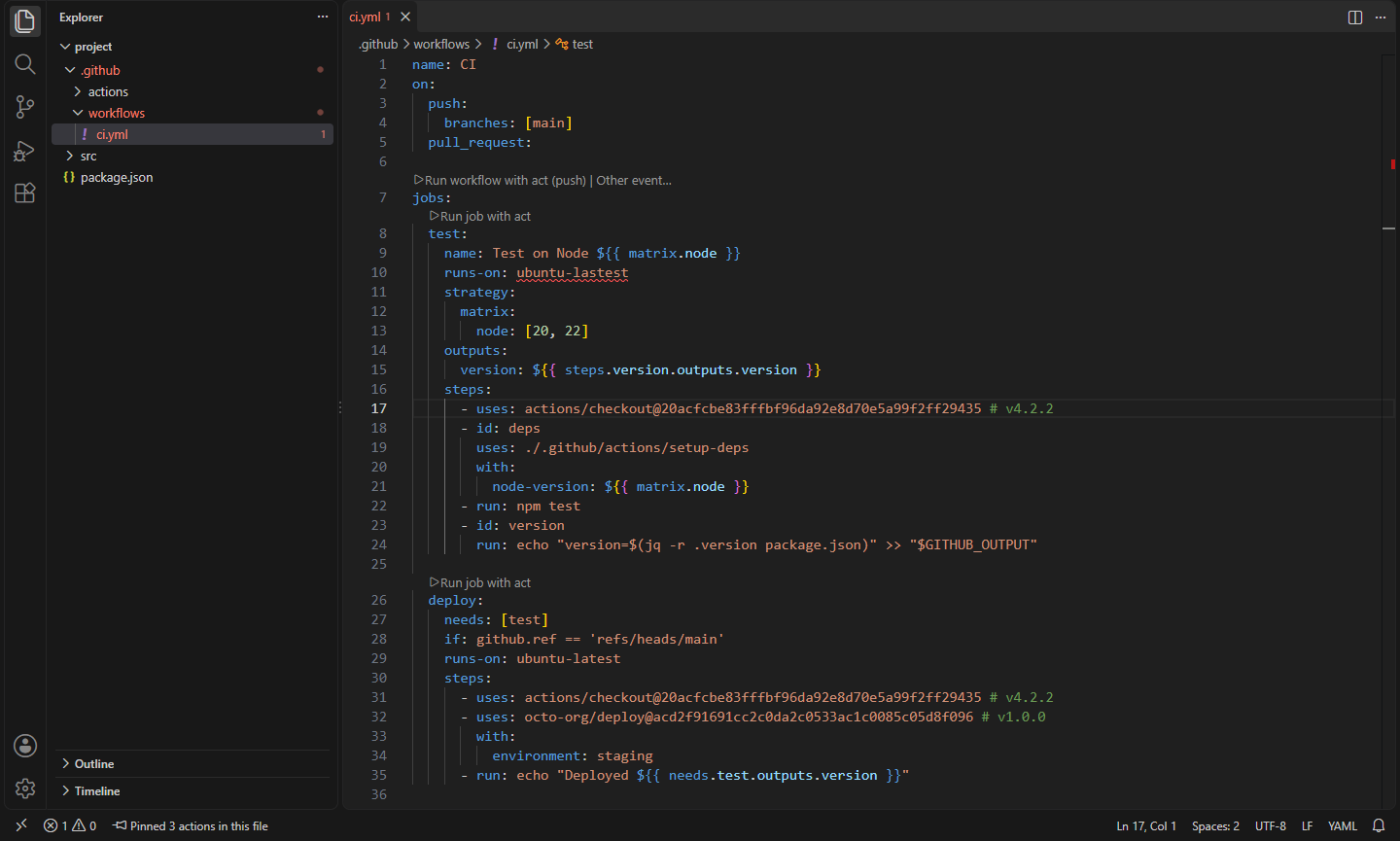
GitHub Actions workflows without sign-in: completion and go to definition for local and reusable actions, actionlint checks, pin actions to commit SHAs, and run jobs locally with act.
Maintained. No sign-in. No telemetry. Works in VS Code, Cursor, Windsurf, VSCodium and other editors that use Open VSX.
Everything works offline and without a GitHub account: completion, hovers, checks, go to definition and the outline read your repository's files. Only pinning, version checks and reading remote action.yml files call the GitHub API, anonymously unless you choose to sign in.
Features


Workflow language support
For .github/workflows/*.yml and action.yml files, whatever language mode they're in:
- Completion of keys (workflow,
on: events and their filters, jobs, steps, strategy, permissions, container, action.yml runs…), values (runner labels, shells, events, job ids for needs), and ./ paths of local actions and reusable workflows after uses:.
- Inputs of what a step or job uses. Under
with: you get the inputs of local composite actions, reusable workflows (uses: ./.github/workflows/x.yml) and remote actions (their action.yml is read from GitHub), with descriptions, defaults and required ones first. Reusable workflows also complete their secrets:.
${{ }} expressions. Contexts and functions; steps. offers only steps with an id that run before the cursor; steps.<id>.outputs. offers the outputs of that step's action or the names its script writes to $GITHUB_OUTPUT; needs. offers the job's needs and needs.<job>.outputs. their outputs (including those of reusable workflows); matrix. offers matrix keys (also those only in include); inputs., env., secrets., github., runner.… if: values work without ${{ }}. Expressions are also highlighted in YAML.
- Hovers for keys, contexts, functions, steps, jobs, inputs and outputs, and for
uses: lines (the action's inputs and outputs, whether it's pinned, and links to pin it or check for a newer release).
- Go to definition from
uses: ./… to the local action or reusable workflow, from needs and needs.<job> to the job, from steps.<id> to the step, from outputs and with: inputs to where they're declared (also in other files), and from matrix.x and inputs.x to their keys.
- Outline of triggers, inputs, jobs and steps (breadcrumbs and Go to Symbol too).
Checks
- actionlint. actionlint checks workflow files as you type: expression types, runner labels, action inputs, cron syntax, and (with shellcheck and pyflakes installed) the scripts in
run:. Problems show actionlint's rule name (runner-label, expression, shellcheck…) with a link to its docs. Use the actionlint on your PATH or set nifty.actions.actionlint.path, or run Nifty Actions: Download actionlint: it downloads a pinned release from rhysd/actionlint's GitHub releases only when you click, and checks it against the release's checksums file and the checksums built into the extension.
- Quick checks when actionlint isn't there (and for
action.yml files): YAML syntax, unknown keys, jobs without runs-on, needs that don't exist or loop, duplicate step ids, steps with both or neither of uses and run, expression syntax, unknown contexts and functions, steps/needs/matrix/inputs names that don't exist, missing local actions, and unknown or missing required inputs and secrets of local actions and reusable workflows. Checks that actionlint also does are skipped while it runs, so nothing is reported twice.
- Suppress a problem on one line with the quick fix Ignore "rule" on this line, which adds
# nifty-actions-ignore: rule (without a rule it hides everything on that line; alone on a line it applies to the next one). nifty.actions.ignoreRules hides a rule everywhere.
Pin actions to commit SHAs
A tag like @v4 can be moved to different code at any time, which is how the tj-actions/changed-files compromise in March 2025 reached thousands of repositories. Pinning to a full commit SHA stops that.
- Actions that use a tag or branch are marked (a hint by default; see
nifty.actions.pinning.unpinned). The quick fix, the hover link, Pin Action to Commit SHA, the "Pin N actions" CodeLens and Pin All Actions in This File rewrite uses: actions/checkout@v4 to uses: actions/checkout@<sha> # v4.2.2. A floating tag like v4 is named by the exact release on the same commit, quotes and other comment text are kept, and each owner/repo@ref is looked up once.
- Pin All Actions in Workspace does every workflow and
action.yml in the workspace and saves them.
- Check for newer versions from the hover, or Update Actions to Latest Versions for the whole file: pinned actions are re-pinned to the new release's SHA, and tags move to the new one in the same style (
v3 → v4).
- Requests go to the GitHub REST API without a token. That allows 60 an hour; when they run out you're told when they reset and can choose to sign in with VS Code's built-in GitHub account (
nifty.actions.github.signIn, 5,000 an hour and private repositories). For GitHub Enterprise Server set nifty.actions.github.apiUrl.
Team policy (.github/nifty-actions.json)
Create Action Policy File writes a starter policy listing the owners your workflows use. Violations show in Problems for everyone who opens the repository with Nifty Actions:
{
"requirePinning": true, // every remote action pinned to a full SHA…
"pinningExceptions": ["actions/*"], // …except these
"allowed": ["actions/*", "github/*", "my-org/*", "docker/login-action@v3"],
"blocked": ["tj-actions/changed-files"],
"allowLocal": true, // ./ actions (default true)
"allowDocker": true, // docker:// actions (default true)
"severity": "error" // or warning, information, hint
}
Patterns work like GitHub's own "allowed actions" setting: owner/*, owner/repo, owner/repo@ref, owner/repo/path@*. The file has a JSON schema, so it completes and validates as you type.
Run jobs locally with act
With act installed, CodeLens above jobs: and each job runs the workflow or that job (Other event… picks the event). act runs in a terminal in your usual shell, so you see its colored output, can answer its first-run question and run the command again. List Jobs with act shows every job act finds and runs the one you pick. Extra arguments (-P images, --secret-file, --container-architecture) go in nifty.actions.act.args.
act runs each job in a container, so Docker must be running (Docker Desktop, Colima, or Podman with DOCKER_HOST set). Not every hosted-runner feature works locally; see act's documentation.
How it fits with other Nifty extensions
- Nifty YAML formats any YAML (workflows included) without losing comments, runs yamllint and copies key paths. Nifty Actions adds what's specific to workflows: their keys, expressions, action references and checks. Use both.
- Nifty JSON Schema validates workflow files against the SchemaStore schema. Nifty Actions goes further than a schema can: it knows which steps run before which, what inputs a local action has and whether a job id exists.
- Nifty Dependency Guard checks npm and pip dependencies. Nifty Actions covers the other supply chain in a repository: the actions your CI runs.
- Nifty Run runs your project's scripts and tasks; Nifty Actions runs its CI jobs with act.
In the browser
On vscode.dev and github.dev, completion, hovers, go to definition, the outline, quick checks, the policy file, pinning and version checks all work. actionlint and act need a local program, so they're desktop only.
Commands
| Command |
What it does |
Nifty Actions: Pin Action to Commit SHA |
Pin the uses: on the cursor line |
Nifty Actions: Pin All Actions in This File |
Pin every action in the file |
Nifty Actions: Pin All Actions in Workspace |
Pin every workflow and action.yml, and save them |
Nifty Actions: Check for a Newer Version of This Action |
Look up the latest release of the action on the cursor line |
Nifty Actions: Update Actions to Latest Versions |
Pick outdated actions in the file and update them |
Nifty Actions: Create Action Policy File |
Create or open .github/nifty-actions.json |
Nifty Actions: Check All Workflows |
Check every workflow and action.yml into Problems |
Nifty Actions: Use GitHub Sign-in for API Requests |
Use VS Code's GitHub account for pinning and version checks |
Nifty Actions: Download actionlint |
Download and verify actionlint (desktop) |
Nifty Actions: Show actionlint Location |
Which actionlint is used, and its version (desktop) |
Nifty Actions: Run Job with act |
Run the job at the cursor (or pick one) with act (desktop) |
Nifty Actions: Run Workflow with act |
Run the whole workflow with act (desktop) |
Nifty Actions: List Jobs with act |
act -l, then run the job you pick (desktop) |
Nifty Actions: Show Log |
Requests, pins and tool runs |
Settings
| Setting |
Default |
What it does |
nifty.actions.actionlint.enabled |
true |
Check workflows with actionlint when it's available |
nifty.actions.actionlint.path |
|
actionlint executable (else the downloaded copy, then PATH) |
nifty.actions.actionlint.run |
onType |
onType or onSave |
nifty.actions.actionlint.shellcheck |
true |
Let actionlint run shellcheck on run: scripts |
nifty.actions.actionlint.pyflakes |
true |
Let actionlint run pyflakes on Python scripts |
nifty.actions.actionlint.ignore |
[] |
Regular expressions of messages to ignore (-ignore) |
nifty.actions.actionlint.args |
[] |
Extra actionlint arguments, e.g. -config-file |
nifty.actions.actionlint.downloadUrl |
GitHub releases |
Where Download actionlint gets releases (a mirror works too) |
nifty.actions.quickChecks.enabled |
true |
Nifty's own checks |
nifty.actions.ignoreRules |
[] |
Rule ids to hide everywhere |
nifty.actions.pinning.unpinned |
hint |
How to mark unpinned actions: off, hint, information, warning, error |
nifty.actions.pinning.trusted |
[] |
Actions that don't need pinning, e.g. my-org/* |
nifty.actions.pinning.codeLens |
true |
The "Pin N actions" CodeLens |
nifty.actions.github.apiUrl |
https://api.github.com |
REST API (GitHub Enterprise Server: https://HOST/api/v3) |
nifty.actions.github.signIn |
false |
Use VS Code's GitHub account for API requests |
nifty.actions.remoteActions.fetch |
true |
Read remote action.yml files for input completion and checks |
nifty.actions.versions.checkOnHover |
false |
Look up newer releases when hovering uses: |
nifty.actions.policy.enabled |
true |
Check actions against .github/nifty-actions.json |
nifty.actions.act.path |
|
act executable (else PATH) |
nifty.actions.act.args |
[] |
Extra arguments for act runs |
nifty.actions.act.codeLens |
true |
"Run job with act" CodeLens |
GitHub and GitHub Actions are trademarks of GitHub, Inc. Nifty Actions is an independent project; it isn't affiliated with or endorsed by GitHub. It works with actionlint (MIT, by rhysd) and act (MIT, by nektos), which it runs but doesn't bundle.
Install
- VS Code: search for "Nifty Actions" in the Extensions view, or install from the Visual Studio Marketplace.
- Cursor, Windsurf, VSCodium, Kiro, Antigravity: install from Open VSX.
Privacy
This extension collects no telemetry and needs no account. It contacts GitHub only to pin actions, check versions, read the action.yml of remote actions (turn off with nifty.actions.remoteActions.fetch) and, when you ask, download actionlint. Requests are anonymous unless you turn on nifty.actions.github.signIn.
- Nifty YAML: Formatter, Validator & Converter: Format YAML without losing comments (Kubernetes-style indents), sort keys, lint with yamllint, copy the key path, and convert to and from JSON. (Open VSX)
- Nifty JSON Schema: Validate with Draft 2020-12 & 2019-09: Validate JSON, JSONC and YAML against JSON Schema 2020-12, 2019-09, draft-07, 06 and 04, with precise errors, hover, completion, SchemaStore lookup and schema generation. (Open VSX)
- Nifty OpenAPI: Outline, Checks and Try It for API Specs: Edit OpenAPI and Swagger files with an outline, $ref navigation and completion, error checking, example payloads, and Try it requests for your REST client. (Open VSX)
- Nifty Dependency Guard: Package Security Check: Catch risky dependencies before you install them: made-up (AI-hallucinated) packages, lookalike names, brand-new versions, install scripts and deprecations, in package.json and requirements.txt. (Open VSX)
- Nifty HCL Tools: .tf and .hcl Language Support: Fast, lightweight Terraform and OpenTofu support: highlighting, outline, go to definition and references across a module, hovers, completion, undefined-reference errors and formatting. (Open VSX)
- Nifty Helm & Kustomize: Values IntelliSense: Helm .Values IntelliSense (completion, hover, go to definition, missing values) and Kustomize navigation, checks with quick fixes, an overlay tree, patch target hovers, build previews and diffs. (Open VSX)
See all 100+ Nifty extensions and web tools at https://getnifty.dev
| |