Nifty JSON Schema
Validate JSON, JSONC and YAML against JSON Schema 2020-12, 2019-09, draft-07, 06 and 04, with precise errors, hover, completion, SchemaStore lookup and schema generation.
Maintained. No sign-in. No telemetry. Works in VS Code, Cursor, Windsurf, VSCodium and other editors that use Open VSX.
Features

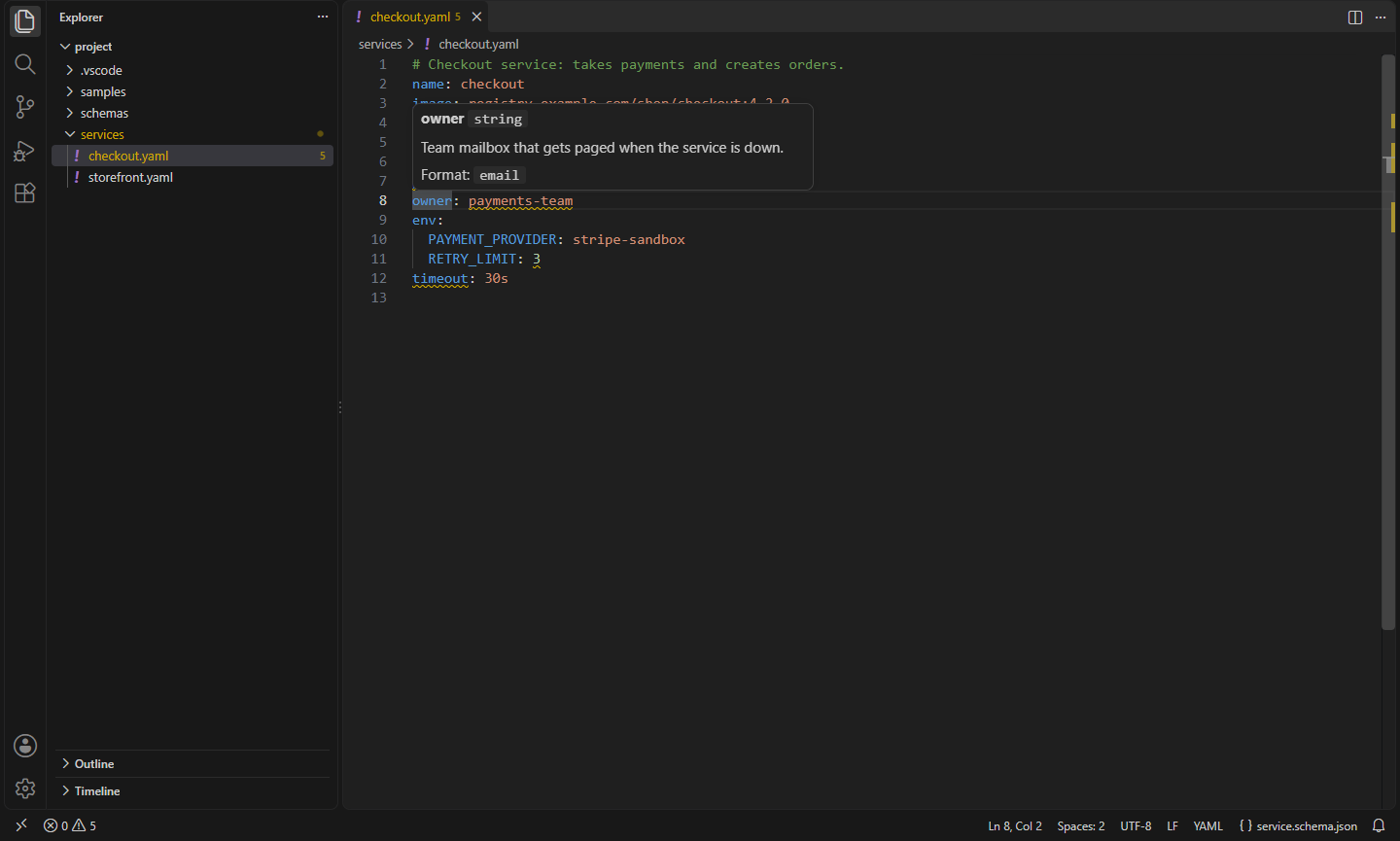


- The newer drafts, fully. 2020-12 and 2019-09 with
unevaluatedProperties, unevaluatedItems, prefixItems, $dynamicRef, $recursiveRef, dependentSchemas, dependentRequired, $defs with $anchor, minContains/maxContains and deprecated. Draft-07, draft-06 and draft-04 work too, each with its own rules (such as draft-04's boolean exclusiveMinimum).
- JSON, JSONC and YAML. YAML files with several documents (
---) are checked document by document.
- Problems where they are. Each problem points at the value or property name it is about, in JSON and in YAML, with a plain message:
Property "timeout" isn't allowed here, Value must be one of: "frontend", "backend", "worker". For anyOf/oneOf, you see why the closest branch failed instead of every branch.
- Finds the schema from
"$schema" in the file, a # yaml-language-server: $schema=… comment, the nifty.json-schema.schemas setting, your existing json.schemas and yaml.schemas settings, or the SchemaStore catalog (GitHub workflows, docker-compose, package.json and hundreds more). The status bar shows which schema a file uses; click it to open the schema.
- Remote
$refs are downloaded and cached, so validation keeps working offline. Turn downloads off with nifty.json-schema.network.
- Formats such as
date-time, email, uri, uuid, hostname, ipv4 and duration are checked, quickly or thoroughly, or not at all.
- Hover a property to see its title, description, type, allowed values and default.
- Completion of property names that aren't in the object yet (required ones first) and of enum values.
- Schema files are checked too: a file with
"$schema": "https://json-schema.org/draft/2020-12/schema" is validated against the meta-schema, without a download.
- Generate Schema from This JSON writes a draft 2020-12 schema from a sample (JSON or YAML): types, required keys, merged array items and formats like
uuid, date-time and email.
- Works in the browser on vscode.dev and github.dev.
Working alongside VS Code's JSON support
VS Code validates JSON files itself, and the YAML extension (Red Hat) validates YAML. So you don't see everything twice:
- JSON files whose schema VS Code already knows (from
"$schema", json.schemas or SchemaStore) and that use draft-04 to draft-07 are left to VS Code. Files with a 2019-09 or 2020-12 schema are checked here too, and a problem VS Code already reports at the same place is hidden (nifty.json-schema.hideDuplicates), so you only get the ones it misses. Set nifty.json-schema.validateJson to always or never to change this.
- YAML files are validated here unless the YAML extension is installed and already validates the file against a draft-04 to draft-07 schema (
nifty.json-schema.validateYaml).
- Hover and completion are offered where no other extension offers them for the file's schema: for YAML without the YAML extension, and for files mapped only in
nifty.json-schema.schemas (nifty.json-schema.intelliSense).
To have only this extension check JSON files, set "json.validate.enable": false and "nifty.json-schema.validateJson": "always".
Commands
| Command |
What it does |
Nifty JSON Schema: Validate Now |
Check the current file and say whether it's valid |
Nifty JSON Schema: Generate Schema from This JSON |
Write a draft 2020-12 schema from the current JSON or YAML file |
Nifty JSON Schema: Open Schema of This File |
Open the schema the current file is checked against |
Nifty JSON Schema: Clear Downloaded Schemas |
Forget downloaded schemas and the catalog, so they're downloaded again |
Settings
| Setting |
Default |
What it does |
nifty.json-schema.schemas |
[] |
Schemas for files: [{ "fileMatch": ["services/*.yaml"], "url": "./schemas/service.schema.json" }] |
nifty.json-schema.useOtherSettings |
true |
Also use json.schemas and yaml.schemas |
nifty.json-schema.schemaStore |
true |
Look up schemas for well-known files in the SchemaStore catalog |
nifty.json-schema.schemaStoreUrl |
SchemaStore |
The catalog to use, e.g. a company mirror |
nifty.json-schema.network |
true |
Download schemas, remote $refs and the catalog (off: only local and cached schemas) |
nifty.json-schema.formats |
fast |
Check format: fast, full or off |
nifty.json-schema.validateJson |
auto |
When to validate JSON files (see above) |
nifty.json-schema.validateYaml |
auto |
When to validate YAML files (see above) |
nifty.json-schema.intelliSense |
auto |
Hover and completion: auto, always or off |
nifty.json-schema.hideDuplicates |
true |
Hide a problem another validator reports at the same place |
Install
- VS Code: search for "Nifty JSON Schema" in the Extensions view, or install from the Visual Studio Marketplace.
- Cursor, Windsurf, VSCodium, Kiro, Antigravity: install from Open VSX.
Privacy
This extension collects no telemetry and needs no account. It downloads schemas only from the URLs your files and settings name and from the SchemaStore catalog; turn that off with nifty.json-schema.network or nifty.json-schema.schemaStore.
- Nifty OpenAPI: Outline, Checks and Try It for API Specs: Edit OpenAPI and Swagger files with an outline, $ref navigation and completion, error checking, example payloads, and Try it requests for your REST client. (Open VSX)
- Nifty TOML: Format, Validate & Schemas: TOML support: highlighting, errors, a formatter that keeps comments, outline, folding, and JSON Schema validation, completion and hover (Cargo.toml, pyproject.toml via SchemaStore). TOML to JSON/YAML. (Open VSX)
- Nifty YAML: Formatter, Validator & Converter: Format YAML without losing comments (Kubernetes-style indents), sort keys, lint with yamllint, copy the key path, and convert to and from JSON. (Open VSX)
- Nifty Data Pack: 9 Nifty extensions for working with JSON, YAML, XML, CSV, SQL and spreadsheets: JSON, YAML, XML, SQL, Data Viewer, SQLite, Spreadsheet Viewer, Paste JSON as Code, Mermaid. (Open VSX)
- Nifty JSON: Formatter, Validator & JSONPath: Format, minify, sort keys, query with JSONPath, copy paths, generate TypeScript types, and browse huge JSON files in a fast tree view. (Open VSX)
- Nifty Paste JSON as Code: JSON to Types: Turn JSON on your clipboard into types for TypeScript, C#, Go, Rust, Python, Java, Kotlin, Swift, Dart and more. (Open VSX)
See all 100+ Nifty extensions and web tools at https://getnifty.dev
| |

