Skip to content
| Marketplace
Sign in
Visual Studio Code>Other>CodeErrorGuard+New to Visual Studio Code? Get it now.
CodeErrorGuard+

CodeErrorGuard+

Manuel Gil

imgil.dev
| (0) | Free
| Sponsor
Insert, review, and remove generated try/catch structures across multiple languages while preserving ownership of your code.
Installation
Launch VS Code Quick Open (Ctrl+P), paste the following command, and press enter.
Copied to clipboard
More Info

CodeErrorGuard+

GitHub package.json version GitHub Repo stars GitHub license

Manage the complete lifecycle of generated try/catch structures in Visual Studio Code.

CodeErrorGuard+ helps developers insert, review, navigate, and remove language-specific try/catch structures while keeping ownership of application code exactly where it belongs: with the developer.

Instead of focusing only on code generation, CodeErrorGuard+ focuses on the entire workflow around error-handling scaffolding.

Whether you are adding temporary protection during a refactor, introducing error handling in legacy code, reviewing generated structures, or cleaning up an entire file before a commit, the extension provides a deterministic and reversible workflow.

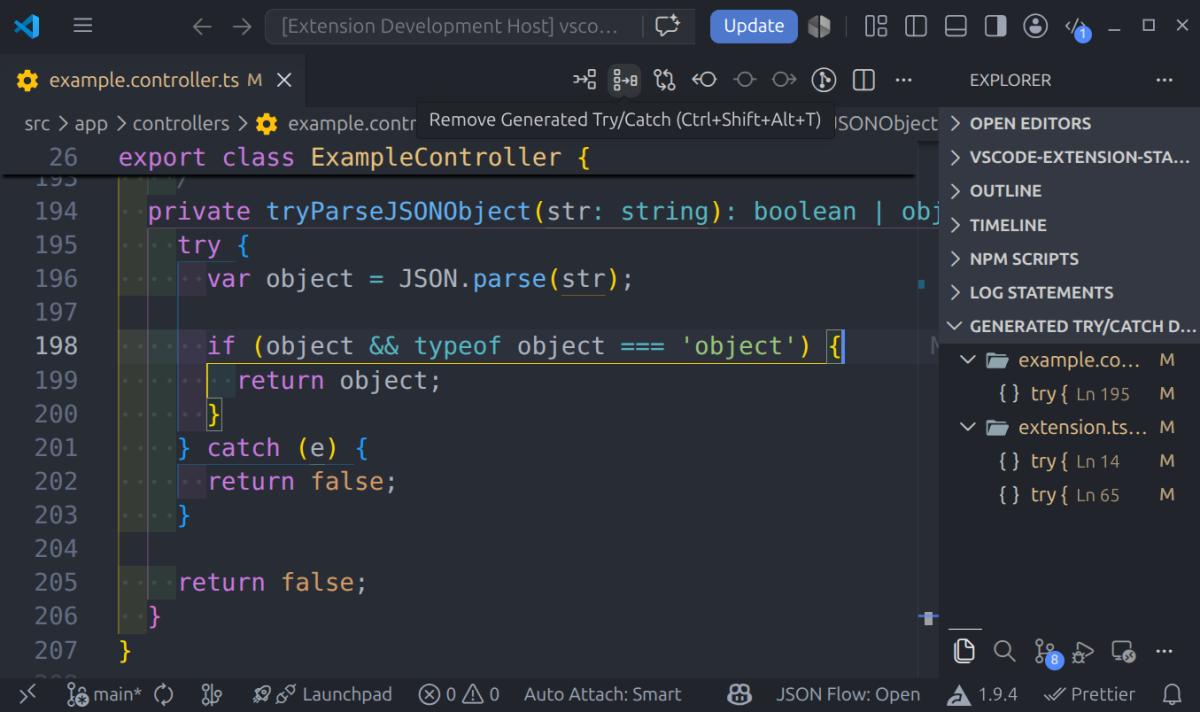
Generated try/catch structures detected and organized in the Explorer view

Discover generated structures, navigate directly to them, and clean them up safely when they are no longer needed.

Why CodeErrorGuard+?

Adding a try/catch block is easy.

Managing hundreds of them over time is not.

Many tools can generate snippets, but they typically stop there.

CodeErrorGuard+ provides a complete workflow:

  • Insert try/catch structures
  • Wrap existing code
  • Review generated structures
  • Navigate generated structures
  • Remove generated structures
  • Clean up an entire file
  • Customize templates
  • Work across multiple languages
  • Support multi-cursor editing

All while preserving the original code contained inside the generated structure.

Core Principle

CodeErrorGuard+ follows a simple rule:

CodeErrorGuard+ owns structure. The user owns code.

The extension is responsible for the scaffolding it generates.

Your application logic remains yours.

This principle influences every feature:

  • Generated structures can be detected later.
  • Generated structures can be removed later.
  • Wrapped code is preserved.
  • Cleanup operations remain predictable.
  • Manually written try/catch blocks are left untouched.

The extension does not attempt to rewrite, reinterpret, or refactor user code.

Insert Try/Catch

The most common workflow is inserting a try/catch structure at the current cursor location.

Place the cursor on a line and run:

Insert Try/Catch

Before

const result = calculate();

After

try {
  const result = calculate();
} catch (error) {
  // TODO: handle error
  // TODO: surface or rethrow error
}

CodeErrorGuard+ automatically respects the indentation level of the current line, making insertion predictable even inside deeply nested code.

Nested Example

function process() {
  const result = calculate();
}

becomes:

function process() {
  try {
    const result = calculate();
  } catch (error) {
    // TODO: handle error
    // TODO: surface or rethrow error
  }
}

Wrap Existing Lines

Existing code can be wrapped without manually moving or reformatting content.

Select one or more complete lines and run:

Insert Try/Catch

Before

const x = 10;
const y = 20;
const sum = x + y;

After

try {
  const x = 10;
  const y = 20;
  const sum = x + y;
} catch (error) {
  // TODO: handle error
  // TODO: surface or rethrow error
}

Selections intentionally operate on complete lines.

This avoids malformed structures and ensures that transformations remain deterministic.

Review Generated Structures

Generated structures can be discovered and reviewed directly from the explorer view.

This allows you to:

  • Inspect generated structures
  • Navigate quickly between structures
  • Review temporary scaffolding
  • Identify cleanup opportunities
  • Understand how generated structures are distributed across files

This capability becomes especially useful during large refactors or migration work.

Remove Generated Try/Catch

Generated structures can be removed as easily as they are created.

Place the cursor anywhere inside a generated structure and run:

Remove Generated Try/Catch

Before

try {
  const result = calculate();
} catch (error) {
  // TODO: handle error
  // TODO: surface or rethrow error
}

After

const result = calculate();

The generated scaffolding is removed and the wrapped code is restored.

Remove Generated Structures from an Entire File

Large refactors often leave many temporary structures behind.

Removing them individually can become tedious.

Run:

Remove Generated Try/Catch Blocks (Current File)

CodeErrorGuard+ will:

  1. Scan the active document.
  2. Detect generated structures.
  3. Validate ownership.
  4. Remove valid generated structures.
  5. Restore the original wrapped code.

This workflow is ideal for:

  • Refactoring sessions
  • Code reviews
  • Migration work
  • Temporary debugging
  • Experimental error-handling changes

Generated Structures Only

CodeErrorGuard+ removes only structures it can positively identify as generated by the extension.

Manually written try/catch blocks remain untouched.

This provides an important safety guarantee:

Generated scaffolding can be cleaned up without risking modifications to user-authored error-handling logic.

Multi-Cursor Support

All major workflows support standard Visual Studio Code multi-cursor editing.

Use multiple cursors to:

Insert Multiple Structures

Insert Try/Catch

across multiple locations simultaneously.

Remove Multiple Structures

Remove Generated Try/Catch

from multiple generated structures in a single operation.

This is particularly useful when working with large files or repetitive patterns.

Supported Languages

CodeErrorGuard+ supports the most common languages used in modern software development:

  • JavaScript
  • TypeScript
  • Python
  • Java
  • C#
  • PHP
  • C++
  • Ruby
  • Dart
  • Go

Each language uses a structure that feels natural for that ecosystem.

JavaScript / TypeScript

try {
  // code
} catch (error) {
  // handling
}

Python

try:
    # code
except Exception as error:
    print(error)

Go

defer func() {
    if err := recover(); err != nil {
        fmt.Println(err)
    }
}()

Custom Templates

Teams often have their own conventions for exception handling.

Some prefer logging.

Others prefer rethrowing exceptions.

Some use centralized error-reporting systems.

CodeErrorGuard+ allows generated structures to be customized through Visual Studio Code settings.

Example:

{
  "codeErrorGuardPlus.customTemplates": [
    {
      "language": "python",
      "tryBlock": [
        "{{indent}}try:"
      ],
      "catchBlock": [
        "{{indent}}except Exception as {{errorVar}}:",
        "{{indent}}{{indentUnit}}logger.exception({{errorVar}})"
      ]
    }
  ]
}

This makes it easy to align generated structures with project standards without changing your workflow.

Workspace Support

Projects within the same workspace often require different conventions.

CodeErrorGuard+ supports workspace-aware configuration through:

Change CodeErrorGuard+ Workspace

This allows teams working with multi-root workspaces to choose the configuration that should be applied to generated structures.

Available Commands

Insert

  • Insert Try/Catch

Review

  • Select Generated Try/Catch Blocks

Remove

  • Remove Generated Try/Catch
  • Remove Generated Try/Catch Blocks (Current File)

Configuration

  • Change CodeErrorGuard+ Workspace

Contributing

CodeErrorGuard+ is open-source and welcomes community contributions:

  1. Fork the GitHub repository.

  2. Create a new branch:

    git checkout -b feature/your-feature
    
  3. Make your changes, commit them, and push to your fork.

  4. Submit a Pull Request against the main branch.

Before contributing, please review the Contribution Guidelines for coding standards, testing, and commit message conventions. Open an Issue if you find a bug or want to request a new feature.

Code of Conduct

We are committed to providing a friendly, safe, and welcoming environment for all, regardless of gender, sexual orientation, disability, ethnicity, religion, or other personal characteristic. Please review our Code of Conduct before participating in our community.

Changelog

For a complete list of changes, see the CHANGELOG.md.

Authors

  • Manuel Gil - Owner - @ManuelGil

See also the list of contributors who participated in this project.

Follow Me

  • GitHub: GitHub followers
  • X (formerly Twitter): X Follow

Other Extensions

  • Auto Barrel Automatically generates and maintains barrel (index.ts) files for your TypeScript projects.

  • Angular File Generator Generates boilerplate and navigates your Angular (9→20+) project from within the editor, with commands for components, services, directives, modules, pipes, guards, reactive snippets, and JSON2TS transformations.

  • NestJS File Generator Simplifies creation of controllers, services, modules, and more for NestJS projects, with custom commands and Swagger snippets.

  • NestJS Snippets Ready-to-use code patterns for creating controllers, services, modules, DTOs, filters, interceptors, and more in NestJS.

  • T3 Stack / NextJS / ReactJS File Generator Automates file creation (components, pages, hooks, API routes, etc.) in T3 Stack (Next.js, React) projects and can start your dev server from VSCode.

  • Drizzle ORM Snippets Collection of code snippets to speed up Drizzle ORM usage, defines schemas, migrations, and common database operations in TypeScript/JavaScript.

  • CodeIgniter 4 Spark Scaffolds controllers, models, migrations, libraries, and CLI commands in CodeIgniter 4 projects using Spark, directly from the editor.

  • CodeIgniter 4 Snippets Snippets for accelerating development with CodeIgniter 4, including controllers, models, validations, and more.

  • CodeIgniter 4 Shield Snippets Snippets tailored to CodeIgniter 4 Shield for faster authentication and security-related code.

  • Mustache Template Engine - Snippets & Autocomplete Snippets and autocomplete support for Mustache templates, making HTML templating faster and more reliable.

Recommended Browser Extension

For developers who work with .vsix files for offline installations or distribution, the complementary One-Click VSIX extension is recommended, available for both Chrome and Firefox.

One-Click VSIX integrates a direct "Download Extension" button into each VSCode Marketplace page, ensuring the file is saved with the .vsix extension, even if the server provides a .zip archive. This simplifies the process of installing or sharing extensions offline by eliminating the need for manual file renaming.

  • Get One-Click VSIX for Chrome →
  • Get One-Click VSIX for Firefox →

License

This project is licensed under the MIT License. See the LICENSE file for details.

  • Contact us
  • Jobs
  • Privacy
  • Manage cookies
  • Terms of use
  • Trademarks
© 2026 Microsoft