Chakra Moments
Seven quiet colour themes, and a breath beside your code.
FREE · LOTUS FROM €1.99 A MONTH
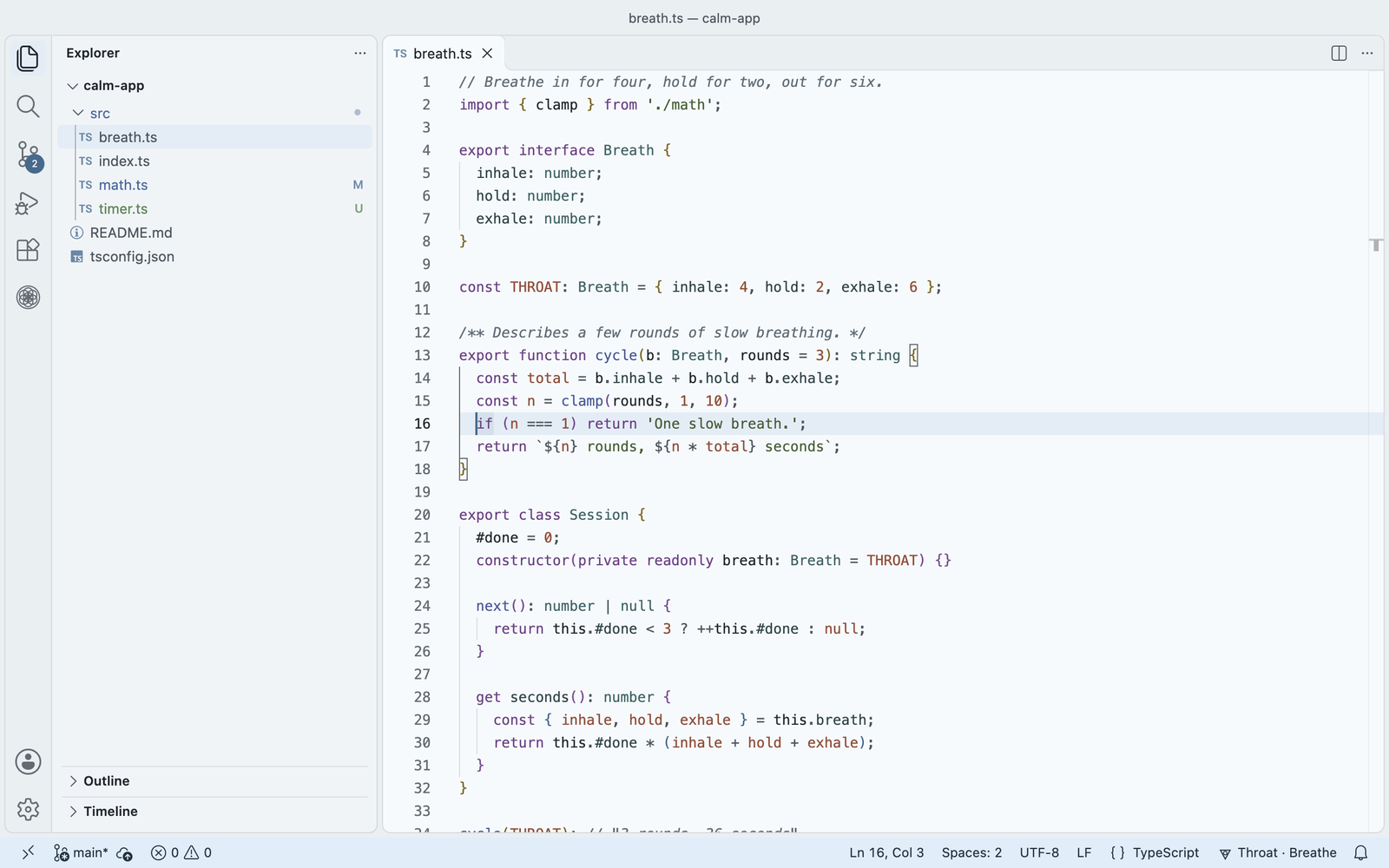
Each day has its own centre: one colour, one symbol, one short breath. Monday is Root, Sunday is Crown, and the days in between each have their own. Chakra Moments changes the room with the day (background, cursor, selection, status bar) while your code colours stay the same, so a string looks the same on Monday and on Sunday.
More at zorzenstudios.dev/chakra.
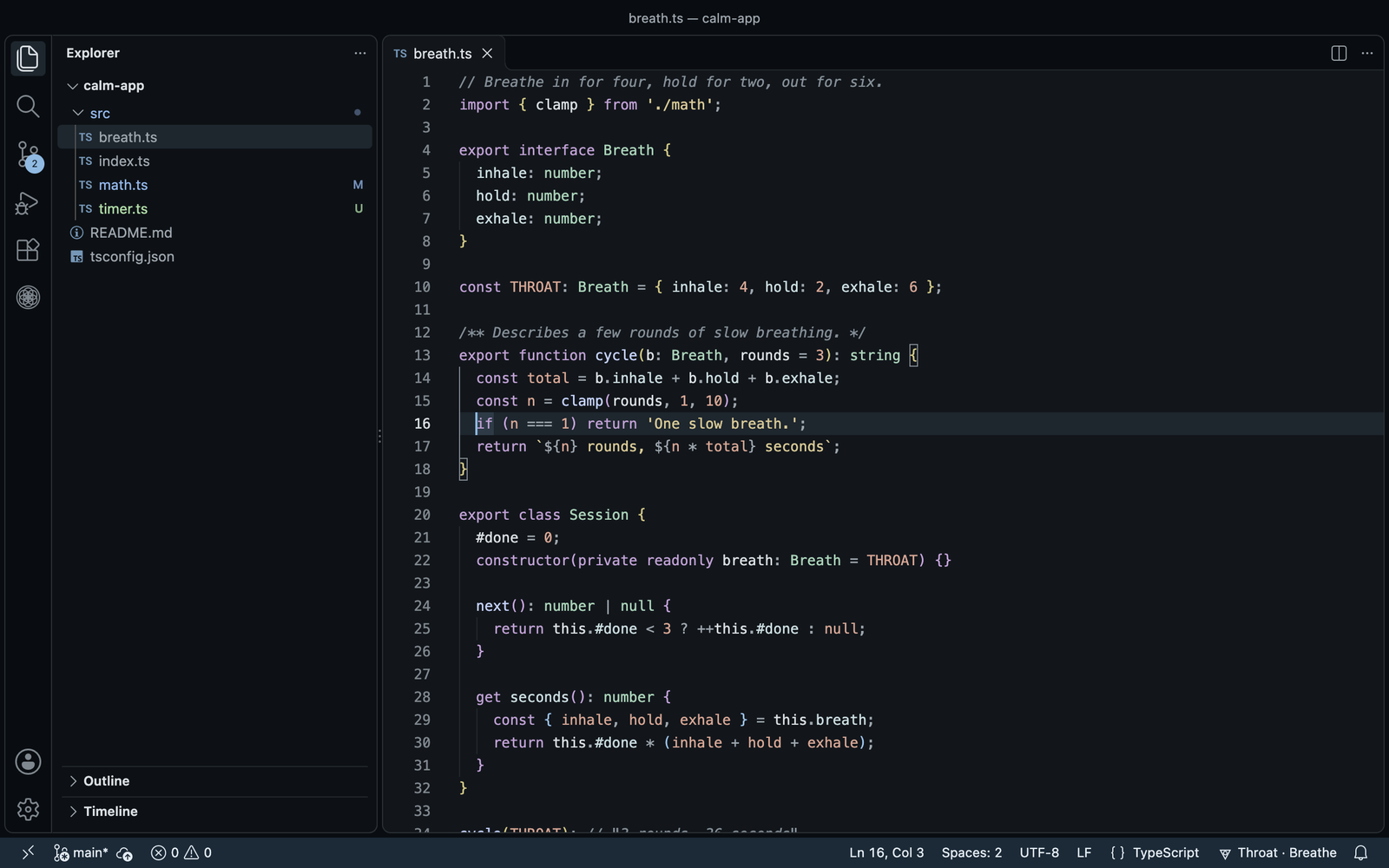
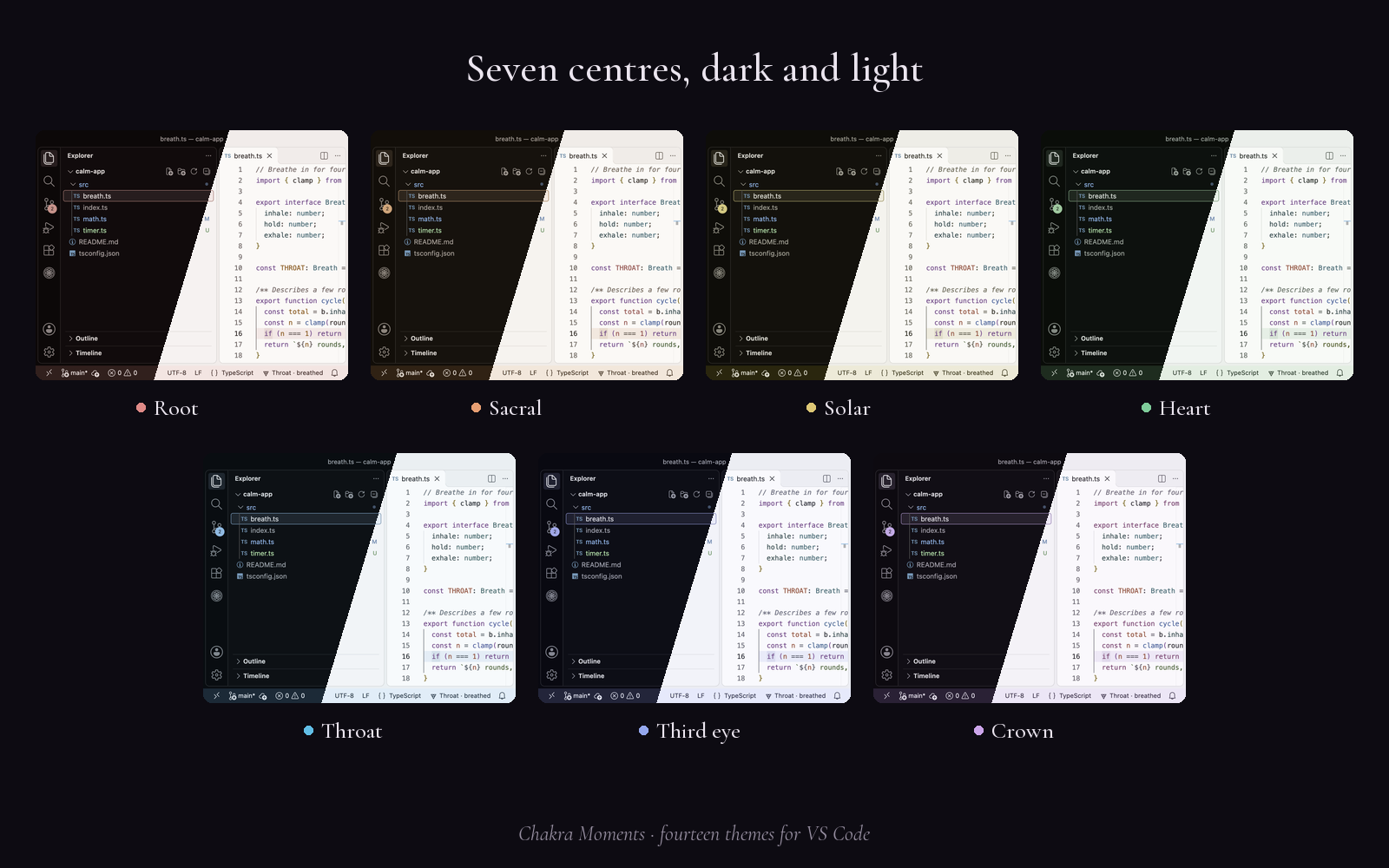
The day's colour
- Seven colour themes, each in dark and light: Root, Sacral, Solar, Heart, Throat, Third eye and Crown, named Chakra Moments Root Dark, Chakra Moments Root Light and so on.
- At start-up and at midnight, Chakra Moments sets the day's theme. On first run it asks once whether to follow your system's light and dark as well.
- Chakra Moments only ever switches between its own themes. If you use a theme from another extension, it leaves you alone.
- Want to keep one? Run Chakra Moments: Pin today's theme, or choose a centre under Pinned theme in Settings. Set it back to Off to follow the day again. Picking another day's theme in the theme picker turns Follow the day off.
- Errors, warnings and git colours keep their usual red, amber and green, and never blend into the day.
- By day code colours (setting
chakraMoments.codeColours): keywords take the day's colour and the rest turn with it.
| Day |
Centre |
Sanskrit |
|
Element |
Breath (in · hold · out) |
| Monday |
Root |
Muladhara |
मूलाधार |
Earth |
4 · 4 · 6 |
| Tuesday |
Sacral |
Svadhisthana |
स्वाधिष्ठान |
Water |
4 · 2 · 6 |
| Wednesday |
Solar |
Manipura |
मणिपूर |
Fire |
4 · 4 |
| Thursday |
Heart |
Anahata |
अनाहत |
Air |
5 · 5 |
| Friday |
Throat |
Vishuddha |
विशुद्ध |
Space |
4 · 2 · 6 |
| Saturday |
Third eye |
Ajna |
आज्ञा |
Light |
4 · 4 · 4 |
| Sunday |
Crown |
Sahasrara |
सहस्रार |
Thought |
4 · 7 · 8 |
The Sanskrit name, in Devanagari and in Latin letters, shows as a small caption in the status bar tooltip and the breathing panel. Turn it off with chakraMoments.showSanskrit.
A breath a click away
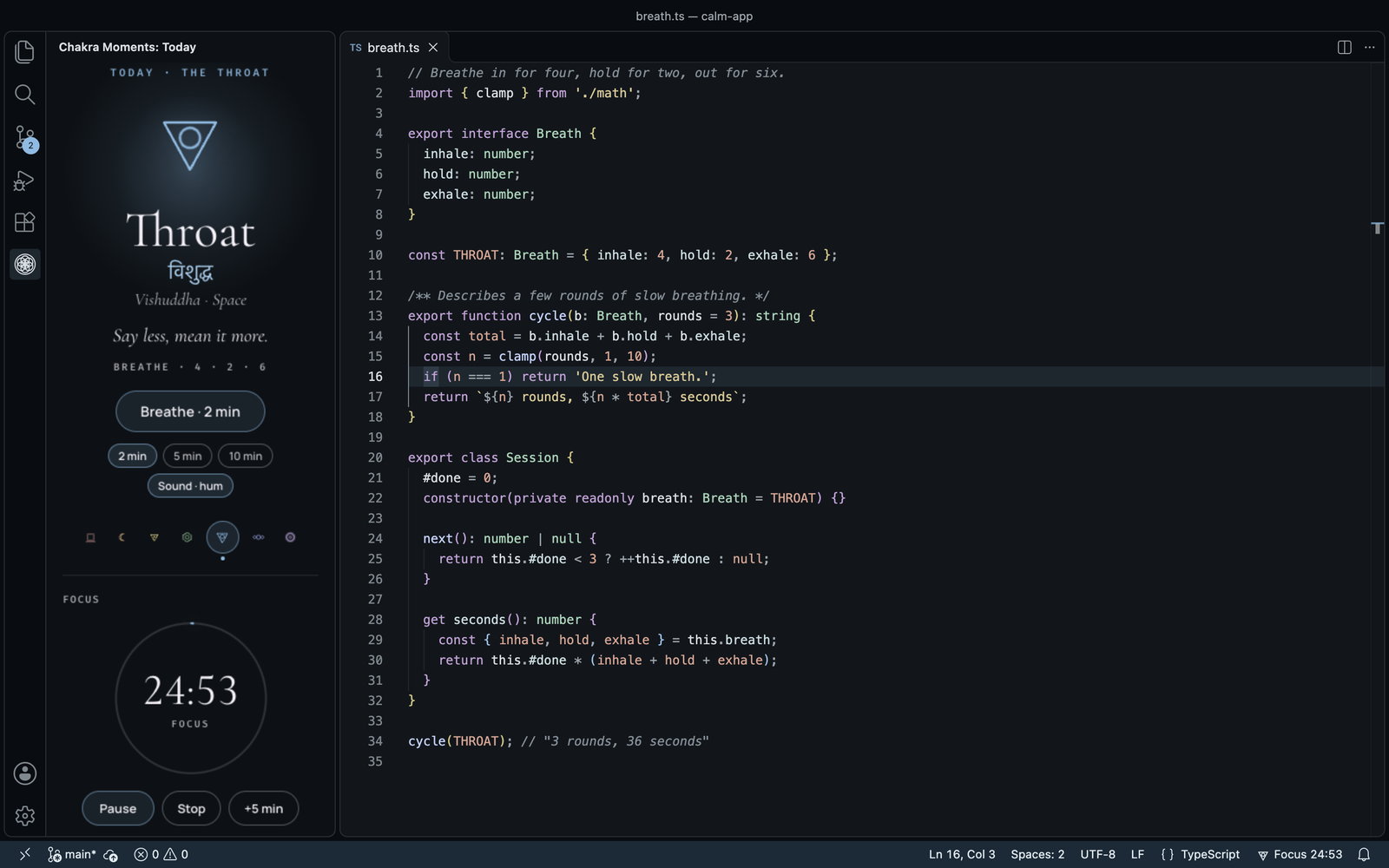
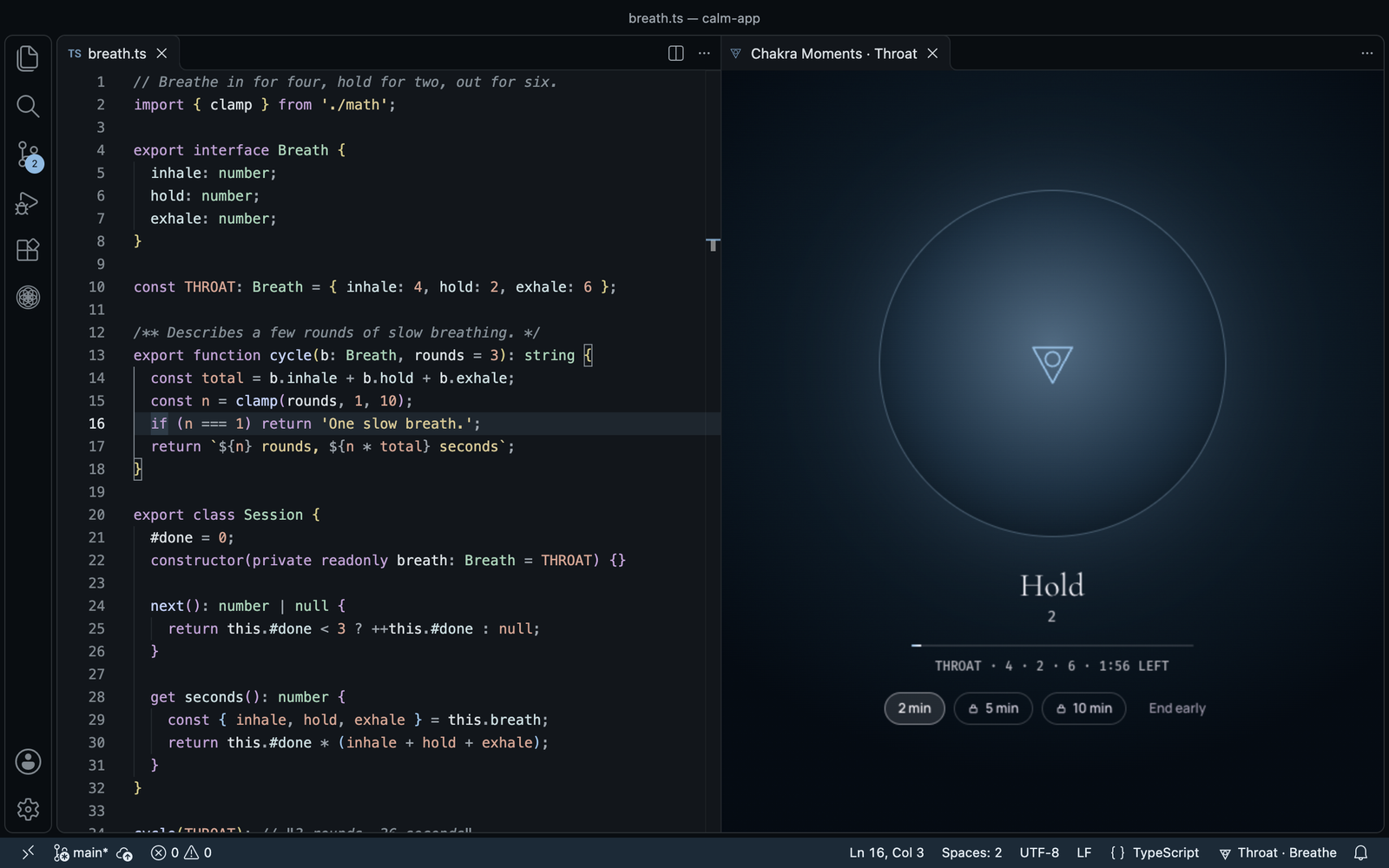
The day's symbol sits in the status bar: Heart · Breathe. Run Chakra Moments: Breathe now, or choose Breathe now after clicking the symbol, and a breathing panel opens beside your code. Your code stays in view.
Follow the circle in, hold, and out, at the day's rhythm: Heart is five in, five out; Crown is a slow 4 · 7 · 8. When it ends, a short line from an old text, if you like (chakraMoments.showQuotes).
With Chakra Moments Lotus, the panel will play the day's sound under the breath (the seven sounds arrive in an update; until then the panel says "Sound isn't available yet"): the sound's name, a volume slider (40% to start, in steps of 10) and Mute sit under the timer, with 2 / 5 / 10 min and End early below. The sound fades in over 2 seconds and out over 3, and a soft bell marks the end. VS Code only lets a panel play sound after a click inside it, so the first time you open a breath the sound row shows Play: one click, and the sound starts. Nothing ever plays on its own.
Focus, then breathe
Click the symbol, or run Chakra Moments: Start focus (no shortcut by default; set your own if you like), and choose 25, 50 or 90 minutes, or your own length from 5 to 180.
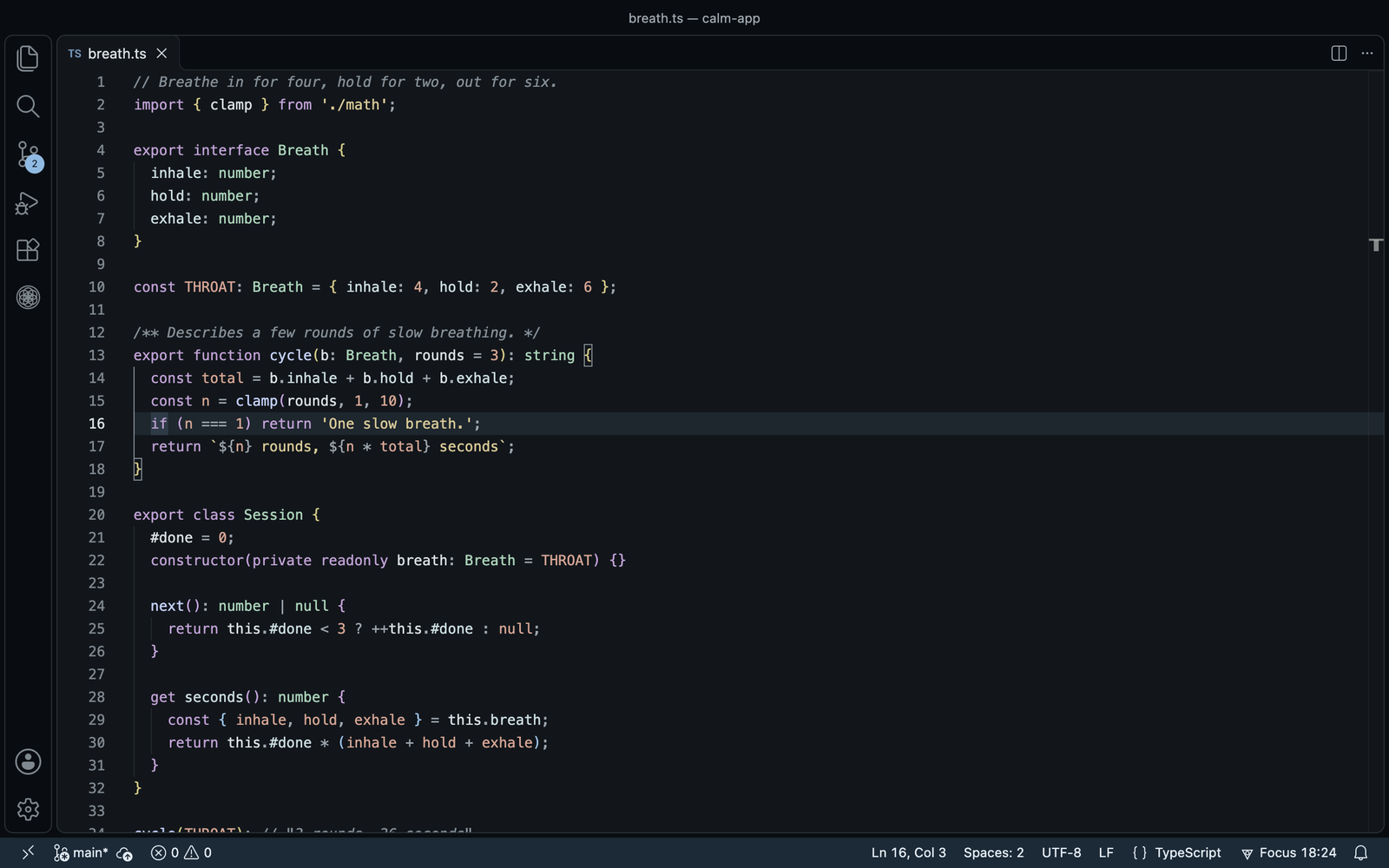
- The status bar counts down: Focus 18:24. Click it to pause (Paused 18:24) or stop.
- When the time is up it reads Focus done · breathe? and the symbol pulses (with the focus sound on, a soft bell rings too). One click starts the day's breath. Choose Not now in its tooltip to skip it.
- After the breath, or after Not now, a short rest counts down (Rest 4:12, 5 minutes by default), then the bar goes back to Heart · Breathe.
- The typing nudge waits while you focus. One focus block runs across all your VS Code windows, and it carries on after a reload.
- No stats, no streaks, no history.
The focus timer is free. On Free, a click on Focus done · breathe? opens the day's breath in the small panel beside your code, and it counts as the day's free breath.
Sound while you focus (Chakra Moments Lotus, the sounds arrive in an update). Choose With the day's sound when you start, or turn on chakraMoments.sound.focus. A small Chakra Moments · Sound tab opens; click Play once (VS Code only plays sound after a click), and your code comes back to the front while the sound plays in that tab. A second status bar item, ♪ Soft wind, shows while it plays: click it to pause the sound or change it. Chakra Moments: Choose sound picks any of the seven sounds; the default is the day's. The sound fades out over the last 10 seconds, so the bell at the end is the only thing you hear. Closing the tab stops the sound.
With VS Code's Reduce motion setting on, the symbol doesn't pulse.
A quiet nudge
After 90 minutes of typing the item reads Heart · 92 min · breathe? and the symbol pulses softly. There is no popup and no sound. Five minutes without typing starts the count again. Breathe, or choose Not now in its tooltip, and it waits another 90 minutes. Turn it off with chakraMoments.nudge.
Free and Chakra Moments Lotus
What you get in VS Code:
| Free |
Chakra Moments Lotus |
| All 14 colour themes (seven centres, dark and light), the day's or any you pick |
Everything in Free |
| The status bar symbol and the quiet nudge |
Breaths as often as you like, 2, 5 or 10 minutes |
| The focus timer |
The breathing panel with the day's sound (the sounds arrive in an update) |
| One 2-minute breath a day in the breathing panel, with the mark that fills over the week |
Sound while you focus (in the same update) |
|
A colour for each window |
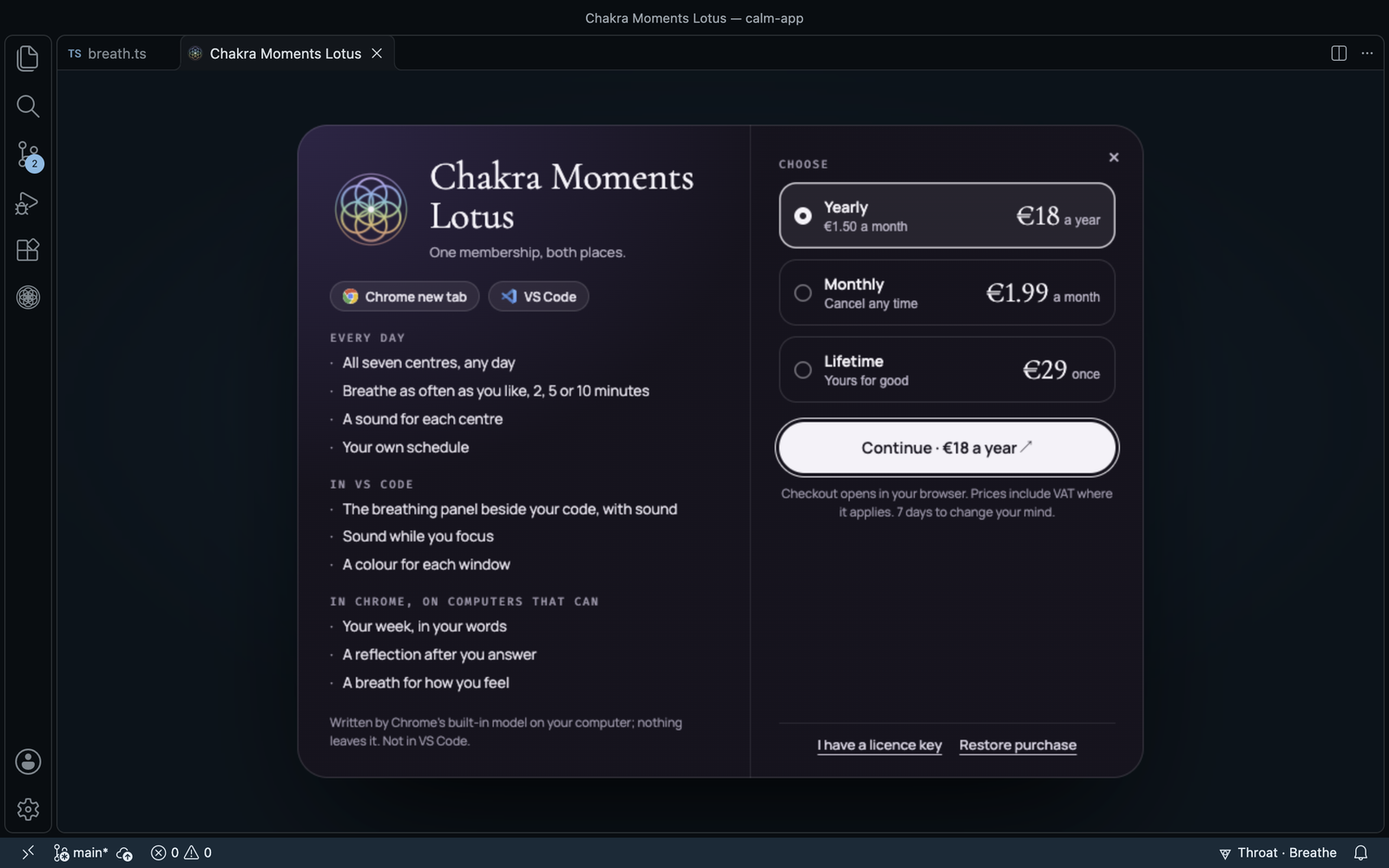
Chakra Moments Lotus is €18 a year, €1.99 a month, or €29 once. One Lotus covers the Chakra Moments new tab in Chrome too, with the same licence key; there it also opens all seven centres on any day and your own schedule. If Lotus isn't for you, you have 7 days to change your mind and get your money back.
Every Get Lotus (in Today, on a Lotus lock, in the breathing panel, the status bar's picks, a Lotus setting switched on, or Chakra Moments: Get Lotus) opens the same Lotus page as in Chrome, in an editor tab: what Lotus adds on the left; on the right, choose yearly, monthly or lifetime and Continue to the checkout in your browser, or I have a licence key and Restore purchase. Esc or × closes it; once your key is in, it closes by itself and Today shows your plan.
Chakra Moments: Account shows your plan and when it renews, and has everything for your licence: Get Lotus, Copy licence key, Enter licence key, Restore purchase (opens a page where you enter the email you paid with, and we send your key there), Manage plan ↗ and Invoices ↗, and Remove from this computer. One key works on up to 3 computers (the Chrome new tab and VS Code each count as one); Remove from this computer frees a place, and a computer you no longer use frees its place after 30 days.
A colour for each window (Lotus, off by default)
With several projects open, each window's frame takes one of the other six centres, so you can tell them apart at a glance. The editor stays on the day's colour, and a project keeps its colour from day to day. The colour is saved in the project's .vscode/settings.json, which can end up in git; Chakra Moments says so when you turn it on, and takes it out again when you turn it off.
Settings
Everything is on VS Code's own Settings page: run Chakra Moments: Open settings, or search @ext:zorzenstudios.chakra-moments. Lotus settings say "(Lotus)"; switched on without Lotus, they offer Lotus once and turn back off.
| Group |
Setting |
Default |
|
| Day |
chakraMoments.followDay |
true |
Change the theme with the day, at start-up and at midnight. |
| Day |
chakraMoments.pinnedTheme |
off |
Always use one centre (root … crown). |
| Day |
chakraMoments.codeColours |
steady |
steady, or byDay to let code colours follow the day. |
| Day |
chakraMoments.appearance |
system |
system, dark or light. |
| Nudge |
chakraMoments.nudge |
true |
Pulse the symbol after a long stretch of typing. |
| Nudge |
chakraMoments.nudgeMinutes |
90 |
Minutes of typing before the nudge. |
| Focus |
chakraMoments.focus.minutes |
25 |
Minutes in one focus block (5–180). |
| Focus |
chakraMoments.focus.restMinutes |
5 |
Minutes of rest after a block. |
| Focus |
chakraMoments.focus.bell |
true |
A soft bell when a block ends, in the Sound tab while the focus sound plays (VS Code plays sound only after a click there). |
| Sound |
chakraMoments.sound.breath |
true |
(Lotus) The day's sound during the breath. |
| Sound |
chakraMoments.sound.focus |
false |
(Lotus) Sound while you focus. |
| Sound |
chakraMoments.sound.volume |
40 |
10 to 100, in steps of 10. |
| Windows |
chakraMoments.windowColours |
false |
(Lotus) A colour for each window. |
| Words |
chakraMoments.showSanskrit |
true |
The Sanskrit name and element as a small caption. |
| Words |
chakraMoments.showQuotes |
true |
A short quote after each breath. |
| Licence |
chakraMoments.licence.verifyUrl |
https://licence.zorzenstudios.dev/v1/verify |
Where the licence check goes. Leave it as it is. |
Privacy
Everything runs on your computer and works offline. Chakra Moments has no account, no telemetry, no tracking and no analytics, and it never reads or sends your code. It keeps your settings and the days you breathed in VS Code's own storage. The only network call is the weekly licence check, which sends the product name, your key and a random ID for this installation (nothing about your computer), and only once you have entered a key; removing the key tells the licence server to free this installation's place. The key and the ID are kept in VS Code's SecretStorage.
Chakra Moments does not claim to heal or balance anything. It gives you a colour and two quiet minutes.
Today, in the side bar
Chakra Moments has its own icon in the activity bar. It opens Today, the one place for everything, the same as the Chakra Moments new tab in Chrome:
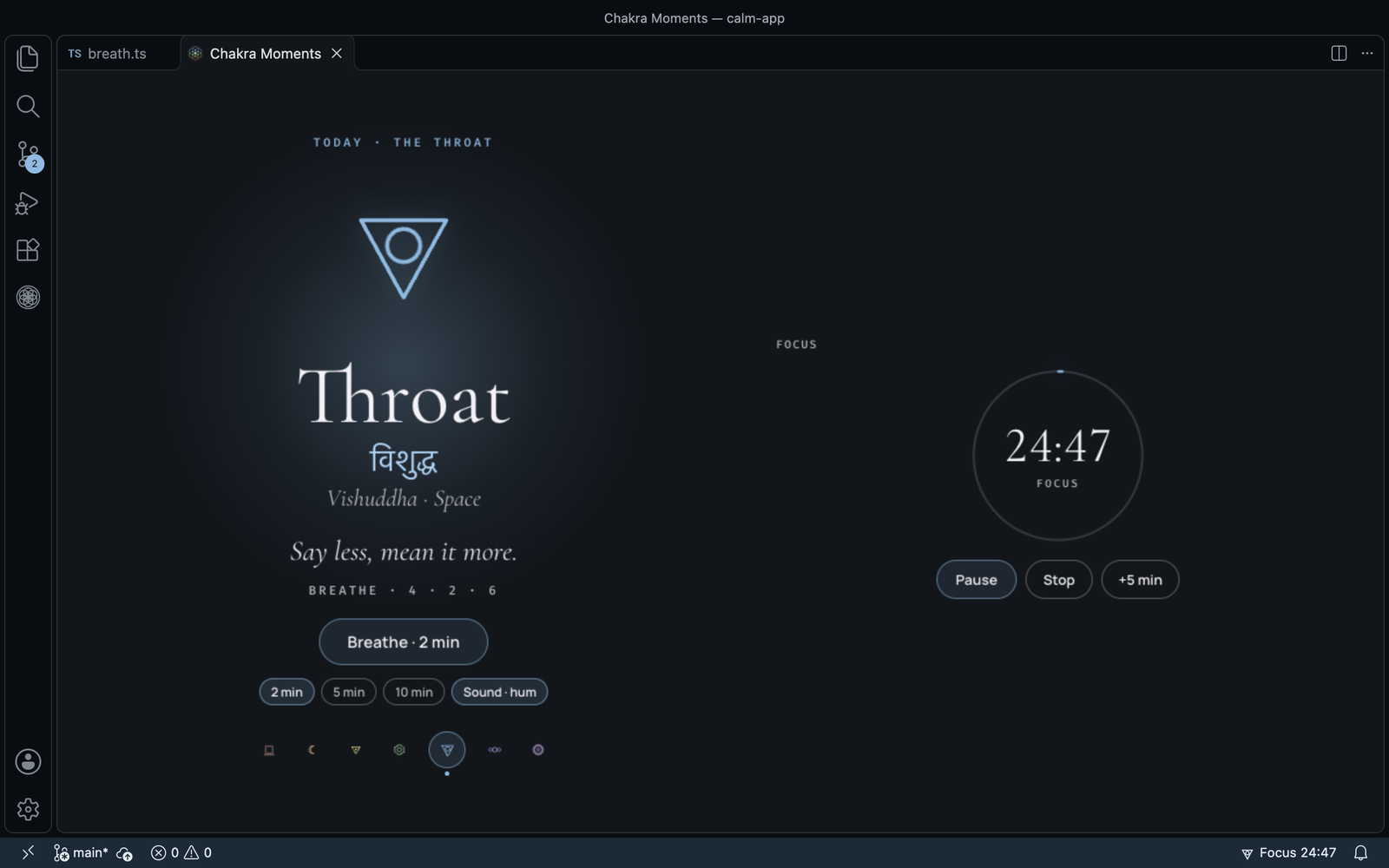
- Today · the Throat: the day's symbol, its name, the Sanskrit name in Devanagari and Latin letters, the element, the day's line and its breath (in · hold · out). Breathe opens the breathing panel; 2 / 5 / 10 min and Sound sit under it (5, 10 and Sound are Lotus). Below, the week: the seven symbols, with a dot under each day you breathed.
- Focus: Start focus with 25, 50, 90 minutes or your own length. While it runs, the time left sits in a ring that fills in the day's colour, with Pause / Resume, Stop and +5 min. Then Focus done · breathe? with Breathe or Rest, and the rest counting down. It is the same focus block as the status bar's, in every window.
- Your plan: Free, or Chakra Moments Lotus with its renewal date. Get Lotus, type your key in (I have a key), restore a purchase, copy the key, manage the plan and invoices, or remove the key from this computer.
- Settings: the everyday ones as switches (follow the day, code colours, the nudge and its minutes, focus length, sound, Sanskrit names, quotes, a colour for each window). All settings ↗ opens the rest.
- Themes: the seven centres as small editors in each theme's own colours, today's marked, with a Dark / Light switch (it starts on the scheme you are in). Click one to put it on; it stays, past midnight, until you press Follow the day. In the narrow side bar the row scrolls sideways; arrow keys move along it and Enter applies.
- Also from Zorzen Studios: our other VS Code extensions (MonoVue, Agent Watchdog, Haar Theme), each marked Installed or with Install, which opens its page in VS Code's Extensions view. Nothing is fetched; the icons ship with Chakra Moments.
Click the status bar symbol and choose Open today, or run Chakra Moments: Open today.
Full view at the top of Today (or Full view in the status bar's picks, or Chakra Moments: Open full view) opens the day and the focus timer filling the editor, laid out wide like the Chrome new tab: the day big on the left, the focus timer on the right, and nothing else. Your plan, settings and themes stay in the side bar's Today. One tab at a time; it stays in step with the side bar and the status bar. On first install, VS Code's Get started page has a short walkthrough: the day's theme, a breath, a focus block and Lotus.
Commands
| Command |
What it does |
| Chakra Moments: Open today |
Opens Today in the side bar. |
| Chakra Moments: Open full view |
The day and the focus timer, filling the editor (side bars hidden). |
| Chakra Moments: Breathe now |
Opens the breathing panel beside your code. |
| Chakra Moments: Start focus |
Starts a focus block: 25, 50, 90 minutes or your own length. |
| Chakra Moments: Stop focus |
Stops the focus block. |
| Chakra Moments: Choose sound (Lotus) |
Picks the sound while you focus. |
| Chakra Moments: Pin today's theme |
Keeps the theme showing now. |
| Chakra Moments: Account |
Your plan, renewal date and licence key. |
| Chakra Moments: Enter licence key |
Adds the key from your email. |
| Chakra Moments: Restore purchase |
Sends your key again to the email you paid with. |
| Chakra Moments: Open settings |
Opens the Chakra Moments settings. |
None has a keyboard shortcut by default.
What Chakra Moments did, and when, is in the Chakra Moments output channel (View › Output).
Support
Questions, bug reports and licence help: support@zorzenstudios.com.
Fonts: Cormorant Garamond, Manrope and Fira Code, under the SIL Open Font License, bundled with the extension.
© 2026 Zorzen Studios. Website · Terms · Privacy
More from Zorzen Studios
Quiet tools for careful work.
|
|
 |
MonoVue · VS Code
Your monorepo, seen whole: every package, and what a change breaks before you save. |
 |
Agent Watchdog · VS Code
Reviews code written by AI agents, with a reason for every flag. |
 |
Haar Theme · VS Code
Six calm fog colour themes, each in light and dark. Free. |
 |
Slowtab · Chrome
Gentle screen time for your browser. |
All by Zorzen Studios.

