MonoVue
See what a change breaks across your monorepo, and which instructions your AI agent receives, before you save.
MonoVue reads your workspace graph (pnpm, npm and yarn workspaces, Nx, Turborepo) in memory. When you edit a public export, it lists every package and import site that would break, and warns you before you save. For the file you are in, it shows which instruction files your agent (Claude Code, Copilot, Cursor, Codex or Gemini CLI) receives and roughly how many tokens they cost.
Everything runs locally. MonoVue has no backend; your code never leaves your machine unless you ask @monovue a question and allow it to send a context pack to the chat model you picked.
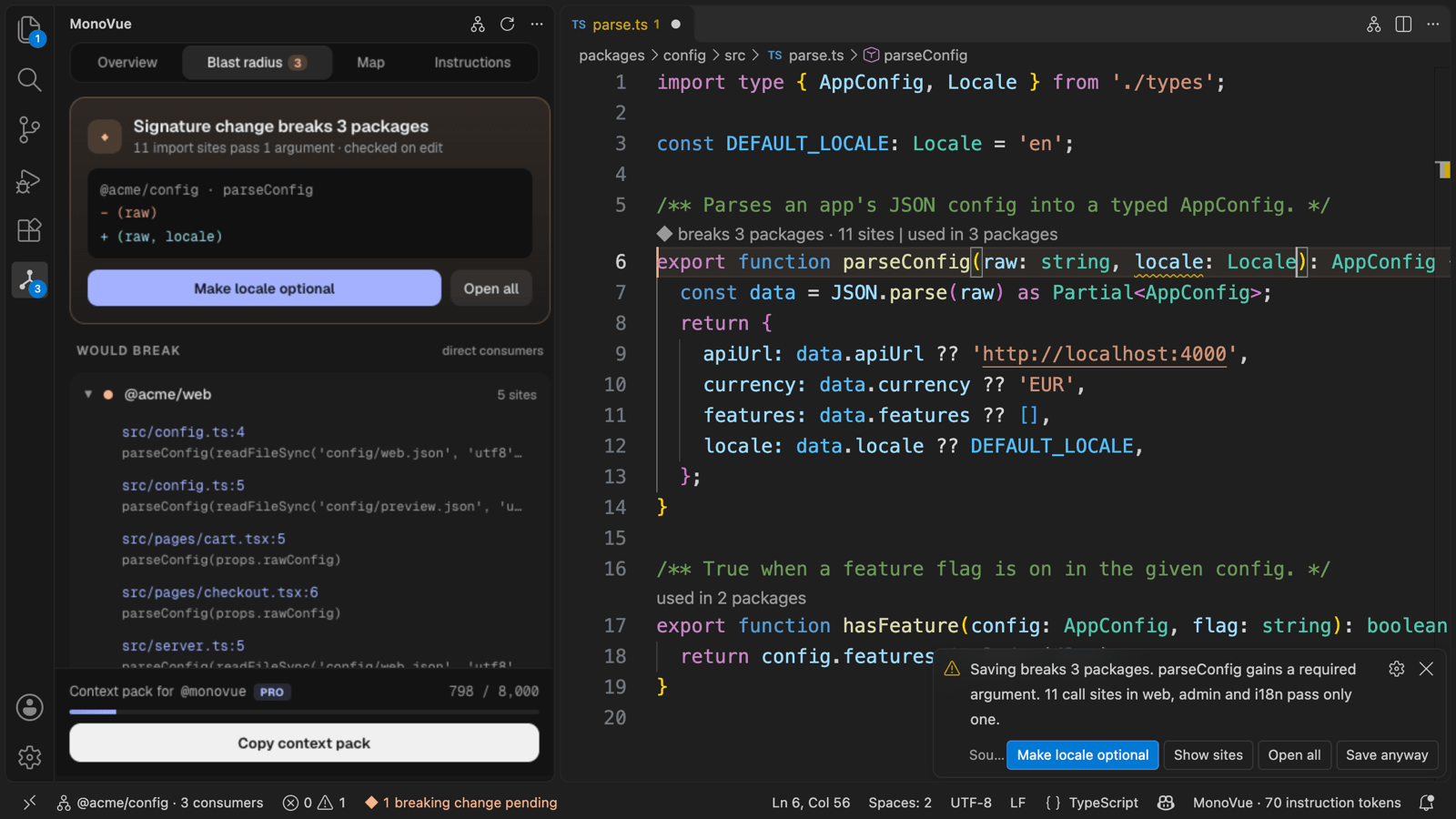
The four parts
1. Blast radius before save
- Edit an exported function, class or constant in a workspace package. About a quarter of a second later MonoVue compares it with the version on disk and checks every consumer package.
- The changed line is highlighted with
◆ breaks 3 packages · 7 sites. A warning on the changed parameter names the export and every import site that would break (each one is a link). The Problems view lists it as ML-03.
- A quick fix is offered where MonoVue can make the change backwards compatible, for example Make locale optional.
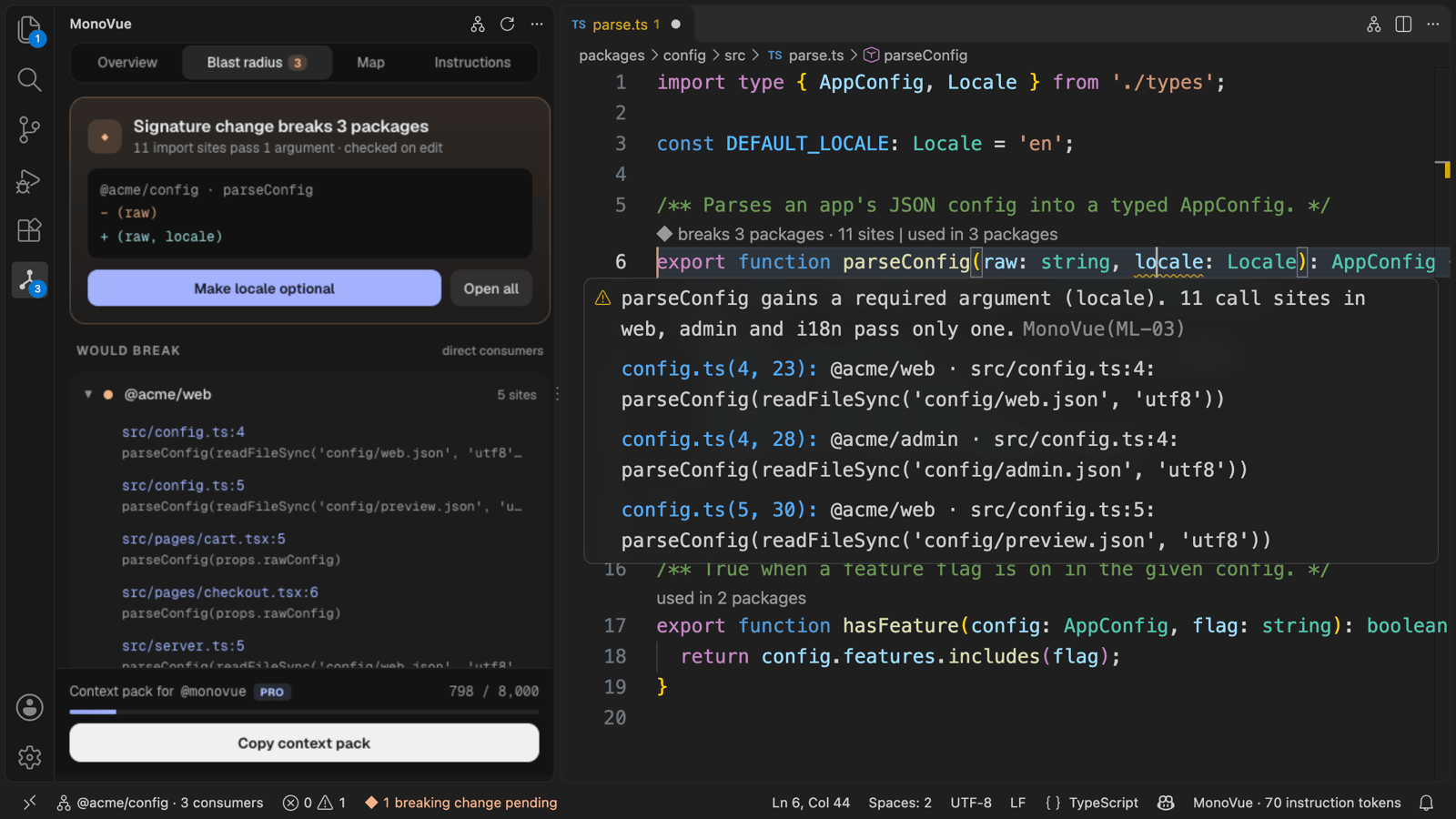
- Press ⌘S / Ctrl+S while a break is pending and MonoVue asks first: Saving breaks 3 packages, with Make locale optional, Show sites, Open all and Save anyway. Press the shortcut a second time to save straight away.
- MonoVue never blocks or delays a save. Saves from the menu or auto-save go through untouched; if they contain a break, MonoVue tells you afterwards ("Saved: 3 packages now break") and the status bar shows
◆ 7 call sites now fail type-check until the consumers are fixed.
- CodeLens above every public export:
used in 3 packages (click to peek the sites).
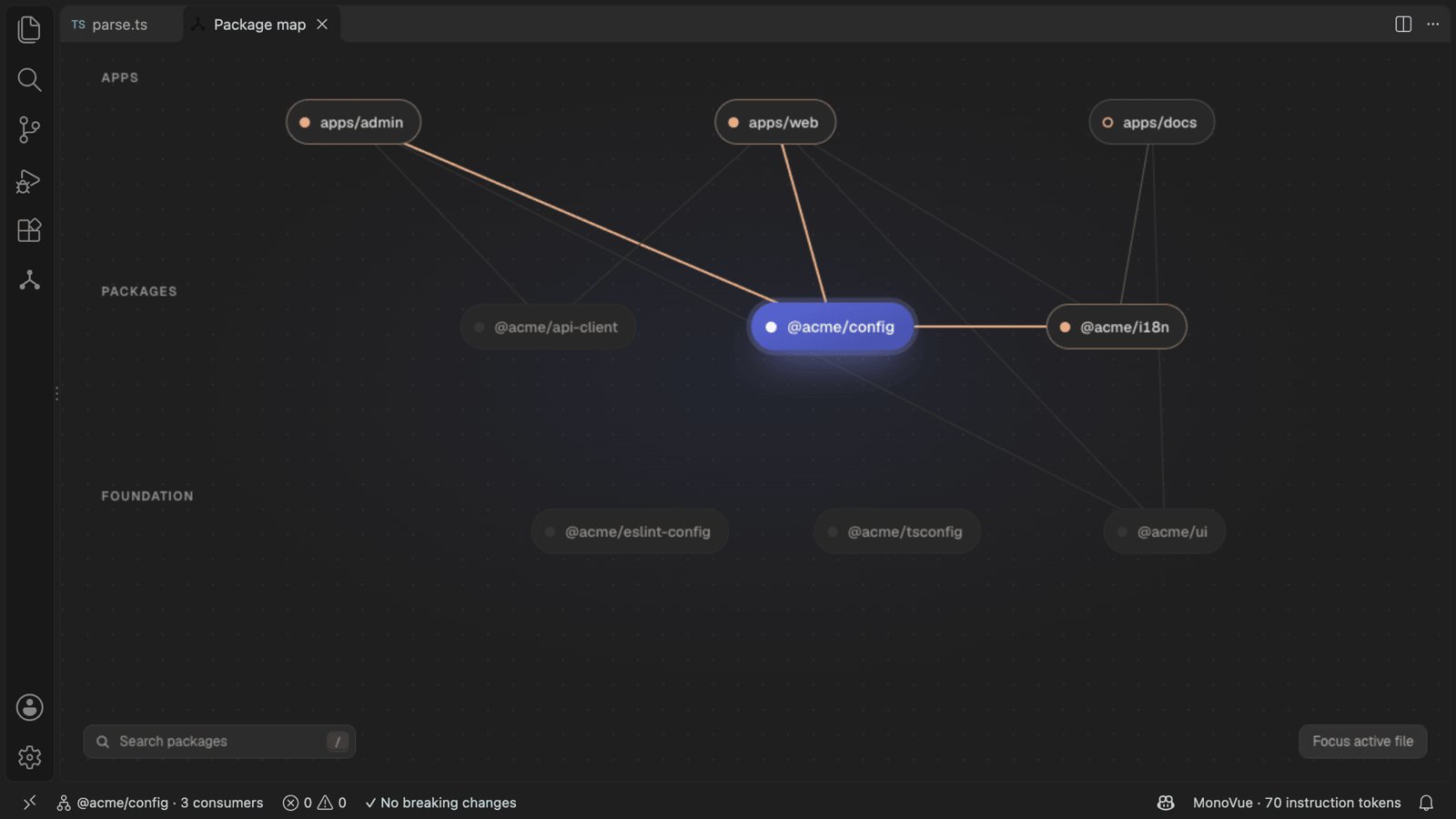
- The Package map shows apps, shared packages and foundation libraries in layers, with the active package, its consumers (direct and indirect) and its dependencies coloured.
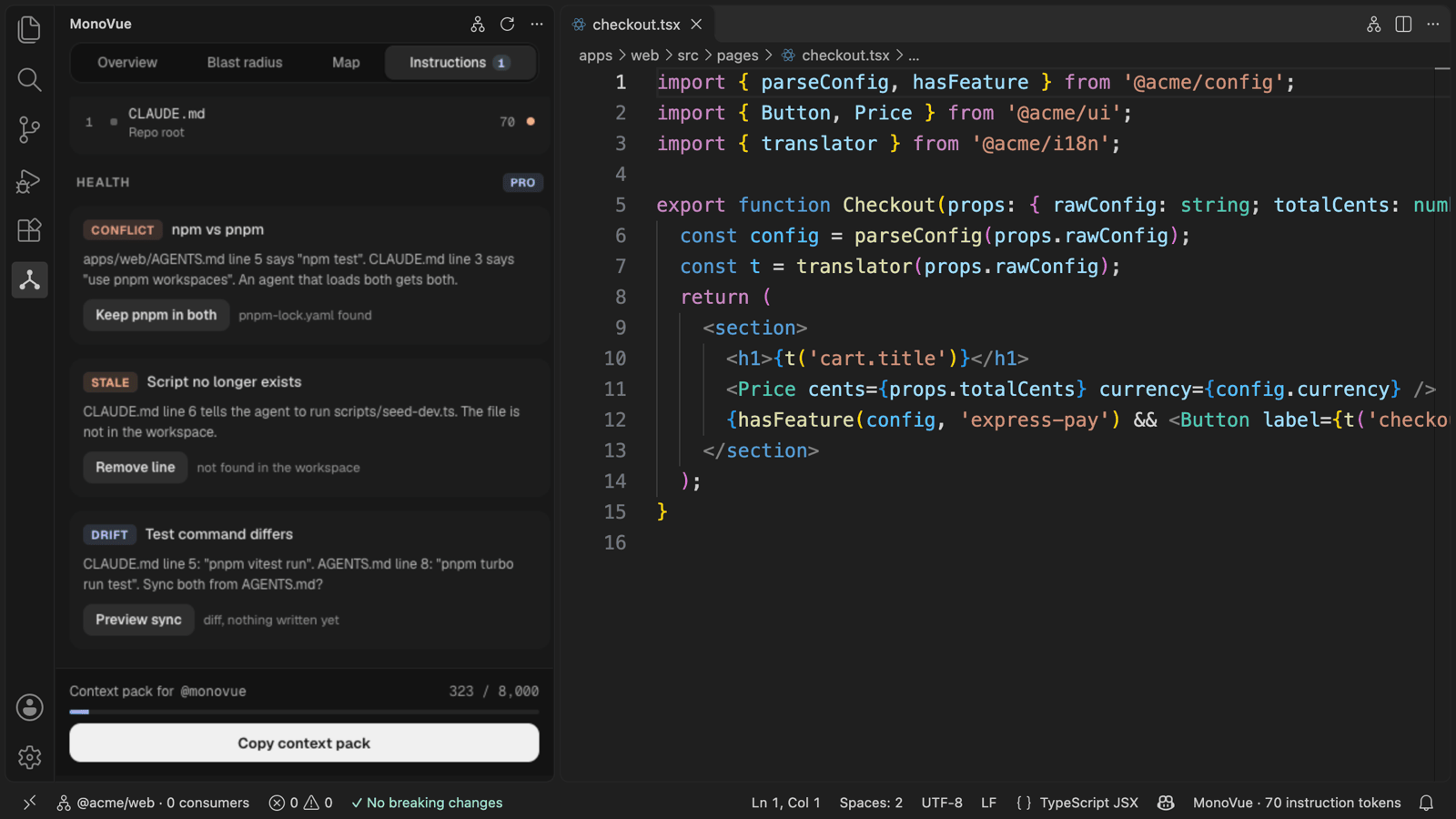
2. Instruction overview
Each agent loads a different set of instruction files, so the overview is per agent. Pick the agent at the top of the Instructions tab (or with zorzen.monovue.instructions.agent); for the open file MonoVue lists exactly the files that agent receives, in its load order, with a token estimate, and a note when an expected file is left out. MonoVue treats the workspace root as the folder the agent was started in. The rules follow each agent's own documentation:
| Agent |
What MonoVue lists for the open file |
| Claude Code (default) |
Managed policy CLAUDE.md, ~/.claude/CLAUDE.md, ~/.claude/rules/, then CLAUDE.md, .claude/CLAUDE.md and CLAUDE.local.md from the filesystem root down to the workspace, .claude/rules/ (rules with paths: only for matching files), and the files in the open file's folders, marked "loads when Claude opens a file here". @path imports are followed up to four hops. AGENTS.md follows Claude's Project instructions setting, read from ~/.claude/settings.json: by default it loads only when there is no CLAUDE.md, .claude/CLAUDE.md or CLAUDE.local.md in the workspace or above it; other values load both, only CLAUDE.md, or only the managed file. Reading AGENTS.md needs Claude Code 2.1.277 or later. |
| GitHub Copilot |
.github/copilot-instructions.md, .github/instructions/**/*.instructions.md whose applyTo matches, the nearest AGENTS.md (it takes precedence), a root CLAUDE.md or GEMINI.md, and personal files in ~/.copilot/. VS Code's own chat settings (chat.useAgentsMdFile, chat.useNestedAgentsMdFiles, chat.useClaudeMdFile) can change what local chat sessions load; MonoVue shows GitHub's documented repository rules. |
| Cursor |
.cursor/rules/**/*.mdc that are alwaysApply or whose globs match, legacy .cursorrules, and AGENTS.md / CLAUDE.md from the root down to the file's folder. Agent-requested and manual rules, and User Rules (kept in Cursor's settings), are not listed. |
| Codex |
~/.codex/AGENTS.override.md or AGENTS.md, then one AGENTS.override.md or AGENTS.md per folder from the git root down to the workspace, up to 32 KiB. Nested files below the workspace load only when Codex starts in their folder. |
| Gemini CLI |
~/.gemini/GEMINI.md, GEMINI.md from the git root down to the workspace, and GEMINI.md in the open file's folders, with @file imports. Assumes the default file name. |
User-level files can be switched off (zorzen.monovue.instructions.includeUserFiles). The status bar shows the selected agent's total: MonoVue · 6,200 instruction tokens. Token counts are estimates: MonoVue counts locally with a cl100k-style approximation, and each agent's model can count differently.
Instruction health (Pro) checks what nobody else checks, each with a one-click fix:
- Conflict: the root says "use npm", the package says "use pnpm".
- Stale: instructions point to scripts or paths that no longer exist.
- Duplicate: the same rule repeated across files.
- Drift: CLAUDE.md and AGENTS.md disagree about the same package. Drift sync is previewed as a diff; nothing is written until you click Apply.
Health checks look at every repo file any of these agents may load for the open file, whichever agent is selected, because a conflict in AGENTS.md matters even while you are looking at Claude's list.
Fixes are normal, undoable edits that MonoVue saves for you.
3. Focused context (Pro)
A short context pack for the active file: the package's own API, the public types of its direct dependencies, how direct consumers call it (file:line and the call as written), and the paths and token counts of the instruction files the selected agent receives. It is trimmed to a token budget (default 8,000).
- Copy context pack in the panel puts it on the clipboard.
- In the chat view,
@monovue /pack shows the pack summary and token breakdown without calling any model. @monovue /blast lists what the unsaved change would break.
- Ask
@monovue a free-form question and it sends the pack plus your question to the model you picked in the chat view, only if you allow it (asked once; setting zorzen.monovue.chat.sendContextToModel). Every answer starts with the provider and model it used.
4. Repo overview
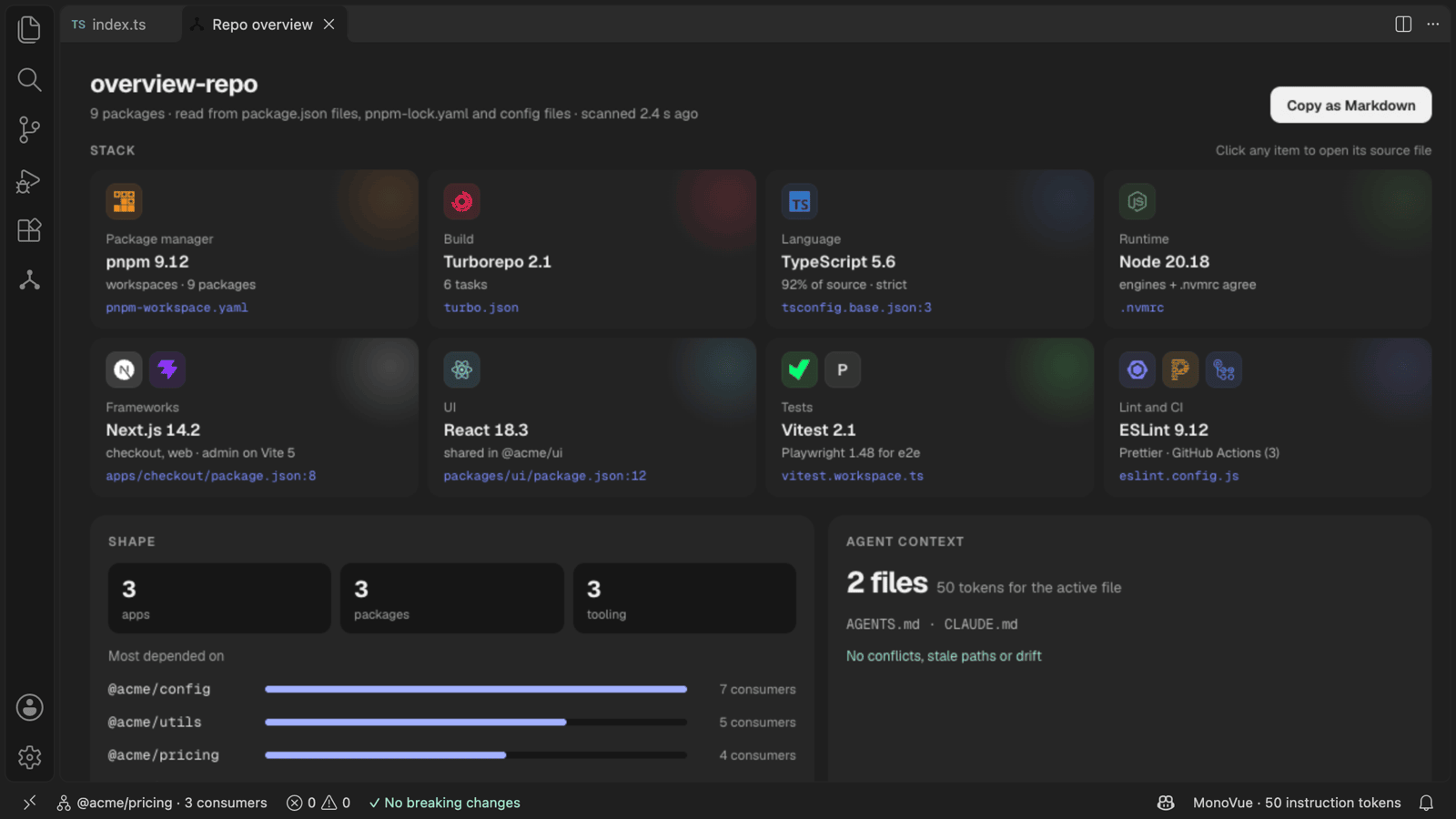
What the repo is made of, and where it needs care. The Overview tab in the panel gives a short summary; Open repo overview (or MonoVue: Open Repo Overview) opens the full view in an editor tab next to the Package map.
- Stack (Free): package manager, build, language, runtime, frameworks, UI, tests, and lint and CI, each with its official logo, one detail line and the file it was read from. When a value is unclear (for example two Node versions), both are shown with their sources.
- Shape (Free): how many apps, packages and tooling packages, the most depended-on packages and the largest ones.
- Agent context (Free): the instruction files your agents read, the tokens for the active file, and their issues.
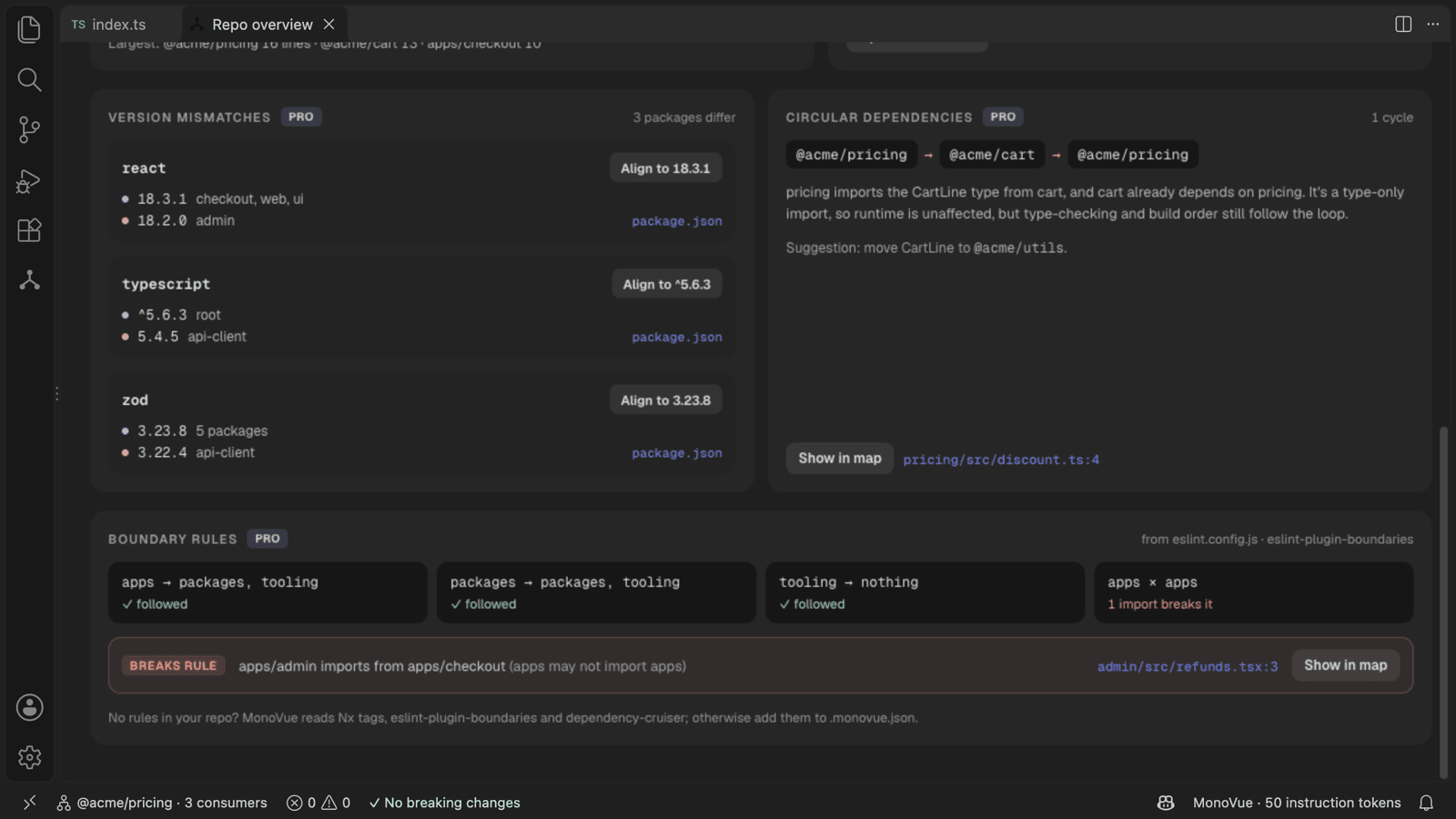
- Repo health (Pro): dependencies at different versions across packages (Align to x previews the package.json changes, then offers to run install), circular dependencies between packages with the import that closes each cycle, and boundary rules with every import that breaks one. Rules are read from Nx tags,
eslint-plugin-boundaries or dependency-cruiser; without those, from .monovue.json → boundaries. On Free, these sections show their counts.
- Copy as Markdown copies the overview for a README or onboarding doc, and
@monovue /overview answers with the same content. Ask @monovue what stack is this? for the stack alone. Neither sends anything to a model.
Click a package name to see it in the Package map, or a file reference to open that file at the line. The overview reads files in your workspace only, with no network calls and no registry lookups, and refreshes when a package.json, lockfile or config file changes.
Tool logos come from Simple Icons (CC0), bundled with the extension. The logos belong to their owners and are shown only to identify the detected tools.
Privacy and security
|
What MonoVue does |
| No backend receives code (SEC-01) |
MonoVue has no server. The only AI request is an opted-in @monovue question, sent by VS Code directly to the chat model you picked. |
| Minimum snippets (SEC-02) |
The context pack holds signatures and single call lines, never whole files, and never exceeds your token budget (default 8,000). |
| Keys (SEC-03) |
Your licence key is kept in VS Code SecretStorage only, never in settings, workspace files or logs. MonoVue needs no AI API key. |
| Logs (SEC-04) |
Output › MonoVue logs file paths, line numbers, counts and timings. Never code, prompts, file contents or keys. |
| Untrusted workspaces (SEC-05) |
Read-only analysis: no fixes, no writes, no model requests. Everything unlocks when you trust the workspace. |
| Graph in memory (SEC-06) |
The package graph is built in memory and rebuilt when the workspace opens. It is never written to disk or sent anywhere. |
| Licence check (SEC-07) |
The only network request MonoVue makes. It sends the licence key, nothing else, at most weekly and never while VS Code starts. A verified key keeps working offline for 7 days after a check falls due. |
| Telemetry (SEC-08) |
MonoVue collects no telemetry. |
Settings that could send data somewhere (chat.sendContextToModel, license.verifyUrl) are user-level only: a workspace's .vscode/settings.json cannot turn them on or redirect them.
Account and thank-you moments
The side bar header and the status bar show your plan: a grey Free tag, or MonoVue Pro with a
solid pill and a thin ring around the logo. Click either (or run MonoVue: Show Account) to open
Account: your plan and since when, how many saves MonoVue checked, breaks avoided and packages
mapped (counted on this computer, never sent anywhere), Write to the maker (an email to
support@zorzenstudios.com) and, on paid plans, Manage plan and Invoices.
When your licence key is verified for the first time, a Thank you tab opens once. MonoVue also says
thank you on every plan, Free included: at 10, 100 and 1,000 checked saves, after your first week with
zero drift between instruction files, and on the first anniversary of a paid licence. These never
appear during a scan or a save, carry no upsell, and respect workbench.reduceMotion. Each shows
once: MonoVue remembers it locally and, for a verified licence, tells the licence server only the
moment's name, so it doesn't repeat on your other computers.
Plans
| Free |
Pro · €12/month or €120/year |
Team · €20/seat/month (min 3) |
| Package graph (pnpm, npm, yarn workspaces, Nx, Turborepo) |
Everything in Free |
Everything in Pro |
| Blast radius before save, CodeLens, quick fix |
Instruction health: conflicts, stale paths, duplicates |
Hot zones and team settings: planned |
| Package map |
Drift sync with diff preview |
|
| Repo overview: stack, shape, agent context |
Repo health: version mismatches, cycles, boundary rules |
|
| Instruction overview with token counts |
Focused context pack and @monovue |
|
|
Rush, Lerna and Bazel workspaces (Bazel: the JavaScript packages inside it; Bazel targets are not graphed yet) |
|
Start a 14-day Pro trial from the panel or the command palette: no card, no account, no network request (one trial per install). Prices exclude VAT. Rush, Lerna or Bazel repositories on Free are not silently ignored: MonoVue says what it found and what it needs.
Licence keys are entered with MonoVue: Enter Licence Key… and unlock a plan once the licence server (licence.zorzenstudios.dev) confirms them. The key is kept in VS Code's secure storage and checked at most once a week; only the product name and the key are sent. Pro keeps working offline for 7 days after a check falls due.
Commands
| Command |
What it does |
| MonoVue: Open Panel |
Opens the MonoVue side panel |
| MonoVue: Show Blast Radius |
Panel on the Blast radius tab |
| MonoVue: Open Package Map |
Package map in an editor tab (also in the editor title bar) |
| MonoVue: Open Repo Overview |
Stack, shape, agent context and repo health in an editor tab |
| MonoVue: Copy Repo Overview as Markdown |
The overview as Markdown, for a README or onboarding doc |
| MonoVue: Apply Version Alignment |
Writes an "Align to x" preview you are looking at |
| MonoVue: Show Instructions for This File |
Panel on the Instructions tab |
| MonoVue: Copy Context Pack |
Copies the context pack for the active file (Pro) |
| MonoVue: Open All Breaking Sites |
Opens every import site the pending change breaks |
| MonoVue: Apply Blast-Radius Fix |
Applies the one-click fix for the pending break |
| MonoVue: Apply Previewed Fix |
Writes a drift-sync preview you are looking at |
| MonoVue: Rebuild Package Graph |
Rebuilds the graph (it also refreshes when workspace config changes) |
| MonoVue: Start 14-Day Pro Trial |
Local trial, no card |
| MonoVue: Enter Licence Key… / Remove Licence Key / Verify Licence Now |
Licence management |
| MonoVue: Compare Plans |
Free, Pro and Team side by side |
| MonoVue: Show Log |
Output › MonoVue |
Settings
| Setting |
Default |
|
zorzen.monovue.warnBeforeSave |
true |
Ask before the save shortcut saves a breaking change |
zorzen.monovue.codeLens.enabled |
true |
"used in N packages" and "◆ breaks N packages" lenses |
zorzen.monovue.decorations.enabled |
true |
Line highlight and end-of-line blast radius |
zorzen.monovue.instructions.agent |
claude |
Agent the instruction overview, status bar and context pack are for (claude, copilot, cursor, codex, gemini); the panel's switcher overrides it per workspace |
zorzen.monovue.instructions.includeUserFiles |
true |
Include ~/.claude/CLAUDE.md and other user-level files, and read Claude's Project instructions setting from ~/.claude/settings.json |
zorzen.monovue.contextPack.budget |
8000 |
Token budget for the context pack |
zorzen.monovue.chat.sendContextToModel |
false |
Let @monovue send the pack to the chat model (user setting only) |
zorzen.monovue.license.verifyUrl |
https://licence.zorzenstudios.dev/v1/verify |
Licence verification endpoint (user setting only). Sends the product name and key, at most weekly. |
Colours (monovue.breakAccent, monovue.safeAccent and their backgrounds) can be changed with workbench.colorCustomizations.
Requirements
VS Code 1.95 or later. Blast radius and CodeLens work on TypeScript and JavaScript. @monovue needs a VS Code build with the Chat API; everything else works without it (for example in Cursor or Windsurf).
Support
Questions, bug reports and licence help: support@zorzenstudios.com.
| |

