Nifty Python REPL
Send lines, blocks and # %% cells to a Python or IPython REPL that stays open, with multi-line code that just works, run-and-advance and cell lenses.
Maintained. No sign-in. No telemetry. Works in VS Code, Cursor, Windsurf, VSCodium and other editors that use Open VSX.
Features
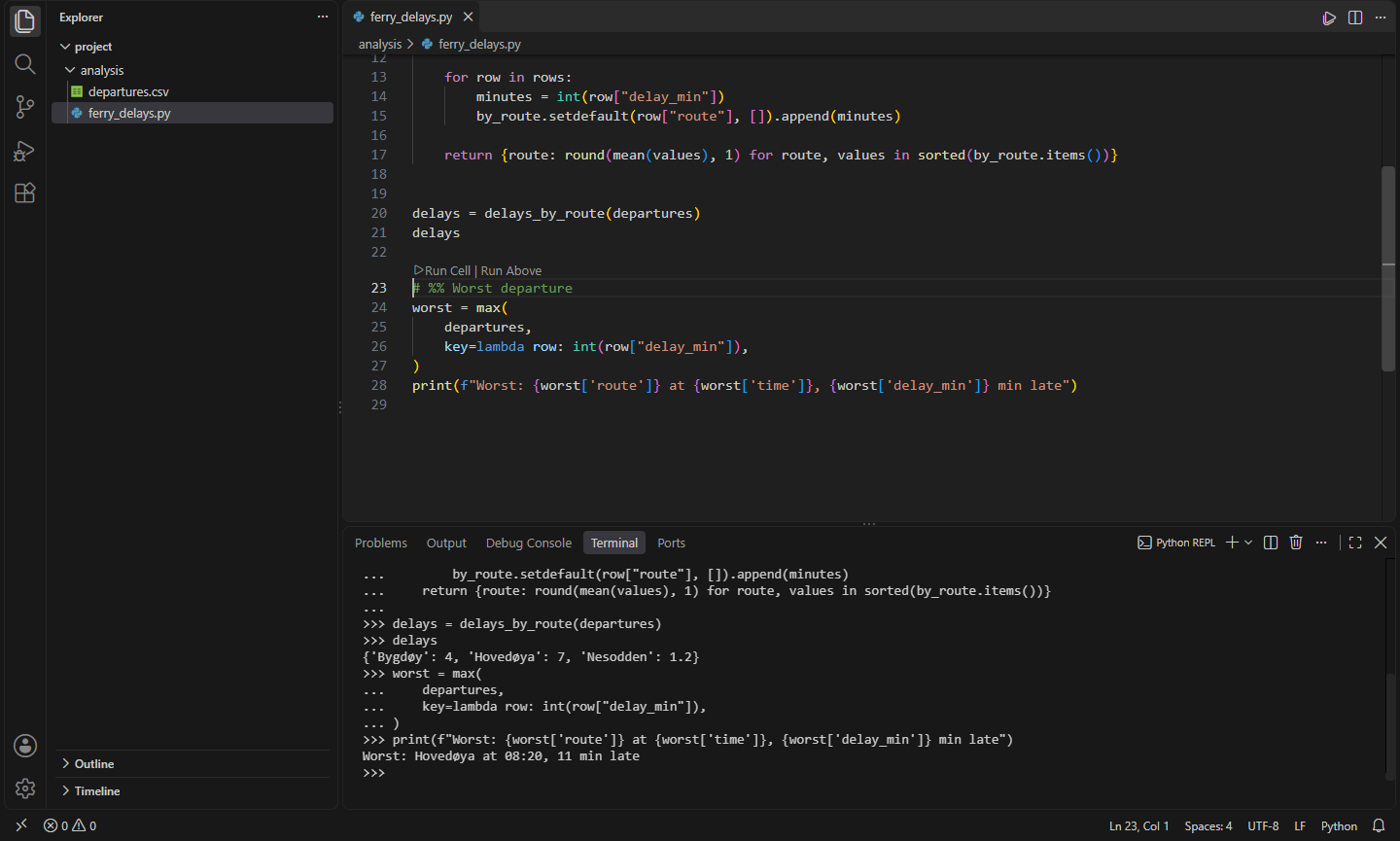
- Shift+Enter sends the statement under the cursor to a Python REPL that stays open, then moves to the next statement, so you can walk through a script one step at a time. It sends the whole statement: a
def with its decorators and body, an if with its else, a call spread over several lines. With a selection, it sends the selection.
- Multi-line code that just works. The classic REPL chokes on blank lines inside functions and needs an empty line to finish a block. Code is re-flowed so it runs as written, indented selections are dedented, and strings and brackets are left alone. For IPython and Python 3.13+, which indent as you type, code goes in as a bracketed paste instead. This is detected automatically. (On Windows, where Python's new REPL doesn't finish a bracketed paste, the classic REPL is started instead.)
# %% cells, as in Jupyter, Spyder and PyCharm. Ctrl+Enter runs the cell and Alt+Enter runs it and moves to the next one. Run Cell and Run Above lenses sit above each marker.- Run the whole file in the REPL (
%run in IPython), keeping every variable around to poke at afterwards.
- IPython with one setting. Uses the environment selected in Nifty Python Envs or the Python extension, or any you set.
- No Jupyter kernel and no notebook, just a terminal. Works in VS Code, VSCodium, Cursor and the rest, with or without the Python extension.
Commands
| Command |
Key |
What it does |
Nifty Python REPL: Send Selection or Statement to REPL |
Shift+Enter |
Send and move to the next statement |
Nifty Python REPL: Run Cell |
Ctrl+Enter |
Run the # %% cell at the cursor |
Nifty Python REPL: Run Cell and Go to Next |
Alt+Enter |
Run it and move on |
Nifty Python REPL: Run Cells Above |
|
Everything before the current cell |
Nifty Python REPL: Run File in REPL |
|
The whole file, interactively |
Nifty Python REPL: Open REPL / Restart REPL |
|
|
If the Python extension's own Shift+Enter gets in the way, turn off nifty.python-repl.keybindings and bind the commands to keys you like.
Settings
| Setting |
Default |
What it does |
nifty.python-repl.python |
selected interpreter |
The Python to run |
nifty.python-repl.useNiftyPythonEnvs |
true |
Use the environment selected in Nifty Python Envs |
nifty.python-repl.ipython |
false |
Use IPython |
nifty.python-repl.args |
[] |
Extra interpreter arguments |
nifty.python-repl.pasteMode |
auto |
bracketed or lines to override detection |
nifty.python-repl.advance |
true |
Move to the next statement after sending |
nifty.python-repl.cwd |
file |
Start in the file's folder or the workspace |
nifty.python-repl.keybindings |
true |
Shift/Ctrl/Alt+Enter in Python files |
nifty.python-repl.codeLens |
true |
Lenses above cells |
Install
- VS Code: search for "Nifty Python REPL" in the Extensions view, or install from the Visual Studio Marketplace.
- Cursor, Windsurf, VSCodium, Kiro, Antigravity: install from Open VSX.
Privacy
This extension collects no telemetry and needs no account.
- Nifty C# Scratchpad: Run C# Snippets & NuGet: Run C# snippets instantly with NuGet packages and rich Dump() output, a LINQPad-style scratchpad and Polyglot Notebooks replacement. (Open VSX)
- Nifty Code Runner: Run Code in 25+ Languages: Run the current file or selection in 25+ languages in the terminal, with input support, your own commands and no telemetry. (Open VSX)
- Nifty Notebook Servers: Kernels, Sessions & Files: Manage Jupyter servers from the side bar: see kernels and sessions, shut down, restart or interrupt kernels, and browse, open and edit the server's files directly. (Open VSX)
- Nifty Python Pack: 7 Nifty extensions for Python development: Python Envs, pytest, Python Profiler, Python REPL, Docstrings, Paired Notebooks, Notebook Servers. (Open VSX)
- Nifty .NET Explorer: Solution & Test Explorer: A solution explorer and test explorer for .NET in VS Code, Cursor, Windsurf and VSCodium: projects, references and files from .sln/.slnx, and xUnit, NUnit and MSTest tests in the Testing view. (Open VSX)
- Nifty Actions: Workflow Checks, SHA Pinning & act: GitHub Actions workflows without sign-in: completion and go to definition for local and reusable actions, actionlint checks, pin actions to commit SHAs, and run jobs locally with act. (Open VSX)
See all 100+ Nifty extensions and web tools at https://getnifty.dev
| |

