Nifty Java App Servers
Run Tomcat and Jetty in VS Code: start, stop and debug servers, deploy WAR files or exploded Maven webapps with hot sync, follow colored logs and open your app in the browser.
Maintained. No sign-in. No telemetry. Works in VS Code, Cursor, Windsurf, VSCodium and other editors that use Open VSX.
Features

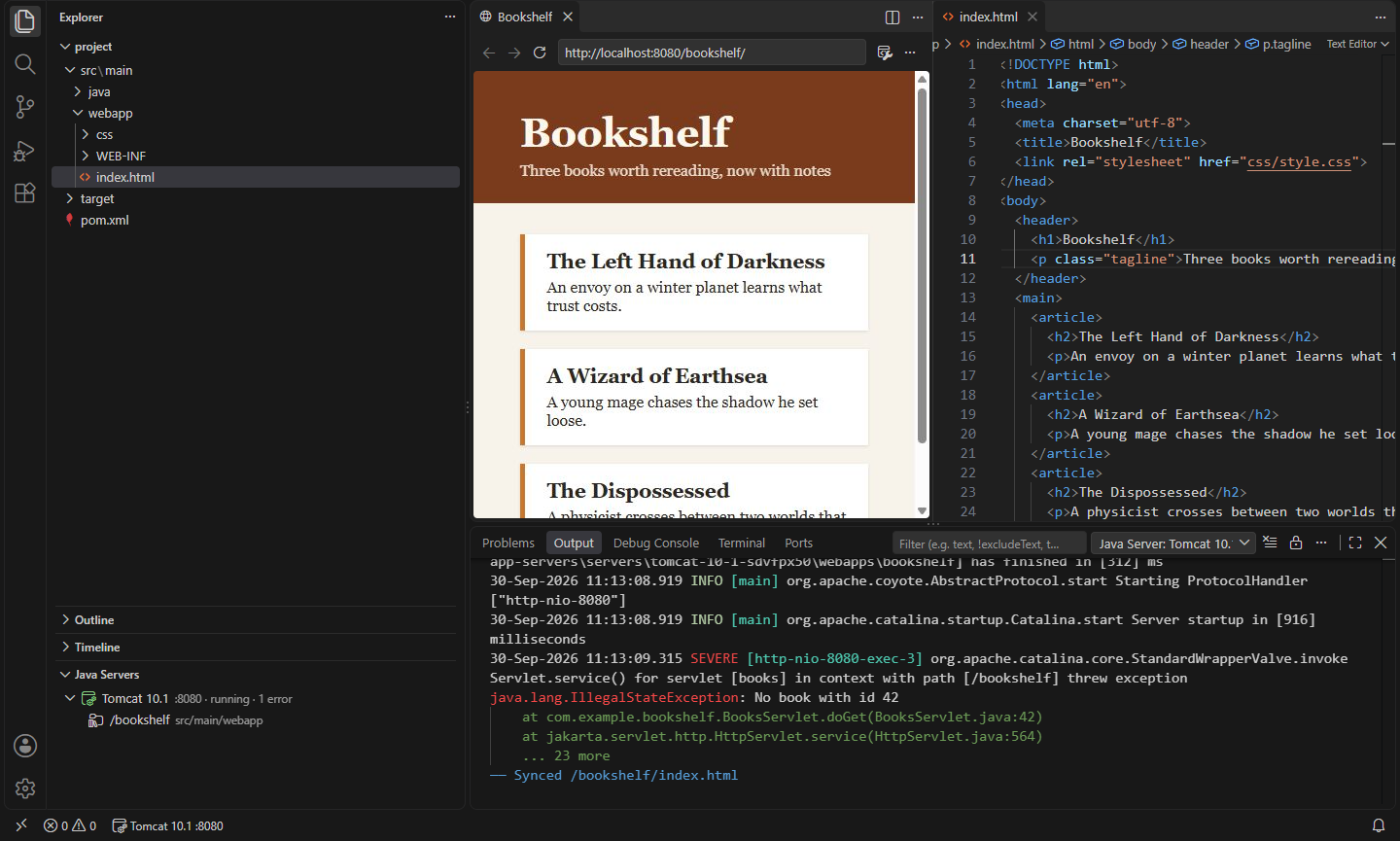
- Java Servers view in the Explorer. Click Add Server… and pick the folder where Tomcat (8.5 to 11) or Jetty (9.4 to 12) is unzipped. Servers are saved for this workspace or for all workspaces.
- Your install is never changed. Each server runs with its own
CATALINA_BASE (or jetty.base) in the extension's storage: a copy of conf/ with your HTTP port, its own logs, and only the apps you deploy.
- Start, Stop, Restart from the view, the status bar or the Command Palette. Stop asks the server to shut down cleanly (Tomcat's shutdown port, Jetty's
STOP.PORT) before ending it.
- Debug. Starts the server listening for a debugger (JPDA/JDWP on port 8000, or the port you set). If a Java debugger extension is installed, it attaches right away; otherwise it tells you the address to attach to.
- Deploy a WAR file (right-click it in the Explorer) or an exploded webapp: a Maven or Gradle project (
src/main/webapp plus compiled classes), an Eclipse WebContent folder, or any folder with WEB-INF. You choose the context path (/shop, or / for the root).
- Hot sync. Saved pages, stylesheets and scripts are copied to the running server straight away, and so are class files your build writes to
target/classes. Tomcat reloads the app when its classes change. A rebuilt .war is redeployed automatically.
- Server log in the Output panel, with levels colored (SEVERE and ERROR in red, WARNING in orange), exceptions and stack traces set apart, and an error count in the view.
- Open in Browser for any deployed app (the globe on its row); the server starts first if needed.
- Status bar shows the running server; click it to open the app, see the log, restart in debug mode or stop.
- Per-server settings with Edit Server…: HTTP and debug ports, JVM options, environment variables, and a JDK of its own. Open Server Configuration opens the server's own
server.xml (Tomcat) or a start.d file (Jetty) for anything else.
- Finds Java from the
javaHome setting, then JAVA_HOME, then java on your PATH.
Commands
| Command |
What it does |
Nifty Java App Servers: Add Server… |
Add a Tomcat or Jetty install folder |
Nifty Java App Servers: Start / Stop / Restart |
Run the server |
Nifty Java App Servers: Debug |
Start listening for a debugger and attach one |
Nifty Java App Servers: Deploy to Java Server… |
Deploy a .war or an exploded webapp |
Nifty Java App Servers: Undeploy |
Remove a deployed app from the server |
Nifty Java App Servers: Redeploy (Copy Everything Again) |
Copy a deployment again in full |
Nifty Java App Servers: Open in Browser |
Open a deployed app |
Nifty Java App Servers: Show Log |
Show the server's output |
Nifty Java App Servers: Edit Server… |
Ports, JVM options, environment, JDK, name |
Nifty Java App Servers: Open Server Configuration |
The server's own server.xml or Jetty start.d file |
Nifty Java App Servers: Remove Server |
Forget a server and delete its copy in storage |
Settings
| Setting |
Default |
What it does |
nifty.app-servers.javaHome |
(empty) |
JDK folder; empty means JAVA_HOME, then java on PATH |
nifty.app-servers.saveServersIn |
workspace |
Save new servers for this workspace or for all workspaces (global) |
nifty.app-servers.httpPort |
8080 |
HTTP port for new servers |
nifty.app-servers.debugPort |
8000 |
Debugger port for new servers |
nifty.app-servers.jvmOptions |
(empty) |
JVM options for every server |
nifty.app-servers.env |
{} |
Environment variables for every server |
nifty.app-servers.reloadClasses |
true |
Tomcat: reload an app when its classes change |
nifty.app-servers.jettyModules |
(empty) |
Jetty modules; empty means server,http,ee10-deploy on Jetty 12 and server,http,deploy before |
nifty.app-servers.startTimeout |
120 |
Seconds to wait for a server to start |
nifty.app-servers.stopTimeout |
15 |
Seconds to wait for a clean stop |
nifty.app-servers.showLogOnStart |
true |
Show the log when a server starts |
nifty.app-servers.showInStatusBar |
true |
Show running servers in the status bar |
Servers stop when VS Code closes. Downloading Tomcat or Jetty isn't part of this extension: unzip the version you want and add its folder.
Install
- VS Code: search for "Nifty Java App Servers" in the Extensions view, or install from the Visual Studio Marketplace.
- Cursor, Windsurf, VSCodium, Kiro, Antigravity: install from Open VSX.
Privacy
This extension collects no telemetry, needs no account and makes no network requests. Servers listen on your machine; they are as reachable from your network as your server configuration makes them.
Apache Tomcat and Eclipse Jetty are trademarks of their respective owners. This extension is not affiliated with or endorsed by the Apache Software Foundation or the Eclipse Foundation.
- Nifty Archive Browser: ZIP, JAR, VSIX & tar.gz: Browse zip, jar, vsix, whl, nupkg and tar.gz archives like folders: open files inside, compare, extract, and create zips. (Open VSX)
- Nifty Bash Debugger: Breakpoints & Step Through Scripts: Debug Bash scripts without bashdb: breakpoints, conditions, logpoints, stepping, call stack, variables and arrays. Works with bash 4.2 to 5.2+ and Git Bash on Windows. (Open VSX)
- Nifty Code Runner: Run Code in 25+ Languages: Run the current file or selection in 25+ languages in the terminal, with input support, your own commands and no telemetry. (Open VSX)
- Nifty Env: .env Files, Profiles & Secrets: Load .env files into terminals, tasks and debug sessions, switch between .env profiles, hide secret values on screen, and check .env against .env.example. (Open VSX)
- Nifty Java Quality: Format, Checkstyle & PMD: Format Java with google-java-format or palantir-java-format, and see Checkstyle and PMD problems as you save. Tools download from Maven Central when you say so; zero setup for Maven and Gradle. (Open VSX)
- Nifty JS Tests: Mocha, node:test & Bun in Test Explorer: Run and debug Mocha, node:test and Bun tests from the Test Explorer: real diffs, stack locations, watch mode, TypeScript loaders and monorepos. No Jest or Vitest. (Open VSX)
See all 100+ Nifty extensions and web tools at https://getnifty.dev
| |

