Format Java with google-java-format or palantir-java-format, and see Checkstyle and PMD problems as you save. Tools download from Maven Central when you say so; zero setup for Maven and Gradle.
Maintained. No sign-in. No telemetry. Works in VS Code, Cursor, Windsurf, VSCodium and other editors that use Open VSX.
Features


- Formatting with google-java-format or palantir-java-format. Format Document, Format Selection and format on save use google-java-format (Google or AOSP style) or palantir-java-format. Choose what happens to imports: sort and remove unused ones, only sort, only remove, or leave them. Organize Imports fixes imports without touching anything else.
- Checkstyle as you work. Files are checked when you open and save them, and Check Workspace checks the whole project. Findings land in the Problems panel with the rule name linked to its documentation, as warnings (errors are left to the compiler;
checkstyle.severity changes that). They stay after you close a file, go when it's deleted or renamed, and Clear Problems removes them all.
- Your project's own config, found for you.
checkstyle.xml or config/checkstyle/checkstyle.xml, or whatever the Maven Checkstyle plugin (configLocation, suppressionsLocation, propertyExpansion) or Gradle's checkstyle { configFile … } points at. Multi-module builds use the nearest module's config. ${config_loc} and ${basedir} just work. Nothing configured? Google's checks, or Sun's if you prefer.
- PMD too. The project's ruleset (a ruleset file, the Maven PMD plugin's
<rulesets> or Gradle's pmd { ruleSetFiles … }), or PMD's quickstart rules. Each finding shows its rule, category and priority, with a link to the docs. With pmd.severity set to asReported, priorities 1-2 are warnings and 3-5 information.
- Suppress in one click. The light bulb adds
// CHECKSTYLE.SUPPRESS: Rule, // CHECKSTYLE:OFF … // CHECKSTYLE:ON or @SuppressWarnings("checkstyle:Rule"), whichever your Checkstyle config supports, and // NOPMD or @SuppressWarnings("PMD.Rule") for PMD.
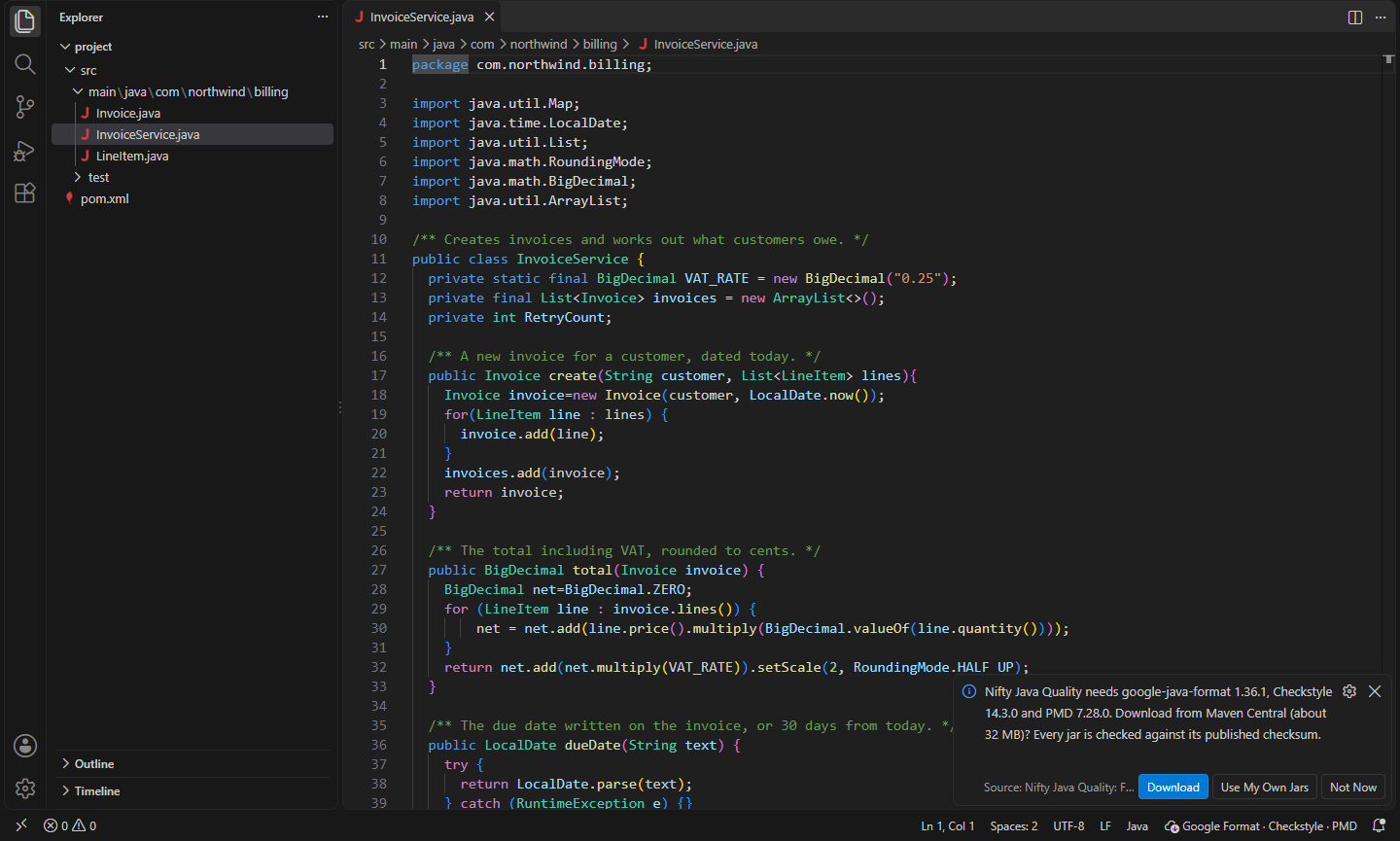
- No manual downloads. The first time a tool is needed, you're asked whether to download the pinned version from Maven Central. Every jar is checked against the checksum published next to it and against the SHA-256 built into the extension, then kept in the extension's own storage. Nothing is downloaded until you click Download. Behind a firewall? Point
download.repository at your company's Maven mirror, or use your own jars.
- See what ran. The status bar shows which tools are active; click it for downloads, Check Workspace and the output, which lists the exact command lines.
Requirements
A JDK, 17 or newer. The extension uses nifty.java-quality.javaHome, then JAVA_HOME, then java on your PATH, and picks the tool versions for it: the newest on Java 21 or newer, and the last google-java-format and Checkstyle releases that run on Java 17 otherwise (it tells you once when it does). PMD also runs on Java 8 to 16; the formatters and Checkstyle don't.
Pinned versions
| Tool |
Java 21+ |
Java 17-20 |
Download |
| google-java-format |
1.36.1 |
1.28.0 |
1 jar, about 4 MB |
| palantir-java-format |
2.100.0 |
2.100.0 |
16 jars, about 7 MB (only when you pick the Palantir style) |
| Checkstyle |
14.3.0 |
12.3.1 |
20 jars, about 15 MB (Java 17: 34 jars, about 18 MB) |
| PMD (Java rules) |
7.28.0 |
7.28.0 |
21 jars, about 13 MB |
Commands
| Command |
What it does |
Nifty Java Quality: Check This File |
Run Checkstyle and PMD on the current file now |
Nifty Java Quality: Check Workspace |
Run Checkstyle and PMD on every Java file (skips target/, build/ and the like) |
Nifty Java Quality: Organize Imports |
Sort imports and remove unused ones |
Nifty Java Quality: Download Tools |
Download the tools your settings use |
Nifty Java Quality: Clear Problems |
Remove every Checkstyle and PMD problem |
Nifty Java Quality: Use as the Java Formatter |
Make this extension the default formatter for Java in this workspace |
Nifty Java Quality: Show Output |
The exact commands that ran, and what the tools printed |
Format Document and Format Selection (Shift+Alt+F) use the formatter. The extension doesn't take over Java formatting on its own, because many Java setups already have a formatter they rely on. The first time you format or save a Java file while another formatter (or none) is the default, it asks once whether to use it for Java: in this workspace, in all workspaces, not now, or never. You can also run Use as the Java Formatter, or pick it with Format Document With….
Settings
| Setting |
Default |
What it does |
nifty.java-quality.javaHome |
|
JDK to run the tools with (default: JAVA_HOME, then PATH) |
nifty.java-quality.format.enabled |
true |
Format Java files |
nifty.java-quality.format.style |
google |
google, aosp (4-space indents) or palantir |
nifty.java-quality.format.imports |
sortAndRemoveUnused |
sortAndRemoveUnused, sortOnly, removeUnusedOnly or leave |
nifty.java-quality.format.skipReflowingLongStrings |
false |
Don't split long strings |
nifty.java-quality.format.skipJavadocFormatting |
false |
Don't reformat Javadoc |
nifty.java-quality.checkstyle.enabled |
true |
Run Checkstyle |
nifty.java-quality.checkstyle.config |
|
google, sun, a file or a URL (default: the project's, else google) |
nifty.java-quality.checkstyle.properties |
{} |
Values for ${...} in the config |
nifty.java-quality.checkstyle.args |
[] |
Extra Checkstyle arguments |
nifty.java-quality.checkstyle.severity |
warning |
asReported, warning or information |
nifty.java-quality.pmd.enabled |
true |
Run PMD |
nifty.java-quality.pmd.ruleset |
|
Rulesets, comma-separated (default: the project's, else quickstart) |
nifty.java-quality.pmd.args |
[] |
Extra PMD arguments, e.g. ["--aux-classpath", "target/classes"] |
nifty.java-quality.pmd.severity |
warning |
asReported (priority 1-2 warnings, 3-5 information), warning or information |
nifty.java-quality.runOnOpen / runOnSave |
true |
When to check files |
nifty.java-quality.googleJavaFormat.path |
|
Your own google-java-format all-deps jar |
nifty.java-quality.palantirJavaFormat.path |
|
Your own palantir-java-format (a folder of jars) |
nifty.java-quality.checkstyle.path |
|
Your own checkstyle-*-all.jar (or a folder of jars) |
nifty.java-quality.pmd.path |
|
Your own PMD (an unzipped pmd-bin folder) |
nifty.java-quality.download.enabled |
true |
Offer downloads; turn off to use only your own jars |
nifty.java-quality.download.repository |
Maven Central |
A Maven mirror to download from |
nifty.java-quality.jvmArgs |
[] |
JVM options for the tools, e.g. ["-Xmx1g"] |
nifty.java-quality.timeoutSeconds |
60 |
Stop a tool that runs longer |
Install
- VS Code: search for "Nifty Java Quality" in the Extensions view, or install from the Visual Studio Marketplace.
- Cursor, Windsurf, VSCodium, Kiro, Antigravity: install from Open VSX.
Privacy
This extension collects no telemetry and needs no account. It only goes online when you click Download (or run Download Tools), to fetch the tools from Maven Central or the repository you set.
- Nifty YAML: Formatter, Validator & Converter: Format YAML without losing comments (Kubernetes-style indents), sort keys, lint with yamllint, copy the key path, and convert to and from JSON. (Open VSX)
- Nifty PHP Quality: PHPStan, PHPCS & Pint: PHPStan, PHP_CodeSniffer, Laravel Pint and PHP-CS-Fixer in one extension: problems as you save, one Fix command, and zero setup when the tools are in your project's vendor/bin. (Open VSX)
- Nifty Shell Format: shfmt Formatter for Bash: Format shell scripts (bash, sh, zsh, bats) with shfmt built in: no binary to install, reads .editorconfig, and shows syntax errors. (Open VSX)
- Nifty SQL: SQL Formatter for 20 Dialects: Format SQL in 20 dialects, including dbt and Jinja templates, with your team's settings. (Open VSX)
- Nifty XML: XPath, Formatter & XML to JSON: Evaluate XPath with namespaces, copy the XPath of any element, format, minify, check well-formedness and convert XML to JSON. (Open VSX)
- Nifty Beautify: Format HTML in PHP, Blade & Twig: Format HTML inside PHP, Blade, Twig, Jinja, Handlebars, ERB and Liquid templates without breaking the template tags. (Open VSX)
See all 100+ Nifty extensions and web tools at https://getnifty.dev
| |

