

|
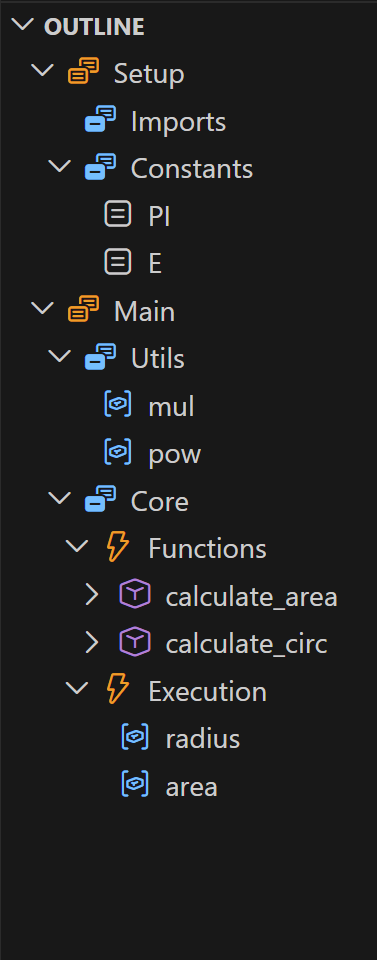
 Outline Sections




| Example | Original | With Sections |
|---|---|---|
 |
 |
 |
Supported Languages
| Supported Languages | Supported Analyser | Region Start | Region End |
|---|---|---|---|
  |
typescript-language-features (built-in) | // #region Name |
// #endregion |
 |
vscode-pylance | # region Name |
# endregion |
  |
cpptools | // #region Name |
// #endregion |
 |
rust-analyzer | // #region Name |
// #endregion |
Settings
To add your own region syntax in addition to built-in #region/#endregion detection, specify custom regex in VSCode settings (Ctrl+, or Cmd+, for MacOS and enter "outline sections"). Example would match > Name (start) and < (end):
{
	"outlineSections.regionStartRegex": "^>(.+)$",
    "outlineSections.regionEndRegex": "^<$" // optional
}
| Regex | Example |
|---|---|
^\s*#\s*note:\s*(.+?)\s*$ |
# note: Helpers |
^\s*//\s*section:\s*(.+?)\s*$ |
// section: Helpers |
^\s*/\*\s*>{6,}\s*(.+?)\s*\*/\s*$ |
/* >>>>>>>>>> Helpers */ |
^\s*/\*\s*<{6,}\s*\*/\s*$ |
/* <<<<<<<<<< */ |
Notes
- Start regex is additive: built-in region markers still work.
- If your start regex has a first capture group, it becomes the region name.
- If no end regex is provided, custom regions auto-close at the next region/header/subheader or end of file.
Development Notes
Install the latest version of Node.js LTS and the dependent packages (note all packages install locally into node_modules/ so no virtual environment is needed):
make setup
Windows: install Node.js LTS from nodejs.org manually, then use
make install(requires Git Bash or WSL).
npm run test                          # run tests + generate coverage report
npm run package                       # compile → out/ and build .vsix (what gets published)
npx semantic-release --dry-run        # preview next release version and notes
[!TIP] You can run
make cleanto clean up compiled/generated files.
Open extension.ts and press F5 (fn + F5 if on Mac) to launch VS Code Extension Development Window with the extension loaded.
How it works?
The extension uses VS Code API to parse the document and create section markers as document symbols based on comments. It then "injects" those symbols into the LSP communicator's parse commands provided by the analyser extension (which depends on language). It's a bit of a simplification but that's the rough idea.