Spring HTTP Buddy
Turn your Spring controllers into ready-to-send .http request files — in one click, straight from the code.



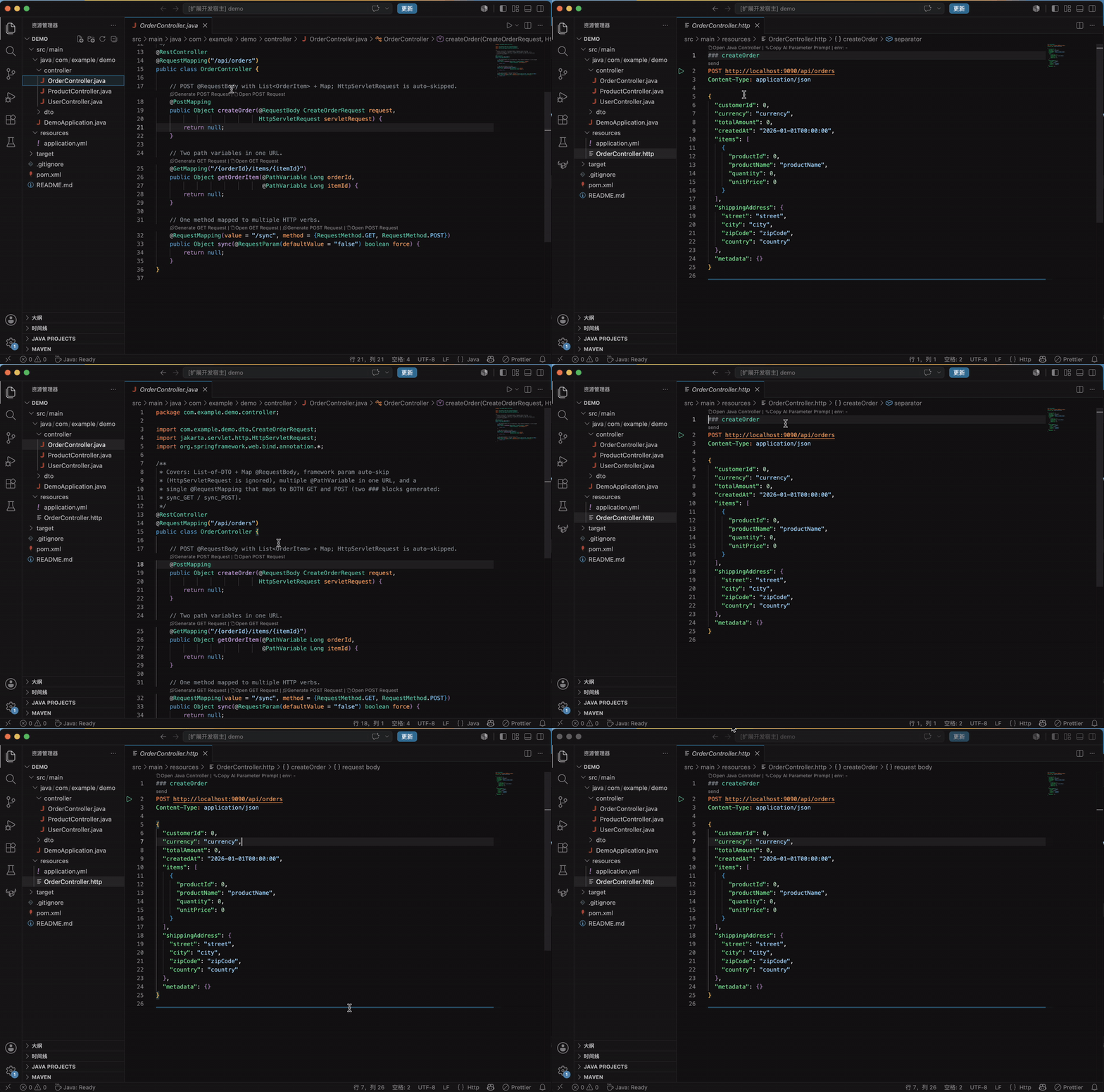
No more hand-writing requests in Postman or copy-pasting URLs. Spring HTTP Buddy reads your @RestController methods and generates a complete, ready-to-run request block above each one — with path variables, query params and JSON bodies already filled in from your DTOs.
The output is plain .http text, so it lives right next to your code, in Git, and runs as-is in REST Client, httpYac, and the IntelliJ HTTP Client.
Why Spring HTTP Buddy
- Zero hand-writing — Click a CodeLens, get a complete request. Path variables, query strings and request bodies are pre-filled.
- Smart, type-aware defaults —
String → the field name, dates → ISO values, DTOs → recursively expanded JSON. Nested objects, List, Map and @ModelAttribute all handled.
- Git-native, team-friendly — Requests are plain text in your repo. Review them in PRs, version them with the code, share them with
git pull. No accounts, no cloud lock-in.
- Not tied to one tool — Generates standard
.http, so REST Client, httpYac and IntelliJ users on your team can all run the same files.
- AI-assisted sample data — One command copies a ready-made prompt so an AI assistant fills placeholders with realistic test values.
Quick start
- Install Spring HTTP Buddy from the VS Code Marketplace.
- Open your Spring Boot project and any
@RestController.
- Click the Generate HTTP Request CodeLens above a mapping method.
- Open the generated
.http file and send it with REST Client / httpYac / IntelliJ.
That's it — no configuration required.
See it in action
Given this controller:
@RestController
@RequestMapping("/api/users")
public class UserController {

    @PostMapping
    public User createUser(@RequestBody CreateUserRequest request) { ... }

    @GetMapping("/{id}")
    public User getUser(@PathVariable Long id) { ... }
}
You get src/main/resources/UserController.http:
### createUser
POST http://localhost:8080/api/users
Content-Type: application/json

{
  "username": "username",
  "email": "email",
  "age": 0,
  "active": false,
  "birthday": "2026-01-01",
  "address": {
    "street": "street",
    "city": "city"
  },
  "roles": [""]
}

### getUser
GET http://localhost:8080/api/users/1
Commands
All available as CodeLens actions — no need to memorize anything.
| Command |
Where |
What it does |
| Generate HTTP Request |
Above a @*Mapping method |
Creates/appends a ready-to-send block in {Controller}.http |
| Open HTTP Request |
Above a @*Mapping method |
Jumps to the matching ### block (picker if several) |
| Open Java Controller |
On a ### block |
Jumps back to the Java method that produced it |
| Copy AI Parameter Prompt |
On a ### block |
Copies a prompt so an AI can fill in realistic sample values |
Smart defaults
| Java type |
Generated value |
String |
the field / parameter name, e.g. "username" |
int, long, BigDecimal, … |
0 |
double, float |
0.0 |
boolean |
false |
LocalDate |
"2026-01-01" |
LocalDateTime / Date / Instant |
"2026-01-01T00:00:00" |
List<X> / Set<X> |
[<default of X>] |
Map<K,V> / array |
{} / [] |
| Custom DTO |
recursively expanded |
It also understands @PathVariable, @RequestParam (with defaultValue / required), @RequestHeader, @ModelAttribute (flattened to query params, including nested objects), and a single @RequestMapping mapped to multiple verbs. Framework parameters like HttpServletRequest and MultipartFile are skipped automatically.
Configuration
| Setting |
Default |
Description |
springHttpBuddy.baseUrl |
http://localhost:8080 |
Base URL for generated requests. If left unset, the extension auto-detects server.port from application.properties / application.yml / application.yaml before falling back to this default. |
Works great with Git & teams
Because requests are just .http files in your repo:
- Commit them alongside the controller — reviewers see exactly how an endpoint is called.
- A teammate clones the repo and instantly has every request, ready to run.
- Endpoint changed? Regenerate, and the diff shows what changed.
Roadmap
Intentionally out of scope for now, candidates for future versions:
- Automatic
multipart/form-data upload blocks for MultipartFile endpoints
- Environment-variable output (
{{baseUrl}}, {{token}}) for cleaner multi-environment sharing
- OpenAPI/Swagger awareness
Development
npm install
npm run build
Press F5 to launch the Extension Development Host, then open a Spring project (a sample is included under demo/) and use the CodeLens actions.
License
MIT

