Skip to content
| Marketplace
Sign in
Visual Studio Code>Data Science>MDB and ACCDB Viewer — DBConvertNew to Visual Studio Code? Get it now.
MDB and ACCDB Viewer — DBConvert

MDB and ACCDB Viewer — DBConvert

DBConvert

|
4 installs
| (0) | Free
Open Microsoft Access .mdb and .accdb files in the editor: tables with their Access types, relationships as an ER diagram, saved queries, read-only SQL. No Access, no Java, no ODBC, no Windows.
Installation
Launch VS Code Quick Open (Ctrl+P), paste the following command, and press enter.
Copied to clipboard
More Info

MDB and ACCDB Viewer — DBConvert

Open Microsoft Access .mdb and .accdb files in the editor: tables with their Access types, relationships as an ER diagram, saved queries, read-only SQL. No Access, no Java, no ODBC, no Windows.

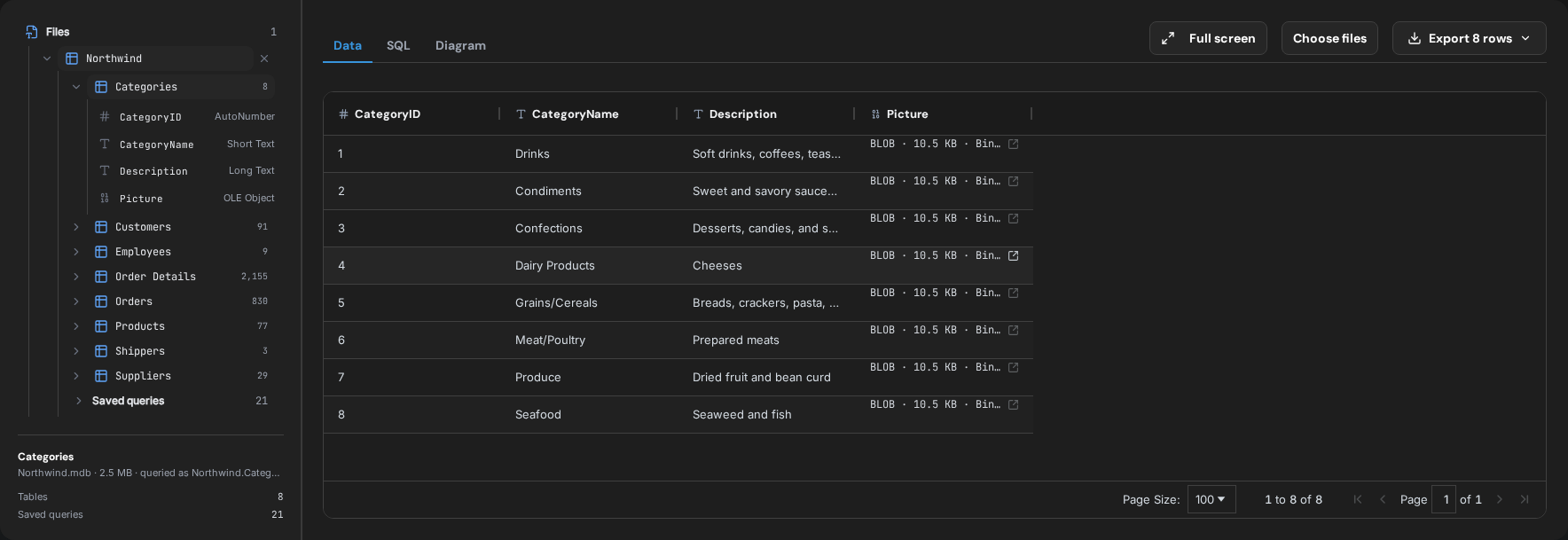
A Northwind .mdb open in an editor tab: tables with their row counts, columns with their Access types

No Access. No Java. No ODBC. No Windows.

Every other way to read an .mdb or .accdb file needs one of them. This one needs the editor: pick the file in the Explorer and it opens as a tab, on macOS, Linux or Windows.

What it shows

  • Every table with its row count, and every column with the type Access gives it — Short Text, Long Text, Number, Currency, Date/Time, Yes/No, AutoNumber, Replication ID, OLE Object, Attachment
  • Currency and Decimal as exact decimals, Date/Time sorted as time, Yes/No as true and false
  • Multi-value fields as lists, and an attachment field as the names of the files it holds
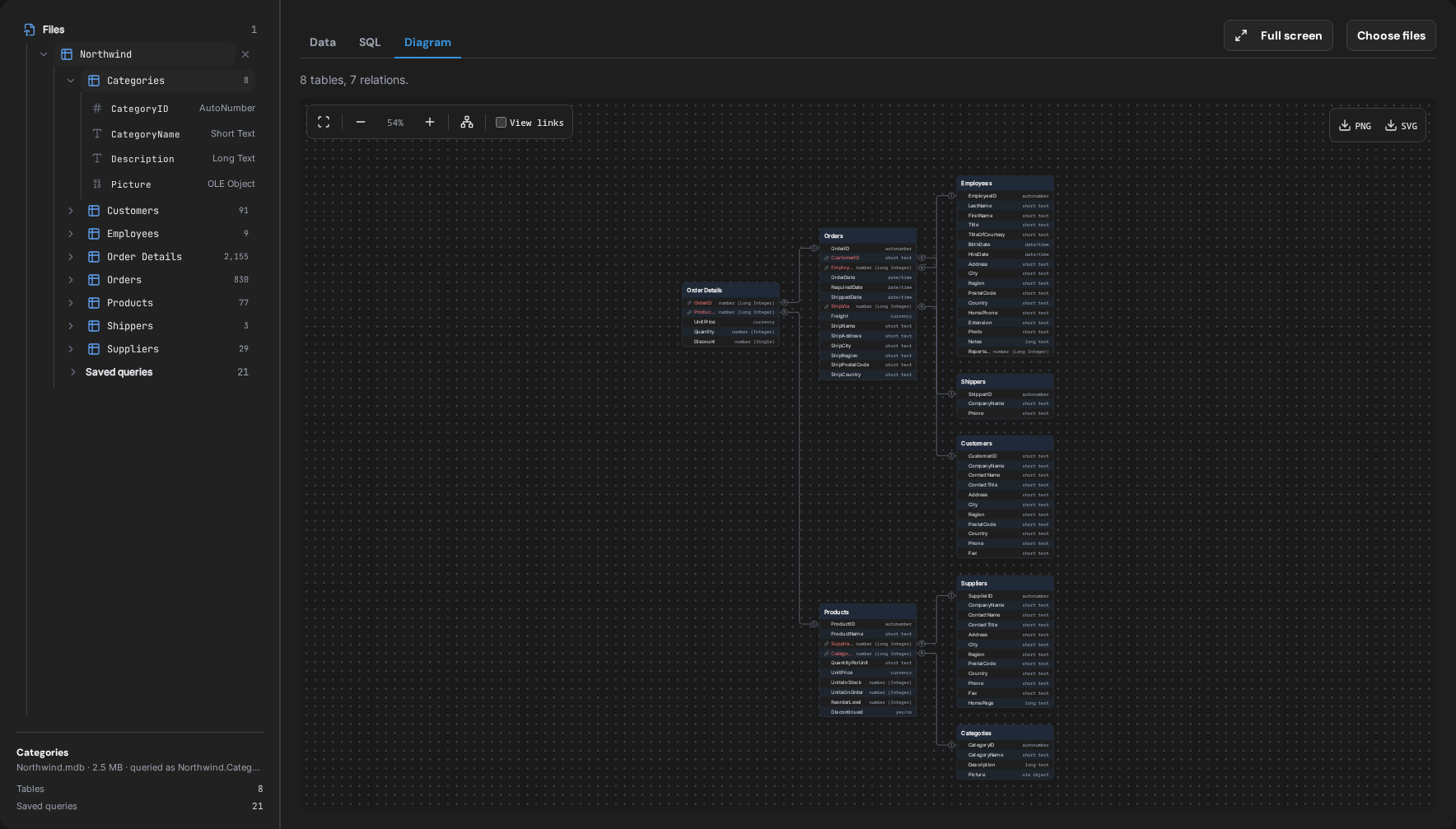
  • The relationships defined in Access, drawn on the Diagram tab
  • Saved queries with their SQL, shown rather than run: they are Access SQL
  • Linked tables named as not included — their rows live in another database

The relationships Access declares, drawn on the Diagram tab

Read-only SQL over the database

Each opened database becomes a schema named after its file, so a query reaches every table in it:

SELECT c.CompanyName, count(*) AS orders
FROM Northwind.Orders o JOIN Northwind.Customers c USING (CustomerID)
GROUP BY 1 ORDER BY 2 DESC

SELECT and WITH … SELECT only, in DuckDB's SQL rather than Access SQL. Export the result as CSV, JSON or Parquet.

Access 97 to 2019

.mdb files written by the Jet 3 and Jet 4 engines, and .accdb files written by ACE. A database encrypted with a password in Access 2007 or later asks for the password in the tab; it is used there and not stored. Forms, reports, macros and VBA modules are not shown.

Where the file goes

Nowhere. The editor reads it from disk and hands it to the panel; the panel parses it with WebAssembly in the editor itself. There is no account and no remote server. The one port the extension opens is the local one AI agents use (below), bound to 127.0.0.1 and closed by a token.

Ask AI about the open file

The file tab has an Ask AI about this file button. It opens the editor's own agent chat with the question already typed — "What is in Northwind.mdb? Use the DBConvert viewer tools to look at its tables and data." — and the agent answers from the file, not from a guess.

The agent gets three read-only tools: list the tables of the files open in the viewer, describe a table, and run one SELECT. Each query it runs shows in the viewer, and a result comes back as at most 100 rows with the full row count.

Where each agent gets the tools from:

  • VS Code with Copilot Chat — nothing to set up. The tools are part of the chat.
  • Cursor — nothing to set up. The extension adds its server to Cursor's MCP list. Cursor asks before each tool call unless you allow it.
  • Claude Code and Codex — run Connect agent to open files from the Command Palette once. It adds the server to the agent's config and prints the first question to ask. Quit Codex before you connect it: a running Codex rewrites its config and drops the entry.
  • Windsurf, Cline, Roo, Kilo, Gemini CLI, Continue and others — the same command shows the config to paste: a JSON block, or the address and header.

In an editor with no agent chat to open, the button copies the question and offers Connect.

One server serves every open editor window and every installed DBConvert viewer, so an agent sees all the files you have open. Reset MCP token issues a new token; connected agents need Connect again after it.

The viewer never talks to a model itself. What the agent reads — table names, columns, the rows its queries return — goes to whichever model that agent uses.

The other viewers

Same viewer, one per format — install only the one you need, so a SQLite user never downloads the Parquet engine.

  • SQLite Viewer — VS Code · Open VSX · Chrome
  • Parquet Viewer — VS Code · Open VSX
  • JSONL Viewer — VS Code · Open VSX

Built by DBConvert. The same viewer runs in a browser tab at streams.dbconvert.com/mdb-viewer if you would rather not install anything.

  • Contact us
  • Jobs
  • Privacy
  • Manage cookies
  • Terms of use
  • Trademarks
  • Your Privacy Choices
  • Consumer Health Privacy
© 2026 Microsoft