Invariant HighlighterIncremental semantic highlighting that complements Invariant and existing language services. Installation Launch VS Code Quick Open ( Ctrl+P), paste the following command, and press enter.Copied to clipboard |


Invariant HighlighterMore precise code highlighting for VS Code, layered on top of its existing syntax and semantic highlighting.
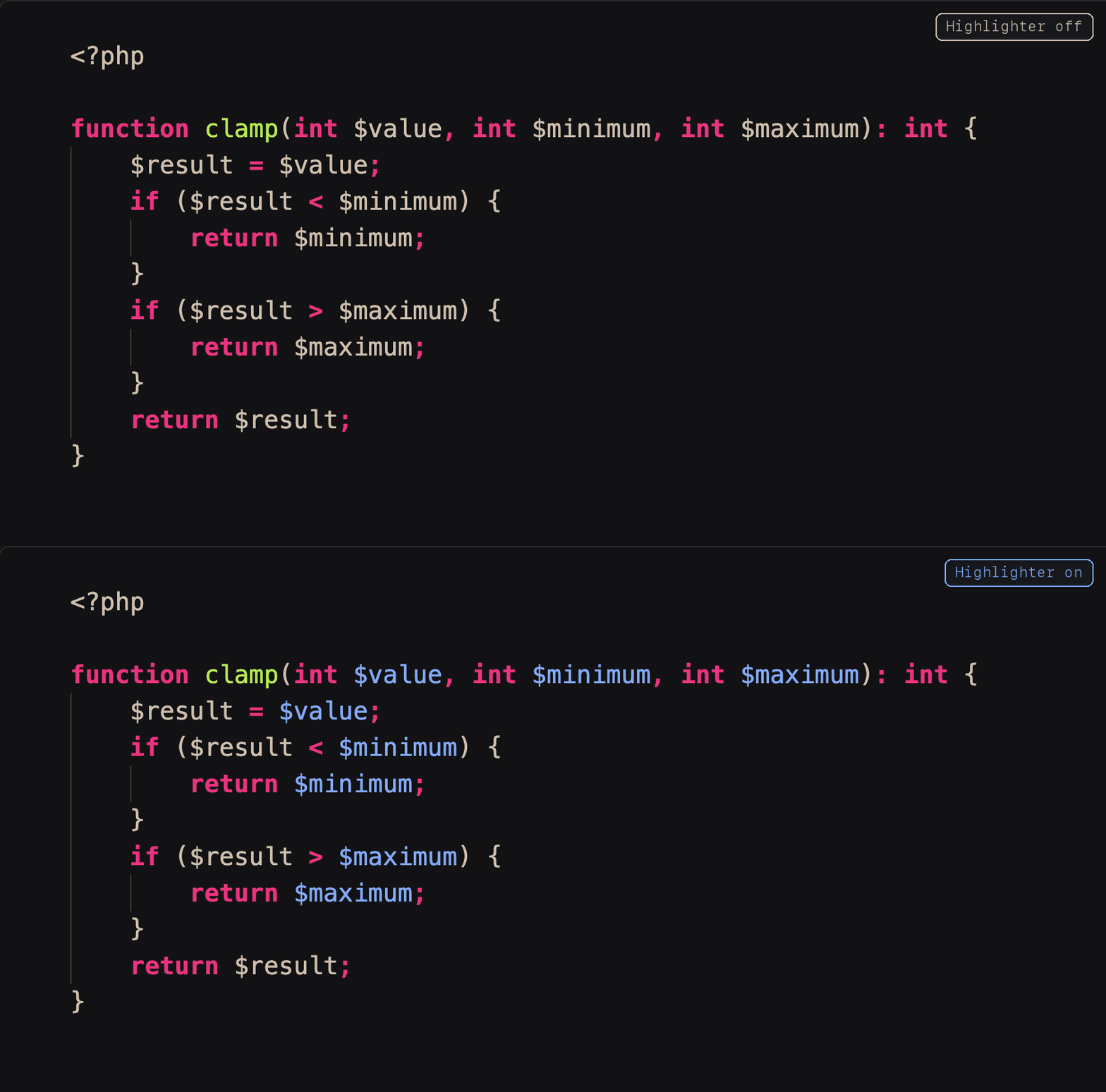
VS Code combines syntax scopes from TextMate grammars with semantic tokens from language extensions. Those sources do not always expose every distinction a theme could use. A language service may understand that several references are the same parameter for navigation, for example, while the highlighting pipeline classifies only the declaration as a parameter. Invariant Highlighter fills selected gaps with incremental Tree-sitter analysis. It adds only the missing information; it does not replace the active grammar, language service, or color theme. The extension is designed for Invariant, but can complement any color theme. The theme determines the parameter color; modified-symbol underlining is added independently. FeaturesConsistent PHP parameter highlightingEvery occurrence of a PHP parameter inside its function is published as the standard
semantic token type
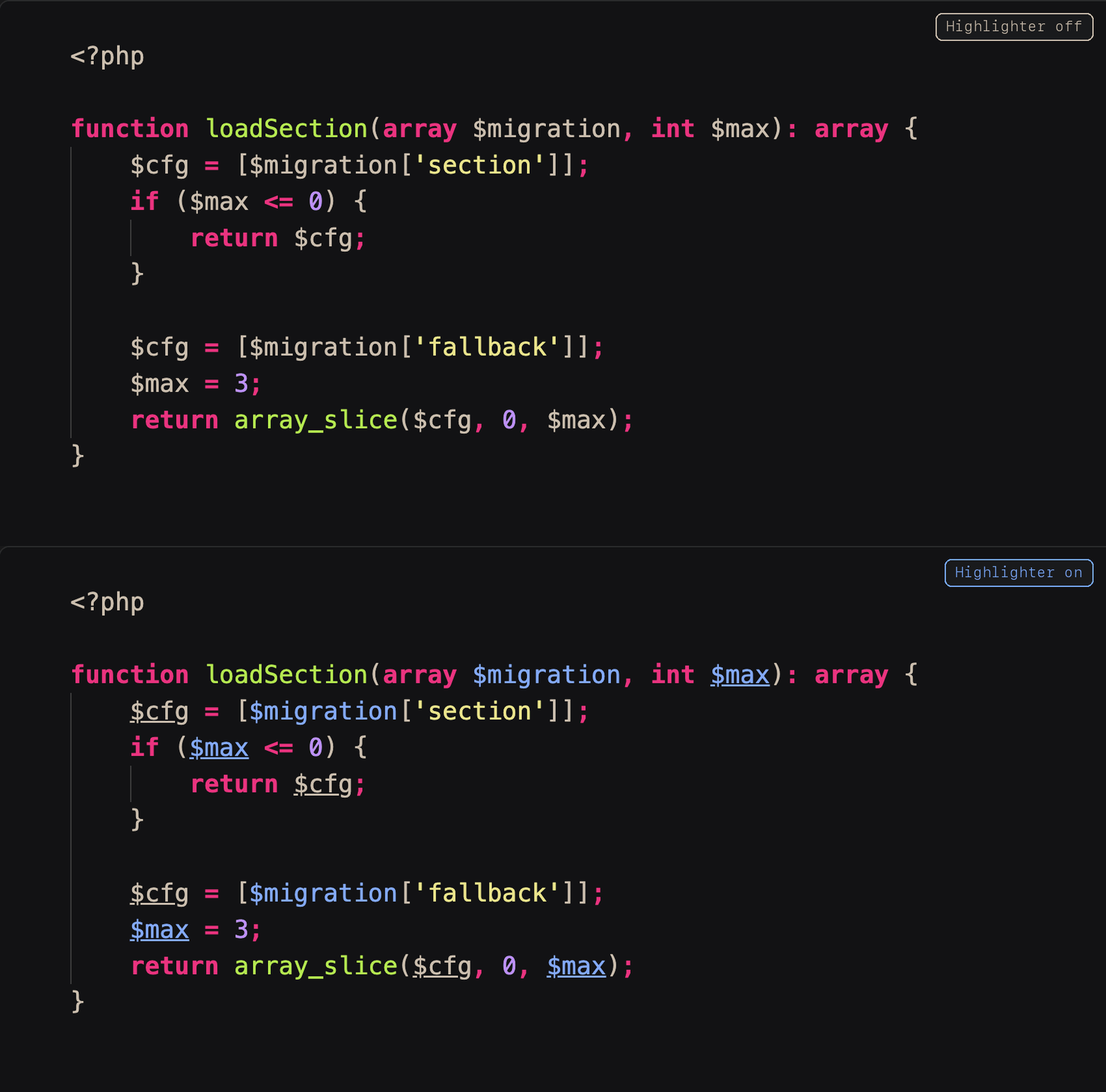
Original PNGs: without Highlighter and with Highlighter. With Highlighter, every Modified-symbol highlightingWhen a parameter is assigned or a variable is assigned again, every occurrence of that symbol in its scope is underlined. This makes mutation visible at a glance while preserving the symbol's existing color.
Original PNGs: without Highlighter and with Highlighter. Every Incremental updatesThe first analysis parses the document once. Later edits update the existing syntax tree and reclassify changed scopes while reusing unchanged function, class, and file results. Existing decorations are only replaced when their ranges or classification change, avoiding whole-file flashes during normal editing. Language support
Kotlin is not intercepted because its language service can publish the standard
How it composes with VS Code
PHP parameter identity uses standard semantic tokens. Modified-symbol highlighting uses editor decorations so it can coexist with Pylance, JDT LS, Intelephense, and other existing highlighting instead of replacing their token providers. Configuration
Remove a language to leave it entirely to its existing grammar and language service. Use an empty list to disable all Highlighter behavior without uninstalling it. VS Code can also disable the extension globally or for an individual workspace. Current limitsThe first release recognizes parameters, direct assignments, augmented assignments, and update expressions within syntax scopes. It does not perform full language-server symbol resolution. Captures and definitions introduced by constructs such as loops may require additional language-specific handling. Design and provenanceThe implementation derives from the MIT-licensed semantic-token approach used by Syntax Highlighter, with current Tree-sitter WASM, incremental tree edits, and per-scope classification caches. Invariant Highlighter is a separate extension because a passive color theme can style tokens but cannot create semantic information that VS Code and its language extensions do not publish. Users who want the theme and Highlighter together can install Invariant Complete. DevelopmentInstall the generated VSIX with: LicenseInvariant Highlighter is licensed under the Eclipse Public License 2.0. Bundled
Tree-sitter components retain their respective MIT licenses; see
|