Style Pastel


Inline styles read flat — every property looks the same. Style Pastel tints each declaration by category so they fall into visual groups at a glance:
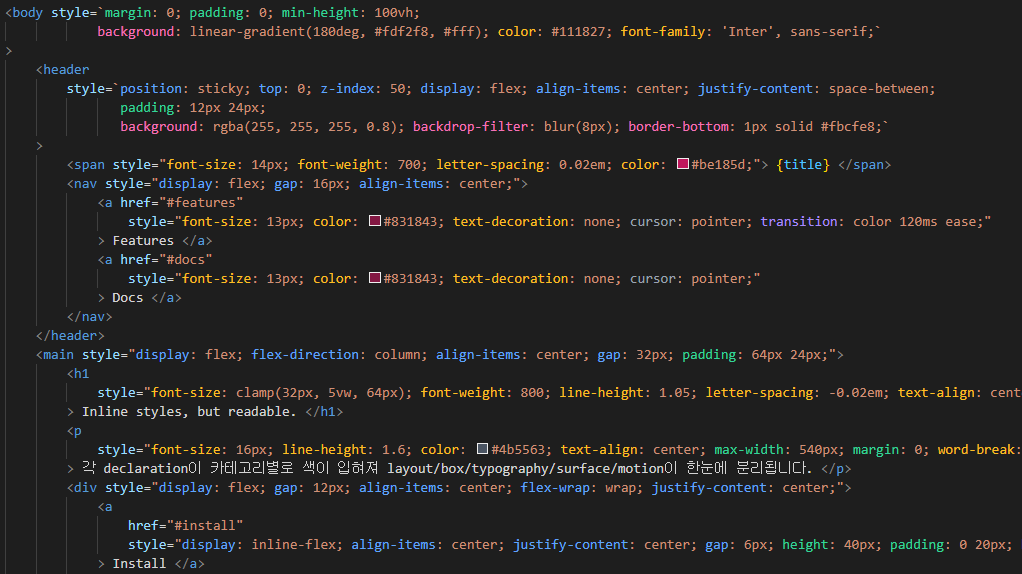
- Layout (blue) —
display, align-items, gap, …
- Box (emerald) —
padding, margin, width, …
- Surface (pink) —
background, border-radius, box-shadow, …
- Typography (amber) —
font-size, color, line-height, …
- Motion (violet) —
transition, transform, …
- Other (gray) —
cursor, user-select, pointer-events, …
Works in both style="..." strings and JSX style={{ ... }} objects (kebab-case and camelCase classify the same way).
Features
- Category-based coloring — every declaration's property name is colored by category
- CSS variable highlighting — both
--brand: red; declarations and var(--brand) references inside values get a distinct cool tone (slate-300)
- Multi-attribute support — picks up
style, :style (Vue), [style] (Angular), ngStyle, and JSX style={ ` ... ` } template literals
- Long property aware —
padding-inline-start, border-top-left-radius, -webkit-mask-image, etc. classify by their longest matching prefix
- Debounced updates — re-highlights 150ms after edits to stay snappy on large files
Categories
Six high-level groups, sharing the same palette as Tailwind Pastel so the visual language stays consistent if you use both:
| Category |
Color |
Covers |
| Layout |
Blue |
display, position, flex/grid, gap, justify/align/place-*, overflow |
| Box |
Emerald |
sizing (width, height, min/max-*) and spacing (padding-*, margin-*) |
| Typography |
Amber |
font-*, color, text-*, line-height, letter-spacing, white-space |
| Surface |
Pink |
background-*, border-*, outline-*, box-shadow, opacity, filter, mask-* |
| Motion |
Violet |
transition-*, animation-*, transform, translate, rotate, scale |
| Other |
Gray |
cursor, user-select, pointer-events, scroll-*, touch-action, fallback |
CSS custom properties (--brand) and var(--brand) references use a separate slate tone so they stand out from regular property names.
Supported Languages
- TypeScript React (
.tsx)
- JavaScript React (
.jsx)
- HTML
- Vue
- Svelte
- Astro
Detection
Style strings are extracted from the following attribute forms:
style="..." / style='...' (HTML, Svelte, Astro, JSX)style={ ` ... ` } (JSX tagged-template inside expression — no ${} interpolation)style={{ ... }} (JSX object form — camelCase keys, kebab-case quoted keys, vendor prefixes like WebkitMaskImage, and '--brand' custom properties all classify correctly):style="..." (Vue)[style]="..." (Angular property binding)ngStyle="..." (Angular)
For string-based attributes, each prop: value; pair becomes one token. Parentheses and brackets in values are respected, so commas/semicolons inside rgb(0, 0, 0) or calc(100% - 16px) don't split a declaration.
For JSX object form, each key: value pair becomes one token, separated at top-level ,. String literals, template literals (including ${} interpolation), comments, and nested ()/[]/{} are all skipped when looking for the separator. Spread (...base) and computed keys ([expr]) are ignored.
Configuration
| Setting |
Type |
Default |
Description |
stylePastel.enabled |
boolean |
true |
Enable category highlighting |
Commands
| Command |
Description |
Style Pastel: Toggle Highlighting |
Flip stylePastel.enabled — writes to workspace settings if defined there, otherwise to global. |
Style Pastel: Inspect Declaration at Cursor |
Shows the category of the declaration under the cursor in the status bar (debug helper). |
License
MIT — see LICENSE.md.
| |

