Tailwind Pastel



Tailwind gives you the wall of utilities. Pastel helps you read it — every class tinted by one of six categories (layout, box, typography, surface, motion, other), so your eyes group them before your brain does.
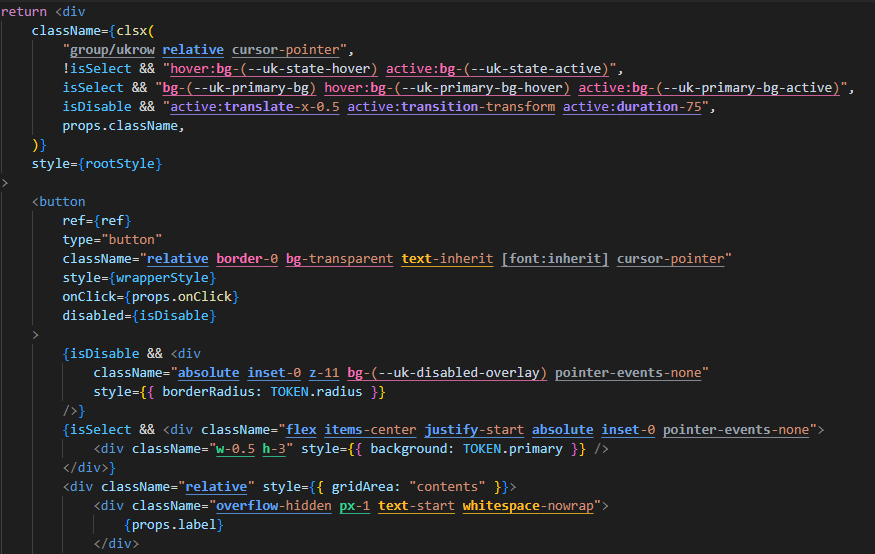
Features
- Category-based coloring — every utility's prefix is colored by category
- Variant-aware —
md:hover:bg-red-500 is classified by the bg- utility, ignoring variant prefixes, !important, and negative - markers
- Arbitrary values supported —
w-[calc(100%-2rem)] and bg-[#1a1a1a] are tokenized correctly even with brackets containing spaces or colons
- Helper-aware — picks up class strings inside
clsx(), cn(), cva(), twMerge(), tagged templates (cn`...`), and namespaced calls (lib.cn(...))
- Debounced updates — re-highlights 150ms after edits to stay snappy on large files
Categories
Six high-level groups, chosen so they're visually distinguishable in both light and dark themes (Tailwind 400-shade palette):
| Category |
Color |
Covers |
| Layout |
Blue |
flex, grid, items-*, justify-*, gap-*, positioning, display |
| Box |
Emerald |
sizing (w-*, h-*, size-*) and spacing (p-*, m-*, space-*) |
| Typography |
Amber |
text-*, font-*, leading-*, tracking-*, decorations, transforms |
| Surface |
Pink |
bg-*, border*, rounded*, shadow*, ring*, opacity, blur, etc. |
| Motion |
Violet |
transition*, duration-*, animate-*, transform, translate-* |
| Other |
Gray |
cursor-*, select-*, pointer-events-*, scroll/snap/touch, fallback |
Supported Languages
- TypeScript React (
.tsx)
- JavaScript React (
.jsx)
- HTML
- Vue
- Svelte
- Astro
Detection
Class strings are extracted from two sources:
(1) Class attributes — class, className, ngClass, class:list, plus their bracket-bound Angular forms ([class], [ngClass]). Static strings ("...", '...') and JSX template literals (className={`...`}) without ${} interpolation are supported.
(2) Helper calls — string literals inside any of these helpers are scanned, including namespaced (lib.cn(...)) and tagged template (cn`...`) forms:
clsx, cn, cx, cva, tw, twMerge, twJoin, classNames, classnames
Templates with ${...} interpolation are skipped to keep position mapping accurate.
Configuration
| Setting |
Type |
Default |
Description |
tailwindPastel.enabled |
boolean |
true |
Enable category highlighting |
Commands
| Command |
Description |
Tailwind Pastel: Toggle Highlighting |
Flip tailwindPastel.enabled — writes to workspace settings if defined there, otherwise to global. |
License
MIT — see LICENSE.md.
| |

