Suno by Ace Data Cloud
Suno music generation by Ace Data Cloud — songs, lyrics, covers and task results in VS Code Chat.
简体中文
This integration is published and operated by Ace Data Cloud. It is not an official extension from the model or service owner. An Ace Data Cloud application API key is required; a key from another provider is not interchangeable.
First, verify without generating: use the read-only tool in the first-use section below. Generation and your Chat model may be billed separately.



Connect VS Code's AI agents to Suno through Ace Data Cloud. Generate songs from text prompts, write custom lyrics with full musical control, extend tracks, remix or cover, separate stems, export MP4/WAV/MIDI — all from chat.
This extension registers the suno MCP server with VS Code so GitHub
Copilot and any other agent that speaks the Model Context Protocol
can call it directly from chat.
Quick Start
- Install this extension. VS Code registers the
suno MCP server automatically.
- Get an application API key using the detailed steps below. Check service access and your current balance before the first request.
- Select a model with tool calling in VS Code Chat. You can use your existing model, or install Ace Data Cloud Chat Models. For the Ace model, first follow its setup guide, open Chat: Manage Language Models, make the model visible, and select it in Chat. BYOK Chat does not require GitHub sign-in or a Copilot plan; organization policies still apply.
- Enable this server's tools. Open Chat → Agent → Configure Tools and select only the tools you need under Suno by Ace Data Cloud. If the list is empty, choose Update Tools. The extension prompts for the API key on first use and saves it in VS Code's
SecretStorage. Disable another copy of the same server from the Ace MCP bundle or manual mcp.json to avoid duplicate tools.
- Verify one result. Check the Tool Reference below and current pricing before running a request. If you already have a task ID, enable its task-query tool and query that same ID first. An accepted generation is not a completed result: poll the original task until it reaches a successful terminal state, open the returned media, and match the task ID in Usage. Do not resubmit generation to poll. Model Chat and background utility calls can add separate charges to the service request.
You can rotate or remove the API key any time from the command palette:
- Suno by Ace Data Cloud: Set Ace Data Cloud API Key
- Suno by Ace Data Cloud: Clear Ace Data Cloud API Key
The default config talks to the hosted streamable-HTTP endpoint at
https://suno.mcp.acedata.cloud/mcp — no Python, no uvx, no local install needed.
Get your credential
- Open Ace Data Cloud → Applications. Sign in, or register an account first.
- Find General application. If it has not been created, choose Initialize General Application. A general key can use the services available to your account; a dedicated application's key is limited to its service. Check the required service/model access and current pricing.
- Copy the API Key from the application card, or open Keys / Manage Keys → Create to create a separate key for this integration. Give it a recognizable name so you can revoke or rotate it independently.
- When creating a key, review Expiration Time, Set Usage Limitation, and Allowed APIs. Enable only the restrictions you need, allow the operations you will call, then click Create and copy the token from the key list. Task lookup does not grant permission to submit a generation. Confirm the application's balance can cover your first request; any trial allowance is whatever your account currently displays.
- Copy only the token value, without quotation marks, spaces, or
Bearer . An API Key / API Token field expects this raw value; only a manually configured HTTP Authorization header needs the Bearer prefix. A platform-... account-management token cannot replace a generation API key.
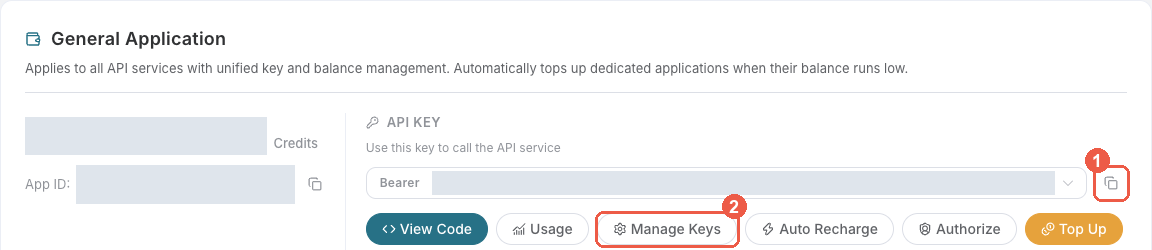
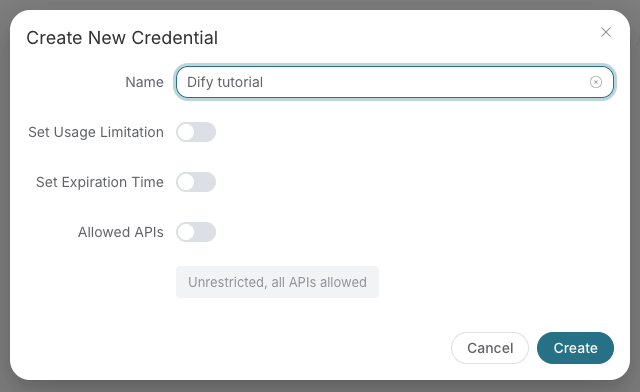
Save the key in the client's credential store or the environment variable shown below. Never put it in a prompt, shared workflow, screenshot, or Git commit. If authentication fails, check the full copied value, application/service access, expiration, usage limit, and balance before creating another key.
Example prompts
- "Generate a lofi hip-hop track about late-night coding. Use suno."
- "Write lyrics for a punk song about deadline pressure, then turn them into a song."
- "Cover the song with task id in a jazz piano style."
37 tools available via this server.
| Tool |
Description |
suno_generate_music |
Generate AI music from a text prompt using Suno's Inspiration Mode. |
suno_generate_custom_music |
Generate AI music with full control over lyrics, title, and style (Custom Mode). |
suno_extend_music |
Extend an existing song from a specific timestamp with new lyrics. |
suno_cover_music |
Create a cover or remix version of an existing song in a different style. |
suno_concat_music |
Concatenate extended song segments into a single complete audio file. |
suno_generate_with_persona |
Generate music using a saved artist persona for consistent vocal style. |
suno_remaster_music |
Remaster an existing song; v5/v5.5 require a variation category. |
suno_stems_music |
Separate a song into individual stems (vocals and instruments). |
suno_replace_section |
Replace a specific time range in a song with new generated content. |
suno_upload_extend |
Extend an uploaded audio (your own music) with new AI-generated content. |
suno_upload_cover |
Create an AI cover of an uploaded audio (your own music). |
suno_mashup_music |
Blend exactly two songs using a required creative-direction prompt. |
suno_all_stems_music |
Return two distinct 12-stem candidate sets, labeled stem_set 1 and 2 in task results. |
suno_generate_lyrics |
Generate song lyrics from a text prompt. |
suno_get_mp4 |
Get an MP4 video version of a generated song. |
suno_get_timing |
Get timing and subtitle data for a generated song. |
suno_check_audio_availability |
Synchronously check for positive evidence that an audio ID is available on the current channel. |
suno_extract_vocals |
Extract a required vocal interval shorter than 30 seconds. |
suno_get_wav |
Get the lossless WAV format of a generated song. |
suno_get_mp3 |
Get the compressed MP3 format of a generated song. |
suno_get_midi |
Get MIDI data extracted from a generated song. |
suno_create_persona |
Create a new artist persona from an existing audio's vocal style; API pricing applies. |
suno_list_personas |
List saved personas for a user without a usage charge. |
suno_delete_persona |
Permanently delete a saved persona without a usage charge. |
suno_create_custom_model |
Create a reusable custom music model from 6 to 24 authorized audio URLs. |
suno_get_custom_model |
Retrieve one custom music model by ID. |
suno_list_custom_models |
List custom music models for the current Suno application. |
suno_generate_with_custom_model |
Generate a song using a ready custom music model. |
suno_delete_custom_model |
Archive a custom music model so it can no longer be used. |
suno_optimize_style |
Optimize a music style description for better generation results. |
suno_mashup_lyrics |
Generate mashup lyrics by combining two sets of lyrics. |
suno_upload_audio |
Upload external audio in standard or enhanced mode for subsequent operations. |
suno_get_task |
Query the status and result of a music generation task. |
suno_get_tasks_batch |
Query multiple music generation tasks at once. |
suno_list_models |
List all available Suno models and their capabilities. |
suno_list_actions |
List all available Suno API actions and corresponding tools. |
suno_get_lyric_format_guide |
Get guidance on formatting lyrics for Suno music generation. |
Supported Models
v3.5, v4, v4.5, v5
Pricing
Music generation is metered. Check current pricing and the trial allowance displayed in your own account. See Documentation.
Configuration
This extension implements the mcpServerDefinitionProviders contribution point
and registers a single hosted server with VS Code:
Provider id : acedatacloud.suno
Server label: Suno by Ace Data Cloud
Server URL  : https://suno.mcp.acedata.cloud/mcp
Transport   : Streamable HTTP
Auth        : Bearer API key from VS Code SecretStorage (or $ACEDATACLOUD_API_TOKEN)
You don't need to edit mcp.json — the extension handles registration and
token handling automatically. If you'd rather configure things by hand, the
sections below show equivalent mcp.json snippets you can use instead of
this extension.
Alternative: manual mcp.json (hosted)
{
  "servers": {
    "suno": {
      "type": "http",
      "url": "https://suno.mcp.acedata.cloud/mcp",
      "headers": { "Authorization": "Bearer ${input:acedatacloud_api_token}" }
    }
  },
  "inputs": [
    {
      "type": "promptString",
      "id": "acedatacloud_api_token",
            "description": "Ace Data Cloud API key",
      "password": true
    }
  ]
}
Alternative: local stdio (no network roundtrip)
For offline dev, air-gapped environments, or pinning to a specific PyPI
version, install uv and use:
{
  "servers": {
    "suno": {
      "type": "stdio",
      "command": "uvx",
      "args": ["mcp-suno"],
      "env": { "ACEDATACLOUD_API_TOKEN": "${input:acedatacloud_api_token}" }
    }
  }
}
uvx will download and run the latest mcp-suno on demand.
Links
License
MIT — see LICENSE.
First use: discover, then read an existing result
- Install Suno by Ace Data Cloud. This is an independent service extension; the Ace toolbox is optional. Do not enable two copies of the same server.
- Complete the application-key steps above. Run Suno by Ace Data Cloud: Set Ace Data Cloud API Key and paste only the token. No workspace configuration file is needed.
- In Chat: Manage Language Models, show and select a tool-capable model. If you use the separate Ace Chat Models extension, follow its model setup. Then open Chat → Agent → Configure Tools and enable only
suno_list_models for this first check.
- Send the prompt below and inspect the confirmation's tool name and arguments. Your Chat model and background requests may be billed even when the service tool is read-only.
Call suno_list_models only. Show supported models/actions. Do not generate anything.
The model-list tool returns reference information without generating media. It does not prove that your key has generation access.
For an application-backed read-only authentication check, enable only suno_list_custom_models and call it with limit=1. A successful items response, including an empty list, confirms custom-model lookup access. It does not create music or train a model; it does not prove generation permission or balance. Check Allowed APIs for that lookup. Your Chat model can still be billed separately.
For an existing media task, enable only suno_get_task, replace TASK_ID with your original task ID, and query that same ID until terminal success or failure. Open the returned media link and match the original generation task to its charge in Usage. An accepted task or green Chat turn alone is not a completed artifact. Never resubmit generation just to check progress.
Real VS Code reference screenshots
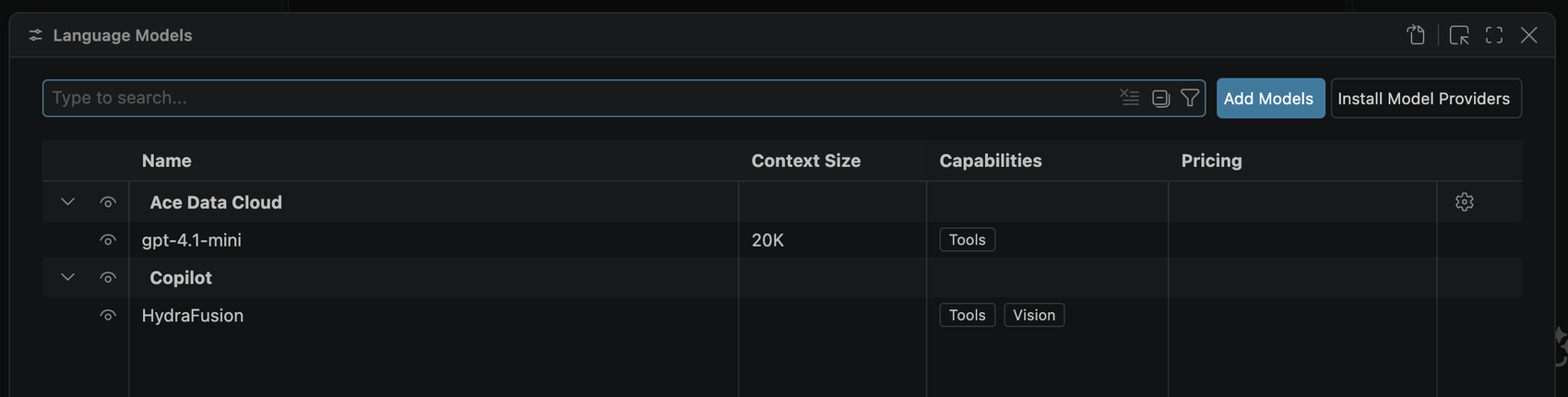
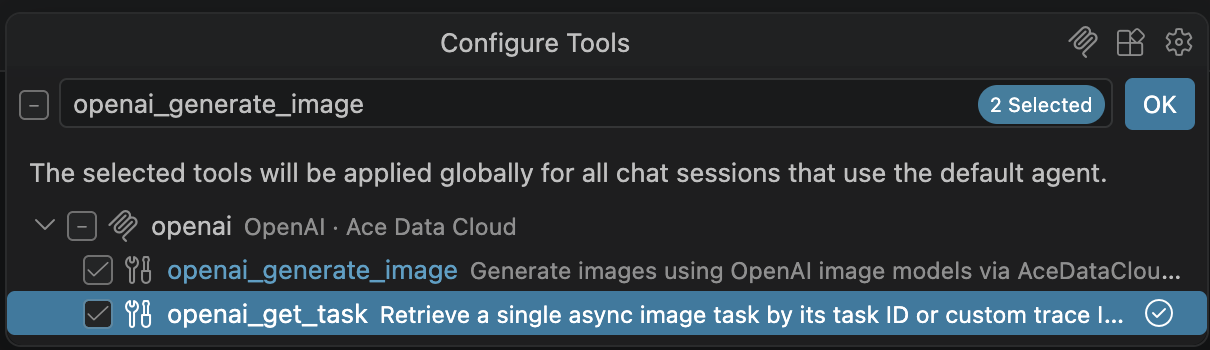
Historical real VS Code 1.141 screenshots, included in tutorials on 2026-10-09 (Asia/Shanghai). The tool-selection image uses the OpenAI server as a reference: choose this extension's server and the exact tool named above. These images do not show a newly published version or prove this independent service was called.
Troubleshooting your first call
| Symptom |
Check |
| Model missing / sign-in prompt |
Complete Manage Language Models and the model extension's setup; respect organizational BYOK policy. |
| Tools missing |
Update Tools, check workspace/server trust, and disable duplicate bundle or manual registrations. |
| 401 / 403 |
Check application/service access, expiry, Allowed APIs, usage limit and balance. Use an application key rather than a platform management token. |
| Pending task |
Query the same original ID; do not submit generation again. |
| 429 / 5xx |
Preserve task/trace ID, inspect original task and Usage, and do not automatically retry a paid operation. |

