Sidekick Docker for VS Code




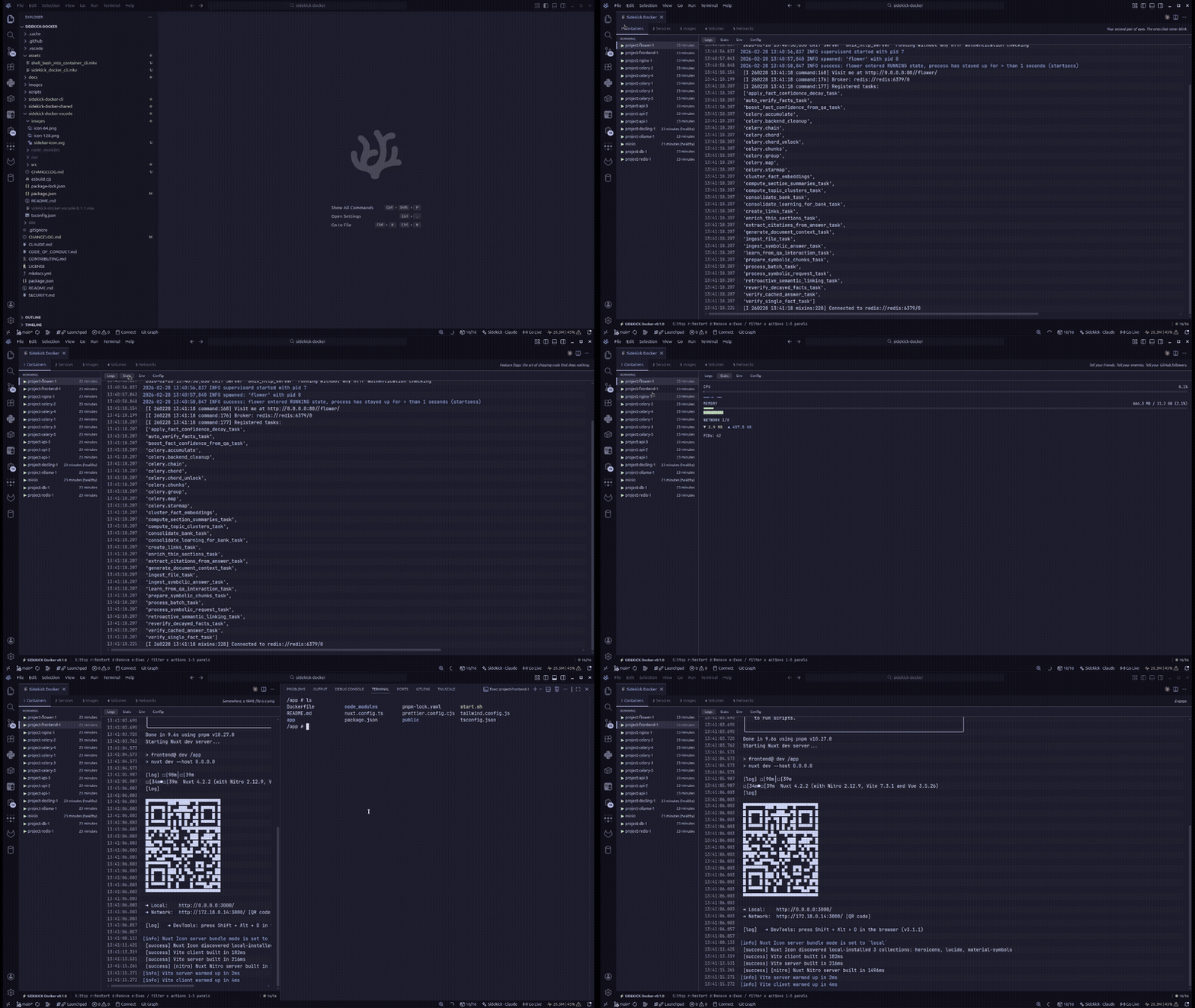
A Docker management dashboard embedded directly in VS Code, VSCodium, and compatible editors. Manage containers, Compose projects, images, volumes, and networks without leaving your editor.
Install
From VSIX
cd sidekick-docker-vscode
npm install
npm run build
npx vsce package
code --install-extension sidekick-docker-vscode-*.vsix
Build from Source
git clone https://github.com/cesarandreslopez/sidekick-docker.git
cd sidekick-docker
bash scripts/build-all.sh
Then open the sidekick-docker-vscode folder in VSCode and press F5 to launch the Extension Development Host.
Usage
Open the command palette (Ctrl+Shift+P / Cmd+Shift+P) and run:
Sidekick Docker: Open Dashboard
or press Ctrl+Alt+D — Ctrl, not Cmd, on macOS too (macOS reserves Cmd+Opt+D
for the Dock). The dashboard opens as a webview panel with the same layout and
capabilities as the terminal TUI, and survives window reloads.
Commands
| Command |
Description |
Sidekick Docker: Open Dashboard |
Open the dashboard (Ctrl+Alt+D, all platforms) |
Sidekick Docker: Open Dashboard to the Side |
Open in a split editor column |
Sidekick Docker: Refresh Containers |
Refresh the tree view (Ctrl+Alt+R / Cmd+Alt+R when focused) |
Sidekick Docker: Start/Stop/Restart Container... |
Quick-pick a container to act on |
The activity-bar Containers tree groups containers by state (and by Compose
project), with start/stop/restart/pause/unpause/remove and Open in Dashboard in
the context menu and a status-bar item showing running/total counts.
Settings
| Setting |
Default |
Description |
sidekick-docker.socketPath |
"" |
Docker endpoint: socket path, unix://, or tcp://host[:port]. Empty uses the platform default (or DOCKER_HOST). |
sidekick-docker.refreshIntervalSeconds |
30 |
Fallback full-refresh interval (min 5). |
sidekick-docker.statusBar.visible |
true |
Show the status-bar container counts. |
sidekick-docker.exec.defaultShell |
/bin/sh |
Shell used by "Exec into container". |
Features
- Full Docker dashboard in VSCode — containers, Compose, images, volumes, networks
- Real-time updates — logs and stats stream live inside the editor
- Smart log highlighting — token-level syntax coloring for HTTP methods, status codes, URLs, IPs, timestamps, JSON keys, and more
- Log search & filter — search within log output with exact or fuzzy matching and match highlighting
- Log analytics — severity count badges and pattern clustering that groups similar logs into templates
- Container management — start, stop, restart, pause, unpause, remove containers directly
- Health status — shows healthy/unhealthy/starting indicators for containers with health checks
- Compose support — detect and manage Compose projects
- Stats monitoring — live CPU, memory, network I/O, and block I/O metrics with sparkline charts
- Filesystem inspector — view all filesystem changes inside containers (Files tab)
- Image layer explorer — inspect image layer history with sizes and Dockerfile instructions (Layers tab)
- Exec into containers — open an interactive terminal inside a container (shell configurable via
sidekick-docker.exec.defaultShell)
- Connection awareness — status-bar connection indicator, a disconnected banner with one-click Retry when the daemon goes away, and a "Retry Connection" action in the Containers view
- Mouse-friendly — click rows and tabs to select, right-click a container row for its action menu, clickable status-bar hint chips
- Accessible — ARIA roles, labels, and live regions; tabs and overlays reachable by keyboard
- Workspace-aware Compose — compose files are detected in your workspace folders, and Compose actions run from the folder containing the compose file
Requirements
- VSCode >= 1.109
- Docker running and accessible
- Node.js >= 20 (for building from source)
Architecture
The extension uses a webview panel to render the dashboard UI. The extension host (Node.js) communicates with the webview (browser) via postMessage() with a typed message protocol:
- Extension side (
src/extension.ts) — activates on startup (onStartupFinished) to register commands and populate the Containers tree and status bar; creates the DockerDashboardProvider
- Provider (
src/providers/DockerDashboardProvider.ts) — manages the webview lifecycle, handles Docker API calls via sidekick-docker-shared
- Webview (
out/webview/dashboard.js) — renders the dashboard UI, sends user actions back to the extension
- Message types (
src/types/messages.ts) — typed request/response messages between extension and webview
Documentation
Full documentation is available at the docs site.
See Also
Sidekick Agent Hub — Multi-provider AI coding agent monitor. Real-time visibility into Claude Code, OpenCode, and Codex CLI sessions with token tracking, context management, and session intelligence. Available as a TUI on npm and a VS Code extension.
Contributing
Contributions are welcome! See CONTRIBUTING.md for setup instructions and guidelines.
License
MIT

