Sidekick Agent Hub
Multi-provider AI coding assistant for VS Code — inline completions, code transforms, commit messages, and agent session monitoring.
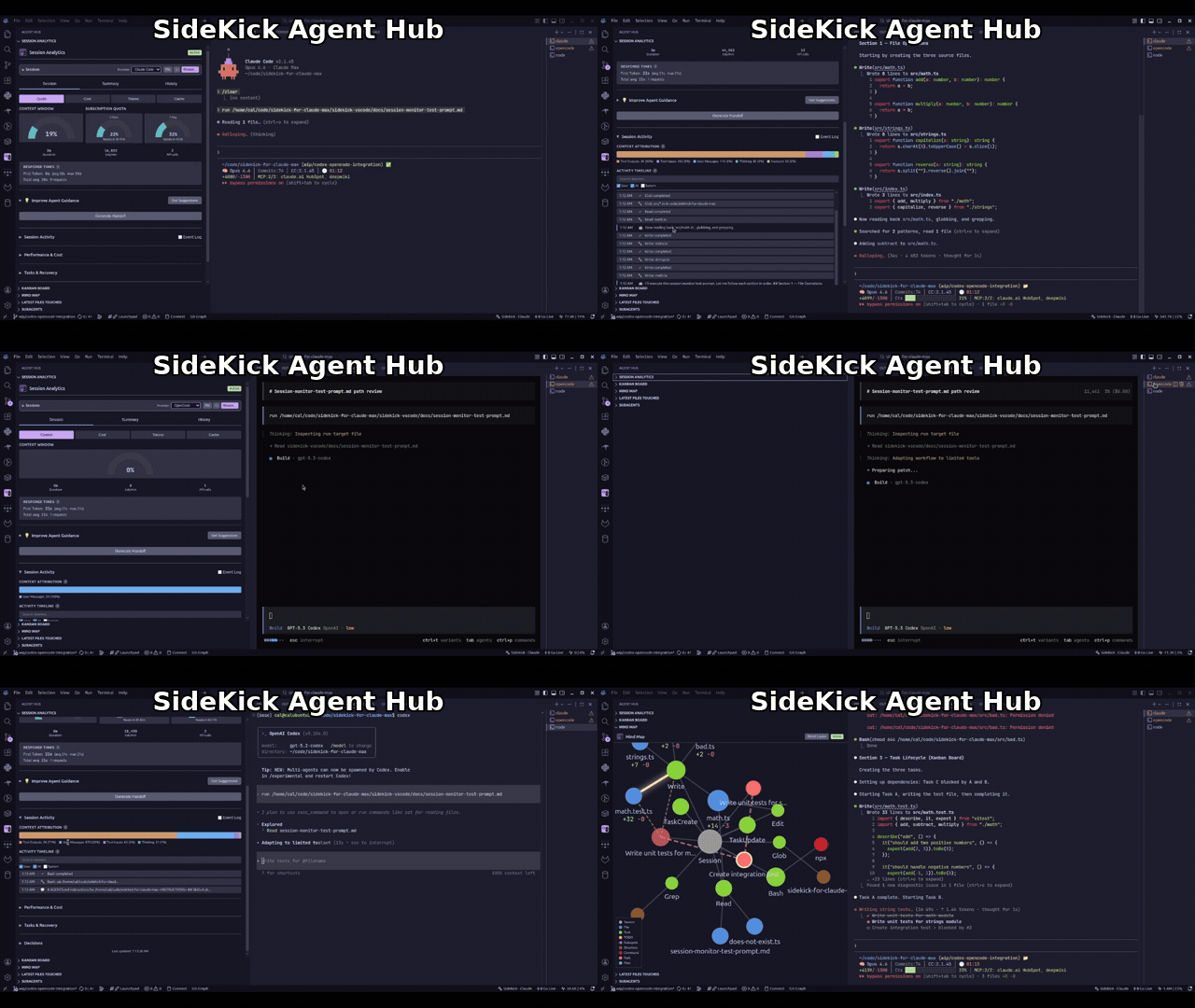
AI coding agents are powerful, but they run autonomously — tokens burn silently, context fills up without warning, and everything is lost when a session ends. Sidekick gives you real-time visibility into what your agent is doing, AI-powered coding features that eliminate mechanical work, and session intelligence that preserves context across sessions.
| Provider |
Inference |
Session Monitoring |
Cost |
| Claude Max |
Yes |
Yes |
Included in subscription |
| Claude API |
Yes |
— |
Per-token billing |
| OpenCode |
Yes |
Yes |
Depends on provider |
| Codex CLI |
Yes |
Yes |
OpenAI API billing |
What's New
- 0.27.0: Opus 5.5 and GPT-6 Astra — the
powerful tier now resolves to Claude Opus 5.5 (claude-opus-5-5; anthropic/claude-opus-5-5 on OpenCode) and the Codex tiers move to GPT-6 (gpt-6-luna / gpt-6-sol / gpt-6-astra), while Claude Max still passes opus. Opus 5.5 costs use its own rates, and dashboard labels show Opus 5.5 / Fable 5.1 instead of dropping the minor version.
- 0.26.6: verified account switching — an Accounts sidebar view and an always-visible status bar badge show every saved Claude Code and Codex account with credential health; the grouped quick pick (
Ctrl+K Ctrl+Shift+A) switches, adds, signs in again, opens a terminal as an account, or undoes. Logins made natively are registered automatically, each switch is verified and reported in one notification with Undo, Details, and Reload Window, and the opt-in sidekick.accounts.keepAlive refreshes inactive accounts through the official CLIs. Account commands no longer depend on the inference provider setting.
- 0.26.5: calibrated high-token alert — the warning fires once when a session's cache-inclusive total first crosses
sidekick.notifications.tokenThreshold (now 5,000,000 by default), later multiples warn at most every 30 minutes, and a new session starts fresh. Session discovery reconciles each watched-file event with one stat instead of re-walking the session directory.
- 0.26.4: sharper authentication and policy guidance — terminal inference failures recognize expired-login and re-authentication messages with guidance matched to the credential kind, distinguish a rejected refresh token from an expired conversation, and treat
Permission denied by policy (including HTTP 403) as an execution-policy denial.
- 0.26.3: provider failure guidance and status evidence — inference failures distinguish credential, session, service, connection, timeout, rate-limit, execution-policy, runtime, and context-limit problems with recovery hints; "Test Connection" separates local CLI readiness from an authenticated request and no longer labels network errors as rejected keys. Public status cards show unavailable or partial evidence, multiple incidents with component associations, and separate check/provider-update timestamps.
- 0.26.2: monitoring recovery — stop/resume preserves subscriptions and custom folders; empty or paused dashboards offer Refresh, Browse, Run Doctor, and Resume. Keyboard navigation works across tabs, session cards, and section toggles.
- Reliable session history — search covers every provider and opens results in the conversation viewer. Claude Code and Codex resume from validated checkpoints; OpenCode replays history to keep totals accurate. Cancelled inline requests stop inference.
- History and Health tabs — the History tab charts hourly today, by-model and by-tool series, a project filter, and a previous-period overlay with deltas; the new Health tab shows doctor checks, provider diagnostics, and failing-tool trends over 7 and 30 days.
- Billing block and quota alerts — a Billing block card beneath the quota gauges shows the open five-hour block computed from session logs with burn rate and projections, next to the official status-line sample;
sidekick.notifications.triggers.quota-threshold warns once per reset window when the five-hour or seven-day window crosses a configurable threshold.
- Consistent totals and costs — the status bar, the dashboard, the timeline, imported history, and the
tokenThreshold notification all count input, output, and both cache buckets through one shared vocabulary, and costs carry their provenance.
- Faster activation and dashboard — account seeding and git initialisation run in the background, the mind map, plan board, and timeline views are built on first show, dashboard messages are coalesced, and the dashboard webview is an esbuild bundle instead of an inline script.
- Responsive account operations — Codex login probes, account switches, login polling, and the shutdown data flush no longer block the extension host, so the editor stays responsive during account setup and exit.
- First-run walkthrough & command hub — a four-step Get Started walkthrough (detect a live session, open the dashboard, read the status bar, capture a note), plus a
Sidekick: Show Menu command hub generated from the extension manifest so it never drifts.
- Claude Code statusline —
Sidekick: Install Statusline wires sidekick statusline into Claude Code's statusLine setting with safe merges; Uninstall Statusline restores the prior block.
- Sidekick Doctor —
Sidekick: Run Doctor diagnoses project identity, sessions, accounts, providers, and dependencies with the same typed report as the CLI.
- External handoff —
Sidekick: Open External Session Handoff opens a URL built from the sidekick.handoffUrlTemplate setting with identifier-only placeholders.
- New dashboard views — error forensics, quality score (beta), code impact, and compaction ledger; the Plans board/history pipeline is re-enabled with per-step timing, token, tool, and cost data.
- Codex reset credits — the dashboard "Rate Limits" tile shows available rate-limit reset credits and their expirations whenever the quota sample came from Codex's usage API, and keeps the last fetched credits when a later sample comes from session logs.
- z.ai Coding Plan quota — when OpenCode has z.ai Coding Plan credentials, the dashboard adds a z.ai quota card (5-Hour / Weekly) sourced from z.ai's quota API, with cached snapshot fallback.
See the full changelog for everything.
Quick Start
- Install and authenticate Claude Code CLI:
npm install -g @anthropic-ai/claude-code
claude auth login
- Install the extension from the VS Code Marketplace or Open VSX
- Start typing — completions appear as ghost text
- Install the extension
- Run "Sidekick: Set API Key" from the Command Palette
- Set
sidekick.inferenceProvider to claude-api
- Ensure OpenCode is running (
opencode in a terminal)
- Set
sidekick.inferenceProvider to opencode
Note: OpenCode session monitoring reads opencode.db and currently expects an executable sqlite3 runtime in the host environment.
- Install Codex CLI:
npm install -g @openai/codex
- Run
codex login, or set OPENAI_API_KEY / CODEX_API_KEY
- Set
sidekick.inferenceProvider to codex
Features
AI Coding
Let AI handle the mechanical work — boilerplate, commit messages, docs, PR descriptions — so you focus on design and logic.
- Inline Completions — context-aware suggestions that understand your project, not just syntax (
Ctrl+Shift+Space to trigger manually)
- Code Transforms — select code, describe changes in natural language (
Ctrl+Shift+M)
- Generate Documentation — auto-generate JSDoc/docstrings from implementation, not just signatures (
Ctrl+K Ctrl+G)
- Explain Code — five complexity levels from ELI5 to PhD Mode (
Ctrl+K Ctrl+E)
- Quick Ask — inline chat for questions and code changes (
Ctrl+K Ctrl+A)
- AI Commit Messages — generate meaningful messages from staged changes (sparkle icon in SCM toolbar)
- Pre-commit Review — catch bugs, security concerns, and code smells before they reach your team (eye icon in SCM toolbar)
- PR Descriptions — auto-generate structured summaries from branch diff (PR icon in SCM toolbar)
- Error Analysis — AI-powered error explanations and one-click fixes
Agent Monitoring
When your AI agent runs autonomously, you need to know what it's doing. Real-time dashboards, visualizations, and alerts keep you in control.
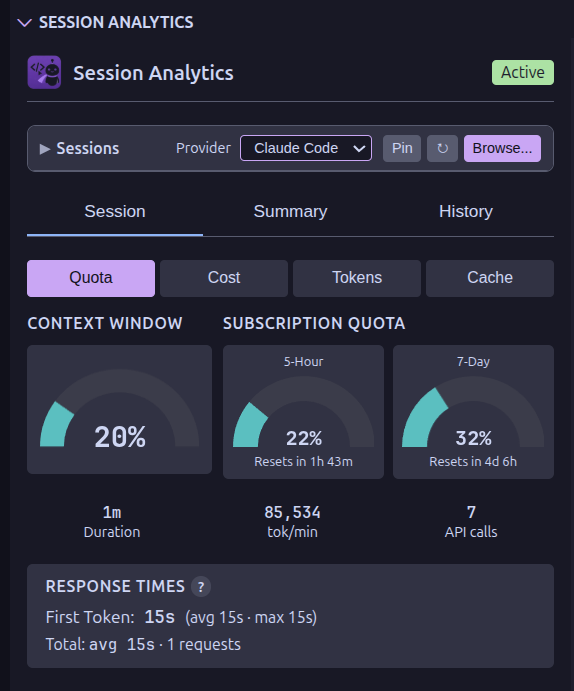
- Mind Map — interactive D3.js graph of session structure and file relationships
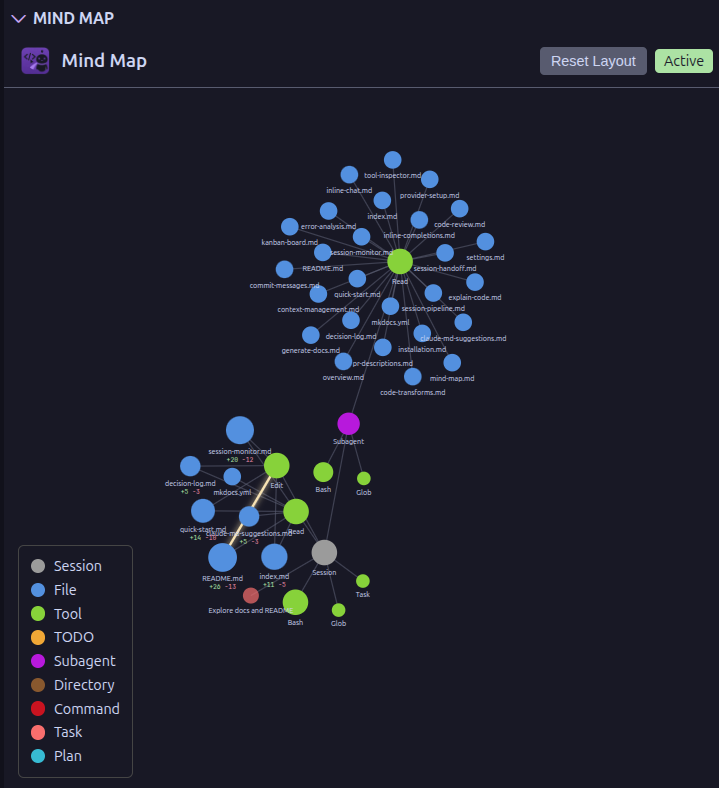
- Kanban Board — task and subagent tracking with real-time updates
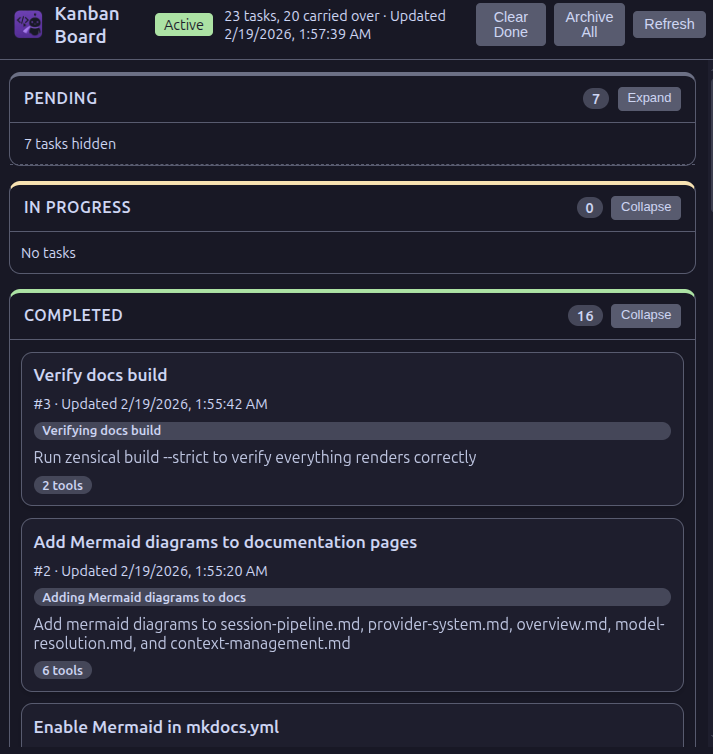
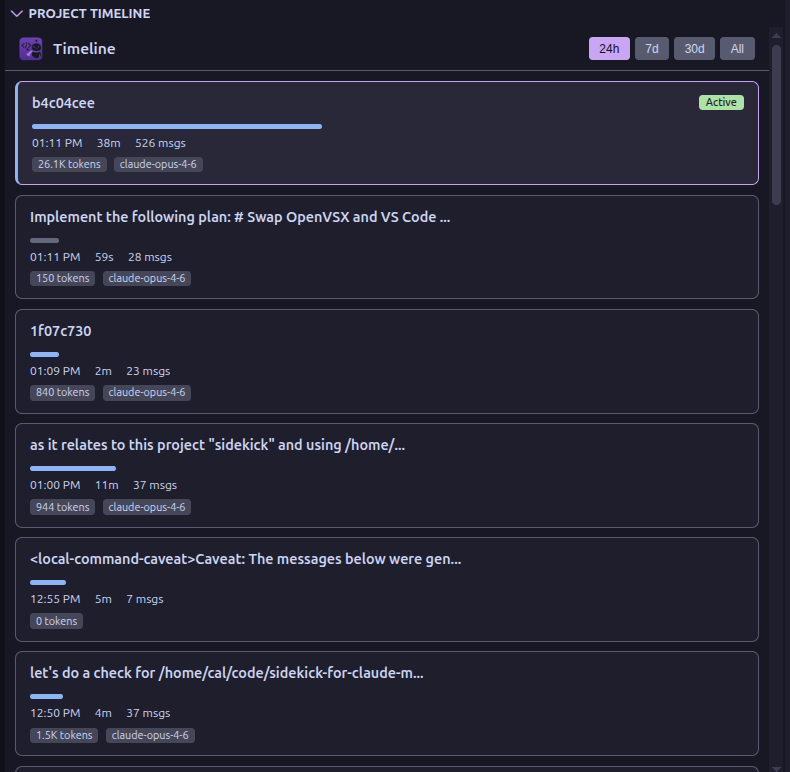
- Project Timeline — chronological view of all sessions with duration, token usage, and expandable details
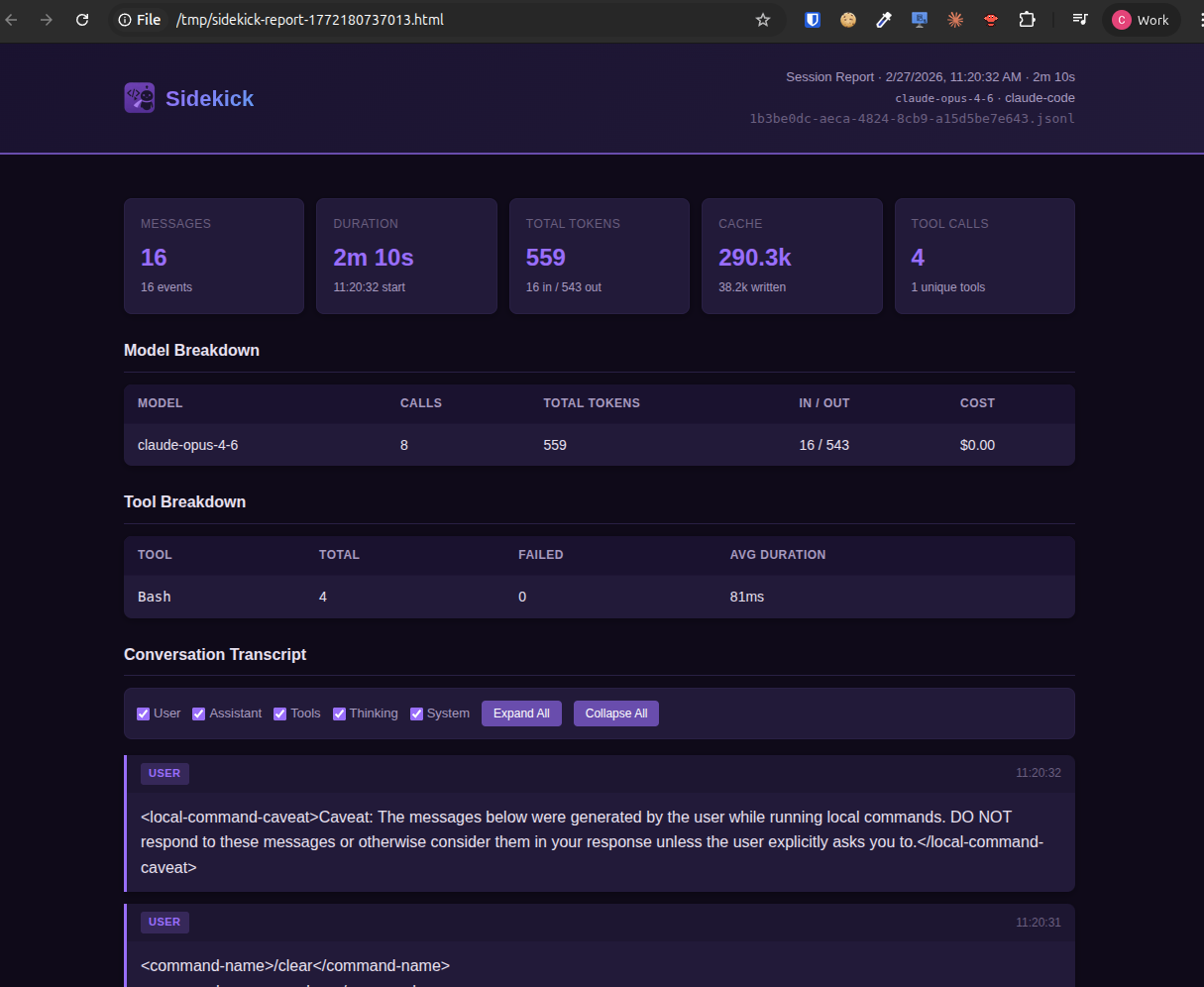
- HTML Session Report — self-contained HTML report with full transcript, token/cost stats, model breakdown, and tool-use summary — opens in a webview panel
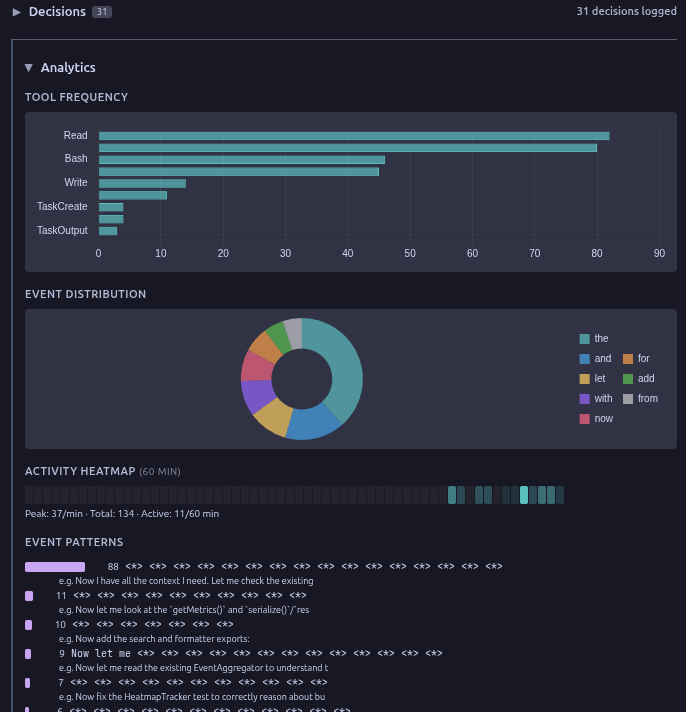
- Analytics Charts — tool frequency, event distribution, activity heatmap, and event pattern detection in the dashboard
- Accounts — sidebar view of every saved Claude Code and Codex account grouped by provider with credential health, plus an always-visible status bar badge; switch, sign in again, open a terminal as an account, or undo from there. See Account Switcher
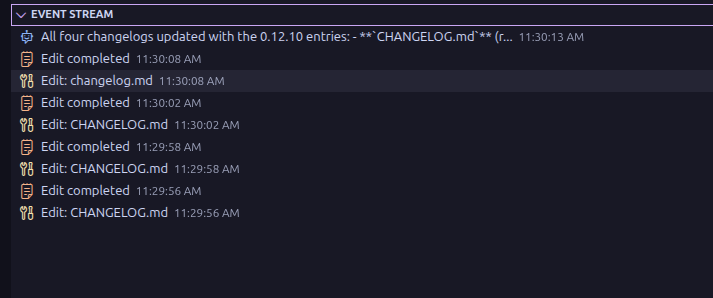
- Event Stream — live sidebar tree view of session events with color-coded type icons and timestamps
- Conversation Viewer — full session transcript that interleaves assistant reasoning, tool calls, and narration in provider-normalized arrival order (a compact Process + Answer shape) for Claude, Codex, and OpenCode; tool calls render as concise rows with expandable outputs, with search across the conversation
- Tool Inspector — per-tool rendering (diffs for Edit, commands for Bash, etc.) with paired tool outputs (file content, stdout, search results)
- Subagent Tree — hierarchical view of subagent spawns with nested parent/child relationships
- Plans Board — agent plans discovered for the project, surfaced as a dedicated sidebar view
- Latest Files Touched — sidebar tree of files the current session has read or modified
- Cross-Session Search — search across all sessions
- Notification Triggers — alerts for credential access, destructive commands, compaction, token thresholds, and quota thresholds (once per reset window)
- Provider Status — live API health indicator scoped to the monitored provider: Claude for Claude Code sessions, OpenAI for Codex sessions, not shown for OpenCode sessions (use
sidekick status in the CLI for a one-shot check)
Session Intelligence
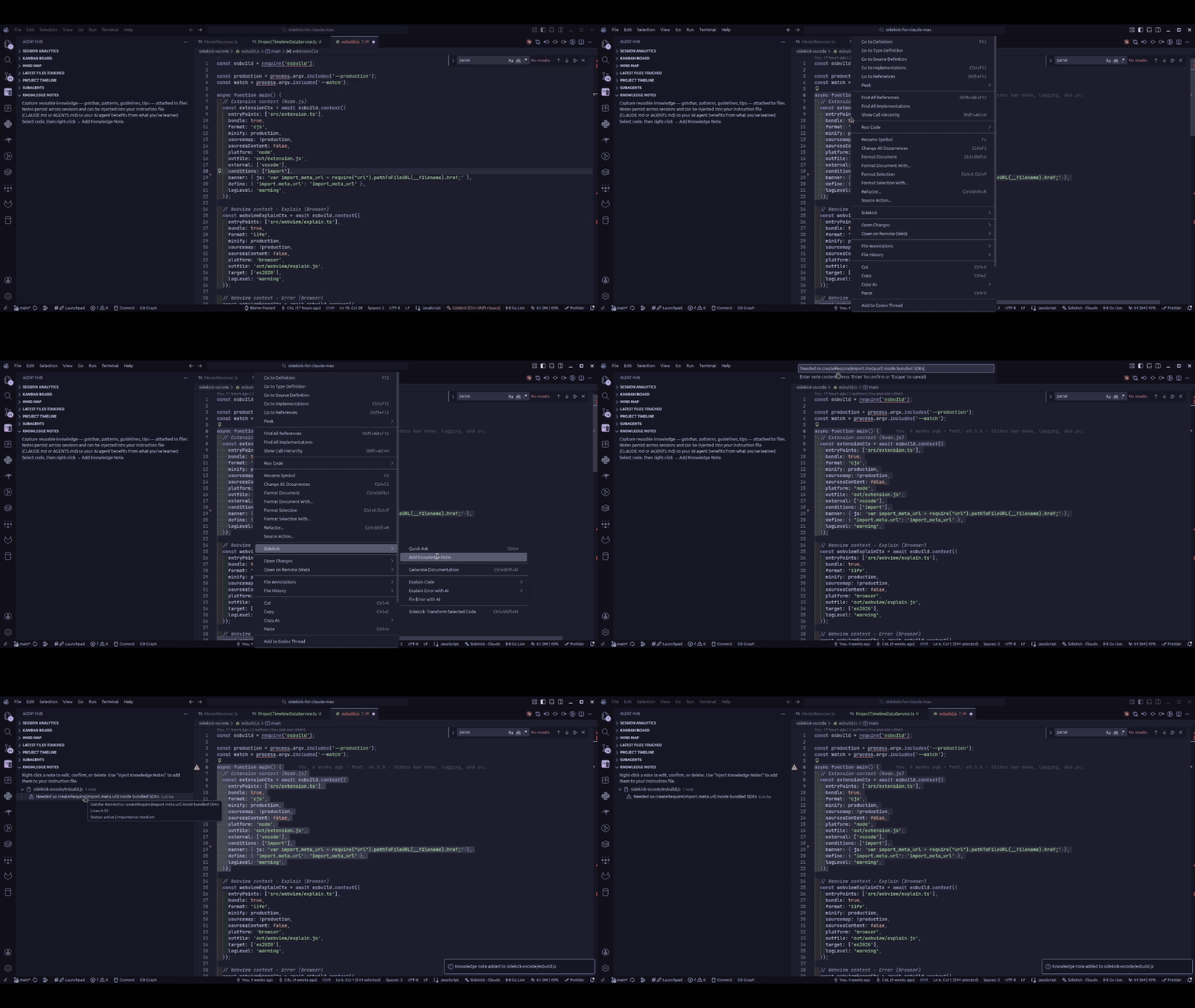
- Knowledge Notes — capture gotchas, patterns, guidelines, and tips attached to files, with lifecycle tracking and instruction file injection
- Session Handoff — automatic context documents for session continuity
- Decision Log — tracks architectural decisions from sessions
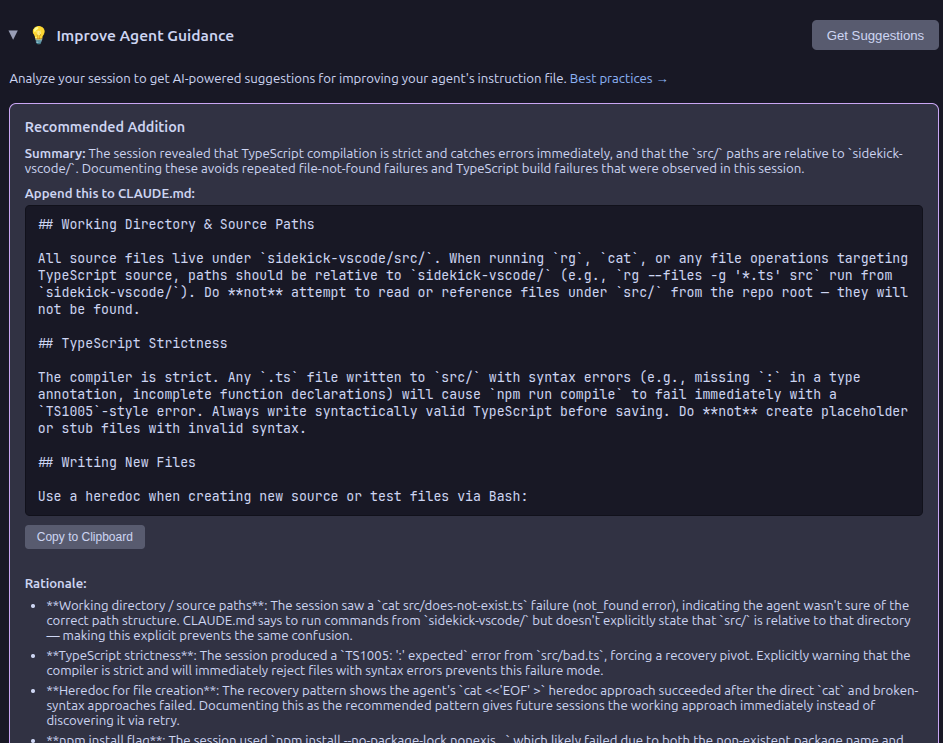
- CLAUDE.md Suggestions — AI-powered session analysis for optimizing agent instructions
- Extract Session Assets — run
Sidekick: Extract Session Assets to search recent Claude Code and Codex chats for URLs, files, commands, and plans. URLs open externally, file paths open in the editor, commands copy to the clipboard, and plans open as Markdown
Terminal Dashboard
All monitoring and intelligence features are also available as a standalone terminal dashboard — no VS Code required.
Note: The npm package is sidekick-agent-hub, but the binary is called sidekick.
npm install -g sidekick-agent-hub    # requires Node.js 20+
sidekick dashboard
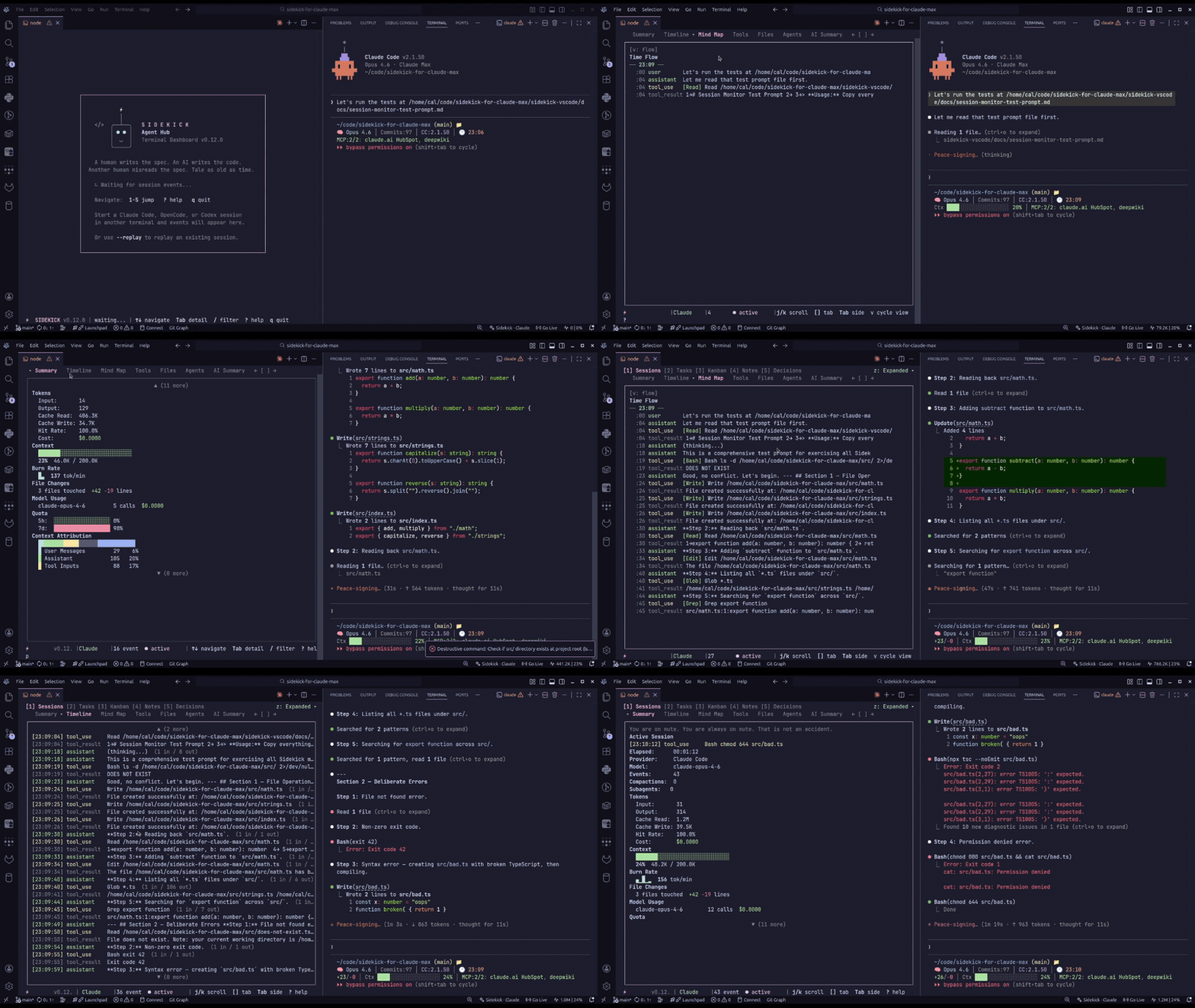
Browse sessions, tasks, decisions, knowledge notes, live event streams, and charts in a full-screen TUI. Eight panels including an Events panel for real-time session activity and a Charts panel with tool frequency, event distribution, activity heatmap, and pattern analysis. Press ? for keybindings. Standalone commands (sidekick tasks, sidekick decisions, sidekick notes, sidekick stats, sidekick handoff, sidekick search, sidekick history, sidekick context, sidekick extract, sidekick quota, sidekick accounts, sidekick status, sidekick peak, sidekick today, sidekick doctor, sidekick statusline, sidekick blocks, sidekick daily/weekly/monthly, sidekick import, sidekick report, sidekick dump, sidekick mcp) run one-shot queries without the TUI. See the CLI Dashboard docs for the full guide.
| Setting |
Default |
Description |
sidekick.inferenceProvider |
auto |
Provider: auto, claude-max, claude-api, opencode, codex |
sidekick.sessionProvider |
auto |
Session monitor: auto, claude-code, opencode, codex |
sidekick.inlineModel |
auto |
Model for completions (fast tier) |
sidekick.transformModel |
auto |
Model for transforms (powerful tier) |
sidekick.debounceMs |
1000 |
Completion delay (ms) |
sidekick.commitMessageStyle |
conventional |
Commit format: conventional or simple |
sidekick.enableSessionMonitoring |
true |
Enable agent session monitoring |
sidekick.accounts.keepAlive |
false |
Refresh saved-but-inactive accounts through the official CLIs after activation and every six hours |
sidekick.accounts.autoSwitchThreshold |
0 |
Quota utilization percentage that triggers an automatic switch to a healthier saved account (0 disables) |
sidekick.notifications.tokenThreshold |
5000000 |
Cache-inclusive session token total that triggers the high-usage warning |
sidekick.notifications.triggers.quota-threshold |
true |
Alert when quota crosses quotaFiveHourThresholds ([80, 95]) or quotaSevenDayThresholds ([90]) |
sidekick.claudePath |
"" |
Full path to the claude CLI when it is not on PATH |
sidekick.autoHandoff |
off |
Session handoff: off, generate-only, generate-and-notify |
sidekick.handoffUrlTemplate |
"" |
External handoff URL template; placeholders {sessionId}, {provider}, {projectPath} — no transcript content is included |
sidekick.pricing.hydrateFromLiteLLM |
true |
Fetch model prices and context window sizes from LiteLLM on activation |
sidekick.pricing.cacheTtlHours |
24 |
LiteLLM catalog cache lifetime (hours) |
sidekick.peakHours.enabled |
true |
Show Claude peak-hours indicator in the dashboard and status bar (Claude Max only) |
sidekick.peakHours.notifyOnTransition |
false |
One-time toast when peak hours start or end (opt-in) |
Model settings accept auto (recommended), a tier (fast/balanced/powerful), a legacy name (haiku/sonnet/opus), or a full model ID. Tiers resolve to current flagships — Claude Opus 5.5 (powerful), Sonnet 5 (balanced), and Haiku 4.5 (fast) on Anthropic providers, and GPT-6 Astra (powerful), GPT-6 Sol (balanced), and GPT-6 Luna (fast) on Codex — with 1M-token context windows where available. See Model Resolution for details.
Commands
| Command |
Keybinding |
Description |
| Toggle Inline Completions |
— |
Enable/disable inline completions |
| Trigger Completion |
Ctrl+Shift+Space |
Manually request completion |
| Transform Selected Code |
Ctrl+Shift+M |
Transform selected code |
| Quick Ask (Inline Chat) |
Ctrl+K Ctrl+A |
Inline chat |
| Generate Documentation |
Ctrl+K Ctrl+G |
Generate documentation |
| Explain Selected Code |
Ctrl+K Ctrl+E |
Explain selected code (five detail levels in the editor context menu) |
| Generate Commit Message |
SCM sparkle icon |
AI commit message |
| Review My Changes |
SCM eye icon |
Pre-commit review |
| Generate PR Description |
SCM PR icon |
Auto-generate PR description |
| Set API Key |
— |
Store the Claude API key for the claude-api provider |
| Test Connection |
— |
Check local CLI readiness or an authenticated request for the current provider |
| Switch Inference Provider |
— |
Change inference provider |
| Show Menu |
Status bar item |
Quick pick of every Sidekick command |
| Switch Account… |
Ctrl+K Ctrl+Shift+A |
Grouped quick pick of every saved account with health; also Add, Open Terminal, Sign In Again, Undo |
| Add Account… |
— |
Sign in to another account in an isolated profile via the integrated terminal; the current login is untouched |
| Sign In Again |
Accounts view |
Re-authenticate an expired saved account in place, keeping its label and id |
| Open Terminal as Account |
Accounts view |
Start a terminal whose claude / codex use a saved account without switching the live login |
| Undo Last Account Switch |
— |
Revert the most recent switch |
| Register Current Login |
— |
Save (or relabel) the account you are signed in to right now |
| Remove Account |
— |
Remove a saved account and its credentials |
| Open Session Dashboard |
— |
Open session analytics |
| Extract Session Assets |
— |
Pick URLs, file paths, commands, or plans from recent sessions |
| Search Across Sessions |
— |
Full-text search over every session |
| View Session Conversation |
— |
Read the current session's transcript with search |
| Dump Session Report |
— |
Export session data as text/markdown/JSON/HTML |
| Generate HTML Report |
— |
Full transcript report in a webview panel |
| Install Statusline |
— |
Wire sidekick statusline into Claude Code's status line |
| Uninstall Statusline |
— |
Restore the previous Claude Code statusLine block |
| Run Doctor |
— |
Cross-provider health diagnostics; focuses the Health tab |
| Open External Session Handoff |
— |
Open the configured handoff URL for the active session |
| Browse Session Folders... |
— |
Select session folder to monitor |
Keybindings are shown for Windows/Linux; use Cmd in place of Ctrl on macOS. Transform and Explain require a selection. Requires VS Code 1.85 or later.
Troubleshooting
No completions? Click Sidekick in the status bar and pick Test Connection (or run Sidekick: Test Connection) to verify provider connectivity.
CLI not found? Set sidekick.claudePath to the full path (find with which claude).
OpenCode issues? Ensure OpenCode is running and listening on port 4096. If session monitoring is still unavailable, verify sqlite3 is executable in the same environment as VS Code because OpenCode session discovery reads opencode.db.
Codex issues? Verify codex login succeeded, or that OPENAI_API_KEY / CODEX_API_KEY is set.
Request failed? Inference failures name the problem — missing or rejected credentials, an expired OAuth sign-in, an invalid provider conversation, a service or connection failure, a timeout, rate limiting, an execution-policy denial, a missing runtime, or a context limit — with a recovery hint. Sidekick never signs in, changes credentials, switches providers, or replays a turn for you. "Test Connection" distinguishes local CLI readiness (Claude Max, Codex) from a successful authenticated request (Claude API), and a network or service error is not reported as a rejected key.
Status card says unavailable? The dashboard's public status card shows Status unavailable when the vendor status page could not be fetched, and Incident information unavailable when the feed omitted incidents. Details list every unresolved incident with its component associations and separate check and provider-update timestamps. A public incident does not establish the cause of a failed request, and an operational status page does not prove your connection works.
Full Documentation
For detailed guides, configuration reference, and architecture docs, visit the documentation site.
See Also
sidekick-shared — the shared data access library, published as a standalone npm package. Types, parsers, session providers, event aggregation, model pricing, actionable session-asset extraction, and more — for building custom tools on Sidekick session data without depending on VS Code. Install with npm install sidekick-shared.
Sidekick Docker — real-time Docker management dashboard as a VS Code extension and CLI. Monitor containers, Compose projects, images, volumes, and networks with vi keybindings and live-streaming stats.
If Sidekick is useful to you, a star on GitHub helps others find it.
Found a bug or have a feature idea? Open an issue — all feedback is welcome.
License
MIT
| |

