



YAML Language Support by Red Hat
Provides comprehensive YAML language support for Visual Studio Code through yaml-language-server, with built-in Kubernetes schema support.
Starting from version 1.0.0, the language server uses eemeli/yaml as its YAML parser, which strictly enforces the specified YAML spec version. The default YAML spec version is 1.2. Set yaml.yamlVersion to 1.1 for compatibility with older YAML files.
Schema validation supports JSON Schema draft-04, draft-07, 2019-09, and 2020-12.
Features
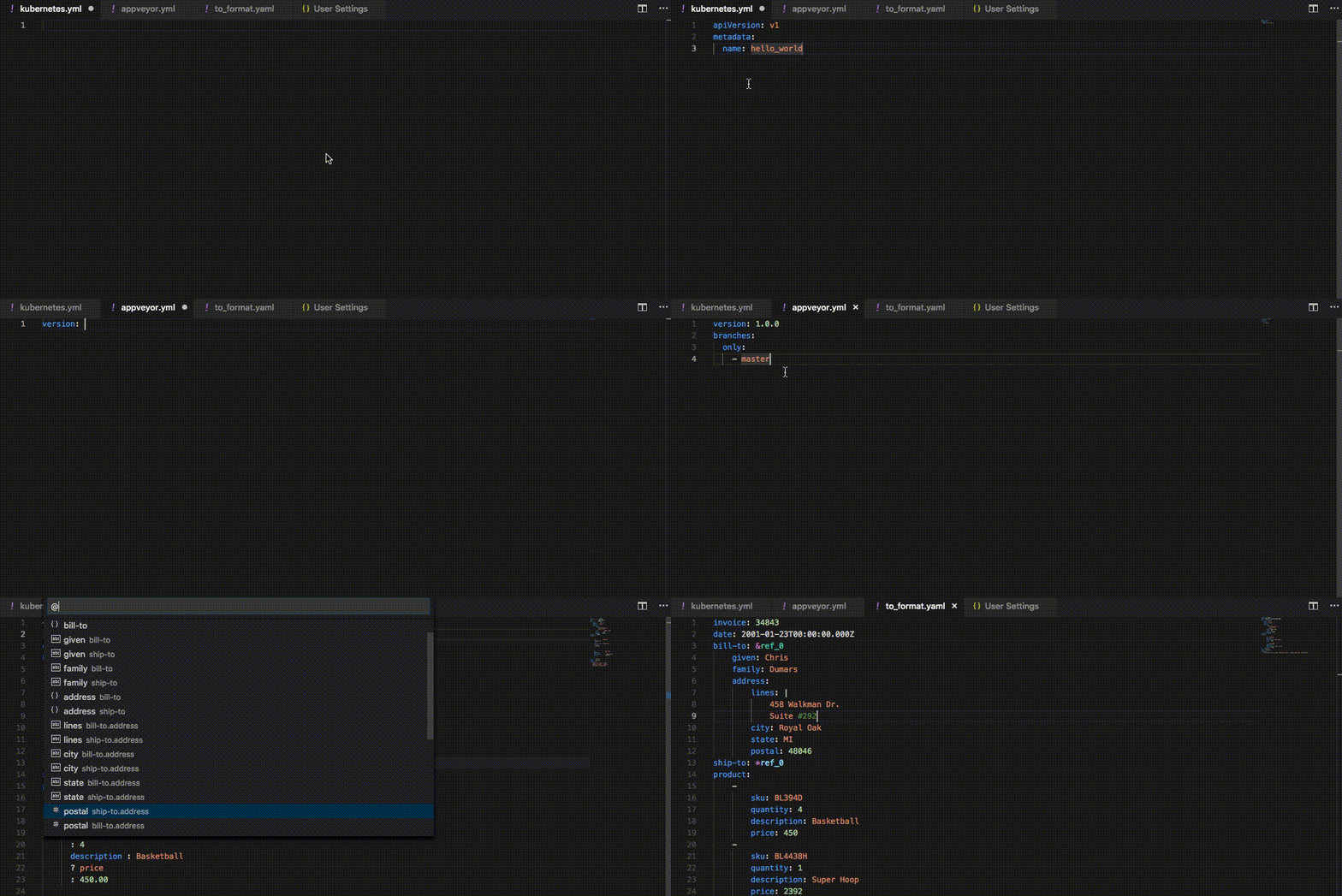
- YAML validation:
- Detects whether the entire file is valid YAML
- Reports diagnostics such as:
- Node is not found
- Node has an invalid key node type
- Node has an invalid type
- Node is not a valid child node
- Node is an additional property of its parent
- Document outlining (Ctrl + Shift + O):
- Shows YAML nodes hierarchically in the Outline view and makes them available through Go to Symbol
- Auto completion (Ctrl + Space):
- Auto completes YAML keys, values, and structure based on the associated schema
- Auto completes scalar nodes with schema defaults when defaults are available
- Hover:
- Shows schema descriptions for YAML nodes when descriptions are available
- Shows anchor information when
yaml.hoverAnchor is enabled
- Shows schema source information when
yaml.hoverSchemaSource is enabled
- Formatting:
- Formats YAML documents
- Supports on-type formatting on newline, including automatic indentation for mappings and array items
Auto completion and hover content are schema-driven. See Associating schemas for configuration details.
Extension settings
The following settings are supported:
yaml.yamlVersion: Set the default YAML spec version (1.2 or 1.1). Defaults to 1.2.
yaml.maxItemsComputed: The maximum number of document symbols and folding regions computed (limited for performance reasons). Defaults to 5000.
yaml.format.enable: Enable/disable the default YAML formatter. Defaults to true.
yaml.format.singleQuote: Use single quotes instead of double quotes. Defaults to false.
yaml.format.bracketSpacing: Print spaces between brackets in objects. Defaults to true.
yaml.format.proseWrap: Control prose wrapping behavior. always: wrap prose if it exceeds the print width, never: never wrap the prose, preserve: wrap prose as-is. Defaults to preserve.
yaml.format.printWidth: Specify the line length that the printer will wrap on. Defaults to 80.
yaml.format.trailingComma: Specify if trailing commas should be used in JSON-like segments of the YAML. Defaults to true.
yaml.validate: Enable/disable validation feature. Defaults to true.
yaml.hover: Enable/disable hover. Defaults to true.
yaml.hoverAnchor: Enable/disable hover feature for anchors. Defaults to true.
yaml.hoverSchemaSource: Enable/disable showing the schema source in hover tooltips. Defaults to true.
yaml.completion: Enable/disable autocompletion. Defaults to true.
yaml.disableDefaultProperties: Disable adding not required properties with default values into completion text. Defaults to false.
yaml.suggest.parentSkeletonSelectedFirst: If true, the user must select some parent skeleton first before autocompletion starts to suggest the rest of the properties. When the YAML object is not empty, autocompletion ignores this setting and returns all properties and skeletons. Defaults to false.
yaml.schemas: Associate schemas with files using glob patterns. See Associating schemas for details.
yaml.disableSchemaDetection: Disable schema detection for YAML files matching the configured glob pattern or list of glob patterns. Modelines still apply.
yaml.schemaStore.enable: Use the SchemaStore catalog to automatically associate schemas with common YAML file patterns. Defaults to true.
yaml.schemaStore.url: URL of a schema store catalog to use when downloading schemas. Defaults to https://www.schemastore.org/api/json/catalog.json.
yaml.customTags: Array of custom tags that the parser will validate against. It has three ways to be used. A tag without a type, such as "!Ref", is treated as a scalar tag. A tag with a node type, such as "!Ref sequence", specifies the YAML node type that the tag is written on. A tag with a node type and return type, such as "!FindInMap sequence:string", also specifies the schema type that the tagged value evaluates to. Supported node types are scalar, sequence, and mapping. Supported return types are string, number, integer, boolean, null, array, and object. The return type aliases scalar, sequence, and mapping are accepted as string, array, and object. See Adding custom tags for usage details.
yaml.disableAdditionalProperties: Globally set additionalProperties to false for all objects. When enabled, no extra properties are allowed in YAML objects beyond those defined in the schema. Defaults to false.
yaml.kubernetesCRDStore.enable: Enable/disable validation of Kubernetes custom resources using schemas from well-known Custom Resource Definitions (CRDs). Defaults to true.
yaml.kubernetesCRDStore.url: The base URL for fetching well-known Custom Resource Definition (CRD) schemas. Defaults to https://raw.githubusercontent.com/datreeio/CRDs-catalog/main.
yaml.kubernetesVersion: Kubernetes version used to build the schema URL when yaml.schemas maps files to the kubernetes keyword. If omitted, the extension falls back to a predefined default Kubernetes version.
yaml.style.flowMapping: Control flow style mappings. Forbids flow style mappings if set to forbid. Defaults to allow.
yaml.style.flowSequence: Control flow style sequences. Forbids flow style sequences if set to forbid. Defaults to allow.
yaml.keyOrdering: Enforces alphabetical ordering of keys in mappings when set to true. Defaults to false.
http.proxy: The URL of the proxy server that will be used when attempting to download a schema. If it is not set or it is undefined, no proxy server will be used.
http.proxyStrictSSL: If true, the proxy server certificate should be verified against the list of supplied CAs. Defaults to false.
yaml.extension.recommendations: Enable/disable extension recommendations for YAML files. Default is true.
yaml.trace.server: Set the language server trace level to off, messages, or verbose. Defaults to off.
[yaml]: VSCode-YAML adds default editor configuration for all YAML files. More specifically, it converts tabs to spaces to ensure valid YAML, sets the tab size, enables quick suggestions while typing, and maintains auto indentation behavior. These default settings can be modified via the corresponding settings in the [yaml] section of VS Code settings:
editor.insertSpaces: Defaults to true.editor.tabSize: Defaults to 2.editor.autoIndent: Defaults to keep.editor.quickSuggestions: Defaults to {"other": true, "comments": false, "strings": true}.
Other VS Code editor settings can also be overridden for YAML files in the [yaml] section, including:
editor.formatOnTypeeditor.codeLens
Associating schemas
The extension uses JSON Schema to understand the shape of YAML files. Schema definitions can be written in JSON (.json) or YAML (.yaml or .yml) format.
Schemas can be associated with YAML files using a modeline, an inline $schema property, or the yaml.schemas setting. The extension can also obtain schemas through the registerContributor extension API and yamlValidation contributions from other VS Code extensions. Additionally, it automatically matches common file patterns to schemas from SchemaStore when yaml.schemaStore.enable is enabled, as it is by default.
When multiple schema sources or schema-disabling settings apply to the same file, see Schema resolution priority.
Using a modeline
Specify a schema for a YAML file by adding a modeline comment at the top of the file:
# yaml-language-server: $schema=<schema-url-or-path>
The IntelliJ-compatible $schema comment format is also supported:
# $schema: <schema-url-or-path>
Relative paths in modelines are resolved from the YAML file's location, not the workspace root.
Using an inline $schema property
Specify a schema for a YAML file by adding a top-level $schema property:
$schema: <schema-url-or-path>
Relative paths in inline $schema properties are resolved from the YAML file's location, not the workspace root.
Using yaml.schemas
The yaml.schemas setting maps schemas to file patterns using key-value pairs:
- Key: Schema URI, local file path, or the
kubernetes keyword
- Value: A glob pattern or array of glob patterns
Prefix a pattern with ! to exclude matching files from that schema association. An association with exclusions must also contain at least one positive pattern. For example, this applies the schema to YAML files except files whose names end with test.yaml:
{
  "yaml.schemas": {
    "https://example.com/schema.json": ["*.yaml", "!*test.yaml"]
  }
}
An exclusion affects only the schema in the same entry. To disable all detected schemas for matching files, use yaml.disableSchemaDetection.
Remote schemas
Use a schema URL as the key:
{
  "yaml.schemas": {
    "https://getcomposer.org/schema.json": "composer.yaml",
    "https://example.com/api-schema.json": ["api/*.yml", "api/*.yaml"]
  }
}
Local schemas
Use an absolute path, file URI, or relative path as the key.
In a single-folder workspace, relative schema paths are resolved from the workspace root.
On macOS or Linux:
{
  "yaml.schemas": {
    "/home/user/custom_schema.json": "someFilePattern.yaml",
    "/home/user/custom_schema.yaml": "anotherPattern.yaml",
    "../relative/path/schema.json": ["filePattern1.yaml", "filePattern2.yaml"]
  }
}
On Windows:
{
  "yaml.schemas": {
    "C:\\Users\\user\\Documents\\custom_schema.json": "someFilePattern.yaml",
    "file:///C:/Users/user/Documents/custom_schema.yaml": "anotherPattern.yaml",
    "../relative/path/schema.json": ["filePattern1.yaml", "filePattern2.yaml"]
  }
}
Multi-root workspaces
In multi-root workspaces, prefix schema paths with the workspace folder name that contains the schema.
Suppose the workspace contains two folders, project-a and project-b:
project-a/
├── test.yaml
└── schema.json
project-b/
├── test.yaml
└── schema.json
Use the workspace folder name at the start of each schema path key:
{
  "yaml.schemas": {
    "project-a/schema.json": "project-a/test.yaml",
    "project-b/schema.json": "project-b/test.yaml"
  }
}
Kubernetes schemas
Use the reserved kubernetes keyword to validate Kubernetes YAML files. The extension resolves the keyword to a versioned Kubernetes schema URL based on yaml.kubernetesVersion.
{
  "yaml.schemas": {
    "kubernetes": "k8s/*.yaml"
  }
}
Specify yaml.kubernetesVersion to choose the Kubernetes schema version:
{
  "yaml.kubernetesVersion": "1.36.1",
  "yaml.schemas": {
    "kubernetes": "k8s/*.yaml"
  }
}
If yaml.kubernetesVersion is not set, the language server uses the default Kubernetes version.
Using the yamlValidation contribution point
Authors of other VS Code extensions can use the yamlValidation contribution point to associate schemas with YAML file patterns. Like VS Code’s jsonValidation contribution point, yamlValidation lets an extension declare a schema URL and the file patterns to which the schema applies.
For example, an extension can add this to its package.json:
{
  "contributes": {
    "yamlValidation": [
      {
        "fileMatch": "yourfile.yaml",
        "url": "./schema.json"
      }
    ]
  }
}
A relative url is resolved from the contributing extension's installation directory.
Suppressing diagnostics
To hide diagnostics for a specific YAML line, add a suppression comment immediately before that line. To disable schema validation for an entire file, see Disabling schema validation.
Suppress all diagnostics on a line
Add # yaml-language-server-disable immediately before the line that produces the diagnostic:
# yaml-language-server-disable
version: 123
Suppress matching diagnostics
Add one or more comma-separated diagnostic message substrings after # yaml-language-server-disable. Only diagnostics whose messages contain a matching substring are suppressed; the rest are still reported. Matching is case-insensitive.
Single substring:
# yaml-language-server-disable Incorrect type
version: 123
Multiple substrings:
# yaml-language-server-disable Incorrect type, not accepted
version: 123
The substrings are matched against the diagnostic messages shown in the VS Code Problems panel.
Disabling schema validation
Disabling schema validation stops schema-based diagnostics. The file is still parsed as YAML, so YAML syntax errors can still be reported.
When another enabled extension provides more specific YAML support, the YAML Language Support extension automatically disables schema detection at runtime for the relevant file patterns, preventing its own schema-based validation from conflicting with that extension. Built-in integrations include dbt, Docker DX, GitHub Actions, or Azure Pipelines.
Using a modeline
Disable schema validation for the current file by setting $schema to none in a modeline:
# yaml-language-server: $schema=none
The IntelliJ-compatible $schema comment format is also supported:
# $schema: none
Using yaml.disableSchemaDetection
Prevent detected schemas from being applied to specific YAML files by configuring yaml.disableSchemaDetection with one or more glob patterns.
For one file pattern:
{
  "yaml.disableSchemaDetection": "**/.github/workflows/*.yaml"
}
For multiple file patterns:
{
  "yaml.disableSchemaDetection": [
    "some.yaml",
    "**/.github/workflows/*.yaml"
  ]
}
Schema resolution priority
When multiple schema sources or schema-disabling mechanisms apply to the same YAML file, the language server uses the following priority order, from highest to lowest:
- Modeline
- Inline
$schema property
registerContributor extension APIyaml.disableSchemaDetectionyaml.schemasyamlValidation contributions from other extensions- SchemaStore
YAML custom tags extend the language with application-specific syntax. Configure custom tags with the yaml.customTags setting.
Each entry supports one of these formats:
!Tag: Treats the tag as a scalar tag!Tag nodeType: Specifies the YAML node type for the tagged value!Tag nodeType:returnType: Specifies the YAML node type and the schema type used during validation
Supported node types are scalar, sequence, and mapping.
Supported return types are string, number, integer, boolean, null, array, and object. The aliases scalar, sequence, and mapping are also accepted as string, array, and object.
For example:
{
  "yaml.customTags": [
    "!Scalar-example",
    "!Seq-example sequence",
    "!Mapping-example mapping",
    "!Seq-as-string-example sequence:string"
  ]
}
These tags can then be used in YAML files:
some_key: !Scalar-example some_value
some_sequence: !Seq-example
  - some_seq_key_1: some_seq_value_1
  - some_seq_key_2: some_seq_value_2
some_mapping: !Mapping-example
  some_mapping_key_1: some_mapping_value_1
  some_mapping_key_2: some_mapping_value_2
some_string: !Seq-as-string-example
  - value_1
  - value_2
In the last example, !Seq-as-string-example is written on a YAML sequence, but schema validation treats the tagged value as a string because its return type is string.
Feedback and questions
If you discover an issue or have questions:
License
This project is licensed under the MIT License. See LICENSE for details.
Data and telemetry
When telemetry is enabled, the extension collects anonymous usage data and sends it to Red Hat to help improve its products and services. For more information, see Red Hat's telemetry data collection notice.
Use the redhat.telemetry.enabled setting to enable or disable telemetry. The extension also honors VS Code's telemetry.telemetryLevel setting. See How to disable telemetry reporting for details.
How to contribute
The instructions are available in the contribution guide.



