HDF5 & NetCDF Explorer (H5 Viewer)
For climate and lab scientists who keep data in .nc or .h5 files, this extension shows the variables, their CF metadata, the values and a plot inside VS Code, without a line of Python.
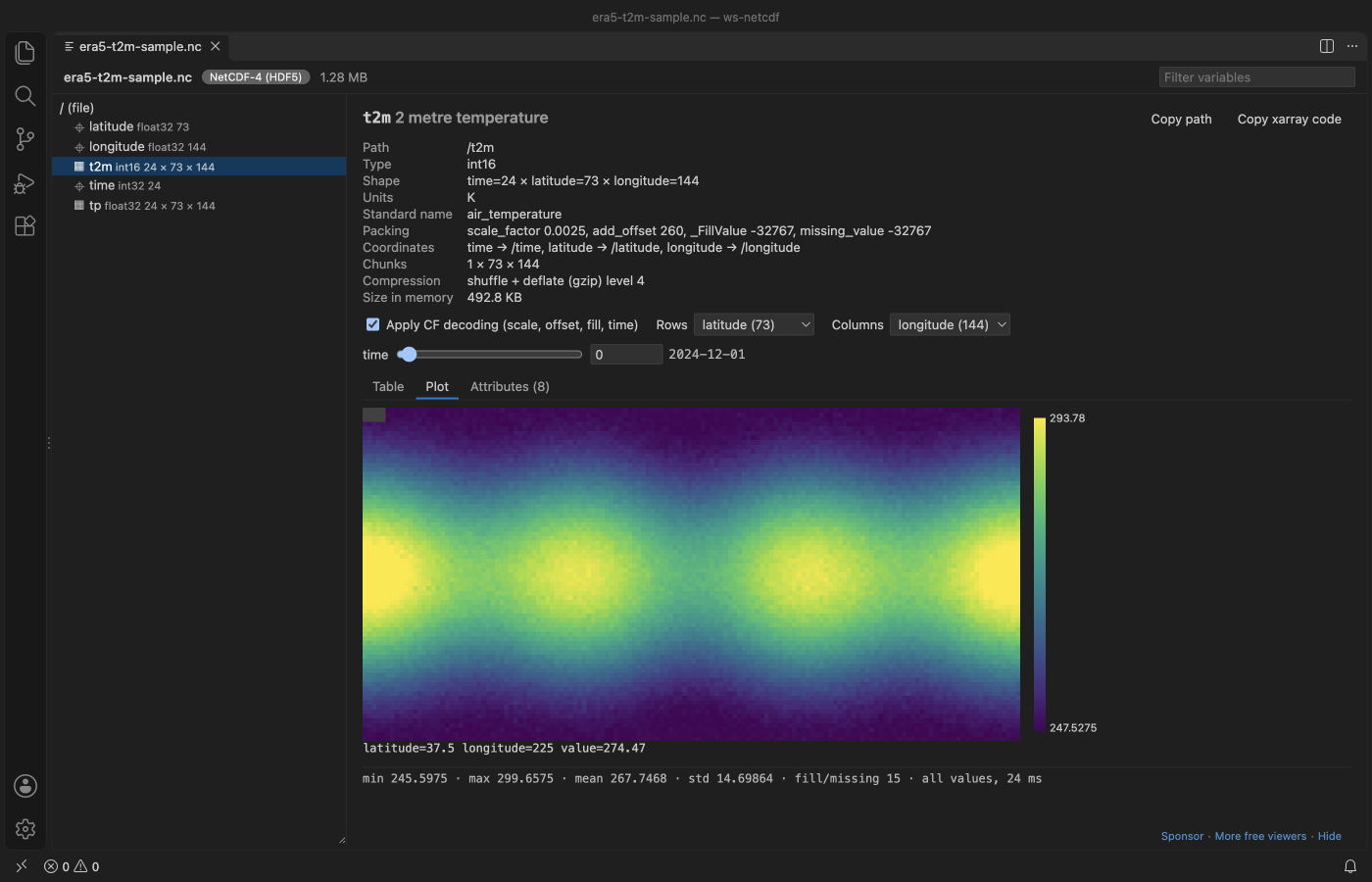
A real VS Code 1.142 window running this extension on samples/era5-t2m-sample.nc, a 1.3 MB NetCDF-4 file made by scripts/make-samples.py.
  
- Made for NetCDF and climate data. Dimension names, coordinates,
scale_factor, add_offset, _FillValue and CF time units are applied for you, so you see 263.75 K on 2024-12-04 06:00, not 1500 at index 13. The noleap, 360_day and all_leap calendars work too.
- Big files stay fast. The file is read slice by slice in a background thread. In our test a 37 GB array opens, shows a page and draws a sampled heatmap in about one second, and a slow read is stopped after 20 s instead of freezing the editor.
- One viewer for HDF5, NetCDF-4 and NetCDF-3, including HDF5 files with other names such as Julia
.jld2, MATLAB 7.3 .mat and .loom. Groups, attributes, compound tables, strings, chunking and compression filters are all shown. Nothing leaves your machine.
Quick start
- Install the extension.
- Click a
.nc or .h5 file in the Explorer. Pick a variable on the left.
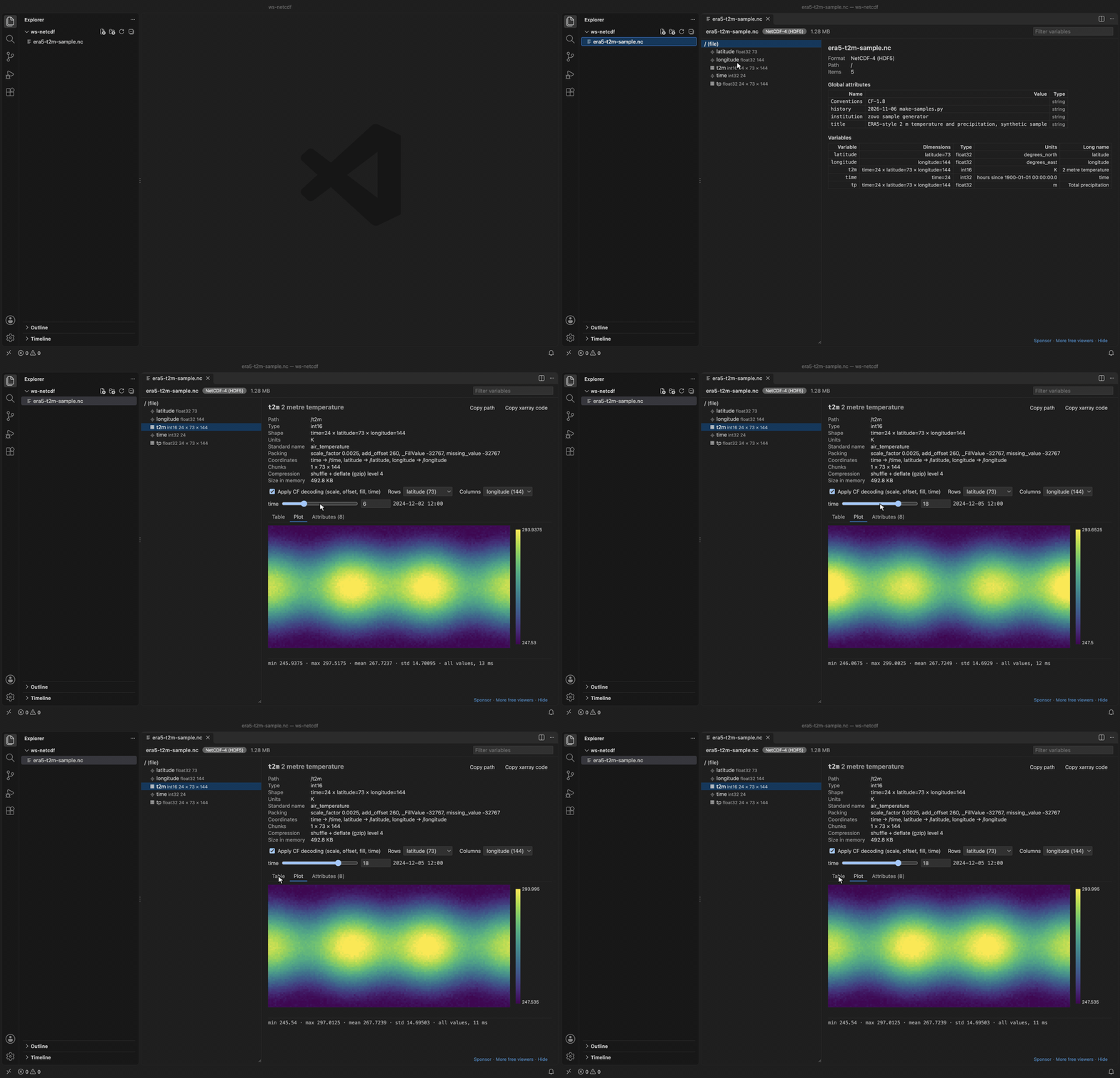
Recorded in the same window. The white arrow is drawn in to show where each click lands.
What you can do
- Browse the group tree with a filter box. Coordinates, plain datasets, external links and NetCDF dimensions have their own icons.
- Read the file overview (format, dimensions, global attributes and a table of all variables with units and long names), much like
ncdump -h.
- See type, shape with dimension names, chunk shape, compression (shuffle, deflate level, LZF, szip and others by name), size in memory and the full attribute list. Internal HDF5 and NetCDF attributes are hidden behind a checkbox.
- Pick any two dimensions as rows and columns. Sliders fix the others and show the decoded coordinate value next to the index.
- Page through values 100 rows by 30 columns at a time, with coordinate values as row and column headers.
- Plot 1D data as a line and 2D slices as a heatmap with a colour bar and hover readout. Arrays larger than 512 x 512 are sampled with a stride.
- See min, max, mean, std and the number of fill, NaN and Inf values for the slice on screen.
- Copy the path, or copy xarray or h5py code that loads the same slice.
- Export the slice on screen to CSV or JSON with "Export slice…". You get every row and column of the two chosen dimensions, with the coordinate values as headers. The sliders fix the other dimensions, and the JSON file records which index and value each of them had. Text from the file that starts with
=, +, - or @ gets a leading ' in the CSV, so a spreadsheet does not run it as a formula.
- Turn CF decoding off to see the raw stored numbers.
- The view reloads when the file changes on disk, which helps while a model run is writing output. A script that deletes the file and writes it again also triggers a reload.

Supported files
| Format |
How it is read |
NetCDF-4 and NetCDF-4 classic (.nc, .nc4) |
h5wasm (HDF5 2.0 compiled to WebAssembly) |
HDF5 (.h5, .hdf5, .he5, .hdf, .nxs, .h5ad) |
h5wasm |
HDF5-based formats (.jld2, .loom, .h5mu, .hf5, .h5oina, .h5ebsd, .edaxh5, .oh5, .dream3d, .geoh5, .nde, .cxi) |
h5wasm, the same way as .h5 |
MATLAB 7.3 (.mat), or an HDF5 file with any other name |
h5wasm. Right-click the file and pick "Open in HDF5 NetCDF Explorer", or use "Reopen Editor With…" |
NetCDF-3 classic and 64-bit offset (.nc, .cdf) |
netcdfjs parses the header, values are read by byte offset |
The format is detected from the first bytes of the file, not from the extension, so a 512-byte user block (JLD2 and MATLAB 7.3 files have one) is fine. HDF4, NASA CDF, NetCDF CDF-5 and older MATLAB v5 .mat files get a clear message instead of an error.
Settings
| Setting |
Default |
Meaning |
hdf5NetcdfExplorer.maxReadValues |
1000000 |
Largest number of values one read may return |
hdf5NetcdfExplorer.maxFileSizeMB |
0 |
Refuse files above this size, 0 means no limit |
hdf5NetcdfExplorer.readTimeoutSeconds |
20 |
Stop a read that takes longer and restart the reader |
hdf5NetcdfExplorer.askForRating |
true |
Ask one time for a Marketplace rating, after 5 files and 2 days. Turn it off with false |
Privacy and safety
The extension makes no network calls and has no telemetry. It never runs code from a file. Values go to the view as plain JSON and are drawn as text or canvas pixels, under a strict Content Security Policy with no remote scripts.
Known limits
- Files must be on this computer. Remote and virtual file systems are not supported yet.
- HDF5 filters that are not built into h5wasm (Blosc, Zstd, bitshuffle and other plugins) show the filter name and a read error.
- Zarr is not supported yet.
- MATLAB
.mat files saved in the v5 format are not HDF5. Save them again with save(filename, '-v7.3').
- Export writes at most
hdf5NetcdfExplorer.maxReadValues values (1,000,000 by default) per file.
- The standard calendar uses the proleptic Gregorian calendar for dates before 1582.
Credits
HDF5 reading uses h5wasm by the National Institute of Standards and Technology, which bundles the HDF5 library by The HDF Group. NetCDF-3 headers are parsed with netcdfjs (MIT). See THIRD-PARTY-NOTICES.txt.
License
MIT
Support
Zovo extensions have no ads and no tracking, and sponsors pay for the time that goes into fixes and new viewers. You can sponsor the work on GitHub Sponsors.
More viewers by Zovo
- GGUF, Safetensors & NPY Viewer (NumPy Viewer) shows NPY, NPZ, Safetensors and GGUF tensors with stats and heatmaps.
- PDF Viewer & PDF Reader with Dark Mode reads PDFs with a real dark mode, search, an outline and thumbnails.
- CSV Viewer, Excel Viewer (XLSX) & Parquet Viewer opens CSV, TSV, Excel and Parquet files as a sortable, filterable table.
- DOCX Viewer & Word Viewer with Dark Mode previews Word and ODT files with dark mode, an outline and search.
- PPTX Viewer & PowerPoint Viewer shows PowerPoint slides, thumbnails and speaker notes.
- Large JSON Viewer & JSON Tree shows large JSON files as a searchable tree, copies JSONPath and turns arrays of objects into a table.
- JSONL Viewer & NDJSON Viewer (JSONL Table) opens JSONL and NDJSON files as a table, as records or as a chat view.
- SQLite Viewer & DB Viewer (Read-Only) browses SQLite tables read-only and runs SELECT queries.
- MP4 Video Player & Video Preview with Sound plays MP4, MOV, MKV and WebM files with their sound.
- DXF Viewer & CAD Viewer for 2D Drawings opens ASCII and binary DXF drawings with layers, measuring and PNG or SVG export.
- AGENTS.md & CLAUDE.md Linter (Context Drift) finds stale commands, paths and versions in AGENTS.md and CLAUDE.md files.
- Agent Skills & Claude Skills (Skill Shelf) lists, checks and toggles the Agent Skills that Claude Code, Codex and Cursor load.
- Claude Code History & Codex History Viewer browses and searches your local Claude Code and Codex sessions.
- Claude Code Usage & Codex Usage Cost Meter shows Claude Code and Codex tokens and estimated cost from your local session files.
Coming soon to the Marketplace, with the code on GitHub now.
- TIFF Viewer (16-bit, Float, GeoTIFF) opens 16-bit, float, multi-page and GeoTIFF images.
- PKL Viewer & Pickle Viewer opens Python pickle files without Python and never runs their code.
- DICOM Viewer & NIfTI Viewer for CT and MRI opens CT and MRI scans, DICOM folders and NIfTI volumes with window presets and three views.
- Audio Preview & Loudness Meter plays audio files with a waveform, a spectrogram and LUFS loudness.
- Graphviz Preview & DOT Viewer shows a live preview of DOT files and exports SVG or PNG.
- Avro Viewer, Arrow Viewer & Feather Viewer opens Avro, Arrow and Feather files as a paged table.
- EML Viewer & MBOX Email Viewer reads EML, EMLX and MBOX email files with remote images blocked.
- 3D Model Viewer (GLB, glTF, STL, OBJ, PLY) views GLB, glTF, STL, OBJ, PLY and 3MF models.
- ZIP Viewer & Archive Explorer (JAR, TAR, GZ) browses ZIP, JAR, VSIX, TAR and GZ files, opens entries in tabs and extracts them safely.
- GCode Viewer & 3D Print Preview shows GCode toolpaths in 3D layer by layer, with print time and filament use.
- EPUB Reader & EPUB Viewer reads EPUB books with a table of contents, search and light, sepia or dark themes.
- HAR Viewer & HTTP Archive Viewer opens HAR files from browser DevTools with a timing waterfall, filters and a redacted copy for sharing.
- Font Viewer & Font Preview (TTF, OTF, WOFF) opens TTF, OTF, WOFF, WOFF2 and TTC fonts with a glyph grid, a type tester with variable axes and the license fields.
- File Viewers Pack installs the PDF, table, Word, PowerPoint, HDF5 and tensor viewers in one step.
| |

