Code Merge
Select files, folders, or code snippets and merge them into a single
live markdown preview — with a project tree, per-file headers, item
counts, and configurable ignore rules. Perfect for feeding context to
LLMs (ChatGPT, Claude, Copilot) or sharing code snapshots with your team.





✨ Features
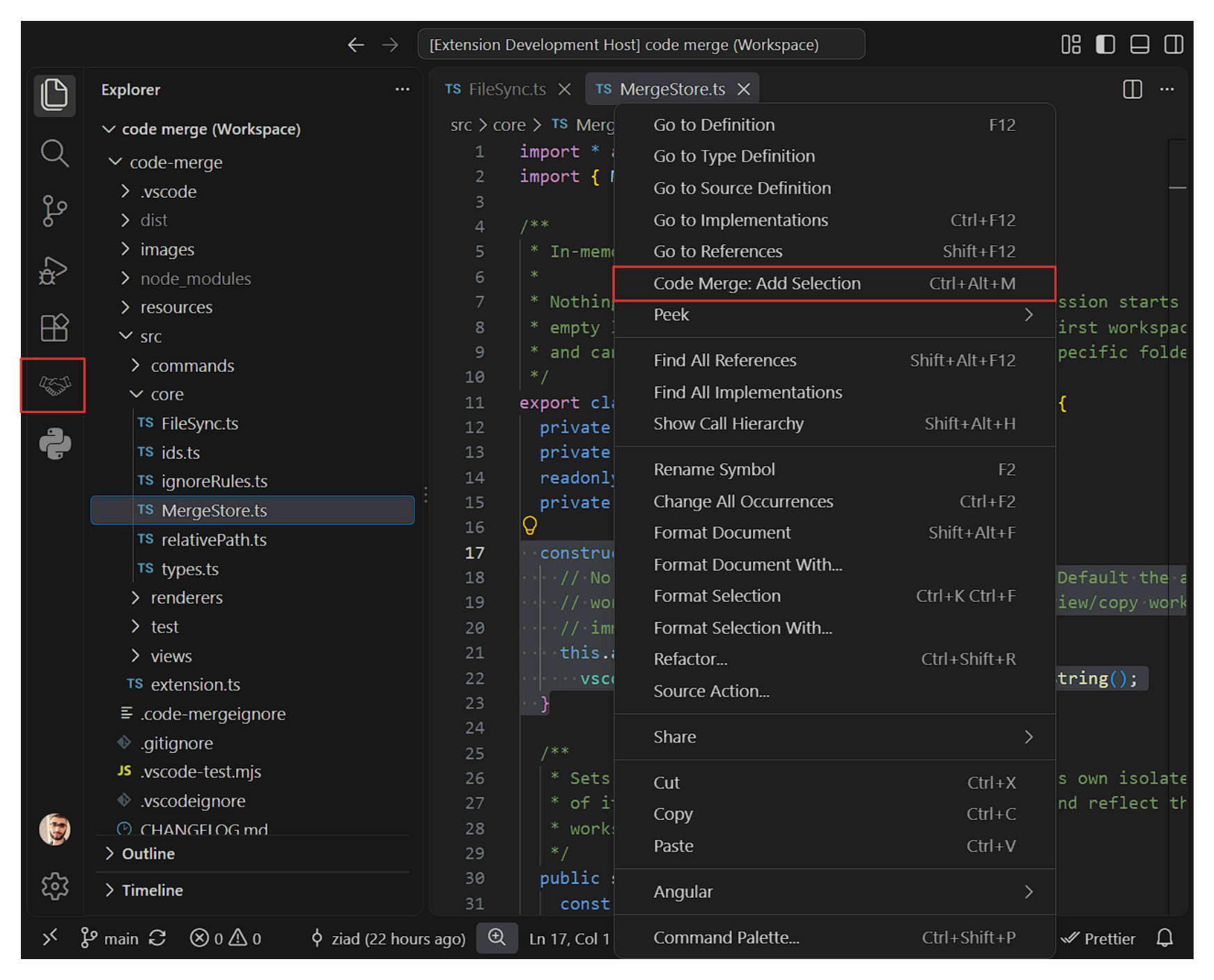
- 📁 Add files / folders / selections — right-click in the Explorer,
select code in the editor, or use a keyboard shortcut. Folder scans
follow smart ignore rules (
node_modules, .git, dist, binaries,
lockfiles, secrets, …) and skip symlinks.
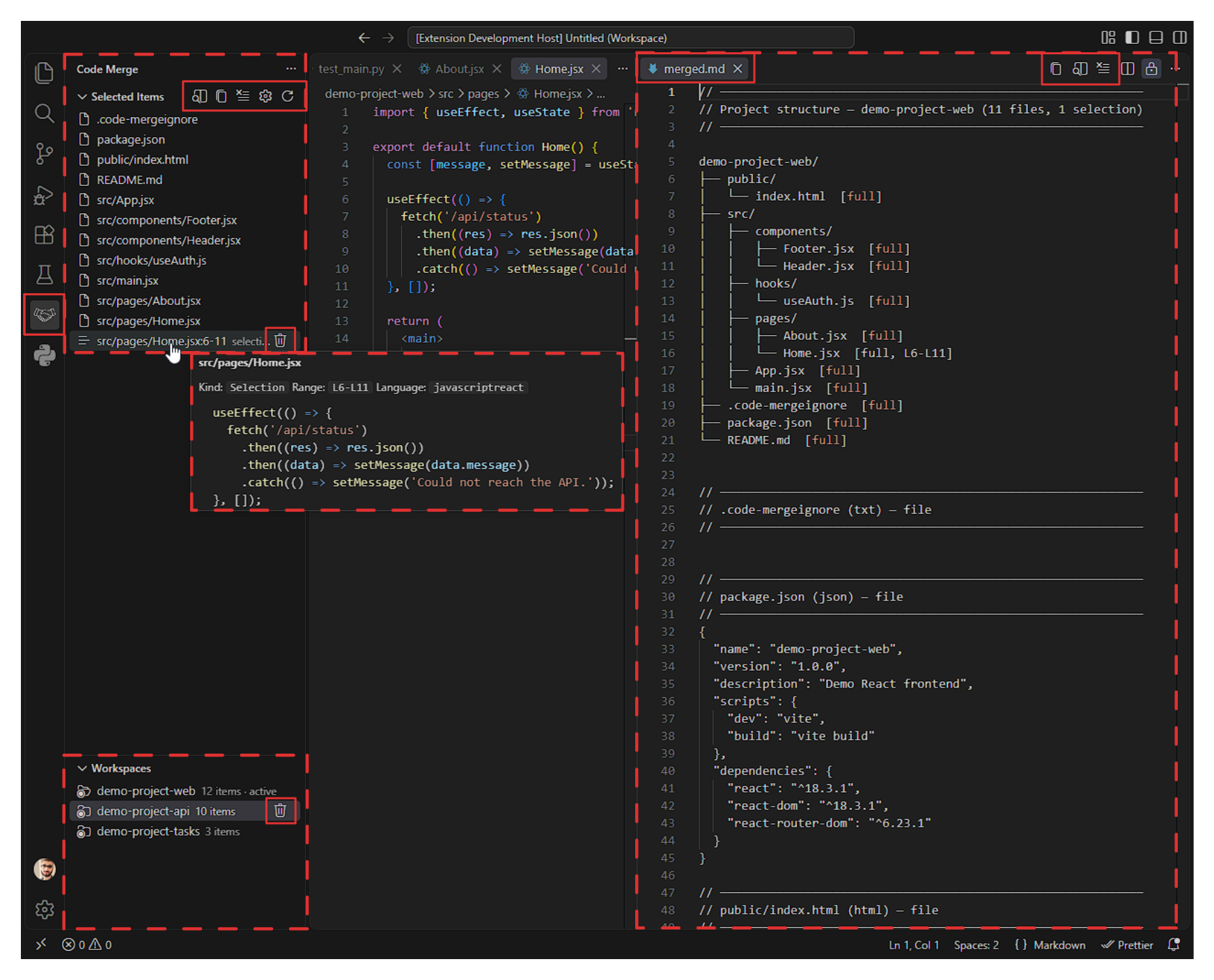
- 🌲 Project tree — every merged output starts with an ASCII tree of
the selected items, including line ranges for selections.
- 🪟 Virtual preview — a live, in-memory document. Nothing is written
to disk; the preview updates as you add, remove, or edit items.
- 🔄 Live sync — edits (including unsaved ones) and external changes
(git pull, other editors) are picked up automatically. Deleted,
oversized, unreadable, or binary files are dropped from the list. In
rare cases, tools that replace files atomically (write-to-temp +
rename —
prettier --write, sed -i, some codemods) can make VS Code
report a delete-and-create pair and the item may be dropped by
mistake — just re-add it if that happens.
- 🛡️ Preview size guard — the preview closes itself if the merged
output grows past
code-merge.maxPreviewSizeChars while you're
editing, so a runaway edit can't freeze the editor. Reopen it
manually, or use Copy Merged Content.
- 📋 One-click copy — copy the entire merged content to the clipboard.
- 🔒 Workspace isolation — each workspace folder gets its own item
list; the preview follows the active workspace as you switch between
multi-root folders.
- 🗂️ Workspaces view — a sidebar view below Selected Items listing
every workspace with tracked items. Click one to make it active, or
hit
🗑 to clear only that workspace.
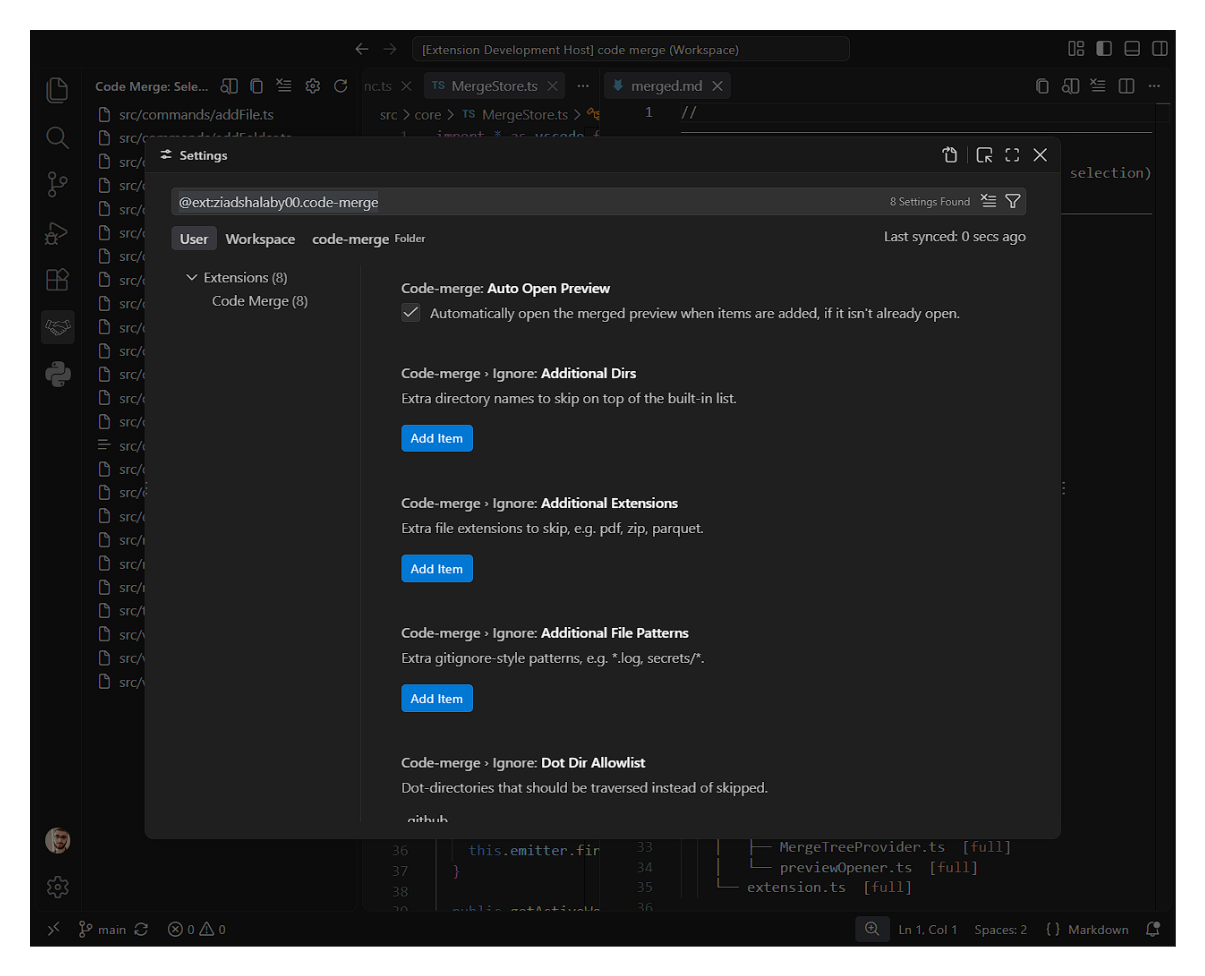
- ⚙️ Configurable ignore rules — extend the built-in lists via VS
Code settings, a
.code-mergeignore file (gitignore syntax), or by
enabling .gitignore support.
- 🚀 Auto-open preview — opens beside the current editor the first
time you add an item. Disable with
code-merge.autoOpenPreview.
- 💾 Session-only state — the selection list lives entirely in memory
and resets when VS Code restarts.
🚀 Usage
Adding items
| Action |
How |
| Add a file |
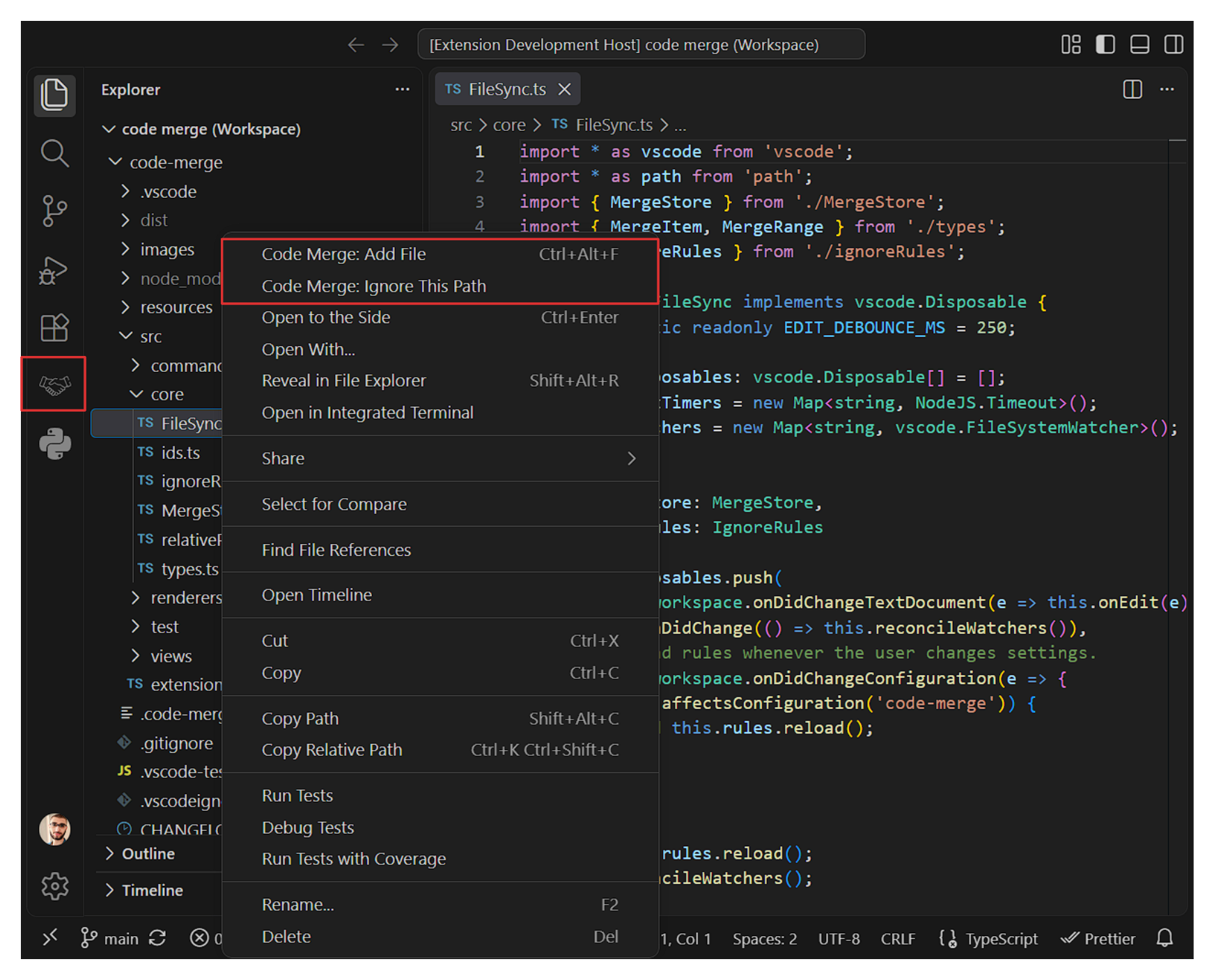
Right-click file in Explorer → Code Merge: Add File |
| Add a folder |
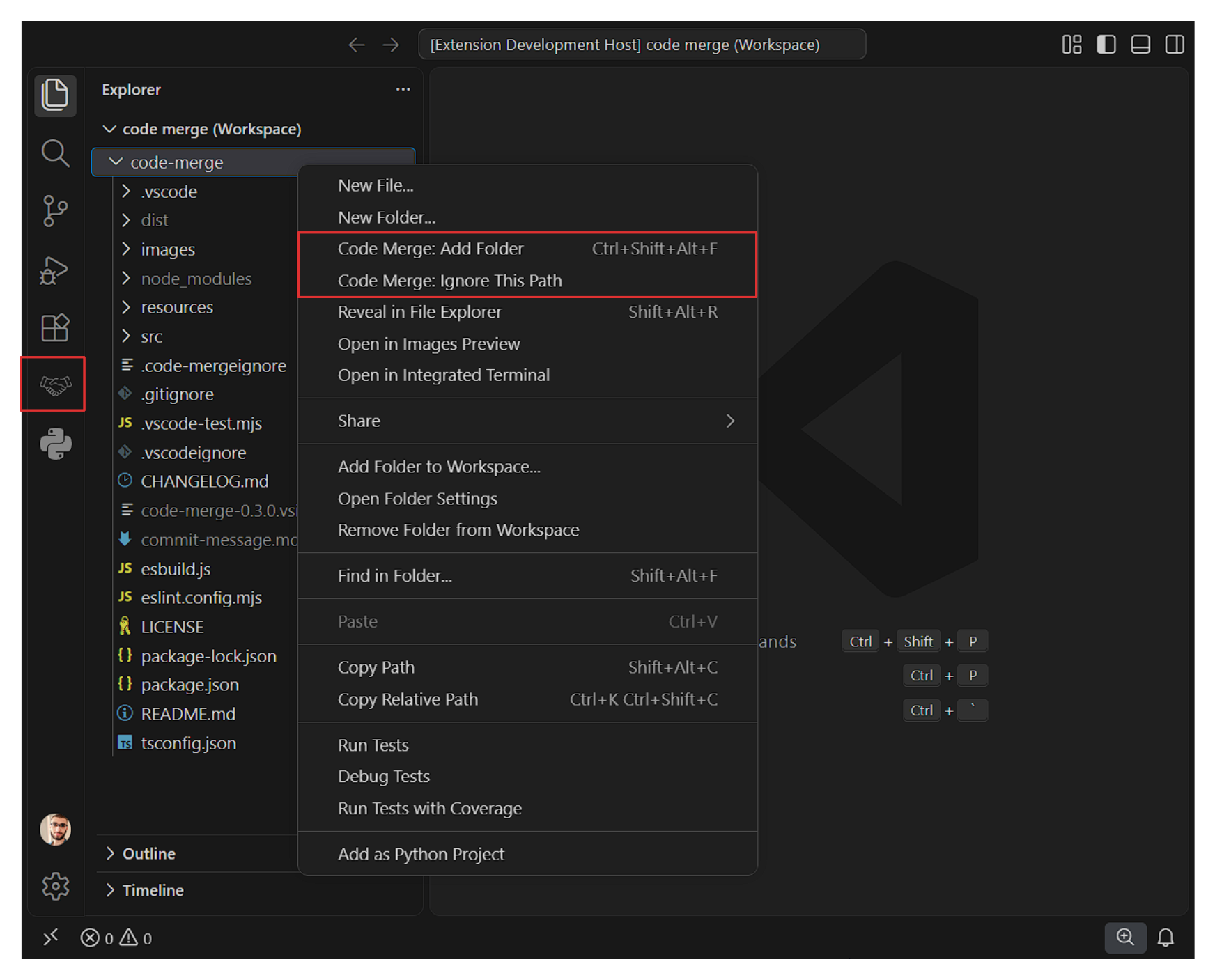
Right-click folder in Explorer → Code Merge: Add Folder |
| Add a selection |
Select code → right-click → Code Merge: Add Selection |
Viewing & exporting
Open the Code Merge view from the Activity Bar to see all selected
items. From there:
- Preview (
$(open-preview)) — opens the merged output as a
read-only virtual document beside the current editor.
- Copy (
$(copy)) — copies the full merged output to the clipboard.
- Clear (
$(clear-all)) — removes every item for the active
workspace.
Clicking any item in the tree opens its source file. For selections,
the file opens scrolled to and highlighting the recorded range.
In a multi-root workspace, the Workspaces view (below Selected
Items) lists every folder with tracked items. The active workspace is
shown first with a · active marker. Click a workspace to switch to
it; hit 🗑 to clear only that workspace. A workspace disappears from
this list once it has no tracked items left.
Managing ignore rules
| Action |
How |
| Open ignore settings |
Command Palette → Code Merge: Open Ignore Settings |
| Reload ignore rules |
Command Palette or view title → Code Merge: Reload Ignore Rules |
| Ignore a path |
Right-click file/folder in Explorer → Code Merge: Ignore This Path |
Edit .code-mergeignore |
Add gitignore-style patterns manually at the workspace root. |
Sensitive files are skipped by default. On top of binaries and
lockfiles, folder scans skip files that look like credentials or
secrets:
- Certificate / key extensions —
*.pem, *.key, *.p12,
*.pfx, *.crt, *.cer, *.der, *.jks, *.keystore.
- Exact credential filenames —
id_rsa, id_dsa, id_ecdsa,
id_ed25519, .netrc, .htpasswd, .npmrc, .pypirc,
service-account.json.
- Config-extension files whose name contains a secret keyword —
files with
.json / .yaml / .env / .txt / .toml / .ini /
.cfg / .conf / .xml / … (or no extension) that contain
secret / credential / password / token / apikey as a
whole word — secrets.yaml, api_token.json, credentials.json,
db_password.txt. Source files like password-validator.ts or
secret_loader.py are not affected: only files that can
plausibly hold a value are checked.
Use Add File explicitly if you really need to include one — it
still asks for confirmation first.
Editing .code-mergeignore doesn't reload rules by itself. The
file is read on startup, when you switch workspaces, when settings
change, and when you add a file or folder — but not when you edit the
file in place. After changing it by hand, run Code Merge: Reload
Ignore Rules from the Command Palette.
Ignore files are read from each workspace folder's root only.
.code-mergeignore and .gitignore (when
code-merge.ignore.useGitignore is enabled) are resolved against the
root of the workspace folder that owns the file being added. Nested
ignore files are not read.
Multi-root workspaces: Add File works on one workspace folder
at a time — selecting files from more than one folder in a single
action is rejected.
Add Anyway and pattern-ignored folders: If a folder is ignored by
a name (node_modules, dist, additionalDirs, non-allowlisted
dot-dirs), Add Anyway adds the non-ignored files inside it. If the
folder is ignored by a pattern (from .code-mergeignore,
.gitignore, or additionalFilePatterns), Add Anyway can't add
anything — the pattern matches every file underneath. Use
Code Merge: Add File on specific files instead.
Adding a path to your ignore rules doesn't remove items already in
the list. Re-run Add Folder on an ancestor to prune — the status
bar reports how many were removed (e.g. removed 3 now-ignored).
Example output
// ────────────────────────────────────────────────────────────
// Project structure — my-api (3 files, 2 selections)
// ────────────────────────────────────────────────────────────

my-api/
├── src/
│   ├── index.ts  [full]
│   ├── routes/
│   │   └── auth.ts  [L10-L25, L40-L50]
│   └── db.ts  [full]
└── README.md  [full]

// ────────────────────────────────────────────────────────────
// src/index.ts (ts) — file
// ────────────────────────────────────────────────────────────
import express from 'express';
...

// ────────────────────────────────────────────────────────────
// src/routes/auth.ts [L10-L25] (typescript) — selection
// ────────────────────────────────────────────────────────────
export function login(req, res) {
  ...
}
⌨️ Keyboard shortcuts
| Command |
Windows / Linux |
macOS |
| Add Selection |
Ctrl+Alt+M |
Cmd+Alt+M |
| Add File |
Ctrl+Alt+F |
Cmd+Alt+F |
| Add Folder |
Ctrl+Alt+Shift+F |
Cmd+Alt+Shift+F |
| Open Preview |
Ctrl+Alt+P |
Cmd+Alt+P |
| Copy Merged Content |
Ctrl+Alt+C |
Cmd+Alt+C |
All shortcuts can be rebound from Keyboard Shortcuts (Ctrl+K Ctrl+S).
⚙️ Configuration
| Setting |
Type |
Default |
Description |
code-merge.ignore.additionalDirs |
string[] |
[] |
Extra directory names to skip on top of the built-in list. |
code-merge.ignore.additionalExtensions |
string[] |
[] |
Extra file extensions to skip, e.g. pdf, zip, parquet. |
code-merge.ignore.additionalFilePatterns |
string[] |
[] |
Extra gitignore-style patterns, e.g. *.log, secrets/*. |
code-merge.ignore.dotDirAllowlist |
string[] |
[".github", ".gitlab", ".devcontainer"] |
Dot-directories that should be traversed instead of skipped. |
code-merge.ignore.file |
string |
.code-mergeignore |
Per-project ignore file (gitignore syntax). Leave empty to disable. |
code-merge.ignore.useGitignore |
boolean |
false |
Also honor the workspace .gitignore file. |
code-merge.maxFileSizeMB |
number |
5 |
Maximum size (in MB) for a file or selection to be merged. |
code-merge.autoOpenPreview |
boolean |
true |
Automatically open the merged preview when items are added, if it isn't already open. |
code-merge.maxPreviewSizeChars |
number |
1000000 |
Maximum total size (characters) of the merged output. If live edits push the content past this limit, the preview closes automatically to keep the editor responsive. It can be reopened manually. |
- Track selections, not whole files.
Add Selection on the function
or class you actually need is dramatically cheaper than Add File on
a 3,000-line source file — and it's usually what you want to feed to
an LLM anyway.
- Keep a good ignore list.
Add Folder walks the tree once and
respects node_modules, .git, dist, lockfiles, binaries, and
anything you add to .code-mergeignore. A well-maintained ignore
file is the single biggest lever in a large repo.
- Stay under the preview limit. The
maxPreviewSizeChars guard
closes the preview when live edits push the merged output past the
limit. If you routinely hit it, split the work into modules and use
Copy Merged Content — you don't have to keep the preview open.
- Closing the preview isn't the same as clearing the list. If items
are still tracked, edits in their files still trigger live-sync work.
Use Clear All (or Clear Workspace) when you're done.
📋 Requirements
- VS Code 1.85.0 or newer.
- The extension bundles the
ignore npm package; no user-installed
dependencies are required.
| |

