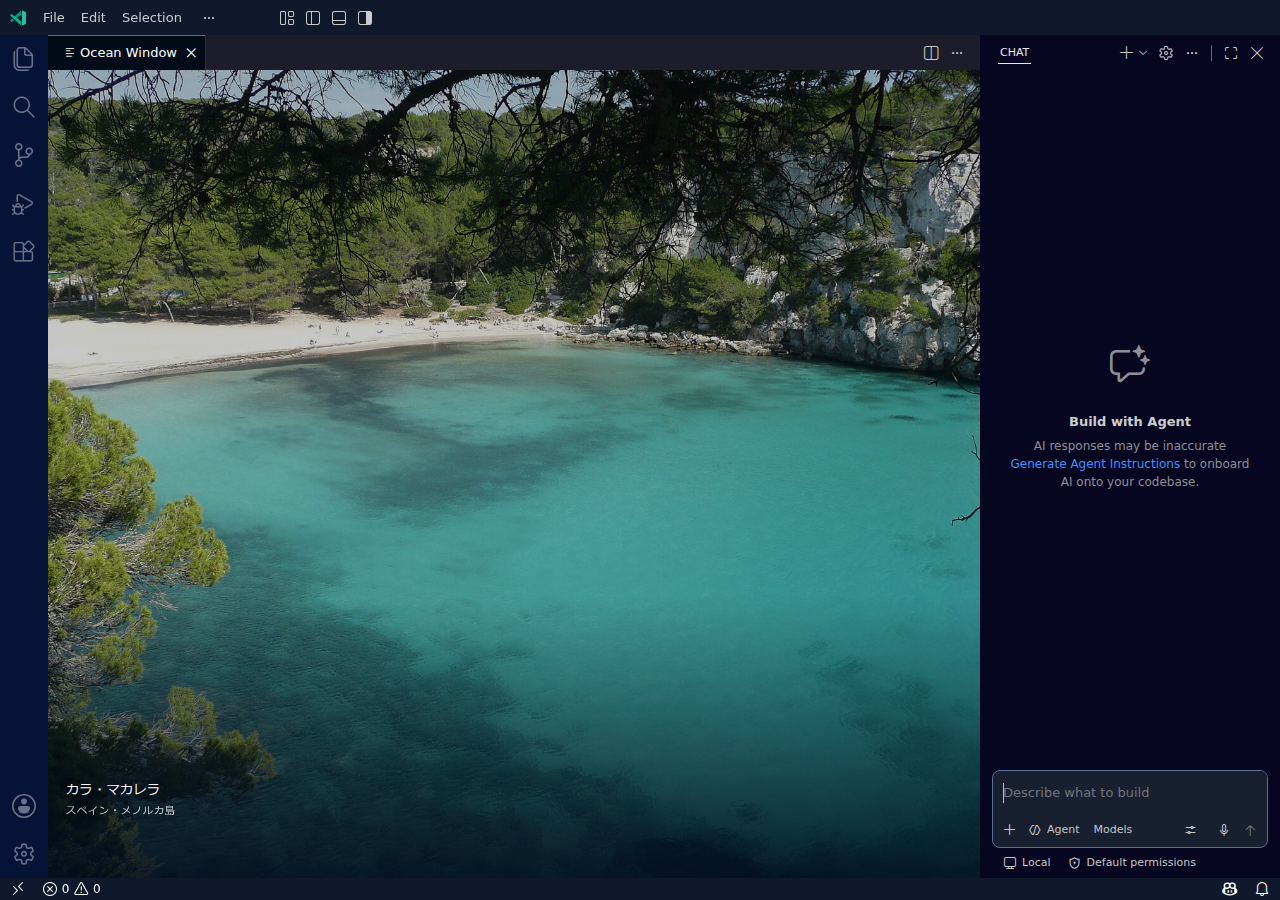
Ocean WindowPreviewA window onto the world's oceans, only while your editor is empty. Installation Launch VS Code Quick Open ( Ctrl+P), paste the following command, and press enter.Copied to clipboard |

Ocean WindowA quiet window onto the world's oceans, only while your editor is empty. Ocean Window opens a temporary scene tab in an unused editor group. Open code, Markdown, a preview, or another editor and the scene tab closes. Close your files and the sea returns. Your editor and chat keep their normal colors. VS Code Marketplace · GitHub releases · Source code · Report an issue
Actual Linux VS Code screenshot. Photograph: Cala Macarella by Paul Stephenson, CC BY 2.0, cropped with a dark overlay. Start looking out
Version 0.3 uses the standard VS Code Webview API. Showing the scene does not change VS Code application files, require administrator access, or require a window reload. This removes the native write-permission requirement of 0.2.x on Linux system packages and read-only installations. From Ocean Window 0.3.1, the universal package targets Windows, Linux, and macOS (Intel and Apple Silicon), in both regular VS Code and Insiders 1.107 or later. Ocean Window 0.3.0 required VS Code 1.130; use 0.3.1 or later for VS Code 1.107. M1 is not a minimum requirement. The installed VS Code build determines the supported operating-system versions. VS Code for the Web is not currently supported. See compatibility verification and publication and validation status. A different sea outside your editorPhotos change every 10 minutes. Move the pointer over the scene for Next, Pause, and Photo credits. Shuffling avoids repetition until the current catalog is exhausted. Rotation pauses while the scene is hidden. Reduced-motion preferences disable the crossfade. The scene is a normal, temporary editor tab, so it has a tab title and close button. Closing it keeps it dismissed until you open and close a real editor, or run Show Ocean Window. It does not immediately reopen after you dismiss it. The on/off choice is remembered per workspace. Real photographs, refreshed onlineWikimedia Commons supplies real coastal photographs. The default catalog contains up to 60 candidates across 12 coastal regions and refreshes after 24 hours. Metadata and playback state are saved through VS Code; photographs load on demand through Chromium's HTTP cache. No API key or separate service is required. Photos are selected using coastal categories, image dimensions, descriptions, and reusable licenses. Composition and weather will vary. Use Next when a scene does not suit you. Photographer, source, and license links remain available on every photograph. Network failures preserve an already loaded picture. On a fresh installation, the scene displays a loading message until a photograph becomes available. SettingsUse Ocean Window: Open Settings. Changes take effect without a VS Code reload and can be set for a workspace.
Updating from the old native wallpaperVersion 0.2.x and the original manual prototype modified VS Code's workbench HTML. Updating the extension does not silently change those application files. If an old native patch is detected, Ocean Window offers Restore Legacy Native Wallpaper. Run that command and reload the affected window once to remove the old patch. Other open windows using the same installation also need reloading to unload it. New installations do not need this step. A failed first enable on Linux may have left a recovery receipt without changing any application files; cleanup retires that receipt without writing to the application or requiring a reload. The new scene works independently of legacy cleanup. The extension ID remains Turning off or uninstalling 0.3 removes its scene through the ordinary extension lifecycle. Only a remaining 0.2.x native patch needs the legacy Restore command. A fallback uninstall hook retains recovery support for validated old installation receipts. Privacy and licensesOcean Window observes which editor tabs are open to decide when to show the scene. It does not read document or chat contents or send workspace information to Wikimedia. Image requests go to Wikimedia Commons and its image hosts, which receive ordinary network information such as your IP address. There is no extension analytics, account, or advertising service. Photo metadata and playback preferences are stored in VS Code's workspace state. Legacy recovery receipts, when present, record old VS Code installation paths in extension storage and the extension directory's parent Extension code is MIT licensed. Photographs retain their individual Creative Commons or public-domain terms; the MIT license does not apply to photographs. See the included For troubleshooting, see Support or open an issue. 日本語インストールすると、何も開いていないエディターに世界の海が映ります。コードや Markdown を開くと海のタブが閉じ、作業を終えてファイルを閉じると海が戻ります。 0.3 から VS Code 標準の Webview を使う方式になりました。本体ファイルの変更、管理者権限、表示のための再読み込みは不要です。Windows・Linux・Intel Mac・Apple Silicon Mac、通常版・Insiders の共通パッケージです。Ocean Window 0.3.1 から VS Code 1.107 以降が対象です。0.3.0 は VS Code 1.130 以降が必要だったため、VS Code 1.107 では Ocean Window 0.3.1 以降を使用してください。 このワークスペースで止めるには Ocean Window: 海の表示をオフにする、再開するには Ocean Window: 海を表示する を実行します。海のタブを閉じた場合は、ファイルを開いて閉じるか「海を表示する」を実行するまで再表示しません。 旧 0.2.x や手動版の壁紙が残っている場合だけ、Ocean Window: 旧方式の壁紙を元に戻す を実行し、一度ウィンドウを再読み込みしてください。Linux で旧版の有効化が権限エラーになり、本体が未変更なら、権限変更や再インストールは不要です。 |