Step Functions Diagram
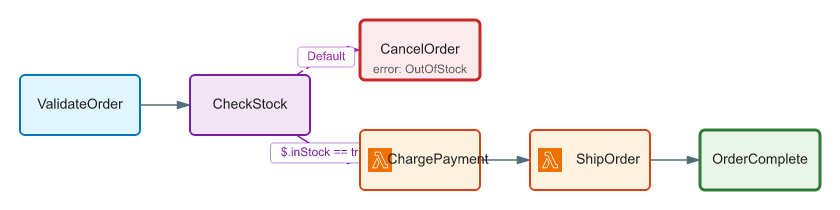
Preview AWS Step Functions ASL definitions as diagrams directly inside VS Code, powered by sfn-diagram.
Install


Search for Step Functions Diagram in the Extensions panel, or:
code --install-extension yusufaf.vscode-sfn-diagram
It is also published to Open VSX, the default registry for Cursor, Windsurf, VSCodium, Gitpod, and Eclipse Theia — searching the Extensions panel works there too:
codium --install-extension yusufaf.vscode-sfn-diagram
Both registries are published automatically whenever a new version of this extension is released, so they carry the same build. The two version badges above report what each one currently has.
Features
- Interactive preview of the state machine — the same pan/zoom/search/minimap viewer as
sfn-diagram --format html, not a static SVG in a scroll box.
- Opens from the command palette for any file, or from a button in the editor title bar for
*.asl.json and *.asl files — and for any other .json file whose top level looks like an ASL definition (a StartAt string and a States object).
- Pan and zoom by dragging or scrolling, with Fit/Reset controls; search (
/) highlights matching states and cycles through hits; the minimap (m) navigates large diagrams; click a state or edge to open a detail panel with its raw ASL, or an edge's endpoints/type/condition. A collapse toggle appears when the diagram has a Parallel/Map container to fold.
- Layout (Top→Bottom, Left→Right, Right→Left, Bottom→Top) and Theme (light/dark) selectors in a floating toolbar that re-render instantly.
- The preview updates automatically as you edit the underlying file — debounced shortly after you stop typing, patching just the diagram in place rather than reloading the whole panel, so your pan/zoom position, search query, and any open detail panel survive across edits. A transient parse error while you're mid-edit shows a small status note in the toolbar instead of replacing the diagram; it clears on the next successful render.
- Execution overlay: paint a real execution's history onto the diagram — succeeded / failed / caught / not-reached states light up, with a colour legend in the toolbar and a one-click Clear overlay. Pan/zoom/search/detail all keep working with the overlay active.
- Configurable defaults for theme, layout, icons, container collapsing, and auto-preview — see Settings.
Usage
- Open a Step Functions ASL file (
*.asl.json, *.asl, or any .json file containing an ASL definition).
- Run Step Functions: Preview Step Functions Diagram from the command palette (
Ctrl/Cmd+Shift+P), or click the diagram button in the editor title bar.
- Use the floating toolbar to change layout and theme; pan, zoom, search, and click into states/edges directly on the diagram.
To overlay a real run, run Step Functions: Preview Execution Overlay and pick an execution-history JSON file (a GetExecutionHistory response, { events: [...] }, or a raw HistoryEvent[]). The run's path lights up on top of the definition; Clear Execution Overlay (or the toolbar button) returns to the plain diagram.
Commands
| Command |
Title |
sfn-diagram.preview |
Preview Step Functions Diagram |
sfn-diagram.previewExecution |
Preview Execution Overlay |
sfn-diagram.clearExecution |
Clear Execution Overlay |
Settings
All settings live under sfnDiagram.* and apply as the default for new previews. Changing a setting live-applies to an already-open preview - except layout/theme once the toolbar has overridden either for the current session; that override wins until the preview is closed and reopened.
| Setting |
Type |
Default |
Description |
sfnDiagram.theme |
"auto" \| "dark" \| "light" |
"auto" |
Default color theme. "auto" follows the current VS Code color theme. |
sfnDiagram.layout |
"TB" \| "LR" \| "RL" \| "BT" |
"TB" |
Default layout direction. |
sfnDiagram.showIcons |
boolean |
false |
Show AWS service icons on Task nodes (fetched from the jsDelivr CDN — requires network access). |
sfnDiagram.collapseContainers |
boolean |
false |
Collapse Parallel and Map containers into a single placeholder node. |
sfnDiagram.autoPreview |
boolean |
false |
Automatically open the diagram preview when a .asl.json or .asl file is opened. A lone .asl file opened with no workspace folder won't trigger this, since VS Code has no language association for .asl outside a workspace. |
Install from source
To build and install a local .vsix instead:
cd packages/vscode-sfn-diagram
pnpm install
pnpm package                       # produces vscode-sfn-diagram-<version>.vsix
code --install-extension vscode-sfn-diagram-*.vsix
Development
pnpm build        # bundle with esbuild -> out/extension.js
pnpm dev          # rebuild on change
pnpm typecheck    # tsc --noEmit
Press F5 in VS Code to launch an Extension Development Host with the extension loaded.
Requires VS Code ^1.85.0.

