Why a sidebar, not the real tab bar?
VS Code's extension API deliberately can't customize editor‑tab hovers, can't color or group individual webview tabs, and exposes tabs as read‑only (except close). The only extensions that paint the tab bar do it by patching VS Code's files on disk — which breaks on every update. So this extension mirrors your Claude conversations into a proper view where all of these features are supported APIs. Full analysis in DESIGN.md.
✨ Features
- 🗂️ Groups — create named, colored groups and drag sessions between them, or start a new session straight into a group with the group's
+ button. They collapse and persist per workspace, just like Chrome tab groups.
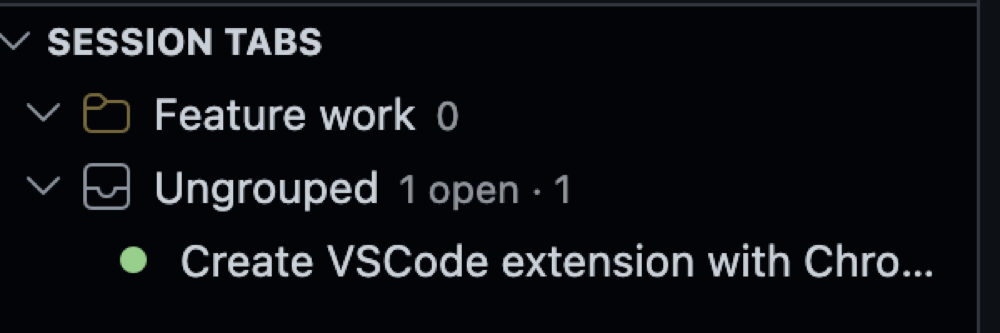
- 🫥 Active by default, reveal on demand — every group (and Ungrouped) shows only its active/open (and pinned) sessions, with a
N hidden count. Hit the 👁 eye on the group to reveal its closed sessions, and again to collapse back. The choice sticks per group.
- ⎇ Branches & worktrees — group your sessions by git branch with one toggle, or open the Branches view to see every git worktree of the repo with its sessions. Run different branches in parallel, jump into another worktree's session (it opens in a new window), or spin up a New Branch Session that creates a worktree and starts Claude there. See Branches & worktrees.
- 🔔 Waiting-for-you alerts — when Claude's last turn was an unanswered question or plan (
AskUserQuestion / ExitPlanMode), that session floats to the top with a bell + count badge on the icon. A real transcript signal — no manual flagging.
- ⚡ Real-time attention (opt-in) — enable Claude Code hooks from the view's ⋯ menu and the bell lights the instant Claude asks, plans, or needs permission — no transcript lag — with an optional sound + OS notification so you don't miss it. It clears the moment you reply, is fully reversible, and stays 100% local (a marker folder the extension watches). See Real-time attention.
- 🤖 Live subagents — expand a session to see the subagents Claude is currently running inside it (finished ones are hidden); click one to open a panel of its task and what it did.
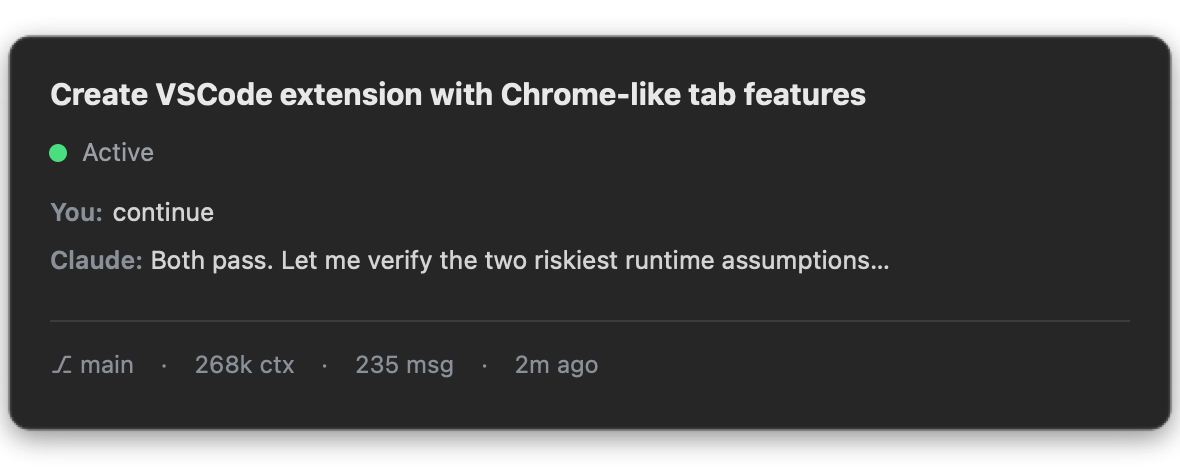
- 👀 Rich hover preview — the last You / Claude messages, git branch, context‑token count, message count, and last‑active time — without opening the session.
- 🟢 Live status — at a glance: active (green), waiting for you (🔔 yellow), open (blue), closed (outline).
- 📌 Pinning — keep the sessions you return to at the top.
- 🔎 Search — fuzzy‑find any conversation in the workspace by title or last prompt, then jump to it.
- ↔️ Two surfaces, one data source — a tree inside the Claude Code sidebar and a horizontal Chrome‑style strip in the bottom panel, always in sync.
- 🔒 Local only — everything is read from your local
~/.claude transcripts; nothing is sent anywhere.
📸 Screenshots
Colored groups, live status dots, and per‑workspace organization — nested right inside Claude Code's own sidebar.
Rich hover preview
Hover any session for an at‑a‑glance card of the conversation.
Horizontal tab strip (bottom panel)
Prefer a browser‑like strip? The Claude Code Tabs panel gives grouped tab chips with the same previews and drag‑to‑group.

🚀 Install
- Open Extensions in VS Code (
⇧⌘X / Ctrl+Shift+X) and search “Claude Code Tabs”, or run:
ext install yousefkadah.claude-session-tabs
- Make sure the Claude Code extension is installed and you've opened at least one conversation.
- Open the Claude Code Tabs icon in the Activity Bar (or find Session Tabs inside the Claude Code sidebar). For the horizontal strip, open the bottom panel (
⌘J / Ctrl+J) → Claude Code Tabs.
Requirements: VS Code ^1.84.0 (or a compatible fork) and the Anthropic Claude Code extension.
🧭 Where it lives
- Claude Code Tabs (Activity Bar) — the dedicated Sessions tree, always available.
- Session Tabs (Claude Code sidebar) — the same tree, mirrored inside Claude Code's own sidebar while it's active.
- Claude Code Tabs (bottom panel,
⌘J / Ctrl+J) — the horizontal Chrome‑style strip.
All three share one data source and stay in sync — use whichever fits your flow.
Right‑click any session or group for actions (pin, move to group, rename/recolor/delete group); use the view's title bar for Search, New Group, and Refresh.
⚡ Real-time attention (optional)
By default the bell reads the transcript, which Claude Code doesn't flush in real time, so it can lag. To make it instant, open the view's ⋯ menu → Enable Real-time Attention. With your confirmation it adds three Claude Code hooks to ~/.claude/settings.json:
| Hook |
Fires when |
Effect |
PreToolUse (AskUserQuestion / ExitPlanMode) |
Claude asks or presents a plan |
🔔 bell on |
Notification (permission prompt) |
Claude needs permission |
🔔 bell on |
UserPromptSubmit |
you reply |
bell off |
Each hook just writes/removes a marker file under ~/.claude/hooks/claude-tabs/; the extension watches that folder. Nothing leaves your machine. It self-heals — a stale marker is ignored once the transcript catches up — and Disable Real-time Attention removes the hooks and scripts, restoring your settings.json. Start a new Claude Code session (or reload) after enabling so it picks up the hooks.
Sound & notification. When a session starts waiting, the extension also plays a sound and shows a notification: a native OS banner when VS Code is in the background, or an in-app toast with a Reveal button when it's focused. It fires once per "needs you" transition, for the window that owns the session. Tune it with claudeSessionTabs.attentionSound, claudeSessionTabs.attentionNotification, and claudeSessionTabs.attentionSoundName (macOS sound). Windows/Linux use the system notification sound.
⎇ Branches & worktrees
Running several Claude sessions on different branches of the same repo? A single
working directory is only on one branch at a time, so parallel branch work uses
git worktrees — one folder per branch. Claude
Code Tabs is built around that:
- Group by Branch — the git-branch button on the Sessions view buckets your sessions
by the branch each ran on (most-recent first). Great even without worktrees.
- Branches view — lists every worktree of the current repo (
git worktree list),
each expandable to its sessions. Your current worktree is marked and sorted first.
- Open across worktrees — click a session in another worktree and choose Open in
New Window; the extension opens that worktree and resumes the exact session there
(handed off via a single-use local file — nothing leaves your machine).
- New Branch Session… — the
+ in the Branches view: pick a new or existing branch,
confirm the worktree folder, and it runs git worktree add and starts a fresh Claude
session in the new window.
⚙️ How it works
- Detects Claude tabs via the Tab API (
TabInputWebview with the claudeVSCodePanel view type).
- Reads session content from
~/.claude/projects/<workspace>/*.jsonl (subagent transcripts excluded), cached by file mtime so unchanged sessions are never re‑parsed.
- Opens/reveals a session with the Claude Code command
claude-vscode.editor.open.
- Optionally installs Claude Code hooks for a lag-free attention bell — see Real-time attention.
🔧 Settings
| Setting |
Default |
Description |
claudeSessionTabs.maxRecentSessions |
25 |
Max recent (closed) sessions shown under Ungrouped. Open/pinned/grouped always show. |
claudeSessionTabs.showClosedSessions |
true |
Include recently closed sessions, not just open tabs. |
claudeSessionTabs.projectDirectory |
"" |
Override the ~/.claude/projects/<slug> directory. Empty = auto‑detect. |
⚠️ Known limitations
- The views live in the sidebar and bottom panel — VS Code's API can't render them on the native editor tab bar.
- A live tab's exact
sessionId isn't exposed by the Tab API, so sessions are matched to tabs by title (with file mtime as a tiebreaker). Two sessions with identical 24‑char‑truncated titles can rarely be matched in the wrong order until one updates.
- The sidebar view rides Claude Code's container; if a future Claude Code update renames it, the view may need a one‑line update.
🛠️ Development
npm install
npm run watch      # or: npm run compile
npm test           # headless data-layer tests
Press F5 to launch an Extension Development Host. Package a .vsix with npx @vscode/vsce package --no-dependencies. The code is organized in layers (model → data → view → wiring); the full VS Code API analysis is in DESIGN.md.
📄 License
MIT © yousefkadah