AWC: Agent Workbench for Codex CLI (Unofficial)

Agent Workbench (AWC) is an independent, unofficial VS Code client built exclusively for the OpenAI Codex CLI. It provides an editor-first interface for managing chats, tool runs, approvals, and diffs.
AWC is not affiliated with, sponsored by, or endorsed by OpenAI. OpenAI and Codex are trademarks of their respective owner.
What's new in 1.7
AWC 1.7 introduces isolated Worktree runs, multi-agent orchestration, richer diff and review workflows, and persistent agent sessions. View the full changelog.
Highlights
- Editor-first Codex workflow — manage chats, approvals, tool runs, inline diffs, and undo checkpoints without leaving VS Code.
- Precise context sharing — attach files, selected code, images, and annotated chat or diff excerpts directly to a request.
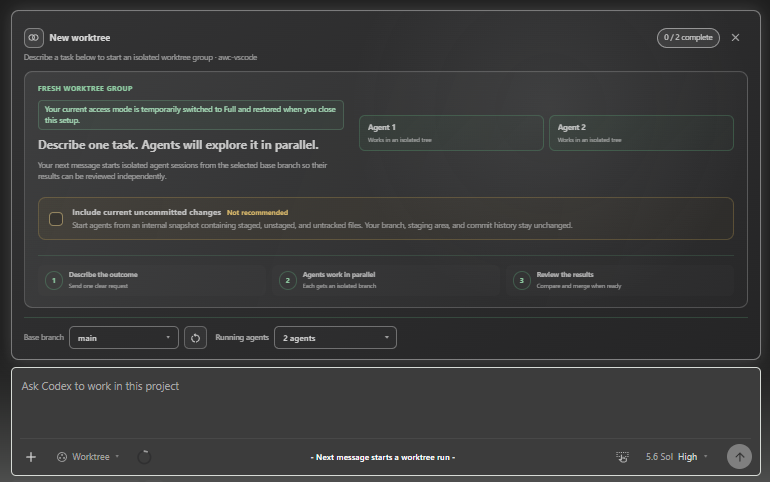
- Isolated worktree agents — run tasks independently in Git worktrees, compare their results, and apply the result you choose.
- Multi-agent orchestration — coordinate substantial tasks across specialized agents while keeping progress and results visible in one place.
- Continuous conversations — switch and restore sessions, then queue or steer follow-up messages while work is running.
Installation
Before installing AWC, prepare Codex using either of these options:
- Install the official Codex extension for VS Code and sign in to Codex.
- Install and authenticate the standalone Codex CLI. Set
awc.cliExecutable if codex is not available on PATH.
Then install AWC: Agent Workbench for Codex CLI (Unofficial) from the Visual Studio Marketplace, or run:
code --install-extension yonnq.awc
Marketplace extension ID: yonnq.awc
Requirements
- VS Code 1.90 or later
- A trusted local workspace
- Either the official Codex extension for VS Code or an authenticated standalone Codex CLI
The extension can run commands and read or modify files, so it does not run in Restricted Mode.
Getting started
- Run
AWC: Open from the Command Palette.
- Select the model, reasoning effort, and execution mode for your project.
- Send a message to start a new chat.
Use the Agent Workbench button in the editor title bar to open another panel. You can attach selected code with Add to Codex Thread or attach the active file with Add File to Codex Thread.
Features
- Account and session integration through the Codex
app-server
- Per-session model, reasoning effort, and IDE Context settings
- Plan, Ask, and Full execution modes
- Command and file-change approvals
- Inline diffs and editable native VS Code diffs
- Chat creation, switching, branching, renaming, archiving, and deletion
- Follow-up queue and steer behavior while a run is active
- Skills, plugins, and MCP status
- Context usage and account rate-limit displays
- Undo checkpoints for code changes
Agents
Worktrees
Use /worktree to run a task in isolated Git worktrees. Agents work independently from the selected base branch, and you can review their results before applying changes to your current checkout.
Orchestration
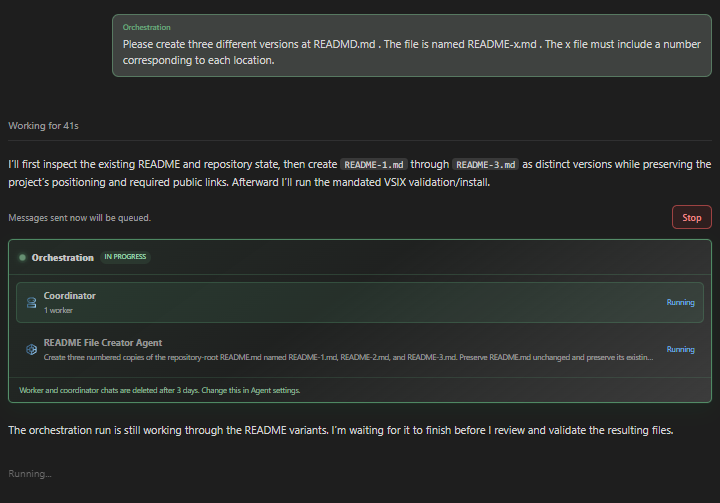
Use /orchestration to explicitly coordinate a message. The coordinator determines how to divide the task, delegates suitable work to agents, and may complete simple requests without workers.
AWC can also start orchestration automatically when a task has at least two substantial, independent worker assignments. Automatic orchestration is enabled by default and can be turned off in Agent settings > Automatic orchestration. Manual /orchestration remains available when automatic orchestration is disabled.
Permissions and data
Agent Workbench may perform the following operations to provide its features:
- Read files and selected text in the current workspace
- Create, modify, or delete files after user approval
- Run the Codex CLI and approved commands
- Read Codex account, session, usage, and plugin information
- Store session metadata and undo checkpoints in VS Code extension storage
The extension does not collect its own analytics, advertising data, or tracking telemetry. Prompts, attached context, commands, and tool requests may be processed according to the policies of the Codex CLI and any connected services. See the public Privacy Policy for details.
Settings
awc.cliExecutable: path to the Codex executableawc.openOnStartup: open Agent Workbench when VS Code startsawc.ideContextEnabled: include the active file or selectionawc.followUpQueueMode: use Queue or Steer for follow-up messagesawc.reviewDelivery: show reviews Inline or Detachedawc.automaticOrchestrationEnabled: allow Codex to start orchestration automatically for suitable tasksawc.runCodexInWindowsSubsystemForLinux: run Codex through WSL on Windows
openOnStartup is disabled by default for public distribution.
License
See the included LICENSE for the project license and the public Third-Party Notices for bundled third-party components.
Report security issues using the process in the public Security Policy, not through a public issue.

