C 语言报错翻译器 · C Error Helper
把 GCC / Dev-C++ 的英文报错,翻译成中文「人话」的 VS Code 扩展。纯本地、离线、秒出结果。
学长视角,不是教授视角 —— 它不告诉你「语法错误」,它告诉你「上一行末尾是不是忘了加分号 ;」。

⭐ 觉得有用就给个 Star,让更多学 C 的同学看到。
English
它解决什么
刚学 C 的人,90% 的时间卡在看不懂报错:报错是英文、是术语、报的位置还常常不是真正出错的地方。于是你复制去问 AI、问同学、问搜索引擎——打断思路,还慢。
这个扩展挂在 VS Code 里,报错一出现,悬停红波浪线就出中文解释,Ctrl+. 弹出「学长解释」。不用联网、不用登录、代码不出本机。
特性
- 🇨🇳 中文人话:
expected ';' before '}' token → 「上一行末尾漏了分号,补个 ;」
- ⚡ 秒解析:纯本地关键词匹配,毫秒级出结果
- 🔒 离线可用:教室 / 图书馆没网也能用,代码不发往任何云端
- 🎯 新手陷阱库:36 条规则,全角标点、整数除法、
if 里把 == 写成 =、scanf 漏 &、for 里分号写成逗号…… 每条都是真踩过的坑
- 🖱️ 不打断心流:原生 hover +
Ctrl+. 快速修复,不用切面板、不用碰鼠标
安装
方式一:VS Code 扩展市场(推荐)
扩展面板(Ctrl+Shift+X)搜 C 语言报错翻译器 或 c-error-helper → 点安装。
市场页面:https://marketplace.visualstudio.com/items?itemName=xiaogaokunkun.c-error-helper
命令行等价写法:
code --install-extension xiaogaokunkun.c-error-helper
方式二:手动装 .vsix(离线 / 单位网络连不上市集时)
- 下载:
c-error-helper-0.1.1.vsix(Release 页:v0.1.1)
- VS Code 里
Ctrl+Shift+P → Extensions: Install from VSIX... → 选那个文件
命令行等价写法:
code --install-extension c-error-helper-0.1.1.vsix
使用
扩展只负责「把已有报错翻成中文」,报错本身由 VS Code 的 C/C++ 扩展(IntelliSense)产生,所以:
- 装 C/C++ 官方扩展:
code --install-extension ms-vscode.cpptools
- 在工作区
.vscode/settings.json 把编译器指过去(否则它找不到 stdio.h,只报 include 错、不报语法错):
{
  "C_Cpp.default.compilerPath": "D:/dev/Dev-Cpp/MinGW64/bin/gcc.exe",
  "C_Cpp.default.cStandard": "c11",
  "C_Cpp.default.intelliSenseMode": "windows-gcc-x64",
  "files.encoding": "gbk"
}
(编译器路径换成你自己的;files.encoding 是因为 Dev-C++ 存的是 GBK 文件。)
- 打开任意
.c 文件,写错一行(比如漏个分号)
- 鼠标悬停到红波浪线上 → 出中文解释;或按
Ctrl+. → 「📖 学长解释:…」
演示
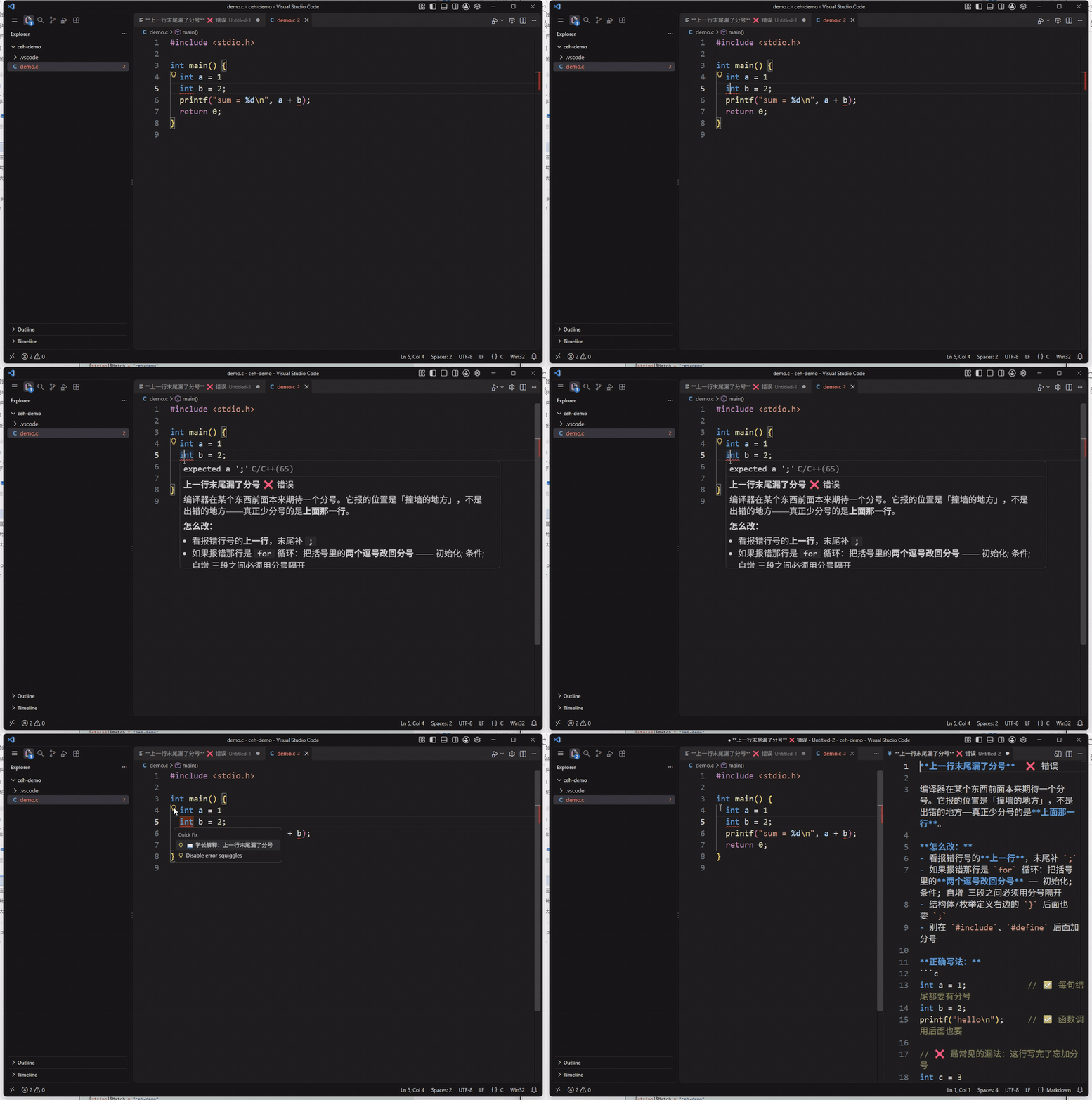
动图里的三拍:① 第 4 行 int a = 1 末尾漏了分号 → ② 第 5 行报 expected a ';',鼠标悬停红波浪线,弹出中文解释「上一行末尾漏了分号:真正少分号的是上面那一行」→ ③ 点左侧灯泡(或按 Ctrl+.)选「📖 学长解释:…」,右侧打开完整讲解文档。
为什么不直接问 ChatGPT
|
这个扩展 |
问 ChatGPT |
| 联网 |
❌ 不需要 |
✅ 需要 |
| 登录 / API Key |
❌ 不需要 |
可能需要 |
| 速度 |
毫秒级 |
几秒 |
| 代码隐私 |
不出本机 |
发给云端 |
| 语境 |
就是给 C 新手写的 |
通用 |
验证状态
| 项 |
结果 |
| 匹配逻辑单测(gcc 原文 + IntelliSense 变体) |
20 / 20 |
| 扩展 host 冒烟(真 VS Code API:hover / Ctrl+. / 解释文档 / 反例不误报) |
14 / 14 |
真机端到端(cpptools + MinGW64 gcc + 工作区 compilerPath,必须命中 expected a ';' → 中文「上一行末尾漏了分号」) |
6 / 6 |
| 规则与网页版逐条核对 |
36 条一致 |
规则库
36 条编译报错 + 逻辑坑,摘自同名网页版《C语言报错翻译器》并补了 cpptools 的同义关键词(如 expected a ';' / use of undeclared identifier)。每条含:错在哪、为什么错、怎么改;其中 11 条另带「正确写法」对照示例(code 字段)。
持续扩充中——你遇到、它没认出来的报错,欢迎提 issue 把原文贴上来,我加进规则库。
开发
npm install        # 装 devDependencies
npm run compile    # tsc 编译
npm test           # 匹配逻辑单测
npm run package    # 打包 .vsix
License
MIT
English
A VS Code extension that translates GCC / Dev-C++ compiler errors into plain Chinese. Offline, instant, zero-config.
Why
C beginners lose most of their time to unreadable error messages — English jargon that points at the wrong line. This extension turns expected ';' before '}' token into "you forgot a semicolon at the end of the previous line".
Features
- Human-language explanations, not compiler-speak
- Instant: pure local keyword matching, no network round-trip
- Fully offline: no login, no API key, your code never leaves the machine
- 36 hand-curated rules covering the classic beginner traps (full-width punctuation, integer division,
= instead of == in an if, missing & in scanf, ; vs , in for, …)
- Native UX: hover the red squiggle for the explanation,
Ctrl+. for a 「学长解释」 quick fix
Install
From the VS Code Marketplace:
code --install-extension xiaogaokunkun.c-error-helper
Or grab the VSIX from the v0.1.1 release and run Extensions: Install from VSIX....
Usage
- Install the official C/C++ extension (
ms-vscode.cpptools) so squiggles appear.
- Point the compiler at your toolchain in
.vscode/settings.json (see the Chinese section above).
- Open any
.c file and make a mistake (e.g. drop a semicolon).
- Hover the red squiggle → Chinese explanation. Or
Ctrl+. → 「📖 学长解释」.
License
MIT

