
CrowdStrike Query Language (CQL) for LogScale & Humio
Zero-runtime, fully auditable syntax highlighting and snippets for CrowdStrike Query Language (CQL/LQL).
Built and maintained by XecureLogic.


Why this extension
Editor extensions run with access to your workspace files, terminal, and
network. For a security team, an unvetted extension is supply-chain risk inside
the tool you spend all day in.
This extension is declarative-only. It contains a TextMate grammar, a
language configuration, and snippets — all JSON. There is:
- No executable code — no
activate() entry point, no JavaScript/TypeScript runtime.
- No dependencies — nothing pulled from npm at install or runtime.
- No network access — it cannot phone home, read secrets, or exfiltrate data.
The entire package is a handful of small JSON files you can read in under five
minutes. Clone the repository, inspect every byte, and decide for yourself.
That is the point.
The grammar is covered by scope-assertion tests (vscode-tmgrammar-test) that
run in CI on every change, so highlighting behavior is pinned and regressions
are caught automatically. The test harness runs through npx — it adds no
runtime or install dependencies to the extension.
Features
- Syntax highlighting for CQL/LQL: comments, strings, regex literals, tag
fields (
#event_simpleName), metadata fields (@timestamp, @rawstring),
query/dashboard parameters (?name), function calls, named parameters
(function=, order=), case / match / default constructs, logical
operators (AND / OR / NOT), assignment (:=), comparisons, the pipe
operator, relative-time literals (24h, 7d), numbers, and constants.
Field names inside list brackets (groupBy([...]), table([...])) are
highlighted too.
- Snippets for common patterns — tag filters,
groupBy, case, regex
filters, formatTime, sort, timechart, bucket, in, select,
head / tail, rename, format, worldmap, and a full hunt-query
skeleton in canonical query order. Type hunt, groupby, case, regex,
and others.
- Editor behavior — comment toggling, bracket matching, auto-closing pairs,
region folding (
// #region / // #endregion), and block indentation.
- File associations —
.cql, .lql, .humio. For any other file, set the
language mode to CrowdStrike Query Language via the status bar.
Example
// Suspicious PowerShell with encoded command
#event_simpleName=ProcessRollup2
| ImageFileName=/powershell\.exe/i
| CommandLine=/encodedcommand/i AND NOT UserName="SYSTEM"
| fileName := lower(ImageFileName)
| groupBy([ComputerName], function=count(as=hits))
| sort(hits, order=desc, limit=20)
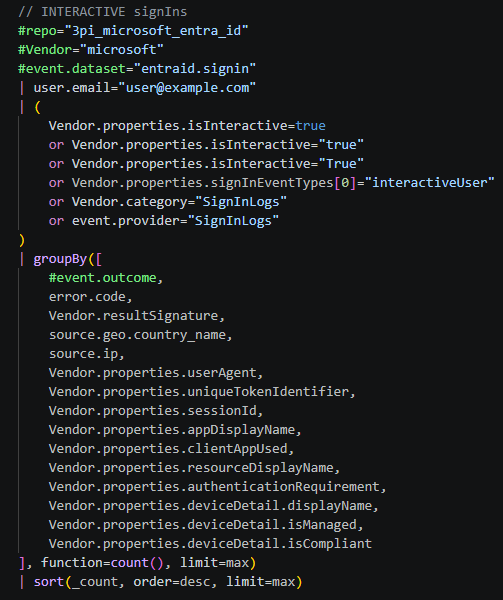
Snippets expand a full query from a short prefix — type signins and press Tab:

Install
From the Marketplace: search CrowdStrike Query Language and click Install.
From a packaged file: Ctrl+Shift+P → Extensions: Install from VSIX...
Known limitation
CQL overloads / for comments, regex literals, and division. CrowdStrike's own
grammar documentation notes this cannot be fully disambiguated without a
language server. This grammar treats a slash-delimited pair on one line as a
regex literal, which covers the common case; a division expression with a
second slash on the same line may occasionally be miscolored. This is cosmetic
and does not affect query execution.
About XecureLogic
XecureLogic builds correlated threat-intelligence tooling for security teams.
Learn more at xecurelogic.com and
kataris.io.
License
MIT © XecureLogic
| |

