


Professional CMake code formatter with CLion-compatible style for Visual Studio Code
💡 Need command-line formatting? Check out the cc-format CLI tool for CI/CD pipelines and terminal workflows!
📌 About This Project
CLion CMake Format is a VS Code extension that provides professional CMake code formatting based on JetBrains CLion's built-in formatting style. This extension is part of the CLion CMake Format project, which offers consistent CMake formatting across different development tools and environments.
Perfect for: Visual Studio Code users who want seamless editor integration with format-on-save, keyboard shortcuts, and visual configuration.
This extension uses the same core formatting engine (@cc-format/core) as the cc-format CLI tool, ensuring consistent formatting results whether you format files in your editor or via command line.
💡 Need to format CMake files in CI/CD or terminal? Install the cc-format CLI tool for command-line formatting, pre-commit hooks, and automated build systems!
Why Use This Extension?
- ⚡ Zero Dependencies - Pure TypeScript implementation, no external tools required
- 🎯 CLion-Compatible - Matches CLion's formatting rules exactly for consistent code style
- 🔧 Zero Setup - Install and format immediately with sensible defaults
- 🛠️ Highly Customizable - 23+ configuration options for complete control
- 📁 Project Config Support - Use
.cc-format.jsonc files to share formatting rules with your team
- 🚀 Fast & Reliable - Instant formatting with idempotent results
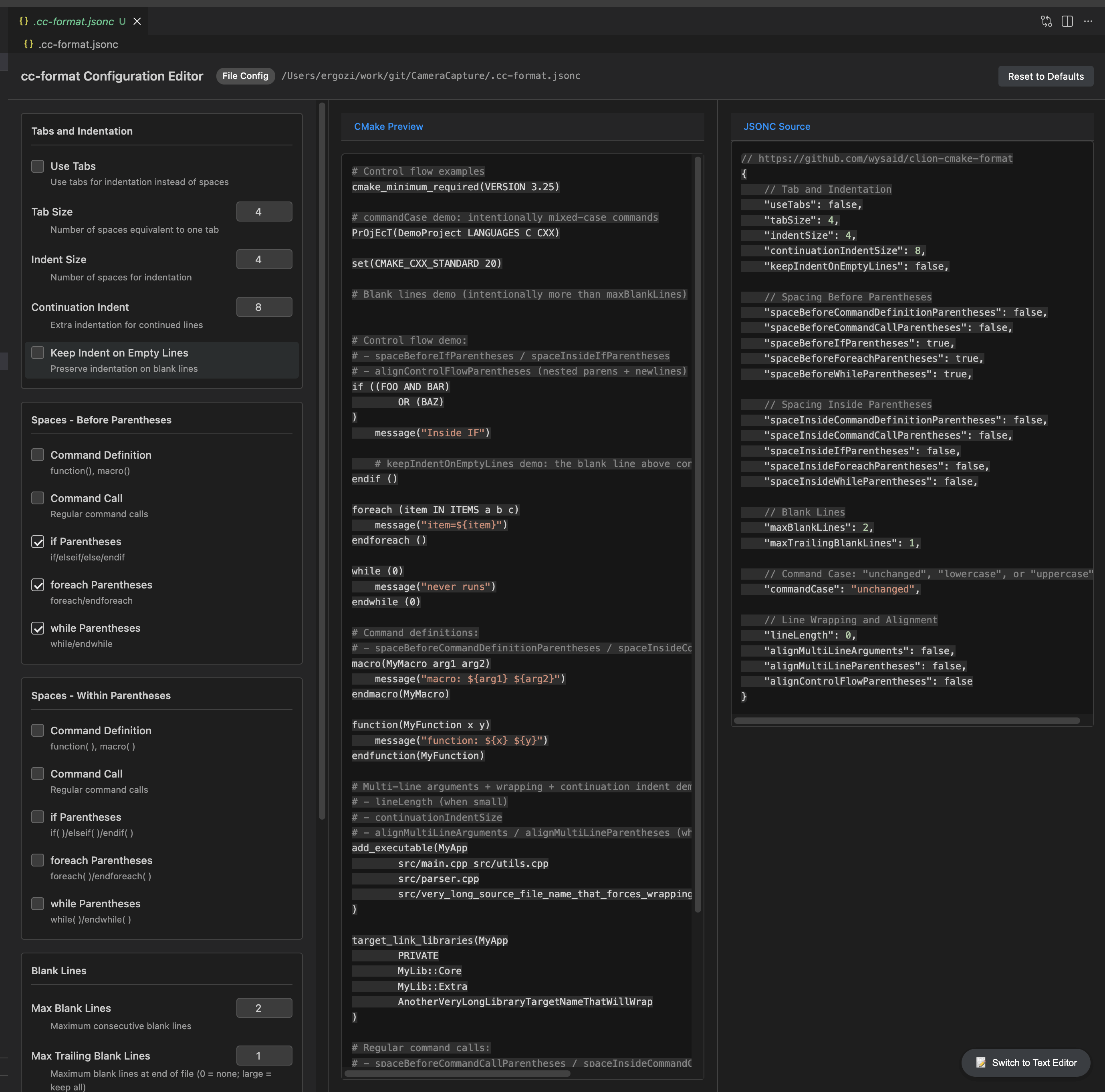
🖼️ Visual Configuration Editor
Edit .cc-format.jsonc with a friendly visual editor inside VS Code.
Project Links
Installation
Install the extension from the VS Code Marketplace or via:
code --install-extension wysaid.clion-cmake-format
Quick Start
- Open a CMake file (
.cmake or CMakeLists.txt)
- Right-click and select "Format Document" or press
Shift+Alt+F
- The file will be formatted according to your configuration
Configuration
Create a .cc-format.jsonc file in your project root (or any parent directory):
{
    // Indentation
    "indentSize": 4,
    "useTabs": false,
    "tabSize": 4,
    "continuationIndentSize": 8,

    // Spacing
    "spaceBeforeIfParentheses": true,
    "spaceBeforeForeachParentheses": true,
    "spaceBeforeWhileParentheses": true,

    // Formatting
    "commandCase": "lowercase",
    "lineLength": 120,
    "maxBlankLines": 2,
    "alignMultiLineArguments": false
}
Configuration Options
| Option |
Type |
Default |
Description |
indentSize |
number |
4 |
Number of spaces for indentation |
useTabs |
boolean |
false |
Use tabs instead of spaces |
tabSize |
number |
4 |
Number of spaces per tab |
continuationIndentSize |
number |
8 |
Continuation line indent size |
commandCase |
string |
unchanged |
Command case: unchanged, lowercase, uppercase |
lineLength |
number |
0 |
Maximum line length (0 for unlimited; min 30 for non-zero values) |
maxBlankLines |
number |
2 |
Maximum consecutive blank lines |
alignMultiLineArguments |
boolean |
false |
Align multi-line arguments |
VS Code Settings
You can also configure the formatter in VS Code settings (.vscode/settings.json):
{
    "clionCMakeFormatter.indentSize": 4,
    "clionCMakeFormatter.commandCase": "lowercase",
    "clionCMakeFormatter.lineLength": 120,
    "clionCMakeFormatter.enableProjectConfig": true
}
Configuration priority (highest to lowest):
- Project config (
.cc-format.jsonc — searched from file's directory up to filesystem root)
- VS Code workspace settings (
.vscode/settings.json)
- VS Code user settings
- Default options
Note: Project-level .cc-format.jsonc files take precedence over VS Code settings to ensure team-wide consistency. To disable this behavior, set "clionCMakeFormatter.enableProjectConfig": false.
Keyboard Shortcuts
- Format Document -
Shift+Alt+F (or Shift+Option+F on macOS)
- Format Selection -
Ctrl+K Ctrl+F (or Cmd+K Cmd+F on macOS)
Commands
- CMake Format: Format Document - Format the current CMake file
- CMake Format: Create Config - Generate a
.cc-format.jsonc template
Project Configuration
Place a .cc-format.jsonc file in your project root (or any parent directory) to apply formatting rules:
// .cc-format.jsonc
{
    "indentSize": 4,
    "commandCase": "lowercase",
    "lineLength": 100
}
Examples
Before
project(MyProject)
set(SOURCES src/main.cpp src/util.cpp src/config.cpp)
add_executable(myapp ${SOURCES})
target_link_libraries(myapp PRIVATE pthread)
project(MyProject)
set(SOURCES
    src/main.cpp
    src/util.cpp
    src/config.cpp
)
add_executable(myapp ${SOURCES})
target_link_libraries(myapp PRIVATE pthread)
Troubleshooting
- Check that the file is recognized as CMake (should show
cmake in the bottom right)
- Verify VS Code has a formatter registered for CMake files
- Check the extension output panel for error messages
- Ensure the file extension is
.cmake or the filename is CMakeLists.txt
Configuration not being applied
- Ensure
.cc-format.jsonc is in the project directory or any parent directory (the extension searches upward from the file being formatted)
- Check that
clionCMakeFormatter.enableProjectConfig is true in settings
- Reload VS Code (
Ctrl+Shift+P → "Reload Window") to refresh the configuration
- Check for syntax errors in your
.cc-format.jsonc file
Verify editor.formatOnSave is true for CMake files:
{
  "[cmake]": {
    "editor.formatOnSave": true,
    "editor.defaultFormatter": "wysaid.clion-cmake-format"
  }
}
Check that no other CMake formatter extension is conflicting
Try manually formatting (Shift+Alt+F) to verify the extension is working
- @cc-format/core — Core formatting engine for integration into your own tools
- cc-format — Command-line interface for CI/CD pipelines, pre-commit hooks, and terminal usage
- Install globally:
npm install -g cc-format
- Perfect for automated build systems, Git hooks, and developers who prefer terminal workflows
License
MIT

