EIDE AI

EIDE AI is an embedded MCU development environment for VS Code and for
headless automation. It manages EIDE projects for ARM Cortex-M, 8051/STM8,
RISC-V, MIPS, and arbitrary GCC targets; builds them with their native
toolchains; flashes devices through supported uploaders; and exposes the same
project and build model through a CLI and MCP server.




简体中文
Overview
- Agent automation — one EIDE project, two ways to work on it: develop in
VS Code, and build, flash, and debug the same project from CI, scripts, and
AI agents through the CLI and MCP server. The GDB/MI debug loop is verified
in CI against QEMU. See the
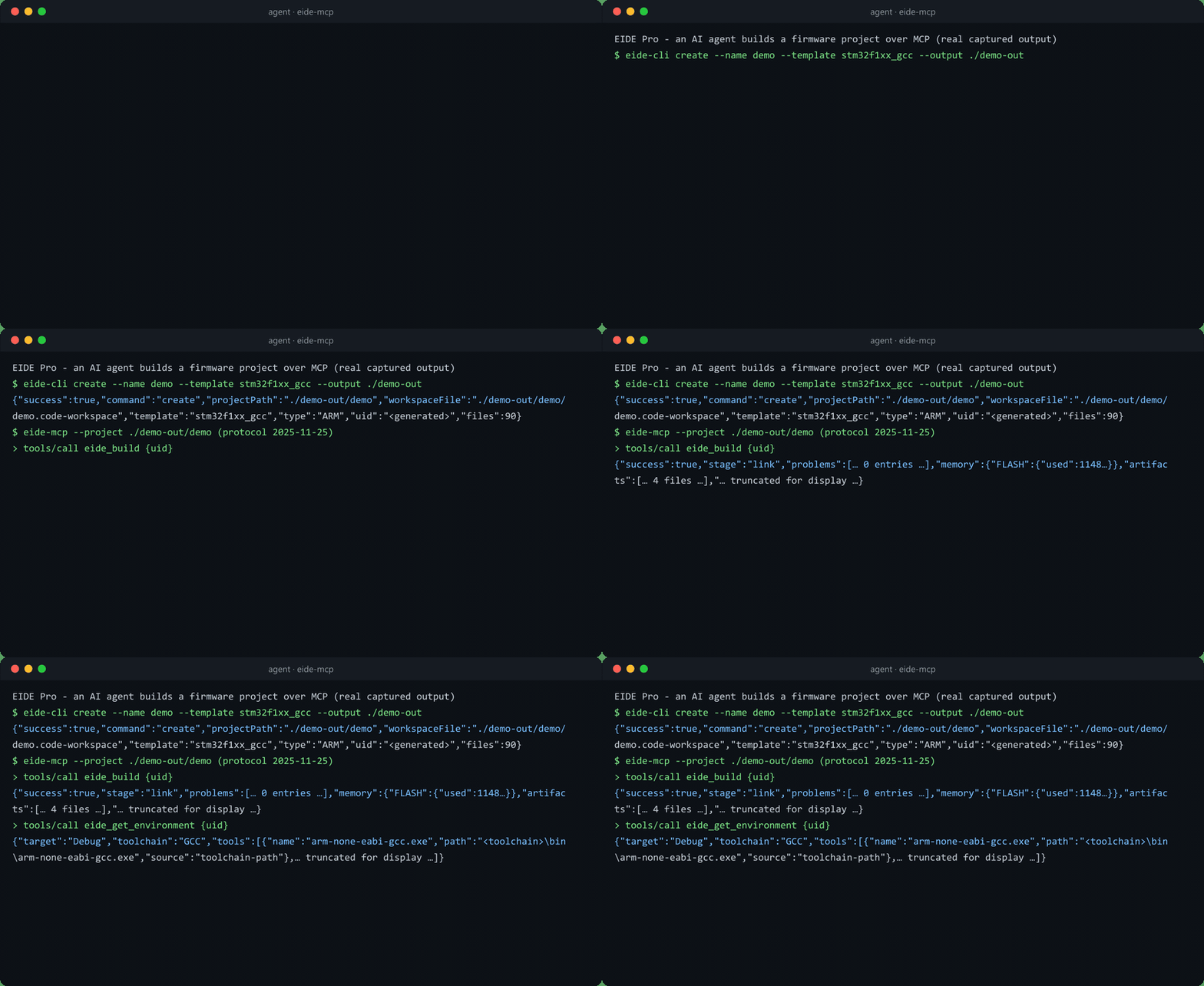
Headless CLI and MCP guide.
- Project setup — create projects from built-in templates, or import
Keil 5 (MDK), IAR, and Eclipse projects in the editor; an imported project
gets a
miscInfo.uid on import, so the CLI can open and build it directly.
Standard Keil chip support packs can be installed for Cortex-M projects.
Keil import is verified end to end for sources, target/group/file defines and
group include paths, through a headless GCC build
(status). IAR and Eclipse import persistence
and headless loadability are verified too; RTE component resolution and ARMCC
output are still unverified.
- Build — build, rebuild, and clean with the AC5, AC6, GCC, LLVM_ARM,
IAR_ARM, Keil_C51, SDCC, GNU_SDCC_MCS51, IAR_STM8, COSMIC_STM8, RISCV_GCC,
MTI_GCC, and ANY_GCC toolchains.
- Flash — program devices through J-Link, ST-Link, OpenOCD, pyOCD,
probe-rs uploaders. Custom command uploaders work only in the VS Code
extension; the headless CLI and MCP fail explicitly for them (STVP and stcgal
likewise), matching the headless Limits.
- Debug integration — generate Cortex-Debug launch and attach
configurations for the supported probes, and provide configurations for the
probe-rs-debug and gdbtarget debug adapters.
- Editor tooling — Cppcheck static analysis, a cpptools IntelliSense
provider that does not require
c_cpp_properties.json, CMSIS Config Wizard,
disassembly view, map view, project resource explorer, the MSYS shell on
Windows, and a GCC callgraph view.
- Automation —
eide-cli for build, rebuild, clean, plan, and flash, plus
eide-mcp for a stdio MCP server. Both use the extension's project loader and
builder.
| Project type |
Toolchains |
| ARM |
AC5, AC6, GCC, LLVM_ARM, IAR_ARM |
| C51 / STM8 |
Keil_C51, SDCC, GNU_SDCC_MCS51, IAR_STM8, COSMIC_STM8 |
| RISC-V |
RISCV_GCC |
| MIPS |
MTI_GCC |
| ANY-GCC |
ANY_GCC |
Projects use the EIDE project format (.eide/eide.yml). Keil 5, IAR, and
Eclipse projects can be imported, and standard Keil chip packs are supported for
Cortex-M projects.
Install
Extension marketplaces
code --install-extension wuwuzhazha.eide-pro
GitHub Releases
Download the latest eide-pro-<version>.vsix from
GitHub Releases, then install
it from the command line or with Extensions: Install from VSIX... in VS
Code:
code --install-extension ./eide-pro-4.3.0.vsix
Headless CLI and MCP
Download eide-pro-headless-<version>.tgz from
GitHub Releases and install it
globally:
npm install -g ./eide-pro-headless-<version>.tgz
This installs the eide-cli and eide-mcp commands without requiring VS Code.
The package bundles the toolchain models, builder binaries, and resources; the
host needs Node.js 18+ and a .NET 6+ runtime. See the
Headless CLI and MCP guide.
Build from source
Requirements: Node.js 18, npm, and Git. The lib/node-utility submodule is
required for the build. Its URL in .gitmodules uses SSH; rewrite it to HTTPS
if you do not have GitHub SSH credentials configured.
git clone https://github.com/wuwuzhazha/eide-pro.git
cd eide-pro
git -c url."https://github.com/".insteadOf="git@github.com:" submodule update --init --recursive
npm install
npm test
npm run vscode:prepublish
npm run vscode:prepublish builds the extension and both headless bundles. To
package a VSIX with Node.js 18, use the vsce version the project has
historically used:
npx @vscode/vsce@2.15.0 package
For day-to-day development, npm run webpack builds the extension in
development mode, and npm run webpack:headless builds only the CLI and MCP
bundles.
Quick start
- Install EIDE AI.
- Install a supported toolchain and set its path in the EIDE AI
Operations view, or follow the startup walkthrough
(Get Started → Setup Toolchain) that offers the same step.
- Create a project from a template, or import an existing Keil, IAR, or
Eclipse project.
- Build the project, then flash a device or start a debug session from the
project view.
Headless CLI and MCP
The headless host loads the same .eide/eide.yml project model and generates
build parameters with the same CodeBuilder as the VS Code extension. Headless
builds therefore honor .eide/env.ini, virtual source folders,
dependenceList groups, per-file options, workspace settings, dynamic
overrides, and xpack-managed toolchains. Coming from the original EIDE? See
migrating-from-eide.md. The extension and the
CLI/MCP tooling are separate installs — see
"Two ways to run EIDE".
CLI
Build a project with the installed package:
eide-cli build \
  --project ./firmware \
  --toolchain-path ./gcc
The commands are create, build, rebuild, clean, plan, and flash.
eide-cli create --name firmware --template stm32f1xx_gcc creates a build-ready
project from a built-in template. plan and build --dry-run produce the build
plan without compiling; flash --dry-run
prints the flash command without touching hardware. Results are emitted as one
JSON object on stdout; logs go to stderr. See
docs/headless.md for the full option list, exit codes,
build result fields, and flash options. For setting up a first build in CI, see
docs/ci.md.
The standalone bundles are dist/eide_cli.js and dist/eide_mcp.js; their
package bin names are eide-cli and eide-mcp. Use node dist/... when
running directly from a development tree.
MCP
eide-mcp \
  --project ./firmware \
  --toolchain-path ./gcc
The stdio server exposes project build/rebuild, clean, flash,
target/source/include configuration, stack usage, and callgraph tools. When
started with --gdb, it also exposes GDB-backed tools for connecting, reading
registers and memory, setting and listing breakpoints, backtraces, thread and
frame selection, local-variable inspection, step over/into/out, continuing and
interrupting execution, evaluating expressions, decoding Cortex-M faults, and
looking up SVD symbols (including derivedFrom inheritance).
VS Code also exposes an HTTP MCP server. Enable it with
EIDE.MCP.Server.Enable and set the port with EIDE.MCP.Server.Port (default
8940). Client configuration uses an entry name of your choosing; the server
itself identifies as EIDE AI:
{
  "servers": {
    "EIDE AI": { "url": "http://localhost:8940/mcp", "type": "http" }
  }
}
Headless flash supports J-Link, OpenOCD, pyOCD, ST-Link, and probe-rs. STVP,
stcgal, and custom command uploaders are not supported in headless mode.
For agent installation and setup, see the
EIDE MCP skill. The skill directory is
docs/skills/eide-mcp-tools.
Requirements
- VS Code — version 1.89 or newer, or a compatible editor that can install
from Open VSX or a VSIX file.
- Toolchain — install the compiler, assembler, and linker for your target
separately, then configure its path in EIDE AI. Headless mode accepts
--toolchain-path or a --settings file.
- Node.js — Node.js 18 or newer for the headless CLI, MCP server, and
builds from source.
- Project — an EIDE project. Headless mode requires
.eide/eide.yml with
miscInfo.uid present.
- Platforms — Windows x64 (Windows 10 or newer), Linux x64, and macOS.
Upstream has tested macOS only on 10.15 x64.
Upstream relationship
EIDE AI is an unofficial fork of
github0null/eide, maintained at
wuwuzhazha/eide-pro. All changes in this
fork were executed with AI and touch core project-loading and build paths;
submitting them upstream would impose a disproportionate review and stability
burden on the upstream maintainers. EIDE AI is therefore maintained as an
independent reference implementation and installable extension. Upstream
remains github0null/eide.
EIDE AI uses the same .eide/eide.yml project model and toolchain definitions
as upstream, and it has its own extension identity, so it installs separately
from upstream EIDE.
Project structure
| Path |
Purpose |
src/extension.ts |
Extension activation, commands, and debug configuration providers |
src/EIDEProject.ts |
.eide/eide.yml project model and configuration |
src/CodeBuilder.ts |
Build parameter generation for all toolchains |
src/core/ |
Headless build and flash services, project snapshots, problem parsing, and GDB/SVD helpers |
src/cli/ |
eide-cli entry (src/cli/eide_cli.ts), argument parsing, and command dispatch |
src/headless/ |
Headless host, settings resolution, and the VS Code API shim |
src/mcp/ |
eide-mcp entry (src/mcp/eide_mcp.ts), stdio server, tools, and GDB integration |
src/html/ |
Webview assets, including the callgraph view |
res/ |
Templates, toolchain metadata, bundled tools, and icons |
test/ |
Test runner, test scripts, and the installed-package E2E fixture |
scripts/ |
Release and headless packaging scripts |
docs/ |
Headless CLI/MCP and agent-skill documentation |
lib/node-utility/ |
Shared utility submodule |
Testing and verification
Run the full suite:
npm test
This compiles src and test, then runs every script in test/scripts through
test/run-tests.js. The suite covers the project model, builders, headless
build and flash paths, the toolchain matrix, MCP protocol behavior, and GDB/SVD
parsing.
Focused commands:
npm run compile             # Compile src with tsc
npm run webpack             # Build the extension in development mode
npm run webpack:headless    # Build dist/eide_cli.js and dist/eide_mcp.js
npm run package:headless    # Build artifacts/eide-pro-headless-<version>.tgz
npm run test:headless-package  # Install the tarball, build the Cortex-M fixture, and open MCP
The installed-package E2E requires an ARM GCC installation (ARM_GCC_ROOT,
default /usr) and a .NET 6+ runtime.
Contributing
See CONTRIBUTING.md for the branch, testing, and pull
request workflow. Report security issues privately as described in
SECURITY.md.
Community and support
Questions, bug reports and field notes are welcome in the QQ group
EIDE Pro 交流区 (group number 1137801106), or as
GitHub issues.
Support the project
EIDE AI is MIT-licensed and stays free. If it saves you time, you can help
cover the maintenance work. The upstream EIDE project by github0null has its own
sponsor page.


License
MIT. See LICENSE and
THIRD_PARTY_NOTICES.md. Additional third-party
license texts are in licenses.
Links

