CodeAtlas Architecture

CodeAtlas Architecture is an interactive call graph and dependency visualization extension for Python, TypeScript, and JavaScript in Visual Studio Code. It provides real-time cursor-linked topology visualization, cross-file static call chain tracing, unused code detection, and direct code navigation inside your editor.
Key Features
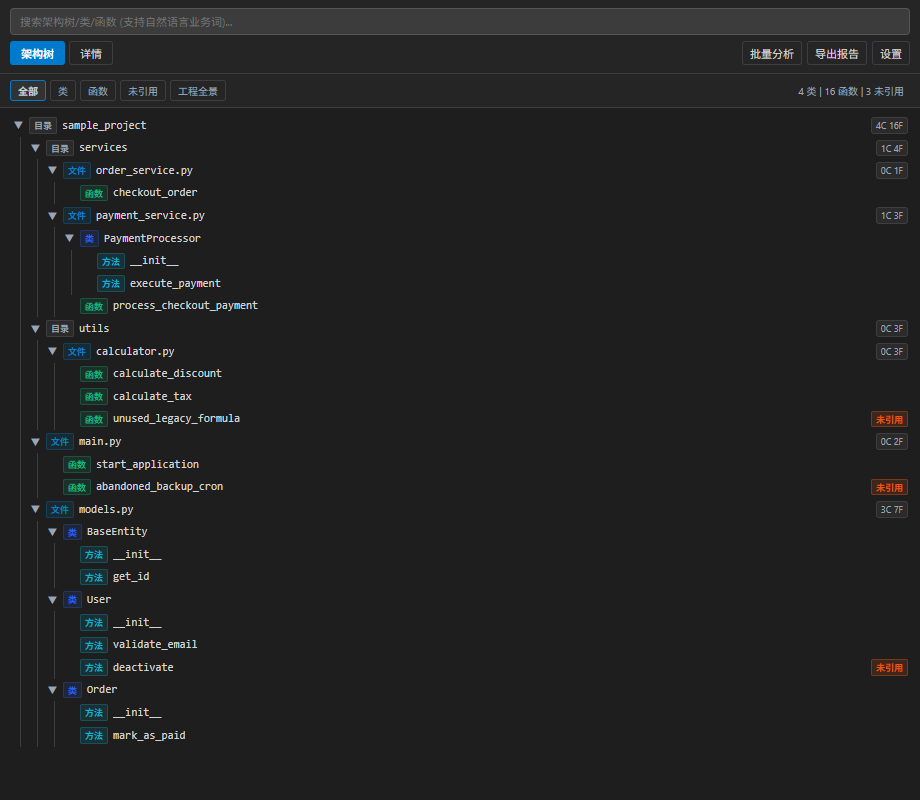
1. Interactive Architecture Tree & Code Hierarchy
- Multi-level Hierarchy: Inspect workspace modules, directories, files, classes, methods, and functions in a clean structured outline.
- Bi-directional Cursor Sync: Move your editor cursor, and CodeAtlas automatically shifts focus to the corresponding symbol within 250ms. Click any node in the graph to navigate directly to its source code definition.
- Instant Filtering: Filter code entities by Classes, Functions, or Unreferenced Candidates with dedicated filter pills.
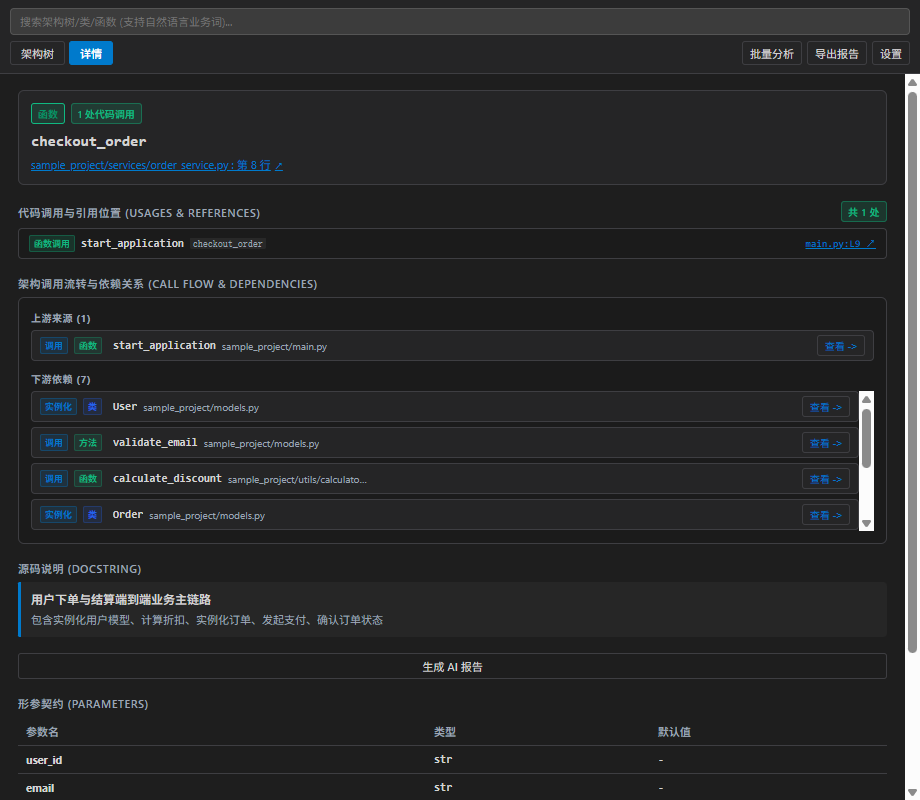
2. Symbol Contract & Dependency Inspection
- Caller & Callee Flow: Select any function or class to inspect its incoming callers, outgoing dependencies, and instantiation sites across files.
- Type Signatures & Docstrings: Review parameter types, return signatures, docstring summaries, and usage snippets in a dedicated side-panel contract card.
- Direct Navigation: Click on any reference or upstream/downstream dependency to jump straight to the source file line.
3. Unused & Dead Symbol Detection
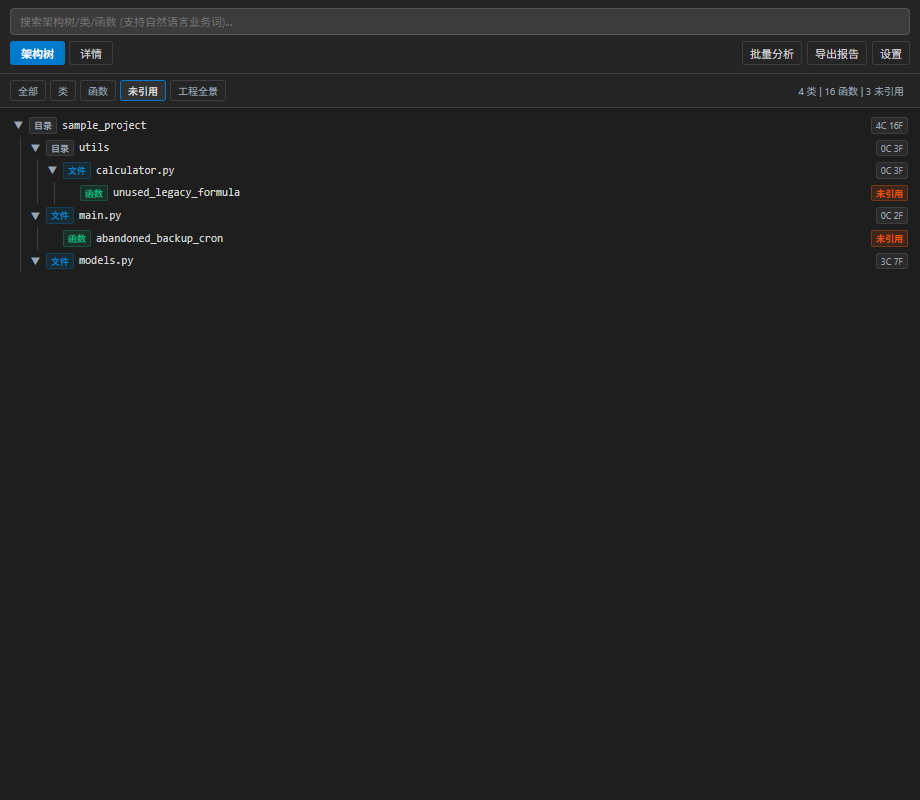
- Scan your workspace to discover top-level functions and classes with zero external calls or references.
- Quickly isolate abandoned endpoints, obsolete helpers, and dead branches to streamline refactoring and eliminate technical debt.
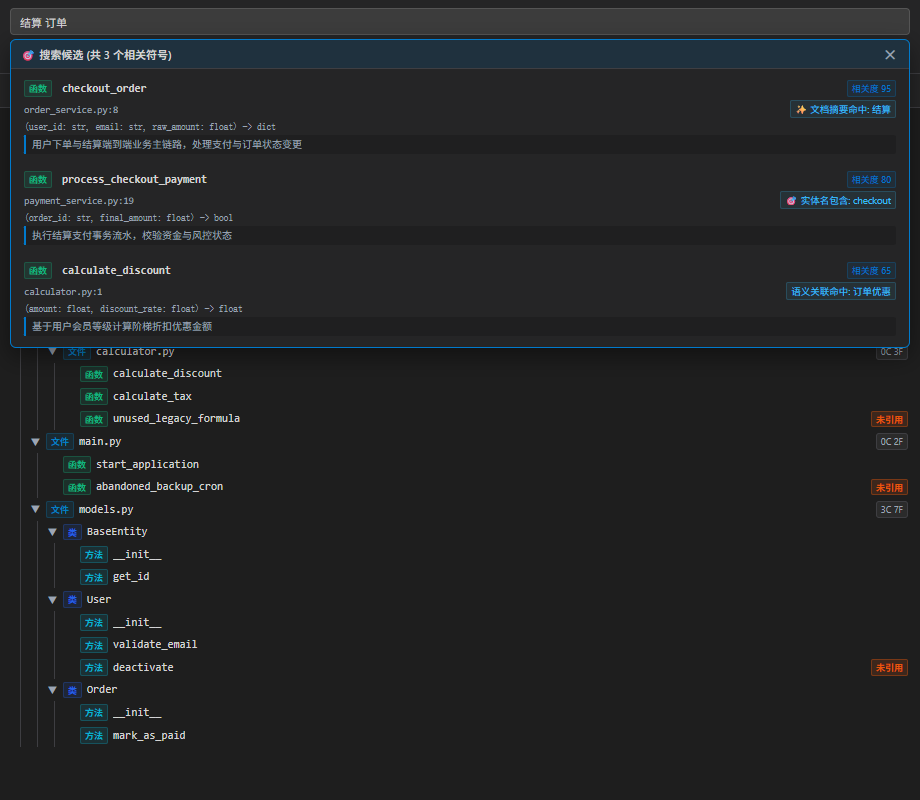
4. Natural Language & Ranked Semantic Search (Top-N Candidates)
- Natural Language Queries: Search functions and classes using natural language descriptions (e.g. "checkout order", "user authentication", "process payment"), matching docstring summaries and symbol semantics.
- Ranked Candidate List: Returns the top matching candidates sorted by relevance, displaying confidence scores, match reasons (exact name, prefix, docstring match), and signatures. Click any candidate to inspect its call flow, or double-click to jump to code.
- Type-Aware Filtering: Combine natural keywords with structural filters such as
in:float out:dict or kind:class.
- Instant Recall: Sub-millisecond prefix, token, and pinyin search across all indexed symbols in your workspace.
5. AI Assistant Integration
- Includes a lightweight Model Context Protocol (MCP) server, allowing modern AI coding assistants to query static codebase topology, call chains, and symbol contracts directly.
Supported Languages
| Language |
Extensions |
Parser Engine |
| Python |
.py |
AST extraction for functions, classes, decorators, docstrings, imports, and script flows |
| TypeScript |
.ts, .tsx |
Official TypeScript Compiler API for classes, interfaces, functions, and module exports |
| JavaScript |
.js, .jsx |
Official TypeScript Compiler API compatibility mode |
Commands & Usage
Access these commands via the Command Palette (Ctrl+Shift+P on Windows/Linux, Cmd+Shift+P on macOS) or the editor context menu:
| Command |
Title |
Location |
codeatlas.showInGraph |
CodeAtlas: Focus Current Symbol in Graph |
Editor Right-Click Context Menu |
codeatlas.openWebviewPanel |
CodeAtlas: Open Architecture Graph in Tab |
View Title Bar / Command Palette |
codeatlas.refresh |
CodeAtlas: Rescan Workspace |
View Title Bar / Command Palette |
Configuration Settings
Customize CodeAtlas behavior in your VS Code settings.json:
{
  // Automatically scan the workspace and build graph on startup
  "codeatlas.scanOnStartup": true,

  // Debounce delay (in milliseconds) for editor cursor tracking
  "codeatlas.cursorDebounceMs": 250,

  // Directories to exclude during graph construction
  "codeatlas.ignoreDirs": [
    ".git",
    "node_modules",
    "dist",
    "out",
    "build",
    "__pycache__",
    ".venv",
    "venv"
  ],

  // Base URL for local LLM inference (e.g., Ollama)
  "codeatlas.llmEndpoint": "http://127.0.0.1:11434/v1",

  // Model identifier for local architecture summarization
  "codeatlas.selectedModel": "qwen2.5-coder:7b",

  // Enable MD5 content-hash incremental caching for instant startup
  "codeatlas.enableIncrementalCache": true
}
| |


