Markdownify
Turn messy text into clean Markdown in one click.
Install from the VS Code Marketplace · or run code --install-extension vitor-padua.markdownify

You already wrote the text. It just doesn't look like Markdown yet — headings that
aren't headings, lists without markers, timeout_ms without backticks.
Select it, click ✨, done. No ChatGPT tab, no account, no API key.
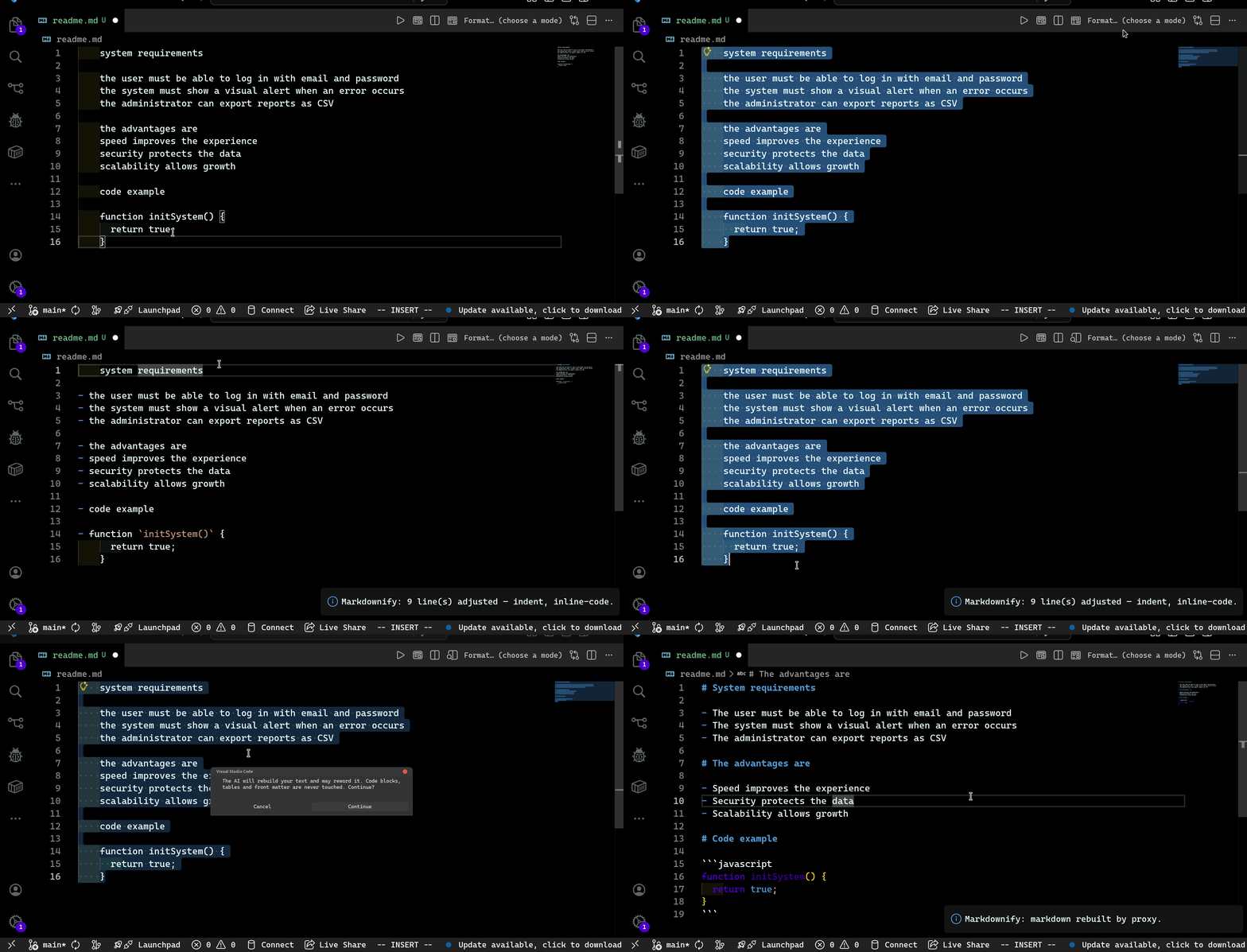
Built for people who write a lot of READMEs, notes and docs — and lose minutes
every time fixing formatting by hand.
Before / After
| You paste this |
You get this |
Processo de build on its own line |
# Processo de build |
* item / 1) item |
- item / 1. item |
| 4 spaces of PDF indent |
A proper nested list |
Dependências: SFML |
**Dependências:** SFML |
O timeout_ms é 30000 |
O `timeout_ms` é 30000 |
Real example, text copied from a PDF:
ANTES
    Sistema operacional: Linux (testado).
    Dependências: SFML. Instale via (por exemplo, sudo apt install libsfml-dev).
    app/jogo.cpp: lógica principal.
DEPOIS
- **Sistema operacional:** Linux (testado).
- **Dependências:** SFML. Instale via (por exemplo, `sudo apt install` libsfml-dev).
- `app/jogo.cpp`: lógica principal.
How it works
Click the ✨ button in the editor title bar (or Ctrl+Alt+M) and pick a mode:
| Mode |
For |
Your words |
| Fix formatting (offline) |
Quick cleanup. Instant, no network |
Never touched |
| Format with AI ⭐ |
Anything, including broken Markdown |
Prose can be reworded. Code and tables can't |
The offline engine runs first, always. Headings, lists, indentation, bold
labels and inline code are handled by rules — free, instant, offline. AI is a
refinement on top, not the core.
Nothing to configure. The default provider is a built-in proxy: the API key
lives on our server, never in the .vsix. Install, click, done.
Want your own key? Set betterMark.ai.provider to deepseek, gemini,
openai, glm or nemotron and run Markdownify: Set API key.
It goes to VS Code's SecretStorage, encrypted by your OS.
Why you can trust it with your README
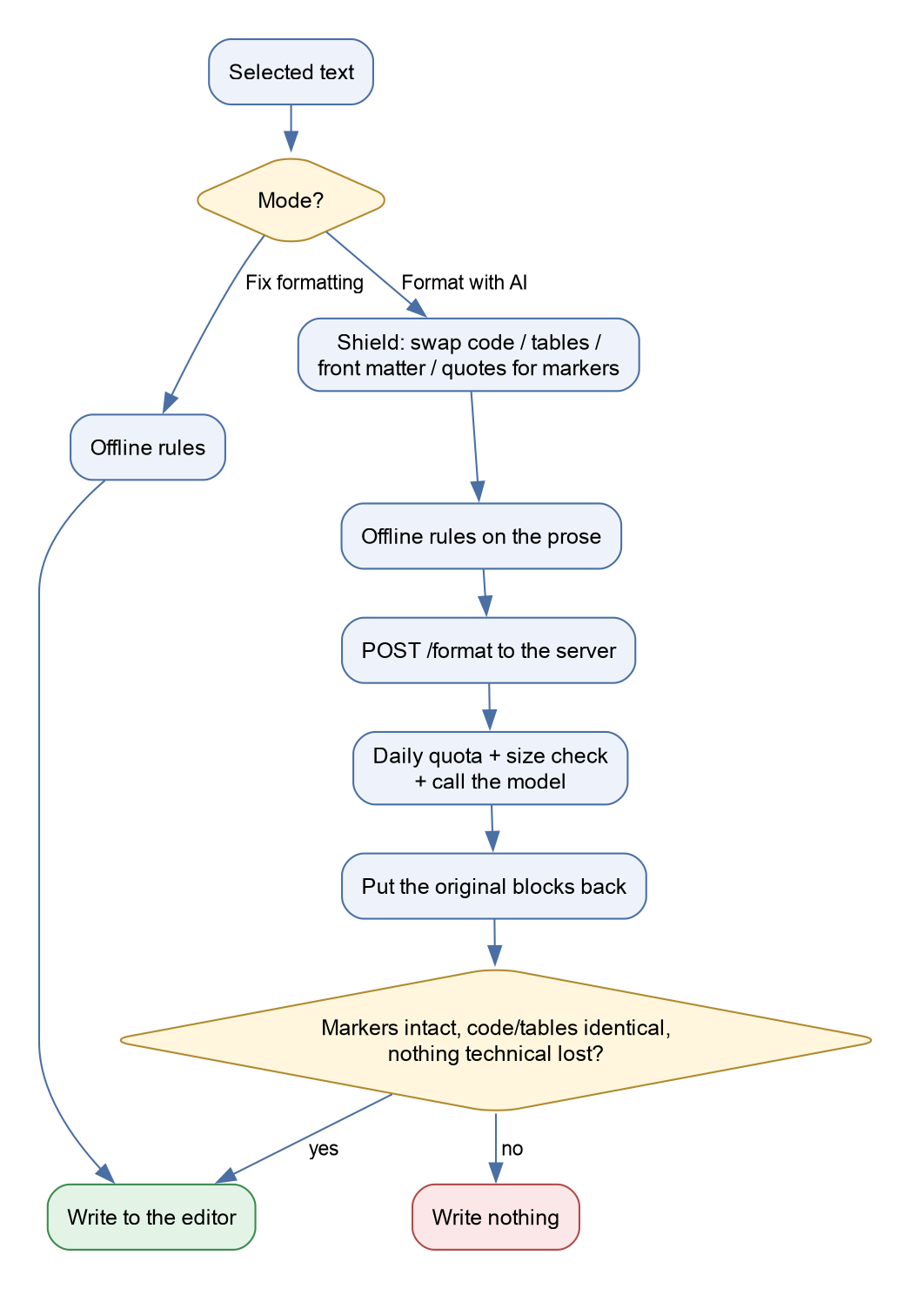
The AI never sees your code blocks, tables, front matter or blockquotes.
They're replaced by markers before the request and restored after. If the model
mangles a single marker, the whole answer is thrown away.
On top of that, independent checks run before anything is written:
| # |
Check |
Guarantees |
| 1 |
Shield |
The AI never sees fragile content |
| 2 |
Restore |
A missing or changed marker discards the whole answer |
| 3 |
validateAiResult |
Empty, refused, too short or too long answers are discarded |
| 4 |
compareProtectedStructure |
Code and tables came back identical, checked separately |
| 5 |
validateContentPreserved |
No command, path, file name or constant disappeared, and the text didn't shrink |
The worst case is "the AI did nothing". Never "the AI broke your code blocks or tables".
What the AI mode may change: it rebuilds the prose into proper Markdown, so
sentences can be split into lists and lightly reworded. That's the job you ask
for. If you want your words untouched, use Fix formatting (offline): it
never changes a single word.
This isn't theoretical. On the first real test, a model turned a ```ts
block into # ts and dropped the pipes from a table — with a prompt that
explicitly said not to. Models disobey. So the defense isn't the prompt: it's
the AI never receiving what's fragile.
Try it: paste a README section with a code block and a table and run
Format with AI. The prose gets restructured; the code and the table come
back byte for byte.
The full flow
How it's tested: see EVALS.md.
Privacy
- Fix formatting (offline) never leaves your machine. No network at all.
- Format with AI sends the selected text to the Markdownify server, which
forwards it to the model and returns the result. Code blocks, tables, front
matter and blockquotes are replaced by markers before sending, so they never
leave your editor.
- The server logs only sizes and token counts, never your text.
- The API key lives only on the server. The extension has no secret in it.
- A random, anonymous install ID is sent only to apply the daily limit
(30 AI calls per day). No account, no e-mail.
What gets cleaned up
Headings — a short standalone line becomes a heading. Prose doesn't:
Processo de build                                    →  # Processo de build
Este é um parâmetro que explica porque falhou.       →  (unchanged)
Lists — *, +, 1), 1-, 1], irregular spacing, PDF indent.
Bold labels — Chave: valor → **Chave:** valor, inside lists too.
Inline code — commands, paths, extensions and constants get backticks.
Prose words don't (Baixar: stays Baixar:).
Left alone, always — code blocks, tables, front matter, HTML, blockquotes.
Settings
| Setting |
Default |
Description |
betterMark.format.headingLevel |
0 |
Heading level. 0 = infer from the document. |
betterMark.format.protectBlocks |
true |
Preserve code, tables, front matter. |
betterMark.level2.inlineCodeTerms |
true |
Backticks on `Termo`: labels. |
betterMark.level2.inlineCodeMentions |
true |
Backticks on files, paths and commands. |
betterMark.ai.provider |
proxy |
AI provider. Works out of the box. |
betterMark.ai.emphasis |
deduce |
deduce / safe / off. |
betterMark.ai.timeoutMs |
30000 |
Request timeout. |
Requirements
VS Code 1.90.0 or later. No account, no API key, no configuration.
Contributing
See CONTRIBUTING.md. Issues and PRs welcome.
The one rule that matters: src/core/ never imports vscode, so the whole
formatting engine is testable without opening the editor.
Support
Markdownify is free. If it saved you time, you can buy me a coffee:
License
MIT

