Overview Version History Q & A Rating & Review
Calliope - Hybrid Markdown Editor
Named after Calliope (Καλλιόπη), the Greek Muse of eloquence and epic poetry — "she of the beautiful voice."
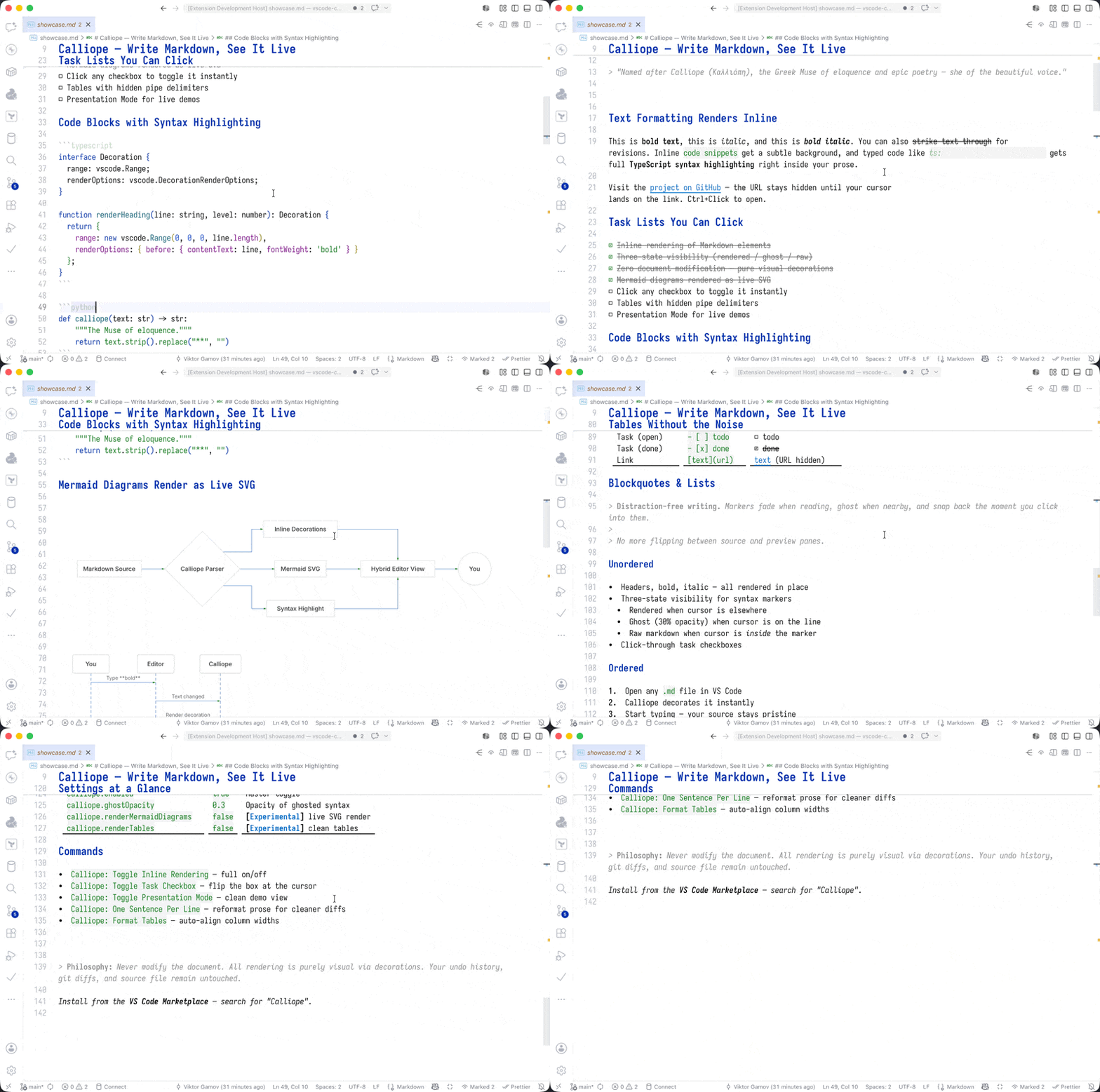
Calliope brings Ulysses-style hybrid WYSIWYG editing to VS Code. Write in Markdown, see it rendered inline — syntax markers hide until you need them.
Features
Distraction-Free Writing
Inline rendering — Headers, bold, italic render in place, not in a separate previewThree-state visibility — Syntax hides when reading, ghosts when nearby, shows when editingZero document modification — Pure visual decorations preserve your source perfectly
What Gets Rendered
Element
Rendered As
# HeadingHeading (larger, bold)
**bold**bold
*italic*italic
~~strike~~~~strike~~
`code`code with background
`ts:code`TypeScript-highlighted code
[link](https://github.com/gAmUssA/calliope-md/blob/HEAD/url)link (clickable, URL hidden)
- [ ] task☐ task (clickable checkbox)
- [x] done☑ ~~done~~ (strikethrough)
> blockquoteItalic prose behind a bar, > hidden
---Visual horizontal separator
```langDimmed fence markers, preserved syntax
Inline thumbnail preview (200px)
- item / 1. itemStyled bullets (•) and numbers
---/YAML/---Dimmed frontmatter block
```mermaidInline diagram (SVG or ASCII art)
Three-State Visibility
Rendered — Cursor elsewhere: syntax completely hiddenGhost — Cursor on line: syntax at 30% opacity (hint it exists)Raw — Cursor inside: full syntax visible for editing
Installation
From VS Code Marketplace
Open VS Code
Press Cmd+Shift+X (Extensions)
Search for "Calliope"
Click Install
From VSIX
code --install-extension calliope-md-0.4.3.vsix
Commands
Command
Description
Calliope: Toggle Inline RenderingEnable/disable all rendering
Calliope: Toggle Task CheckboxToggle checkbox at cursor
Calliope: Toggle Presentation ModeDistraction-free mode for demos
Settings
Setting
Default
Description
calliope.enabledtrueEnable inline rendering
calliope.ghostOpacity0.3Opacity for ghost state (0-1)
calliope.renderHeaderstrueRender headers with styling
calliope.renderEmphasistrueRender bold/italic/strikethrough
calliope.renderTaskListstrueRender task checkboxes
calliope.renderLinkstrueRender links with hidden URLs
calliope.renderInlineCodetrueRender inline code with background
calliope.renderBlockquotestrueRender blockquotes with left border
calliope.italicBlockquotestrueSet quoted text in italics
calliope.renderHorizontalRulestrueRender horizontal rules as separators
calliope.renderCodeBlockstrueStyle fenced code block delimiters
calliope.renderImagesfalseRender inline image previews (opt-in — resolves files from disk and fetches remote URLs)
calliope.renderListstrueRender list markers with bullet styling
calliope.renderMetadatatrueDim YAML frontmatter blocks
calliope.renderTablesfalseExperimental. Render tables with styled headers, hidden pipes and alignment indicators
calliope.codeBlockCopyButtontrueShow a "Copy code" link when hovering a fenced code block
calliope.renderMermaidDiagramsfalse[EXPERIMENTAL] Render mermaid diagrams inline
calliope.mermaidRenderModeautoDiagram mode: svg, ascii, or auto
Tips
Click checkboxes to toggle task completionCtrl+click links to open URLs in browserHover links to see the URL tooltipHover images to see full-size previewHover mermaid code blocks in ASCII mode to view the ASCII diagramPresentation mode — Increases font size, hides UI chrome, applies clean background for demosUse Calliope: Toggle to quickly switch between rendered and raw view
TypeScript highlighting — Add ts: prefix to inline code for language-specific highlighting (e.g., `ts:const x: number = 5`)
Supported prefixes: ts:, typescript:, js:, javascript:, py:, python:
Note on ASCII mode : Due to VS Code decoration API limitations, ASCII diagrams cannot be rendered inline. They appear as an indicator with hover tooltip support.
Requirements
VS Code 1.96.0 or later (April 2025+)
Philosophy
Never modify the document. All rendering is purely visual via decorations.
Calliope preserves:
Undo/redo history
Git diffs
Compatibility with other extensions
Your exact Markdown source
Contributing
Issues and PRs welcome at GitHub .
License
MIT
Inspired by Ulysses for Mac