⚡ VibeFlow — Build Automation Workflows From Plain English
Describe what you want. AI builds it, runs it, and fixes it — without you writing a single line of Python.
🎬 See It In Action
The Problem Every Developer Hits
Automation is supposed to save time. Instead you spend hours writing boilerplate, debugging APIs, and hunting down the right library.
Then compliance shows up and adds another week.
Then the script breaks in production at 2am.
VibeFlow handles all of that. You just describe what you want.
⚡ What VibeFlow Does
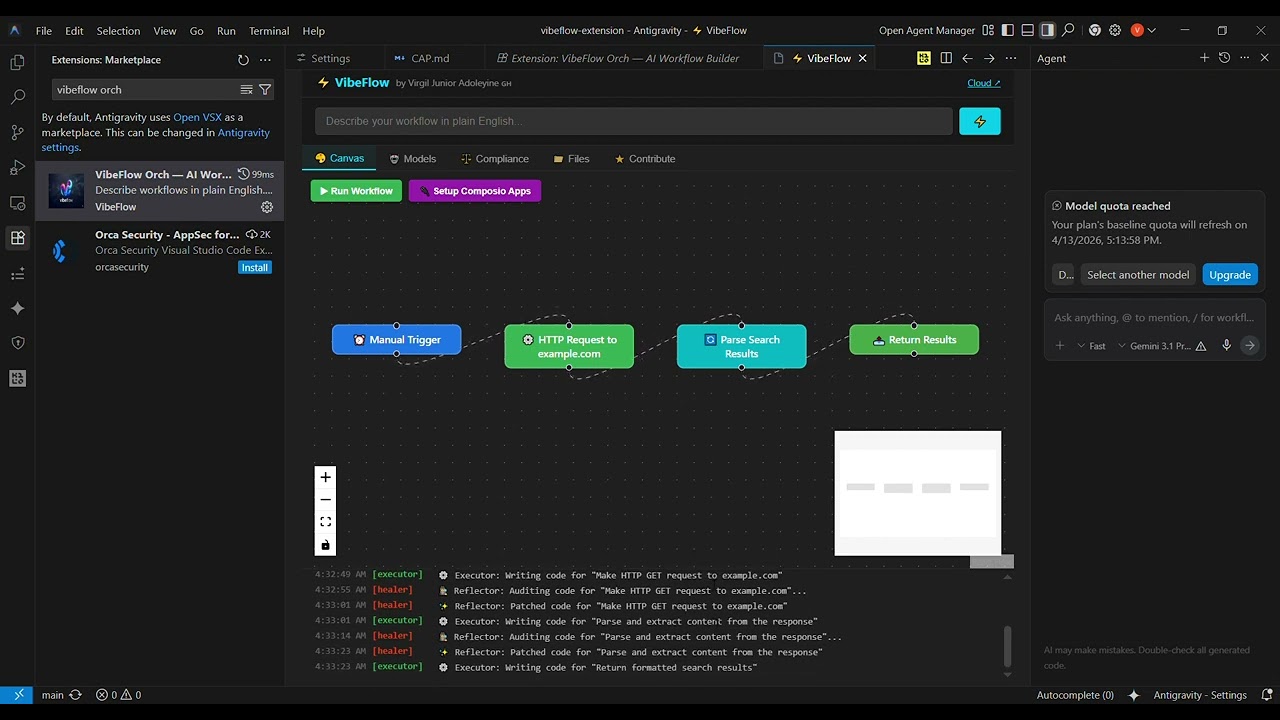
VibeFlow takes a plain English description of your workflow and turns it into a full, runnable Python automation — with self-healing built in. If the script breaks, AI fixes it and retries automatically. You don't have to touch the code unless you want to.
You describe the workflow → AI builds the script → It runs → If it breaks, AI fixes it → Done
No boilerplate. No debugging loops. No compliance surprises.
🚀 Install Now — Free
→ Install from VS Code Marketplace
→ Star on GitHub ⭐
Or install directly in VS Code:
Ctrl/Cmd + P → ext install regguard.vibeflow
🔧 Get Started
Step 1 — Install
→ Install from VS Code Marketplace
Or: Ctrl/Cmd + P → ext install regguard.vibeflow
Step 2 — Set Up Your Keys
Open Settings (Ctrl/Cmd + ,) → search VibeFlow. You'll see 6 fields. Here's exactly where to get each one — every service has a free tier:
| Setting |
What It's For |
Get It Here |
OpenRouter Key |
Powers the AI that builds your workflows |
openrouter.ai — free to start |
E2B API Key |
Sandboxed Python execution for your workflows |
e2b.dev — free tier available |
Neon Database URL |
Stores your workflow history |
neon.tech — free Postgres in 30 seconds |
Upstash Redis URL |
Fast caching between runs |
upstash.com — free tier, no credit card |
Upstash Redis Token |
Auth for your Redis instance |
Same dashboard as the URL above |
GitHub Repo URL |
Where your generated workflows get pushed |
Your existing repo — e.g. https://github.com/you/workflows |
This looks like a lot. It isn't. Each service takes under 2 minutes to sign up for and gives you a free key to copy-paste. You do this once — then you never think about it again. VibeFlow handles everything else from that point forward.
Step 3 — Build
Press Ctrl+Shift+P → VibeFlow: Open Workflow Builder
Describe your workflow. Watch AI build, run, and ship it.
🤖 How It Works
A 4-node AI agent pipeline that builds, runs, heals, and formats your workflow automatically:
| Node |
Role |
| Planner |
Breaks your description into a structured workflow |
| Executor |
Writes and runs the Python script |
| Reflector |
Catches errors and self-heals — retries until fixed |
| Formatter |
Outputs clean .py + .env + README files |
Plus Perplexity finds the best model for your specific task, and compliance is checked automatically via Perplexity + Grok — with Claude patching any violations before you ship.
🚀 Features
- Natural Language First — Type what you want, AI builds it
- Visual Canvas — React Flow node editor for power users who want full control
- In-Canvas Execution — Run and test workflows without leaving the builder
- Live Node Editing — Click and customise any node's logic or integration on the fly
- Composio Native Setup — Link 400+ apps directly via the extension
- Infinite Self-Healing — Code retries until fixed, or until you stop it
- Best Model Search — Perplexity finds the right model for your specific task
- Global Compliance — Regulations checked via Perplexity + Grok automatically
- Claude Compliance Fixes — Auto-patches code to meet regulations before you ship
- Full File Output — Generates
.py + .env + README — ready to run anywhere
- Dual-Remote Git Sync — Push to cloud + community repos in one command
☁️ Want More? Try VibeFlow Cloud
→ vibeflow-cloud.vercel.app
- Full visual UI with execution history
- 400+ OAuth integrations (Gmail, Slack, GitHub, Notion...)
- Memory of past workflows
- No-code friendly — works without VS Code
🙋 A Note From The Builder
The first version of VibeFlow was shipped fast and got 112 installs — but it wasn't good enough. I deleted it, rewrote everything in 2 hours, and the clean version got 54 installs in its first 3 hours. I'm 17, building in public from Ghana, and I'm learning fast. Every issue, bug report, and feature request you send goes directly to me. I read all of them.
— Virgil Junior Adoleyine
→ Email me directly
🐛 Help Me Make It Better
Found a bug or have an idea? I prioritise fixes based on what the community asks for.
🤝 Contributing
git clone https://github.com/VirgilAdoleyine/regguard
cd regguard
npm install && cd webview && npm install
# Press F5 in VS Code to debug
Submit a PR — every contribution helps developers worldwide automate faster.
🛡️ Pair It With RegGuard
VibeFlow generates the automation. RegGuard makes sure every line is compliant.
Two extensions. Zero compliance surprises. Both free.
→ Install RegGuard
⭐ One Last Thing
VibeFlow is an open-source mission to empower developers everywhere to automate anything — without writing a single line of boilerplate.
If it saves you an hour, tell an engineer you know.
Star on GitHub · Install on VS Code · Cloud Version · MIT License · Made with ❤️ in Ghana 🇬🇭