Claude usage by chat
See how much of your 5-hour limit each Claude Code chat uses. Other tools show tokens or dollars. This one shows the share of your real limit: "this chat used 8% of my 5h". Also your 5h and weekly usage. Unofficial, not made by Anthropic.
- Follows the chat tab you're in, and sums all the chats in the workspace.
- Calibrated against Anthropic's own 5h numbers, so the per-chat % matches reality.
- Subagents included, each weighted by its model's price: a token on Opus counts more than on Sonnet, and Sonnet more than Haiku.
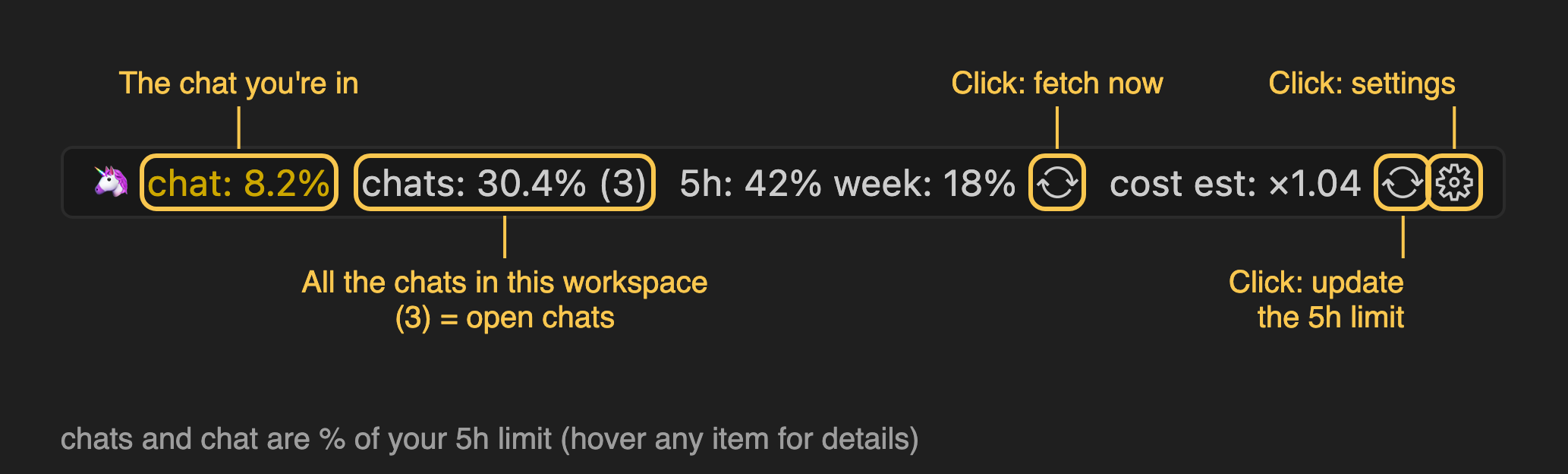
chats and chat are % of your 5h limit, counted from each chat's first message: a 5h reset doesn't zero an open chat. Hover any item for details.
- Setup: install it, that's all. It starts from your plan's 5h limit. When
cost est turns yellow, click its ⟳ → Update to fit the limit to your real usage (more).
- Only this computer counts in
chats and chat. Claude used elsewhere (claude.ai, your phone, another computer) shows in 5h and week only. If you did, click cost est → Hide until the 5h reset.
- macOS only for now. It doesn't work on Windows yet (planned). Linux isn't tested.
- All local. Everything is calculated on your computer from Claude Code's own logs. The only network call is to Anthropic's usage API, with the login Claude Code already saved. Nothing is sent to anyone else.
Bug or question? Open an issue on GitHub.
What each section shows
Turn each one on or off in the settings (click ⚙ at the end of the bar, then Show …).
| Section |
What it shows |
Click |
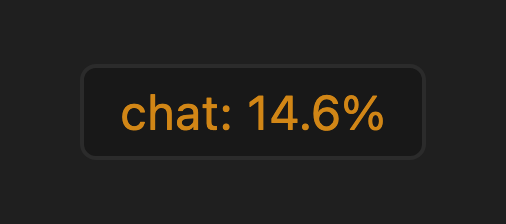 |
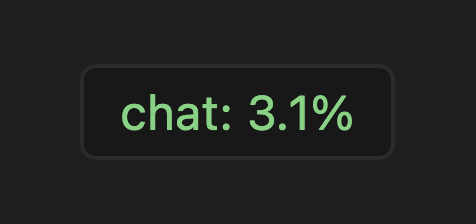
The chat you're in now, since its first message: what it really costs, so you know when to /clear. Green when small, then yellow (above 5%), orange (above 10%) and red (above 20%). Hover for its part in the current 5h window. |
|
 |
All the open chats in this workspace, each since its first message, as % of the 5h limit. (3) is how many chats are open. |
|
 |
CPU and memory of the running chats and of the chat you're in (macOS and Linux). Off by default: turn on Show Cpu Memory. |
|
 |
Your real 5h and weekly usage, from Anthropic's server. Hover for when each one resets. |
⟳ fetches it now. |
 |
How far the 5h limit setting is from the real limit (see Cost estimate). |
⟳ fetches the server and offers to update the limit. |
Install
In VS Code: Extensions panel → search Claude usage by chat → Install. Or from the Marketplace page. VS Code keeps it up to date.
You need Claude Code installed and signed in. The extension uses the login Claude Code already saved.
Use it
- Open a Claude Code chat as an editor tab.
chat: N% follows the tab you're in. The sidebar chat isn't a tab, so the last chat tab seen stays shown.
- A new chat shows up after its first prompt.
5h and week come from the server every 5 minutes. Click them to fetch now.
Cost estimate
The chats and chat percents are worked out locally against a 5h limit. Anthropic doesn't publish that limit, so the extension starts from your plan (Pro, Max 5x, Max 20x) and then checks itself against the server's 5h percent.
cost est: ×1.14 means the real limit is smaller than the setting, so your chats really cost 14% more than shown. The colour turns yellow above ×1.05, orange above ×1.20 and red above ×1.30 (time to update). The estimate starts once the 5h usage passes 10%. Before that it shows ?.
To update the limit, click cost est → Update. For the most accurate estimate:
- Stop working in the last 5 minutes before the 5h window resets.
- After the reset, work in one chat until the 5h usage is above 10%.
- Click
cost est → Update.
Recalibrate after changing plans. If you used Claude somewhere else in this window (claude.ai, your phone, another computer), choose Hide until the 5h reset. That usage isn't in the local logs and makes the estimate wrong.
Settings
Command Palette → Claude usage: Settings, or click ⚙.
| Setting |
Default |
What it does |
claudeUsage.showLimits, showChats, showChat, showCostEstimate |
true |
Show that section in the status bar. |
claudeUsage.showCpuMemory |
false |
Show CPU and memory of the chats. |
claudeUsage.limit5h |
0 |
The 5h limit in weighted tokens. 0 means by your plan (Pro 10,000,000). The extension never changes it on its own: edit it, or click cost est → Update. |
claudeUsage.refreshSeconds |
60 |
How often to recompute 5h, week and chats. |
claudeUsage.chatRefreshSeconds |
5 |
How often to recompute the focused chat. |
claudeUsage.processStats |
cpu+memory |
The CPU/memory item: cpu+memory, cpu, memory or off. |
claudeUsage.processIncludeChildren |
true |
Count a chat's shell commands and MCP servers in CPU/memory. |
claudeUsage.processRefreshSeconds |
5 |
How often to update CPU/memory. |
How it works and privacy
- It reads Claude Code's own logs in
~/.claude/projects and ~/.claude/sessions. Usage is the sum of each message's tokens at that model's API price.
- Every 5 minutes it asks Anthropic's usage API for the real 5h and weekly percent, using the token Claude Code already saved (macOS keychain, or
~/.claude/.credentials.json). Several VS Code windows share one request.
- That API call goes only to Anthropic. Nothing is sent anywhere else.
- The usage API isn't documented, so it may change or stop working.
Questions
Does an open chat start over when the 5h window resets?
No. chat and chats count each open chat from its first message, so a long chat keeps showing what it really costs, also after a night run. Hover them to see the part in the current 5h window. Only 5h itself resets, because Anthropic's limit does.
Why can chats be above 100%?
It adds up the whole cost of every open chat, even the parts from earlier 5h windows. It's a cost, not how close you are to the limit right now: that's 5h.
Why doesn't chat match 5h?
5h comes from Anthropic's server and counts everything in the window, also chats you closed and Claude used elsewhere. chat is only the chat you're in, worked out on your computer.
How exact is the %?
Anthropic doesn't publish the 5h limit in tokens. The extension starts from your plan and then fits it to the server's real 5h percent (cost est). After you click Update once, the % of a chat matches the server's way of counting.
How are subagents and models counted?
A chat includes the subagents it starts. Each message counts at its model's API price, so a token on Opus counts more than on Sonnet, and Sonnet more than Haiku. Fast mode counts double.
What if Anthropic's server doesn't answer?
5h and week show ?. chat and chats keep working from the local logs.
Something looks wrong?
Open an issue with a screenshot of the bar and its tooltip.
Limitations
- Doesn't work on Windows yet:
chats and chat look for the chat logs in the wrong folder. Linux isn't tested.
- Usage outside this computer (claude.ai, your phone, another computer) counts in
5h and week but not in chats or chat, and it makes cost est wrong for that 5h window.
- Two open chats with the same title:
chat may show the other one.
- Two VS Code windows on the same folder count each other's chats in
chats.
- Right after VS Code starts,
chat can take a few seconds to show correctly.
Support
Found a bug or have an idea? Open an issue on GitHub.
Develop
Run it from a clone instead of the Marketplace (uninstall the Marketplace one first):
git clone https://github.com/Ola1707/claude-usage-by-chat.git ~/Repos/claude-usage-by-chat
ln -s ~/Repos/claude-usage-by-chat ~/.vscode/extensions/local.claude-usage-by-chat-0.0.1
Then Developer: Reload Window. npm test runs the unit tests. ROADMAP.md has the plan and the details of how it works.

