
git & fit
Commit. Stretch. Commit again.
A VS Code extension that suggests a short exercise break after meaningful commits.
Built for developers who would rather refactor than rest.


You wrote 4,800 lines today and the only muscle you used was your
trapezius, complaining. git & fit notices when you commit something
real, then suggests a short exercise break — with a video to follow along.
- Triggers on real commits — a
chore: typo commit will not make
you do squats. Default thresholds: 5 files / 200 lines / 60-min
cooldown. Tunable per repo.
- Follow-along routines — 3–5 minute sequences with a demo video and
step-by-step instructions, picked from a library of desk-friendly
mobility, stretch, strength, and posture exercises.
- Injury-aware — toggle wrist / knee sensitivity, floor-free, quiet,
and equipment preferences; the planner excludes anything incompatible.
- Snooze without guilt — 5 / 30 / 120 minutes, rest of day, or
forever. No motivational language.
- Anonymous by default — the free tier sends only opt-out usage
counts (never your code); Pro adds an optional email sign-in. Open
source under MIT.
See it in action
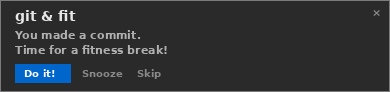
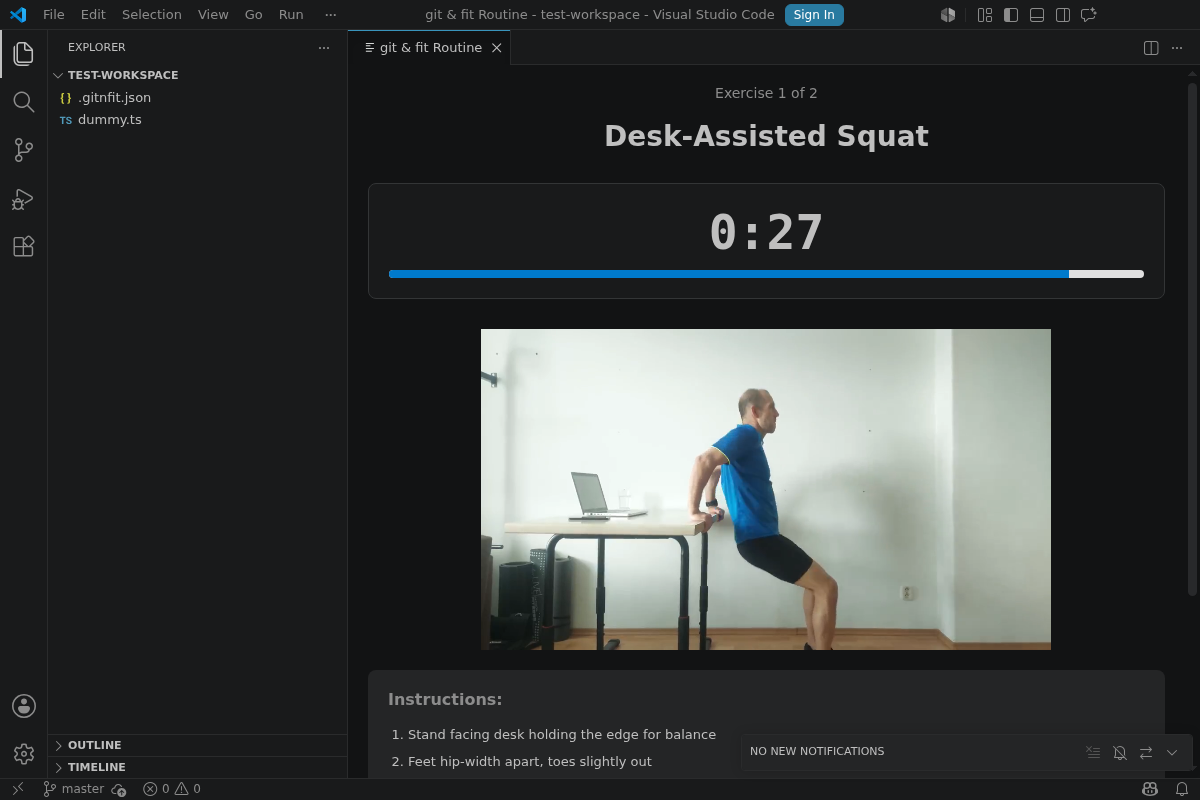
A notification slides in after a meaningful commit — click Do it! and a
follow-along routine opens with a demo video, timer, and instructions:
Free vs Pro
The core extension is free forever. Pro unlocks the full experience —
with a 7-day free trial, no credit card.
|
Free |
Pro |
| Exercise break after every commit |
✅ |
✅ |
| Exercise library |
6 core |
Full 21 |
| Routine after a commit |
Fixed 2-exercise |
Sprint Fitness Plan (rotating, multi-day) |
Custom exercises (.gitnfit.json) |
— |
✅ |
| Injury-aware fitness profile |
✅ |
✅ |
| Price |
$0 forever |
$4.99/mo or $39/yr |
Upgrade from inside VS Code: run git & fit: Upgrade to Pro from the
Command Palette and start your trial — see pricing.
Install
From the VS Code Marketplace:
ext install twentydeka.gitnfit-vscode
Or click Install at the top of the listing page.
Quick start
Open a git repository in VS Code.
Run git & fit: Enable for Workspace from the Command Palette
(Ctrl+Shift+P). Or commit a .gitnfit.json to the repo root —
see Per-repo config below.
Make commits as usual. When one crosses the thresholds, a
notification slides in from the bottom-right:
git & fit — Time for a quick break! You committed 8 lines
across 2 files. [Do it!] [Snooze] [Skip]
Click Do it! and a 3–5 minute routine opens in a panel with a
demo video, instructions, and a timer. Keyboard: Space pause,
N next, Esc close.
Per-repo config
Drop a .gitnfit.json in the repo root to share settings with your
team:
{
  "detection": {
    "minFilesChanged": 5,
    "minLinesChanged":  200,
    "cooldownMinutes":  60
  },
  "sprint": {
    "mode":         "fixed-calendar",
    "lengthDays":   14,
    "anchorDate":   "2026-01-06"
  },
  "routines": {
    "durationMinutes":  4,
    "intensityByPhase": { "start": "medium", "mid": "medium", "end": "low" }
  }
}
Custom exercises (a Pro feature) are supported via a customExercises
block. See the sample config
for the full schema.
User settings
Settings → Extensions → git & fit:
| Setting |
Default |
What it does |
gitnfit.enabled |
true |
Master on/off switch for suggestions. |
gitnfit.profile.defaultIntensity |
"medium" |
low / medium / high — biases the planner's exercise picks. |
gitnfit.profile.avoidFloor |
false |
Skip exercises requiring floor space. |
gitnfit.profile.quietMode |
true |
Avoid jumping or stomping exercises. |
gitnfit.profile.wristSensitive |
false |
Skip wrist-intensive exercises. |
gitnfit.profile.kneeSensitive |
false |
Skip knee-intensive exercises. |
gitnfit.profile.useEquipment |
false |
Include exercises that need equipment (e.g. resistance bands). |
gitnfit.notification.timeout |
60000 |
Auto-dismiss timeout for the notification (ms). |
gitnfit.telemetry.enabled |
true |
Send anonymous, opt-out usage counts (never code/files/commits). VS Code's global telemetry setting is always respected. |
Commands
Open the Command Palette (Ctrl+Shift+P) and type git & fit:
- Enable for Workspace / Disable for Workspace
- Start a Break Routine — manually trigger a routine without a commit
- Pick Exercise from Library — pick a single exercise
- Configure Fitness Profile — quick-setup wizard
- Try Pro Free for 7 Days — start the card-free trial
- Upgrade to Pro — subscribe (monthly or annual)
- Manage Subscription — open the Stripe Customer Portal (update card, switch plan, cancel)
- Sign In — optional email magic-link sign-in
- Privacy — view what's collected / toggle telemetry
How it works
- Commit detection. A filesystem watcher on
.git/logs/HEAD
notices new commits. No polling, no background daemon.
- Significance check. Commits are compared against the
detection thresholds. Trivial commits are ignored.
- Cooldown check. Ensures enough time has passed since the last
nudge.
- Sprint inference. Detects the current sprint phase (start /
mid / end) via fixed-calendar, branch-name, or commit-cadence
mode.
- Routine planning. Picks a 3–5 minute sequence from the
exercise library, weighted by sprint phase and filtered by the
user's fitness profile.
- Notification + panel. Slides in a notification; on Do it!,
opens the routine webview with a demo video, instructions, timer,
and controls.
Privacy
Your code never leaves your machine — not file names, not commit
messages, not a thing. The free tier sends only anonymous, opt-out
usage counts (extension version, OS family, a random install id, and
event counts) to help improve the extension — and it honors VS Code's
global telemetry setting. We only learn your email if you choose to
sign in or subscribe, and payments go through Stripe (we never see
your card). Full details: gitnfit.dev/privacy.
Troubleshooting
- No suggestion after a commit: verify your commit crosses the
thresholds (
detection.minFilesChanged / minLinesChanged) and
that you're not in cooldown. Output panel → "Extension Host" shows
what the evaluator saw.
- Routine panel won't open: check
Help → Toggle Developer Tools for webview errors. Most often a corporate CSP policy on the
user-data dir.
- Wrong sprint phase: confirm
.gitnfit.json sprint.anchorDate
is correct; or switch sprint.mode to disabled to fall back to
generic routines.
Detailed reports → GitHub issues.
Links
Commit. Stretch. Commit again.

