
LPilot




Use local or remote LLM servers as native chat models in VS Code — with
automatic model discovery.
LPilot registers your servers with VS Code's Language Model Chat Provider API,
so their models appear directly in the chat model picker and work in Ask,
Edit and Agent mode. Point it at LM Studio, llama.cpp, vLLM, Ollama,
OpenAI or any OpenAI-compatible endpoint.
Features
- 🔌 Any OpenAI-compatible server — LM Studio, llama.cpp (
llama-server),
vLLM, Ollama, OpenAI, and anything else exposing /v1/chat/completions.
- 🔍 Automatic model discovery — models are detected from the server and
kept in sync, with user overrides preserved.
- 🧠 Rich metadata — context length, tool calling, vision, quantization,
publisher and architecture are read from the server when available.
- ✅ Currently-loaded detection — the model currently in server memory is
marked
loaded; an optional Loaded only filter hides the rest. Works
for both LM Studio (state / loaded_instances) and llama.cpp (/props).
- 🧹 Sensible pruning — models the server no longer reports are removed,
while hand-added and customized models are always kept.
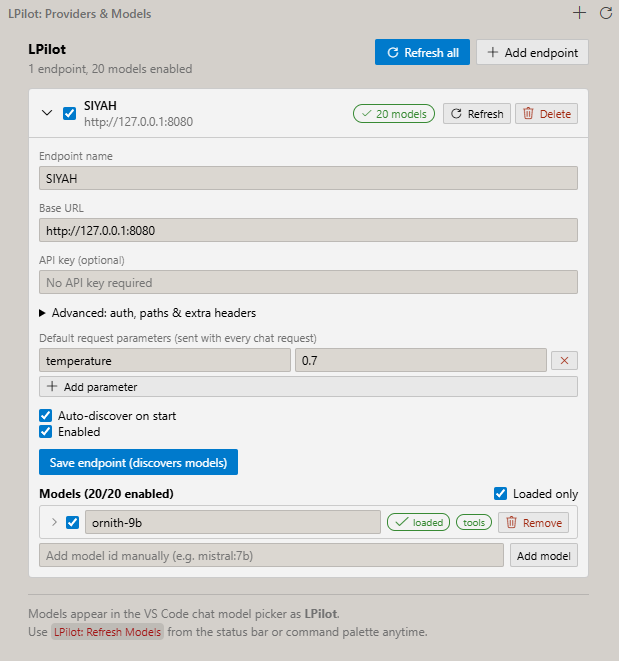
- 🛠️ Full configuration UI — manage endpoints, API keys, extra headers,
default request parameters and per-model overrides from the sidebar.
- 🧩 Agent mode ready — tool calling and image input are supported and
surfaced with badges.
- 🏷️ Grouped by endpoint — models are labelled
endpoint/model in the
picker (e.g. NVIDIA/Deepseek, Siyah/ornith) so models from different
servers are easy to tell apart.
Screenshot
Requirements
- VS Code
^1.140.0 or newer.
- A running LLM server. Any of these work out of the box:
- LM Studio (developer server on
http://127.0.0.1:1234)
- llama.cpp
llama-server (default http://127.0.0.1:8080)
- Ollama (default
http://127.0.0.1:11434)
- vLLM (default
http://127.0.0.1:8000)
- OpenAI or any OpenAI-compatible API
Getting started
- Install LPilot and open the LPilot view in the activity bar.
- Click Add endpoint and enter the server's base URL, e.g.
http://127.0.0.1:8080. Add an API key only if your server needs one.
- Click Add & discover models. LPilot lists every model the server
exposes.
- Open the VS Code chat view, pick a model under LPilot, and start
chatting.
Run LPilot: Refresh Models any time (command palette, sidebar or the status
bar) to re-discover models.
Configuration
| Setting |
Type |
Default |
Description |
localllm.autoDiscoverOnStart |
boolean |
true |
Discover models from all enabled endpoints when the extension starts. |
localllm.discoveryTimeoutMs |
number |
15000 |
Timeout for model discovery requests. |
localllm.requestTimeoutMs |
number |
300000 |
Timeout for chat completion requests. |
localllm.testModel |
string |
"" |
Model id used by the integration smoke tests (empty = auto-pick). |
Each endpoint also stores its own base URL, auth header/prefix, models path,
chat path, extra headers and default request parameters. Common parameters
(temperature, max_tokens, …) are sent with every chat request and can be
overridden per model.
Commands
| Command |
Description |
LPilot: Open Configuration |
Focus the configuration view. |
LPilot: Add Endpoint |
Open the "add endpoint" form. |
LPilot: Refresh Models |
Re-discover models on every endpoint. |
LPilot: Show Logs |
Show the LPilot output channel. |
LPilot: Set Test Model |
Choose the model used by integration tests. |
Loaded only & pruning
- Loaded only (per endpoint) hides models the server explicitly reports
as not loaded. Servers that don't expose a load state keep every model
visible.
- Pruning removes discovered models that the server stops reporting after
two consecutive discoveries (so a briefly offline server doesn't wipe
your list). Models you add or edit by hand are never pruned — remove them
with the trash button in the configuration UI.
Security
API keys are stored with context.secrets (VS Code's encrypted secret
storage) and are never written to global state or the configuration UI state.
Release Notes
See CHANGELOG.md for the full release history.
License
MIT © 2026 Turgut Hakkı Özdemir

