

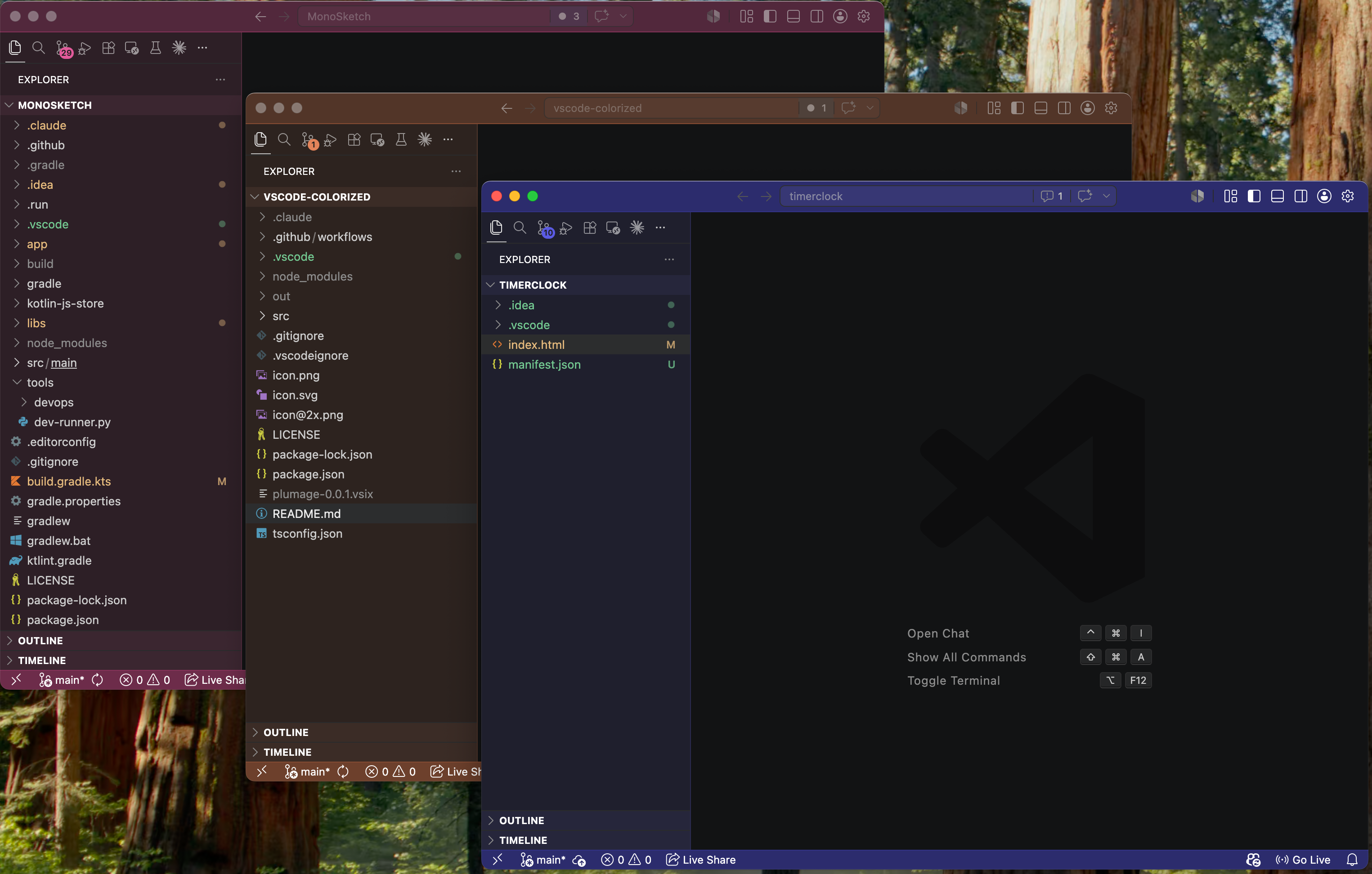
PlumageAutomatically color the title bar, activity bar, side bar, and status bar of each VSCode window based on a hash of the workspace path. Theme-aware (light / dark), zero configuration.
Built for people who keep ten VSCode windows open and can't tell which is which. Why not Peacock?Peacock is manual and its default greens/oranges are loud. Plumage:
InstallFrom the Extensions sidebar — open VSCode, press From the command line: From the web: https://marketplace.visualstudio.com/items?itemName=tuanchauict.plumage After install, open any folder. The chrome will recolor on the next window — no setup needed. UsagePlumage runs on startup. No setup. Open a folder and the chrome recolors. Commands (
|




| Command | What it does |
|---|---|
Plumage: Refresh Colors |
Re-apply colors (e.g. after editing settings). |
Plumage: Shuffle (next color) |
Jump to a different color (roughly opposite on the color wheel) if you don't like the default. |
Plumage: Pick Color... |
Quick-pick from all 24 colors. |
Plumage: Set Palette... |
Choose Auto / Dim / Light / Vibrant / Contrast chrome palette. |
Plumage: Clear Colors |
Remove all Plumage-managed entries from workbench.colorCustomizations. |
Settings
| Setting | Default | Description |
|---|---|---|
plumage.enabled |
true |
Toggle the extension on/off. |
plumage.hueOffset |
0 |
Integer offset added to the hash-derived color index. Bumped by Shuffle / Pick. |
plumage.palette |
"auto" |
Chrome flavor: "auto" follows the editor theme, "dim" is Monokai-flavored, "light" is soft pastel, "vibrant" is bold/saturated, "contrast" is high-contrast with a near-black side bar. |
How it works
- Hash the workspace's absolute path (FNV-1a 32-bit).
- Map the hash to one of 24 curated hues: lime, chartreuse, green, fern, emerald, jade, teal, spruce, cyan, turquoise, sky, azure, blue, indigo, violet, iris, purple, orchid, magenta, fuchsia, pink, rose, red, orange.
- Detect the active color theme (
vscode.window.activeColorTheme.kind) and build a dark- or light-tuned palette. - Write the resulting colors into the workspace's
.vscode/settings.jsonunderworkbench.colorCustomizations.
Only Plumage's own keys are touched — anything you've manually set is preserved.
Build from source
git clone https://github.com/tuanchauict/vscode-plumage.git
cd vscode-plumage
npm install
npm run compile
Open the folder in VSCode and press F5 to launch an Extension Development Host with the local build active. To produce an installable .vsix:
npx @vscode/vsce package
code --install-extension plumage-0.0.1.vsix
License
MIT
plumage /ˈpluː.mɪdʒ/ (noun) — a bird's covering of feathers, especially when vividly coloured.
Like a kingfisher's flash of blue or a peacock's iridescent fan, every workspace deserves its own.