ScanReq — Dependency Security Scanner for VS Code
Real-time CVE detection and outdated package alerts for Python, Node.js, Rust, Go, PHP, Ruby and Java — directly inside VS Code.
8 ecosystems. Zero config. One panel.


Screenshots
Scanned against real open-source projects — not hand-picked examples. See all 8 ecosystems at scanreq.com/showcase.
Free plan
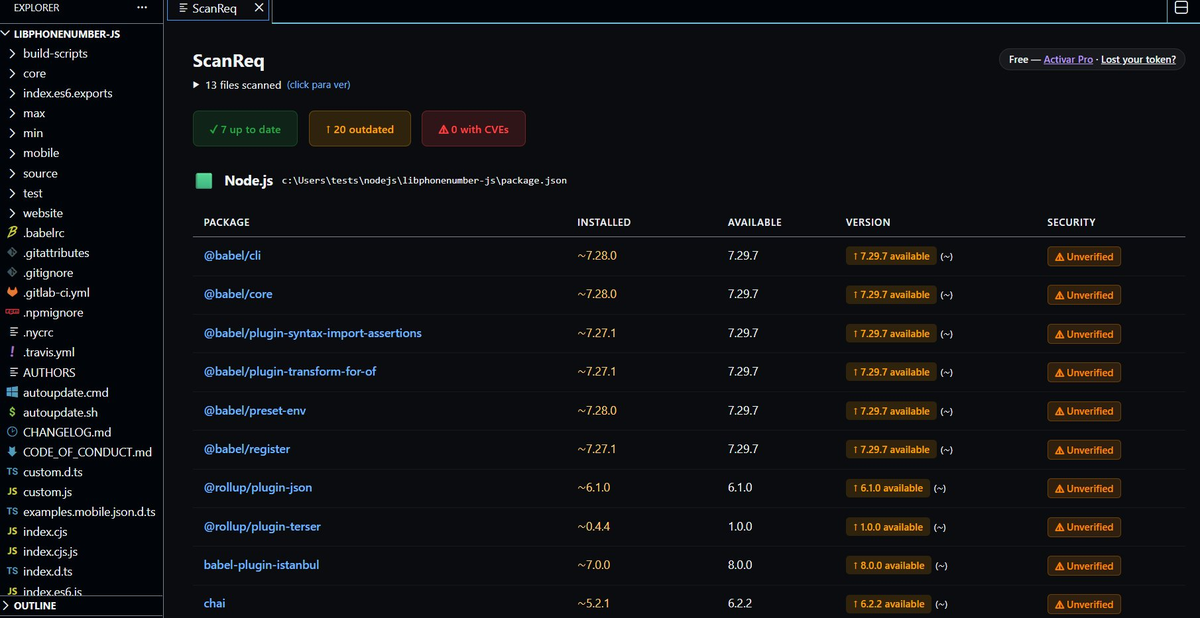
Node.js (libphonenumber-js) — 20 outdated, all marked ⚠ Unverified because Free cannot resolve non-exact versions
Pro plan
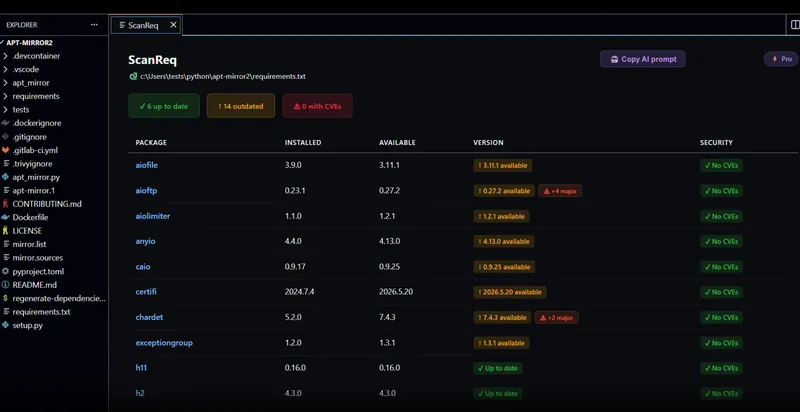
Python (apt-mirror2) — 14 outdated, 2 dependency conflicts detected, pip-compile format with -r recursive includes resolved
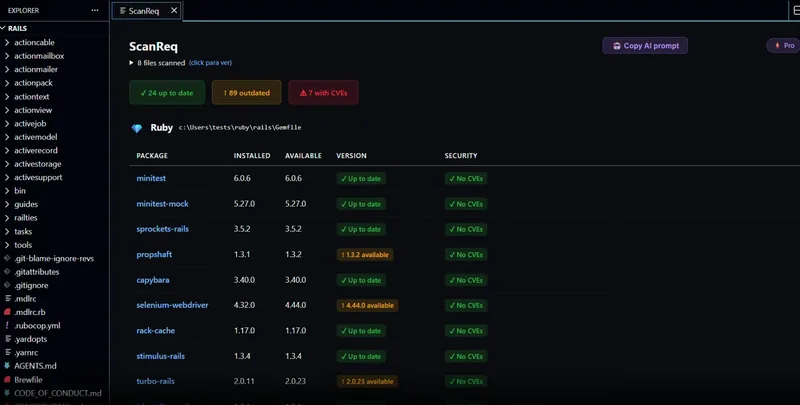
Ruby (rails/rails) — 89 outdated, 7 CVEs including 5 HIGH on rack, 1 dependency conflict
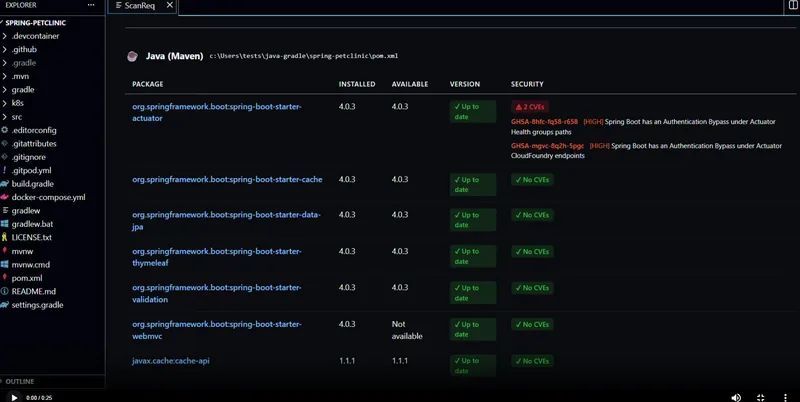
Java Maven (spring-petclinic) — 5 HIGH CVEs on Spring Boot Actuator and PostgreSQL, BOM version resolution
Why ScanReq
You open a cloned repo. It has 80 dependencies. Some are two years old. You don't know which ones have known CVEs, which are 3 major versions behind, or which update will break your build.
npm audit, pip-audit, cargo audit — they help, but only one ecosystem at a time, only from the terminal, and only when you remember to run them.
ScanReq runs in the background, covers 8 ecosystems at once, and shows the answer without you asking.
Supported ecosystems
|
Ecosystem |
Dependency file |
Registry |
Lockfile support |
| 🐍 |
Python |
requirements.txt |
PyPI |
pip installed version detection |
| 🟩 |
Node.js |
package.json |
npm |
package-lock, pnpm-lock, yarn.lock |
| 🦀 |
Rust |
Cargo.toml |
crates.io |
Cargo.lock (workspace-aware) |
| 🔵 |
Go |
go.mod |
proxy.golang.org |
go mod graph (transitive) |
| 🐘 |
PHP |
composer.json |
Packagist |
composer.lock (monorepo-aware) |
| 💎 |
Ruby |
Gemfile |
RubyGems |
Gemfile.lock |
| ☕ |
Java (Maven) |
pom.xml |
Maven Central |
Spring Boot BOM resolution |
| ☕ |
Java (Gradle) |
build.gradle / .kts |
Maven Central |
platform() BOM resolution |
No per-language configuration. Open a project and it works.
How it works
- Open any project. ScanReq detects dependency files automatically across all subdirectories.
- Background scan. Queries each registry and OSV.dev for CVEs — no spinner blocking your editor.
- Status bar badge. 🔴 vulnerabilities found · 🟠 outdated packages · 🟢 everything clean.
- Results panel. Click the badge or run
Ctrl+Shift+P → ScanReq: Scan dependencies.
- Auto-refresh. Every time you save a dependency file, the scan reruns.
Works in monorepos — every dependency file gets its own section in a single panel.
Free plan — no account required
| Feature |
|
| All 8 ecosystems |
✅ |
| Registry version check (PyPI, npm, crates.io, Maven Central, Packagist, RubyGems, proxy.golang.org) |
✅ |
| CVE detection for exact versions via OSV.dev |
✅ |
| Color-coded results panel with inline CVE details |
✅ |
| Status bar badge |
✅ |
| Smart insights (critical warnings, bulk update notices) |
✅ |
| Auto-refresh on save |
✅ |
| Monorepo support |
✅ |
| English and Spanish UI |
✅ |
Note: CVE detection on the free plan requires exact version pins (==, =). Non-exact specifiers (>=, ^, ~=) are marked ⚠ Unverified — Pro resolves the actual installed version.
Pro — $19 one-time payment
Most real projects don't pin every version. Most real projects have transitive conflicts nobody notices until production breaks. Pro solves both.
CVE detection for all version specifiers
When you write >=, ^, ~=, ~> or a range, Pro detects the version actually installed via pip, node_modules, composer.lock, Gemfile.lock, or Cargo.lock — and checks that version against OSV.dev.
Dependency conflict detection
Detects cases where package A requires foo>=2.0 and package B requires foo<2.0 before your build fails. Works across Python, Node.js, Rust, Go, PHP, and Ruby.
Safe update plan — 3 phases by risk
| Phase |
Risk level |
Action |
| Phase 1 |
Low — patch/minor, no CVEs |
Update directly |
| Phase 2 |
Medium — has CVEs, needs review |
Check changelog first |
| Phase 3 |
High — major version jump |
Plan migration |
CRITICAL and HIGH CVEs are forced to Phase 3 regardless of version jump. Packages with CVEs are listed first within each phase.
Major version badge
⚠ Major and ⚠ +N major badges appear on packages that require a breaking version jump. Visible at a glance — separate "run the update" from "this needs a migration plan."
Spring Boot BOM resolution
Projects using spring-boot-starter-parent or spring-boot-dependencies BOM (Maven and Gradle) get full version resolution. ScanReq downloads and parses the BOM from Maven Central.
Go transitive analysis
With Go in PATH, ScanReq runs go mod graph to detect indirect dependency conflicts invisible in go.mod.
🤖 AI prompt export
One click copies a structured prompt with the full scan — CVEs, conflicts, versions, recommendations. Paste into Claude, Copilot, or Cursor and let AI plan the migration with real data.
Free vs Pro
| Feature |
Free |
Pro |
| All 8 ecosystems, registry check, CVE detection (exact) |
✅ |
✅ |
CVE detection for >=, ^, ~=, ranges |
— |
✅ |
| Installed version detection (pip, node_modules, lockfiles) |
— |
✅ |
| Cross-version compatibility analysis |
— |
✅ |
| Dependency conflict detection |
— |
✅ |
| Go transitive conflict analysis |
— |
✅ |
| Spring Boot BOM resolution |
— |
✅ |
| ⚠ Major version badge |
— |
✅ |
| Safe update plan (3 phases) |
— |
✅ |
| 🤖 AI prompt export |
— |
✅ |
$19 USD / €17 EUR · One-time · No subscription · All your machines
→ Get Pro · See it in action
Getting started
Install
From VS Code: Ctrl+Shift+X → search ScanReq → Install.
Or from the terminal:
ext install trustdev.scanreq
Activate Pro
- Purchase at scanreq.com/pricing
- Your token is delivered on the success page and sent to your email
Ctrl+Shift+P → ScanReq: Activate Pro Plan → paste your token
Lost your token? Recover it at scanreq.com/recover.
Requirements
Free: nothing. ScanReq queries all registries over HTTPS with no local tools needed.
Pro — most features work without anything extra:
| Ecosystem |
Pro requirement |
| Python |
pip in PATH (installed version detection) |
| Node.js |
node_modules present (npm install) |
| Go |
go in PATH (transitive graph via go mod graph) |
| PHP, Ruby, Rust, Java |
Nothing additional |
If a tool is missing, ScanReq shows a specific notice in the panel — it never fails silently.
Settings
| Setting |
Default |
Description |
scanreq.autoOpenPanel |
false |
Open results panel on startup or dependency file changes |
scanreq.showNotification |
true |
Show progress notification during scan |
scanreq.excludePaths |
[] |
Glob patterns to exclude from scanning (e.g. **/test/resources, **/fixtures) |
Privacy
ScanReq sends no telemetry and collects no personal data.
Package names and versions are sent only to public registries and OSV.dev for CVE lookups. No usage data is tracked. Pro tokens are validated against scanreq.com — the token is stored in VS Code's global state.
Full policy at scanreq.com/privacy.
Release notes
See CHANGELOG.md for full history.
v2.7.0 — Python -r recursive include support. Ruby eval_gemfile support. Rust Cargo.lock workspace resolution. PHP composer.lock monorepo resolution. Ruby platform-specific gems filtered. pip-compile hash format support.
v2.6.4 — Python conflict detection fix. Spring Boot Kotlin DSL detection. Pre-release comparisons. CalVer detection. CRITICAL/HIGH CVEs force Phase 3. Platform-specific CVE badges. scanreq.excludePaths setting.
scanreq.com · Marketplace · GitHub · Showcase

