Transitrix Studio
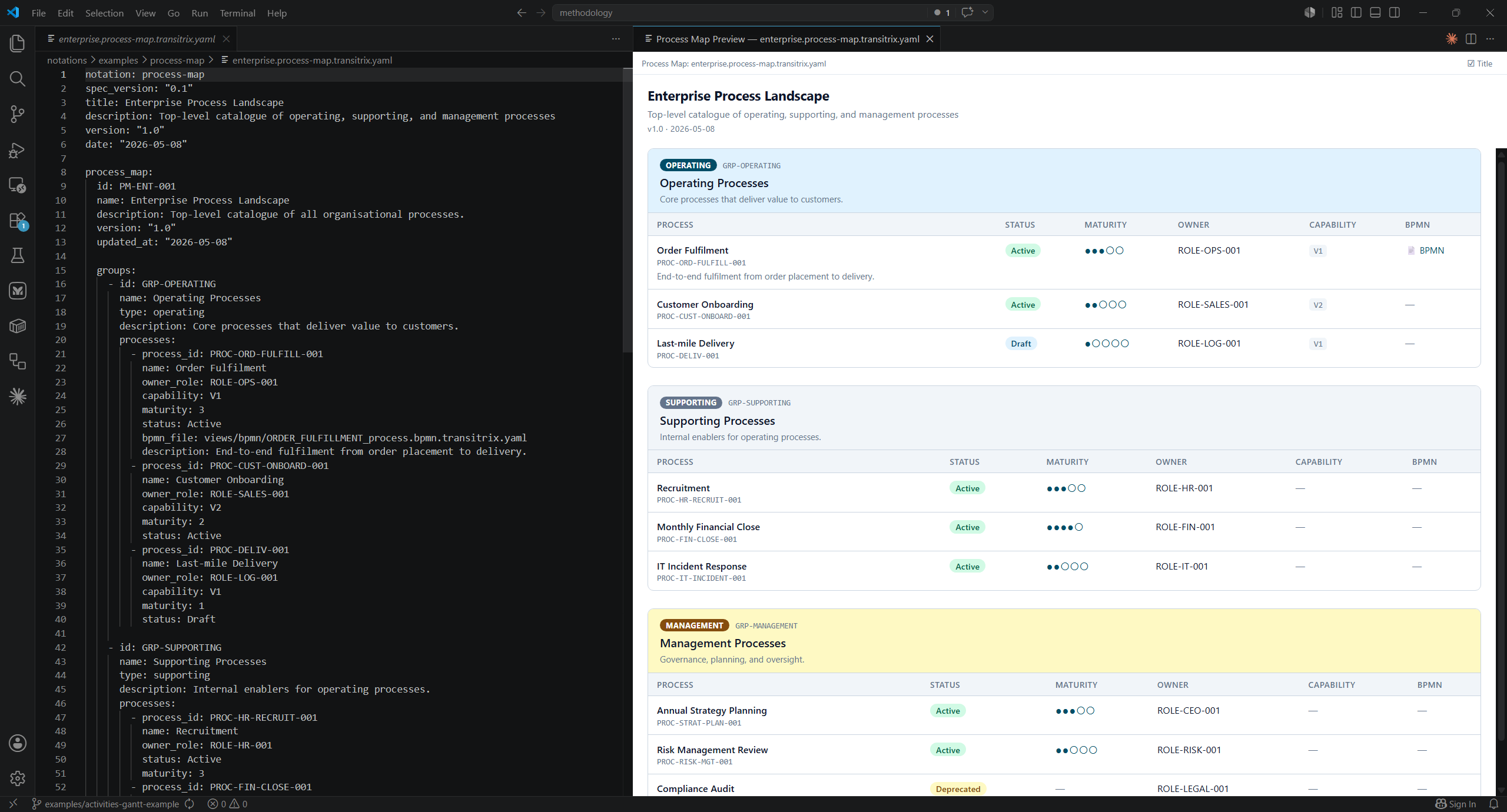
Diagrams as text, in your editor. Write a diagram in a plain YAML file, and Transitrix Studio renders it live, right beside your code. No drag-and-drop canvas, no proprietary file format — just text you can diff, review in a pull request, and hand to an AI that reads it natively.
Why text-native diagrams?
Diagrams hidden in proprietary binary files don't survive contact with version control. They are hard to diff, hard to review, hard to merge. They drift from the truth they once described.
Transitrix flips that:
- The diagram lives in a YAML file — readable in any editor, diffable in git, reviewable in pull requests.
- The picture is derived, not authored — edit the text, save, and the diagram updates itself. Never out of sync.
- AI works with it natively — your assistant can read, edit, and reason about the diagram's source without a plugin or export step.
- Built on open standards — ArchiMate 3.2, BPMN 2.0, CMM. Your files aren't locked to this extension.
17 notations, one extension
| Domain |
Notation |
Use it for |
| Strategy |
Goals tree |
Hierarchical goal decomposition |
| Strategy |
DGCA / DGA |
Drivers → goals → (changes →) activities chains |
| Capability |
Capability map |
Current vs target maturity per capability |
| Process |
Process map |
Operating / supporting / management process landscape |
| Process |
Process blueprint |
Stage-by-stage design with systems, actors, equipment, information |
| Process |
BPMN |
Full BPMN 2.0 — YAML-authored, BPMN-rendered |
| Schedule |
Activity network |
PSND / AoN diagrams + Gantt + critical path |
| Schedule |
Activity card |
Single-project narrative: scope, motivation chain, milestones |
| Risk |
Scenarios |
Scenario planning across factors |
| Catalogue |
Applications |
Applications, integrations, platforms, data stores |
| Catalogue |
Products |
Digital products, services, bundles |
| Decomposition |
Nested blocks |
Recursive block tree |
| Compliance |
Compliance impact |
Obligation × subject impact matrix |
| Compliance |
Compliance matrix |
Products × requirements coverage view |
| Compliance |
Coverage metric |
Law coverage stats with RAG status |
| Compliance |
Gap dashboard |
Open gaps: unasserted requirements, stale assertions |
Every preview ships with a toolbar: title toggle, discrete zoom (50–200%), save as SVG, save as PNG (2× for crisp output), and copy PNG to clipboard (Windows today; macOS / Linux planned).
The preview opens automatically when a recognised file becomes the active editor, and refreshes on save — not on every keystroke. That's deliberate: re-rendering mid-edit would burn CPU and flash parse errors on every intermediate state of a structural change. It also means an edit with no save behind it looks, at a glance, like a broken preview — the toolbar's small "as of last save" label is the tell that nothing's wrong, the file just hasn't been saved yet.
For an edit-and-watch-it-update feel without an explicit save keystroke, turn on autosave with a short delay:
{
  "files.autoSave": "afterDelay",
  "files.autoSaveDelay": 500
}
Turn auto-open off with transitrix.preview.autoOpenOnFileOpen if you'd rather open previews on demand — the toolbar preview icon (same $(graph) icon across every notation) always works regardless of the setting.
Pairs well with Mermaid
Transitrix and Mermaid are complementary, not competing. Use Mermaid for general-purpose diagrams — flowcharts, sequence diagrams, ER, Gantt. Use Transitrix for the structured enterprise notations Mermaid doesn't cover. Together: nearly 30 notations at your fingertips, both free and open source.
Get started in 3 steps
Install this extension — search for Transitrix Studio in the Extensions panel of VS Code, Cursor, VSCodium, or Windsurf.
Create a file ending in one of the recognised suffixes, e.g. app.blocks.transitrix.yaml:
notation: blocks
nested_blocks:
  id: BLOCKS-DEMO-1
  name: "My app"
  blocks:
    - { id: FRONTEND, name: "Frontend" }
    - { id: BACKEND, name: "Backend" }
Save it. The preview panel opens automatically beside the file and shows two connected boxes, "Frontend" and "Backend", inside a "My app" container — and re-renders on every save from then on.
Every notation in the table above follows the same pattern: *.<notation>.transitrix.yaml in, live diagram out. Recognised suffixes are configurable in Settings → Transitrix Studio.
Editors: the extension ships to the VS Code Marketplace (VS Code) and to the Open VSX Registry (Cursor, VSCodium, Windsurf). The artefact is identical; pick whichever Extensions panel ships with your editor. JetBrains IDEs (IntelliJ IDEA and the rest) have a companion Transitrix Studio plugin — install it from Settings → Plugins → Marketplace and search for Transitrix Studio.
Creating a new element
In a repository that follows the Transitrix methodology, the Command Palette
carries Transitrix: New Goal Element and the matching Driver,
Constraint and Requirement commands. Each asks only for what carries
the element's own meaning — its id, its name, the one field its type requires —
and writes the file into the folder that type belongs in.
Everything else the file needs is computed rather than typed: the zone, the
admission record (who admitted it, when, and the result of the checks that
actually ran), and the lifecycle dates. Two of those values are yours to set
rather than accept:
| Prompt |
Default |
Notes |
admitted_by |
git config user.name |
Asked only when git has no name configured. |
valid_from |
today |
Pre-filled — press Enter to accept, or type the date the element starts being true (YYYY-MM-DD). |
The command refuses to write a file whose id already exists, or whose
references do not resolve, rather than recording a check as passed when it
did not.
The same defaults, and the equivalent --author / --valid-from flags, are
available from the CLI's transitrix new and transitrix validate --fix —
see docs/cli.md.
Settings
Configure under Settings → Transitrix Studio. The canonical keys are transitrix.*.
| Setting |
Default |
Description |
transitrix.fileExtensions |
[".bpmn.transitrix.yaml"] |
File suffixes recognised as Transitrix BPMN source files (leading dot required). |
transitrix.exportEnabled |
false |
Show the experimental BPMN/SVG/PNG export commands. |
transitrix.preview.autoOpenOnFileOpen |
true |
Auto-open the matching preview when a recognised file becomes the active editor. Set to false to only open previews via the toolbar button. |
transitrix.nodeSize.goals |
normal |
Block size preset for Goals preview (compact / normal / wide). Also in the in-preview Controls panel. |
transitrix.nodeSize.dgca / .dga |
normal |
Block size preset for DGCA/DGA chain previews. |
transitrix.nodeSize.action |
normal |
Block size preset for Activities network preview. |
transitrix.nodeSize.blocks |
normal |
Leaf block size preset for Nested Blocks preview (settings; Controls panel deferred). |
transitrix.nodeSize.processBlueprint |
normal |
Cell/column sizing preset for Process Blueprint (pairs with existing column-width slider). |
transitrix.nodeSize.capabilityMap |
normal |
Node size preset for Capability Map tree preview. |
Doing this for a whole system, not one diagram?
Studio renders one file at a time — no repository, no setup beyond installing it. If you want to model an entire organization's goals, processes, and capabilities as one connected, version-controlled model instead of separate diagrams, that's a different job with its own quick start: set up an architecture repository →
Learn more
Open source. MIT licensed. Built by Valerii Korobeinikov.

