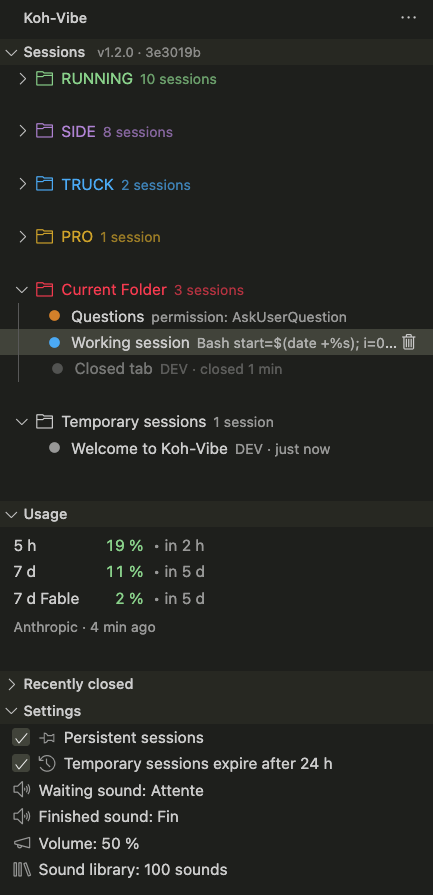
Koh-VibeAll your Claude Code sessions in a single view: live status, folders, usage and chimes. Installation Launch VS Code Quick Open ( Ctrl+P), paste the following command, and press enter.Copied to clipboard |

Koh-Vibe
Every Claude Code session you have running, in one view: across projects, across windows, across editors — with its status, what it is doing right now, and your usage.
Requirements
InstallSearch Koh-Vibe in the Extensions view, or run: Then reload the window, open the Koh-Vibe view in the activity bar, and install the hooks. VSCode forks — Cursor, Windsurf, VSCodium, Antigravity — do not reach the Microsoft
marketplace: they read Open VSX, where
Koh-Vibe is published as well, in the same version. Search Koh-Vibe there too, or take
the Building the package yourself stays an option, below — it is one command. Install the hooksNothing appears until Claude Code starts dropping its events. Open the Koh-Vibe view and click Hooks not installed, or run Koh-Vibe: Install hooks from the palette. The script adds eight hooks to From sourceFrom the integrated terminal of the editor you want it in:
What it shows
Using itFiling. Create folders, drag sessions into them, give them a colour. The order inside a folder is set by hand and stays put: a session opened later lands at the end without disturbing what you placed. The folders themselves are dragged the same way — drop one onto another to put it in front, or onto Temporary sessions to send it to the end. New session. The + button in the view title opens a new Claude Code tab — a fresh conversation in the window's folder. Hover a folder: the same + appears at the right of its row (right-click offers it too, as New session here) and files the conversation in that folder as soon as it shows up, so it is not a temporary one. Chimes. One when a session starts waiting for you, another when it finishes. Three levels, most specific first: a conversation's sound beats its folder's, which beats the global setting. "None" is a chosen silence rather than an absent choice, so it does not fall through to the level above. The macOS sounds are the baseline. Koh-Vibe offers to add a library of a hundred short
interface sounds (Kenney, CC0), downloaded once
and kept in its own folder — never in Two of its sounds travel inside the package, renamed after what they announce: Attente, when a session starts waiting for you, and Fin, when it finishes. A fresh install starts on those two, so the dashboard chimes from the first launch, library or no library. They are a default, not a policy: a sound already chosen — a chosen silence included — stays as it is, and an update never puts them back. In the picker, the arrow keys play each sound; → replays the highlighted one. Removing. Right-click a session → Remove from the list. Nothing is stopped: Claude Code runs in its own terminal, and a session still alive reappears on its next event. Persistent sessions. The first row of the settings, a checkbox, decides what closing a tab does to its row. Checked — the default — the conversation stays in the list, greyed out, in its folder, with a muted dot and the time it closed; the fifty most recent are kept, and Remove from the list takes one away for good. Unchecked, closing the tab removes the row instead; the rows already greyed stay either way. Hover the row for the same explanation. Temporary sessions. The second checkbox. A conversation filed in no folder is temporary: after 24 hours without activity it leaves the list — hidden, not forgotten, so any activity in it brings it back, and filing it in a folder keeps it for good. Unchecked, temporary conversations stay until you remove them. Reopening. One click on an ended conversation — a greyed row, or an entry of Recently closed — brings it back: in the editor tab it ran in, or a fresh terminal on its folder, whichever it came from. The editor tab only when Claude Code will find the conversation from this window — its transcript under the window's own project, and not hidden from its session list; otherwise a terminal resumes it, which works from anywhere. A restored tab nobody has opened yet is simply brought to the front, never opened a second time. While it comes back, the row spins in place of its dot — a few seconds pass between the click and the conversation showing up, during which nothing else moves — and takes no second click, which would open a second tab. The spinner clears when the conversation is open again, or after thirty seconds without it. Settings and commandsKoh-Vibe's settings live in its own Settings view, at the bottom of the panel, not in the editor's settings: two checkboxes — Persistent sessions and Temporary sessions — the global chime for each event, the volume, and the sound library. Folders and conversations override the chimes from their own right-click menu. From the command palette, under Koh-Vibe:
The rest — reopening, closing, renaming, colouring, per-folder and per-conversation sounds — is on the right-click menu of the row it applies to. Your data, and what leaves the machineNothing is sent anywhere, and there is no telemetry. The one network call Koh-Vibe makes is to Anthropic, for your usage figures, at most once every five minutes. The OAuth token it needs is read from the system keychain — never logged, never written to disk. No prompt, no transcript and no path ever leaves the machine. Everything else sits under
These files are shared across every window and every editor on the machine: a folder made on one side shows up on the other, and a sound chosen once applies everywhere. Uninstalling the extension does not erase them; deleting the directory is enough to start over. How it worksClaude Code's hooks call a shell bridge that parses nothing: it copies what it receives into the spool, never writes to standard output, and always exits successfully. A bridge that parsed JSON could fail, and a failing hook disturbs the session it observes — the only acceptable behaviour is to break nothing, even at the cost of losing an event. Each window watches the spool on its own, reduces the events into state, and displays it. No locks: shared files are merged three ways (the state read, ours, and the freshest one re-read just before writing), so two windows filing at the same time do not erase each other. A conversation leaves the list when it ends, when you close it, or when you remove it —
never because it went quiet: a tab you left open for a day is still a conversation.
Refresh reads Claude Code's own registry of running processes ( What's new1.2.0 keeps every conversation: ended ones stay greyed in their folder, reopening brings back that very conversation rather than a blank one, unfiled ones are temporary until you file them, the trash closes tab and row in one click, and a + starts a new session from the dashboard. Nothing is forgotten for going quiet any more. Every version, and what it changed, is in the changelog. ContributingOutside contributions are welcome — the flow, the commands and what the review looks at are
in CONTRIBUTING.md. Versioning is described in CLAUDE.md: one
pull request merged into CreditsKoh means "island" in Thai. Inspired by open-vibe-island, which does the same thing in the Mac notch. No code is taken from it. Koh-Vibe is an independent project. It is not affiliated with, endorsed by, or sponsored by Anthropic. LicenceMIT. |