🏢 Agent Office 3D
Watch your Claude Code agents come to life in a living, isometric 3D office.
Introduction
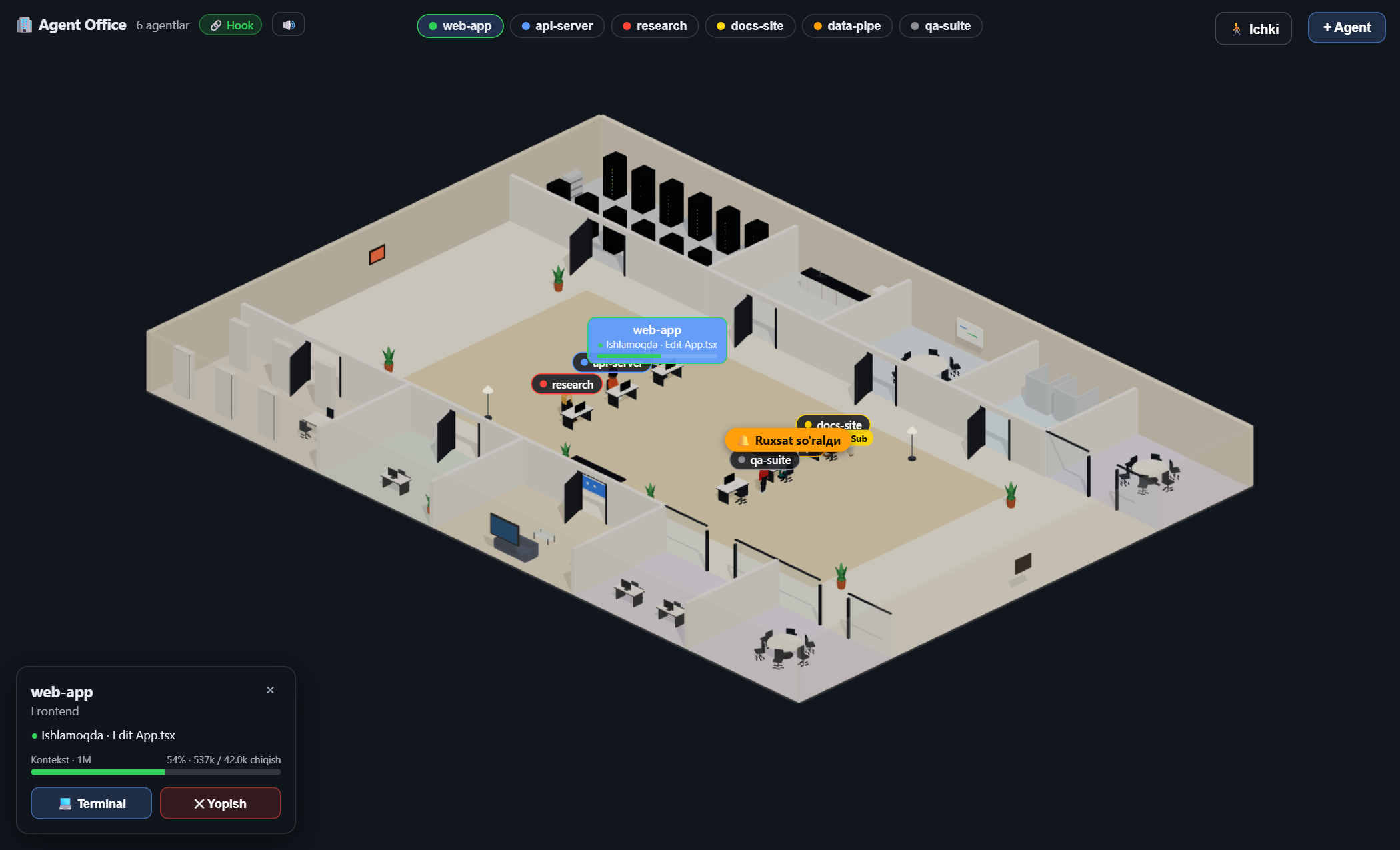
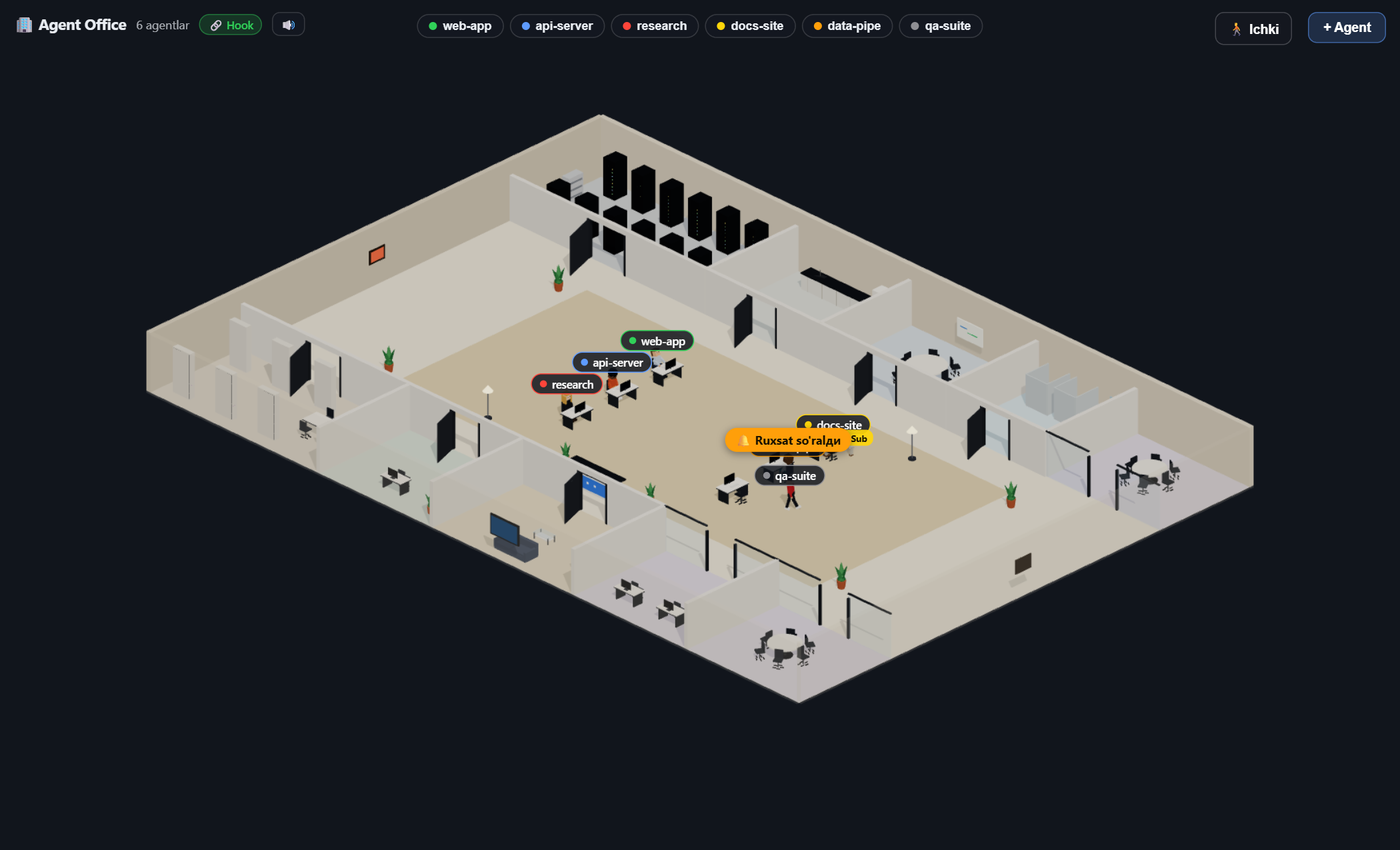
Agent Office 3D turns your Claude Code sessions into an animated 3D office you can watch while you work. Every agent becomes a voxel character that sits at a desk and types while Claude is working, wanders the office when it's idle, and shows exactly what it's doing — the file it's reading, the command it's running, whether it's waiting on you, and how full its context window is.
It observes, never runs Claude Code — no API key, no credentials, nothing to configure. It reads your local session transcripts (and, optionally, Claude Code Hooks) and renders the activity live in a panel next to your editor.
Inspired by Pixel Agents — but rebuilt from scratch with a full 3D office instead of 2D pixel art.
Features
Highlights
- 🧑💻 Live agent characters — one voxel character per Claude Code session. They sit and type while working, stand up and wander the office (through doors, into rooms) when idle, and return to their desk when you give them a task. Solid collision: characters and the camera never pass through walls, glass or furniture.
- 🧑🎨 Distinct, lively agents — same-role agents look different (accessories + subtle colour shifts), idle agents head to role-fitting rooms (research → library, backend → server room, everyone → the kitchen for a break), stretch now and then, and their monitors glow in their status colour.
- 🏢 A whole company floor — a large, fully-enclosed multi-room office with modern furniture: a server room, kitchen, meeting rooms, a library, a bathroom, a lounge, glass-walled rooms and an open work area — each a real room with walls, doors and its own floor.
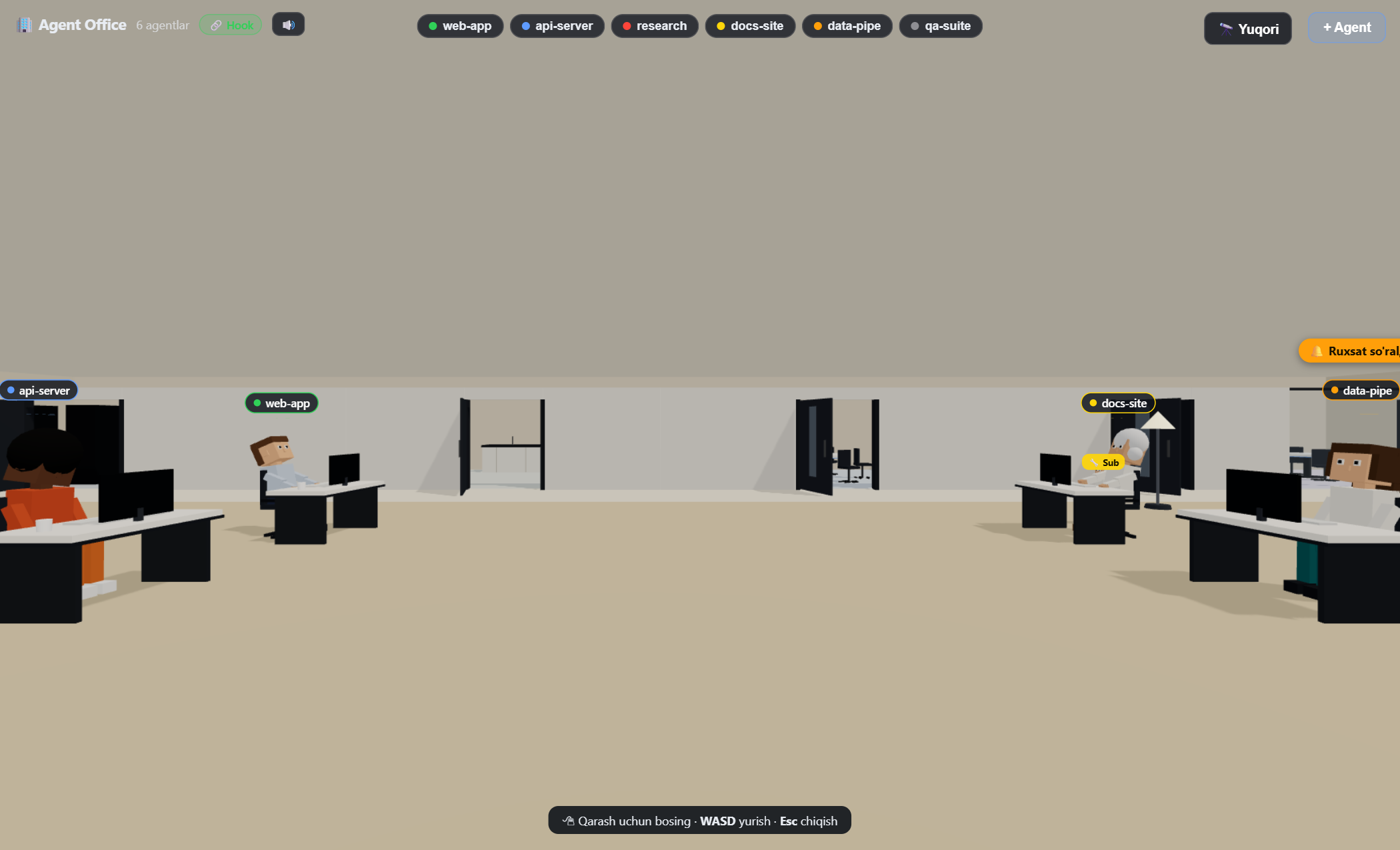
- 🎥 Two camera modes — an isometric observer view (near walls turn translucent so you can see in) and a first-person walk-around mode (
WASD + mouse) to explore the office from inside.
- 📊 Rich status at a glance — floating labels show the current tool and file (
Edit App.tsx, Read db.ts, …), a colour-coded context/token health-bar, permission "🔔" bubbles, and a per-agent inspector. Labels stay compact for unselected agents so a crowded office never turns into a wall of text.
- 🎯 Model-aware context meter — the token gauge sizes itself to the session's real context window, so 1M-context sessions read correctly instead of pegging at 100%.
- 🧩 Sub-agents — when an agent spawns a
Task/Agent sub-agent, a "hiring" bubble pops up and a smaller helper character appears beside the parent (and the hire is logged in the activity feed).
- 📊 Session stats & activity feed — the inspector tracks each agent's turns, tool calls and active time, and a 📜 feed logs recent events (tool runs, permission prompts, blocks, sub-agent hires, join/leave).
- 🎨 Office themes — five one-click palettes (Warm, Cool, Night, Forest, Rose) recolour the floor and walls, alongside the per-item furniture and floor/wall colour pickers.
- ♿ Keyboard & accessibility — arrow keys cycle the selected agent (Esc deselects), controls show a focus outline, and buttons carry ARIA labels.
- 🔔 Sound + native notifications — subtle chimes when a turn finishes or a permission is requested (with a one-click mute), plus VS Code toasts when an agent needs you while the panel is hidden.
- 🔌 Two detection paths, clearly labelled — reliable Claude Code Hooks plus a JSONL transcript fallback. A badge in the top bar shows whether this window has the live 🔗 Hook stream or is on the 📄 JSONL fallback.
- 🪑 Layout editor — an ✏️ edit mode to place, drag, rotate and delete furniture on a grid, recolour the floor, undo/redo, and export/import the layout as JSON. Layouts persist to
~/.agent-office/layout.json and are shared with the standalone viewer.
- 🌐 Standalone browser viewer — run
npx agent-office (or node dist/cli.js) to watch the same 3D office in any browser at http://localhost:3100, no VS Code required. It reuses the hook/JSONL detection and the shared layout.
Status at a glance
Every character's colour and label reflect what the agent is actually doing:
|
Status |
Meaning |
| 🟢 |
Working |
actively editing / running a tool |
| 🔵 |
Thinking |
reasoning or reading |
| 🟡 |
Collab |
orchestrating sub-agents |
| 🟠 |
Review |
waiting on you — a permission prompt or your input |
| 🔴 |
Blocked |
an error occurred (failed tool / API error) — needs attention |
| ⚪ |
Idle |
done — up and wandering the office |
How It Works
   You + Claude Code
        │
        ├──► writes JSONL:  ~/.claude/projects/<project>/<session>.jsonl
        │                   (every message, tool call, token)
        │
        └──► fires Hooks (PreToolUse, Stop, Notification, …)  ──┐
                                                                 ▼
                    ┌───────────────────────────────────────────────┐
                    │  Extension host                                │
                    │  • FileWatcher (500 ms polling)                │
                    │  • local Hook server (127.0.0.1)               │
                    │  • state machine → AgentStateStore             │
                    └───────────────────────┬───────────────────────┘
                                            │  ServerMessage (postMessage)
                                            ▼
                       React + three.js webview → live 3D office
The extension does not run Claude — it only watches. When Hooks are delivering, they are authoritative and the JSONL heuristics stand down (JSONL still supplies token usage). Detection is hardened for real sessions: parallel tool calls are tracked independently, /clear and /resume re-bind the existing character instead of spawning a duplicate, a long transcript is replayed silently on adoption (no event flood), and multibyte-safe reads keep non-ASCII paths intact.
Requirements
- VS Code 1.84 or newer
- Claude Code CLI installed and on your
PATH (for the + Agent button)
Install
From the Marketplace: open Extensions in VS Code and search “Agent Office 3D”, or install thomasarisu.agent-office.
From a packaged .vsix:
code --install-extension agent-office-0.1.6.vsix
…or in VS Code: Extensions → ⋯ → Install from VSIX…
Then reload the window (Ctrl+Shift+P → Developer: Reload Window).
Usage
- Open the Agent Office panel from the bottom panel area, or run
Agent Office: Show Panel.
- Click
+ Agent and pick a role — a new Claude Code terminal opens and a character appears. In a multi-root workspace you can choose the folder; there is also an optional ⚡ skip-permissions launch. (Any Claude session you start in the workspace is auto-detected too.)
- Give Claude a task and watch the character work; when it finishes, it gets up and wanders the office.
- Toggle 🚶 Ichki / 🔭 Yuqori to switch between the first-person and isometric camera. In first-person: click to look,
WASD to walk, Esc to exit.
- Click a character to open its inspector (task, tokens, Terminal / Close).
- The top bar shows the detection mode (🔗 Hook / 📄 JSONL) and a 🔊 sound toggle.
Settings
| Setting |
Default |
Description |
agent-office.hooksEnabled |
true |
Use Claude Code Hooks for reliable detection (writes a hook into ~/.claude/settings.json). |
agent-office.notifications |
true |
Show a VS Code toast when an agent needs permission or is blocked while the panel is hidden. |
agent-office.autoShowPanel |
false |
Open the panel automatically on startup. |
agent-office.autoSpawnAgent |
false |
Spawn one agent on startup if none are running. |
Project Structure
| Path |
Purpose |
extension/core/ |
Message protocol, constants, path helpers |
extension/server/ |
AgentStateStore, transcript state machine, file watcher, hook server/handler |
extension/vscode/ |
Activation, webview provider, agent manager, hook installer |
webview-ui/ |
React + three.js 3D office (transport → reducer → store → scene) |
Build From Source
npm run install:all   # extension + webview dependencies
npm run build         # type-check + esbuild (host) + Vite (webview)
npm run package       # produce the .vsix
Press F5 to launch an Extension Development Host for debugging.
Standalone viewer (CLI)
Watch the office in a plain browser — handy for a second monitor or when you're not in VS Code:
npx agent-office                 # watch the current folder at http://localhost:3100
npx agent-office ../my-project   # watch a specific project
npx agent-office --port 4000     # custom port
It runs the same JSONL/hook detection and reads the layout you edited in the extension. (Observation only — the + Agent terminal features are VS-Code specific.)
Roadmap
- Layout presets and more office themes
- Open VSX distribution
- Richer sub-agent choreography
Security & Privacy
Agent Office is observation-only and fully local:
- It never sees your Claude API key and sends no data anywhere — it reads
your local transcripts under
~/.claude/projects and, if enabled, receives
Claude Code hooks.
- The hook server and the standalone viewer bind to
127.0.0.1 only (never
exposed to the network); the hook endpoint uses a random per-session token.
- Asset packs and layouts are parsed as plain JSON (no
eval), and the
extension runs no child_process.
- Hook installation into
~/.claude/settings.json never overwrites an
unreadable file and writes atomically.
Found a security issue? Please open a private report via
GitHub Security Advisories.
License
MIT © Agent Office
| |