Engram Alpha — VS Code extension





The most powerful and feature-rich inspectable long-term graph memory for
software development with AI agents — built on reproducible research.
Engram is a durable, graph-based
long-term memory for AI coding assistants: the reasoning and decision
layer — why we chose this, what bit us, what's still open — kept as a graph
you can see, edit, and own. Local-first, no cloud, no keys: your memory is a
file inside your repo, and every model that reads it runs on your machine.
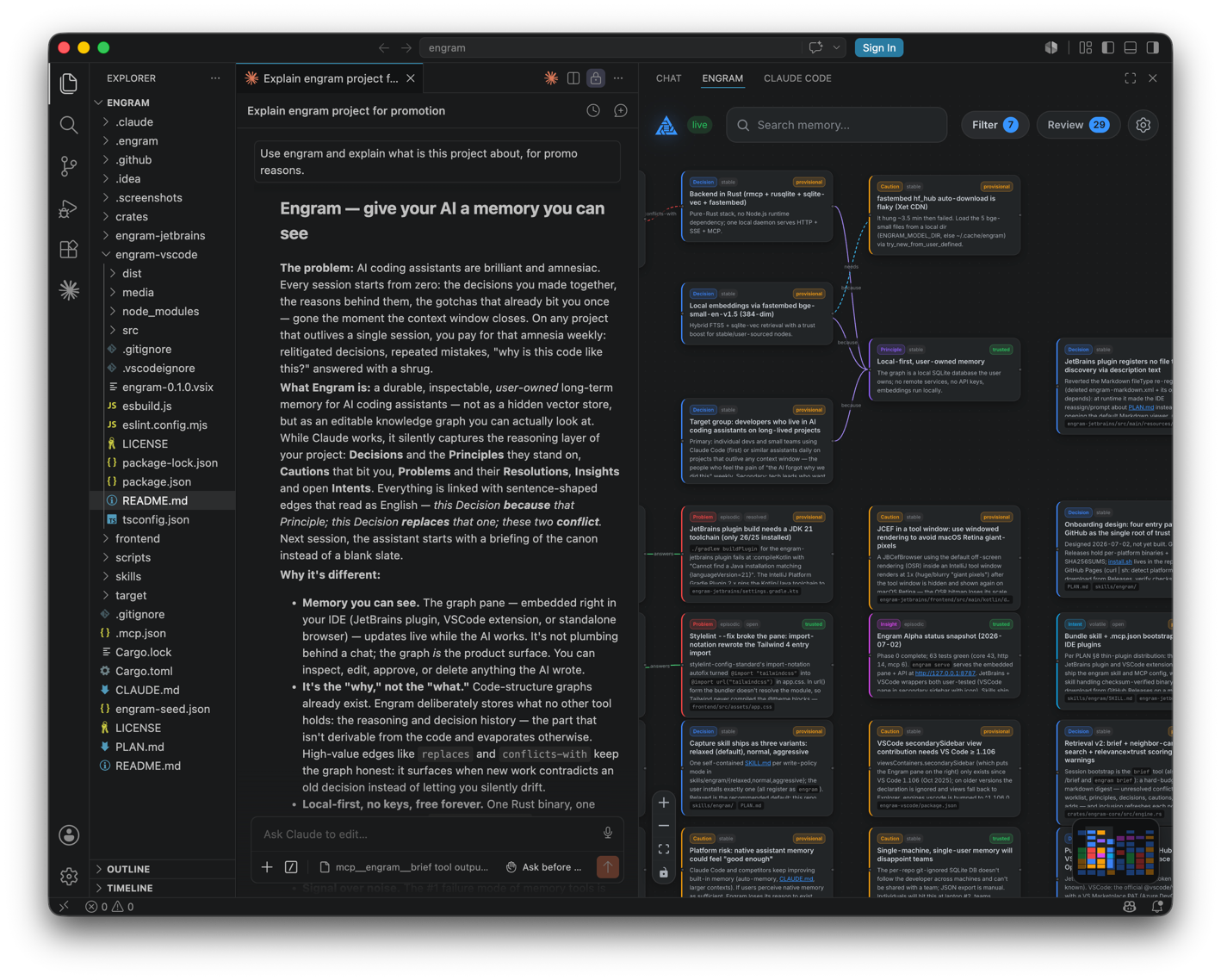
This extension embeds the Engram pane in VS Code and talks to the local
engram-alpha core — the same process your assistants read from and write
to over MCP. Decisions, cautions, problems, and insights surface and update
live while you work.
Try the live demo → — the
real pane in your browser over an invented project's memory. Nothing to
install.
Why a graph, not a notes file
A flat memory file is whole below about forty notes and overtaken by
retrieval after that. Engram's graph is active: superseded knowledge is
archived behind a replaces edge instead of silently contradicting the new
canon, look-alike claims get flagged and judged, contradictions become
visible conflicts-with edges, deliberately removed knowledge leaves a
Tombstone so nobody re-learns it, and trust fades on scratch that never gets
re-confirmed while pinned decisions never fade at all. The payoff shows up
the second time something goes wrong: the graph already holds the
Problem, the Resolution that answered it, and the Caution that
would have prevented it.
- One memory, every agent. The core speaks MCP, so Claude Code, Codex
(CLI and desktop app), Gemini CLI, OpenCode, Kilo, Google Antigravity, Bob
(IDE and Shell), Windsurf, and Devin CLI share the same per-repo graph.
A decision captured by one assistant is recalled by the next.
- An assistant that starts briefed. A session-start digest of conflicts
to judge, open work, and standing decisions; mid-session hybrid search
where every hit carries its conflicts and supersessions first, and every
reply says how confident it is.
- Silent capture, accountable review. Writes are quiet, and every one
comes back checked: duplicates merge instead of piling up, writes near
superseded, conflicted, or tombstoned knowledge are warned. The Review
drawer is where you approve what you vouch for.
- A memory that argues back. A local NLI model checks claims against
your canon with receipts and sweeps the graph for hidden conflicts and
duplicates. Models nominate; you judge.
- Measured, not promised. Retrieval defaults are outputs of a published
offline benchmark — about 9× the recall per token of a conventional
vector stack at 1,500 notes. The runs live next to the code.
What the extension gives you
- The Engram view in the activity bar (graph icon) — the full pane: the
live graph in three layouts, the timeline feed, tags and filters, the
Review drawer, Checkup, settings. Everything the standalone pane does.
- Engram: Open Graph in Editor for a center-tab view when the sidebar is
too narrow.
- A status bar item showing core connectivity. If the core is down the
pane shows a Retry overlay and reconnects on its own once it is up.
- Detect-and-guide setup. On activation the extension checks for the
engram-alpha binary and a running core and offers the next step —
Install Backend, Start Daemon, or Configure MCP — without
spawning anything behind your back.
Setup
Install the backend (the extension can run this for you via
Engram: Install Backend). From your project's root:
curl -fsSL https://raw.githubusercontent.com/techtheist/engram/main/install.sh | sh
This installs the engram-alpha binary, checksum-verified, into
~/.local/bin — and nothing else. On Windows, use PowerShell:
powershell -ExecutionPolicy Bypass -c "irm https://raw.githubusercontent.com/techtheist/engram/main/install.ps1 | iex"
(Assistants living in WSL2 should run the install.sh line inside WSL
instead, so the core and the agents share one filesystem.)
Wire your assistants, still from the project root:
engram-alpha setup
It auto-detects what is installed and writes each agent's MCP config plus
the capture skill. engram-alpha setup --cli claude,codex wires only the
ones you name.
Start the core: engram-alpha serve (or Engram: Start Daemon). The
first run downloads the three local models — embeddings, reranker, NLI —
into ~/.cache/engram. After that it is fully offline.
Open the Engram view. The pane finds the core through the
workspace's .engram/daemon.json; engram.daemonUrl is the fallback
when that file is absent (default http://127.0.0.1:8787).
engram-alpha setup already writes the workspace .mcp.json. If you
installed the binary another way, Engram: Configure MCP for Claude Code
merges an engram server into .mcp.json without touching other servers:
{ "mcpServers": { "engram": { "command": "engram-alpha", "args": ["mcp"] } } }
No database path is needed: Claude Code launches the server with the
project as its working directory and answers MCP roots, so the light stdio
bridge binds the project's graph (.engram/graph.tepin) on its own and the
entry is portable across checkouts. Restart Claude Code to pick it up.
engram-alpha doctor checks the whole chain if something looks off.
The memory model
Nine node types — Principle, Decision, Caution, Problem, Resolution,
Insight, Intent, Anchor, Tombstone — and seven edge verbs that read as
sentences: a Decision because a Principle, a Resolution answers a
Problem, the newer replaces the older, two claims conflict-with each
other. Three capture intensities (relaxed / normal / aggressive) set
how much your assistant writes. The ontology, the trust numbers, and the
brief are per-graph configuration you can reshape from the pane, custom
fields included.
Full documentation: docs
— getting started, the pane, the memory model, trust, conflicts and
Checkup, multi-project memory, storage, local models, troubleshooting.
Build from source
The pane is the repo's frontend/ build, copied in at package time.
npm install
npm run build:pane   # builds ../frontend (needs Bun)
npm run build        # copies the pane in + bundles the extension (esbuild)
npm run package      # -> engram-<version>.vsix
Install the .vsix via Extensions view → ⋯ → Install from VSIX….
License
MIT — see the repository.

