Coding Plans for Copilot
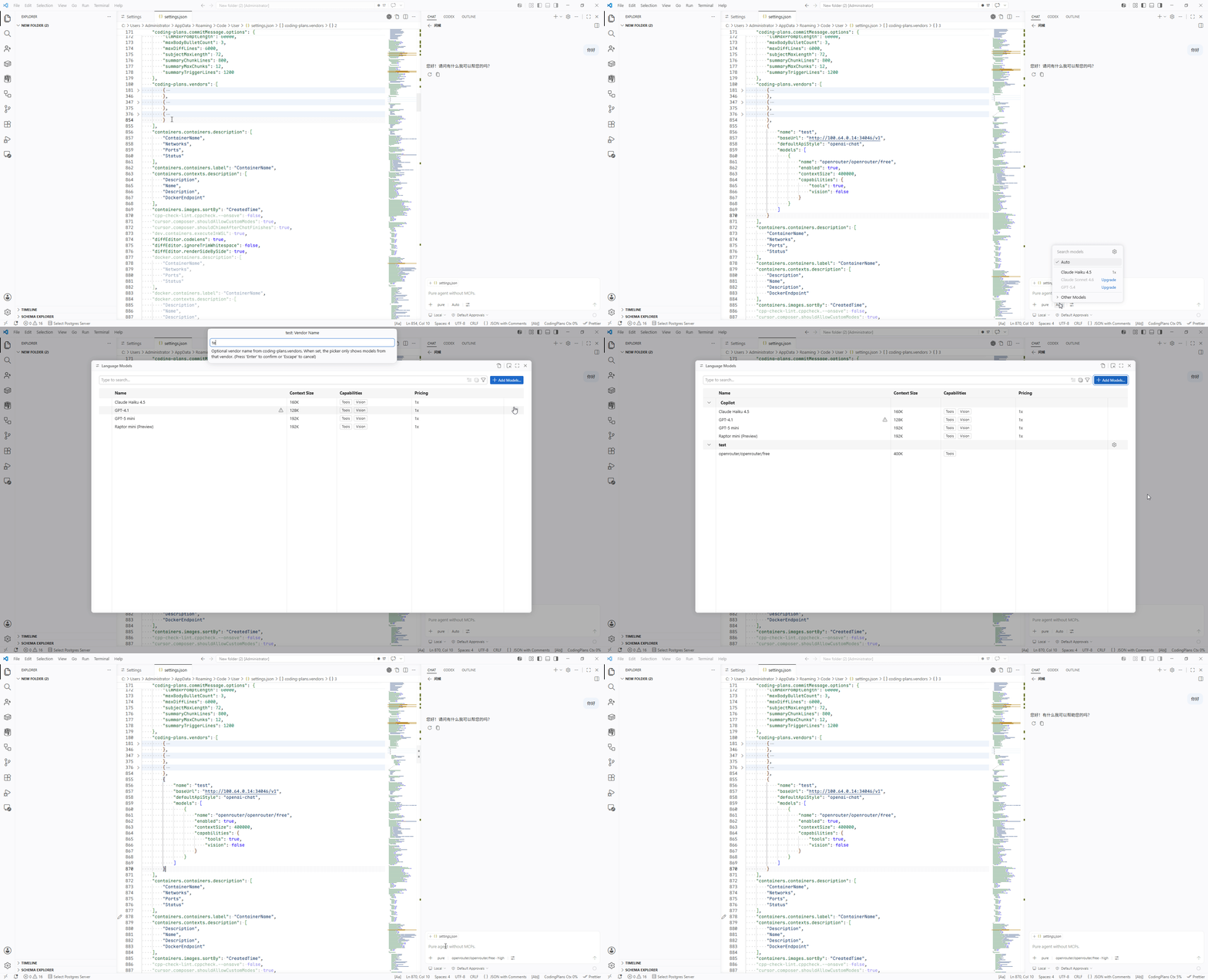
Switch between multiple AI model vendors with one click, breaking Copilot plan limitations.
Supports domestic major vendors like Zhipu, Kimi, iFlytek, Volcengine, MiniMax, Baidu Qianfan, Tencent Cloud, JD Cloud, Kuaishou KAT, X-AIO, Compshare, Alibaba Cloud, Xiaomi MiMo, DeepSeek, as well as any vendor that follows OpenAI Chat, OpenAI Responses, or Anthropic protocol styles. No need to change usage habits; call them directly in VS Code Copilot Chat.
This extension is a general protocol adapter, not a clone of Copilot's private endpoint protocol. It sends public OpenAI/Anthropic-compatible fields and avoids Copilot-private request fields; as a result, it can work with Codex, Claude Code, and similar reverse-proxied APIs that native VS Code/Copilot Chat endpoint requests usually cannot call directly.
VS Code for the Web
Coding Plans runs in VS Code for the Web, including vscode.dev and github.dev. The language model provider, vendor configuration and Secret Storage API keys, model refresh, model-configuration copy, usage status, and commit-message commands remain available when the host provides Copilot Chat and an SCM/Git provider.
- Browser extension hosts cannot run a local Git executable. When
coding-plans.commitMessage.useRecentCommitStyle is enabled, the web host skips only the optional recent-commit style samples; commit generation still uses the current SCM diff.
- Requests originate in the browser extension host. Each configured API endpoint, including
/models and optional usage endpoints, must allow the required cross-origin requests (CORS). Use a CORS-enabled vendor endpoint or proxy when the upstream API does not support browser requests.
Core Features
- Multi-Protocol Unified Access: Supports OpenAI Chat (
/chat/completions), OpenAI Responses (/responses), and Anthropic (/messages) three protocol styles, adapting to any compatible vendor.
- General Request Format: Avoids Copilot-private request fields and sends public compatible fields, enabling Codex, Claude Code, and similar reverse-proxied OpenAI/Anthropic-style APIs.
- Anthropic Protocol First: Built-in vendors default to Anthropic-style endpoints (
/messages).
- Zero Learning Curve: Fully integrated into VS Code Copilot Chat without changing any operational habits.
- Flexible Model Management: Supports dynamic fetching from
/models endpoint, or custom model lists.
- Intelligent Commit Generation: Automatically generates Conventional Commits-compliant commit messages based on Git changes.
- Coding Plans Dashboard: Visit GitHub Pages Dashboard to view monthly fees and benefits from multiple coding plans, as well as OpenRouter vendor performance metrics. The dashboard updates daily with automated scraping, multi-dimensional filtering, and URL state sync.
- Key Security: API Keys are stored locally using VS Code Secret Storage, not uploaded to the cloud or shared.
Quick Start
Installation
Recommended Method: Search "Coding Plans" or Coding Plans for Copilot directly in the VS Code Marketplace.
Method 1: Install within VS Code (Recommended)
- Open VS Code
- Press
Ctrl+Shift+X to open the Extensions panel
- Type
Coding Plans for Copilot in the search box
- Click Install to install
- After installation, press
Ctrl+Shift+P and type Coding Plans to see related commands
Method 2: Command Line Installation
code --install-extension techfetch-dev.coding-plans-for-copilot
Method 3: Install from Marketplace Page
👉 VS Code Marketplace Direct Link
Click the Install button on the marketplace page, which will automatically open the extension in VS Code and install it.
Prerequisites: Requires VS Code ≥ 1.120.0 and the GitHub Copilot extension installed.
Configuration
- Press
Ctrl+Shift+P, type Coding Plans: Manage Vendor Configuration
- Pick the platform you've registered with from the vendor picker (e.g., Zhipu, Kimi, Volcengine, etc.)
- Select "Set API Key" and paste your API Key; the extension stores it and refreshes models
- Open Copilot Chat (
Ctrl+L) and choose a model provided by Coding Plans in the model picker
- Set
Thinking Effort per request from the model row More Actions menu. OpenAI Chat-compatible models support none / low / medium / high / xhigh / max, and also show Thinking Type (enabled / disabled / default, default: default; default omits the thinking field and only sends reasoning_effort, matching native Custom Endpoint). Choose enabled to also send thinking.enabled. OpenAI Responses models support low / medium / high / xhigh / max (default: max). Anthropic models show Effort (low / medium / high / xhigh / max, default: max) and Thinking Type (think / non-think, default: think); think sends thinking.enabled with budget_tokens mapped from Effort, and non-think disables thinking. Copilot Chat may pass reasoningEffort instead of thinkingEffort; the adapter maps that alias. More Actions is thinking-only. Vendor temperature / topP keys remain in settings but are not sent.
- When a vendor has
useModelsEndpoint enabled, run Coding Plans: Update Coding Plans Models List to request /models, write the result back to coding-plans.vendors[].models, and refresh the VS Code model picker. By default, saving settings only refreshes currently configured models; it does not automatically request /models or write back the model list. Set coding-plans.autoRefreshModels to false to stop settings/API-key changes from automatically refreshing runtime models and the VS Code model picker; manual refresh commands still work.
- During refresh, the extension prefers models.dev
catalog.json and falls back to api.json to enrich newly discovered models by model ID/name with description, capabilities, contextSize, apiStyle, and price. Matching ignores tags after : in the final model path segment, such as :free. The description shows id | Lab | Family | Weights | ReleaseDate, where Lab comes from the model ID prefix. capabilities.thinking maps to models.dev reasoning. New model apiStyle is inferred only from the model source: OpenAI and Grok/xAI use openai-responses, Anthropic uses anthropic, and all others default to openai-chat. Grok models that still have the legacy openai-chat value are automatically upgraded to openai-responses during refresh. Prices use the median across all matching model sources and do not match the local vendor name to a models.dev provider. If the catalog cannot be fetched or matched, it keeps the upstream /models data and built-in defaults. Existing manual model entries are not overwritten; extension-generated fallback descriptions such as vendor model: model can be upgraded to the models.dev structure.
You can also directly edit settings.json; the extension will open settings and navigate to coding-plans.vendors.
Built-in Vendor Endpoints
The following vendors come with built-in default configurations and are ready to use after installation:
| Vendor |
Default Built-in Endpoint |
Other Endpoints |
| Zhipu (zhipu) |
https://open.bigmodel.cn/api/coding/paas/v4 |
https://open.bigmodel.cn/api/anthropic (Claude Code) / https://open.bigmodel.cn/api/paas/v4 (general) |
| z.ai |
https://api.z.ai/api/anthropic |
https://api.z.ai/api/coding/paas/v4 |
| Volcano Engine (火山引擎) |
https://ark.cn-beijing.volces.com/api/coding/v3 (Responses) |
https://ark.cn-beijing.volces.com/api/coding/v1 (Anthropic; authType: "bearer") |
| Volcengine Overseas |
https://ark.ap-southeast.bytepluses.com/api/coding |
https://ark.ap-southeast.bytepluses.com/api/coding/v3 |
| Kimi |
https://api.kimi.com/coding/v1 |
https://api.kimi.com/coding/v1 |
| Alibaba Cloud (Aliyun) |
https://token-plan.cn-beijing.maas.aliyuncs.com/apps/anthropic |
https://token-plan.cn-beijing.maas.aliyuncs.com/compatible-mode/v1 |
| Tencent Cloud |
https://api.lkeap.cloud.tencent.com/plan/anthropic |
https://api.lkeap.cloud.tencent.com/plan/v3 |
| Xiaomi MiMo |
https://token-plan-cn.xiaomimimo.com/anthropic |
https://token-plan-cn.xiaomimimo.com/v1 |
| DeepSeek |
https://api.deepseek.com/anthropic |
https://api.deepseek.com/v1 |
| OpenRouter |
https://openrouter.ai/api |
https://openrouter.ai/api/v1 |
To switch to OpenAI-compatible endpoints, modify the vendor's baseUrl and defaultApiStyle.
The built-in Zhipu default uses the dedicated GLM Coding Plan endpoint https://open.bigmodel.cn/api/coding/paas/v4. If you want the Claude Code-compatible entrypoint instead, switch baseUrl to https://open.bigmodel.cn/api/anthropic and set defaultApiStyle to anthropic.
The built-in Xiaomi MiMo default uses the Token Plan endpoint. If you want pay-as-you-go API access instead, switch baseUrl to https://api.xiaomimimo.com/anthropic (https://api.xiaomimimo.com/v1 for OpenAI compatibility) and use the matching API key.
Volcano Engine Coding Plan
The built-in vendor keeps the name 火山引擎 (including its Secret Storage key association). It uses defaultApiStyle: "openai-responses", baseUrl: "https://ark.cn-beijing.volces.com/api/coding/v3", and useModelsEndpoint: false. The resulting request URL is https://ark.cn-beijing.volces.com/api/coding/v3/responses. Chat Completions is also supported at /api/coding/v3/chat/completions; Responses is the recommended default, not the only supported protocol.
The static model IDs are doubao-seed-evolving, doubao-seed-2.1-turbo, doubao-seed-2.0-lite, minimax-m3, glm-5.3, glm-5.3-flash, deepseek-v4-flash, deepseek-v4-pro, kimi-k2.7-code, and kimi-k3. No unverified per-model vision, context-window, or thinking settings are preset. Keep models populated and discovery disabled: even a forced refresh then uses the static list without requesting /models. Add the 火山引擎 provider group in Manage Language Models to see these models; the unscoped Coding Plans root remains hidden.
For the Anthropic-compatible alternative, set vendor defaultApiStyle: "anthropic", authType: "bearer", and baseUrl: "https://ark.cn-beijing.volces.com/api/coding/v1", keeping useModelsEndpoint: false and the static models. This extension only appends /messages, producing https://ark.cn-beijing.volces.com/api/coding/v1/messages; do not copy Claude Code's /api/coding base URL directly. The official Claude Code setup uses ANTHROPIC_AUTH_TOKEN, hence Bearer authentication; this extension uses the key stored through Manage Vendor Configuration, not that environment variable. Anthropic Bearer requests still include anthropic-version: 2023-06-01 and omit x-api-key.
Existing explicit settings are not automatically replaced. Manually update the existing 火山引擎 entry in coding-plans.vendors with the new endpoint, protocol, static models and useModelsEndpoint: false. An explicit models[].apiStyle takes precedence over defaultApiStyle; remove or update old model-level overrides too. Do not use the general /api/v3 endpoint as a fallback: it is outside this Coding Plan route and may incur additional usage charges. A failed /models request falls back to configured/cached models; it does not necessarily clear the list.
References: Claude Code authentication, Codex Responses configuration, Coding Plan API support. Upstream availability and account access still require verification with your own Coding Plan key.
Configuration Examples
Moonshot/Kimi note: some Anthropic-compatible entrypoints require a non-standard reasoning_content field on assistant tool-call history messages when thinking is enabled and a tool continuation occurs. They may return thinking is enabled but reasoning_content is missing in assistant tool call message. This project does not send that field by default on the Anthropic path. When using Moonshot/Kimi Anthropic entrypoints, disable thinking from the model row More Actions; if you need thinking, prefer the OpenAI Chat-compatible API and set apiStyle to openai-chat. See Moonshot Anthropic Thinking Tool-Call Compatibility.
Anthropic Style Example
{
  "coding-plans.vendors": [
    {
      "name": "my-anthropic-vendor",
      "baseUrl": "https://api.example.com/anthropic",
      "defaultApiStyle": "anthropic",
      "useModelsEndpoint": false,
      "models": [
        {
          "name": "my-model",
          "enabled": true,
          "capabilities": { "tools": true, "vision": false },
          "maxInputTokens": 128000,
          "maxOutputTokens": 30000
        }
      ]
    }
  ]
}
OpenAI Chat Style
{
  "coding-plans.vendors": [
    {
      "name": "my-openai-vendor",
      "baseUrl": "https://api.example.com/v1",
      "defaultApiStyle": "openai-chat",
      "useModelsEndpoint": true,
      "models": []
    }
  ]
}
OpenAI Responses Style
{
  "coding-plans.vendors": [
    {
      "name": "openai-responses-demo",
      "baseUrl": "https://api.openai.com/v1",
      "defaultApiStyle": "openai-responses",
      "useModelsEndpoint": false,
      "models": [
        {
          "name": "gpt-5",
          "apiStyle": "openai-responses",
          "enabled": true,
          "editTools": ["apply-patch"],
          "price": {
            "inputCost": 4,
            "cacheCost": 1,
            "outputCost": 12
          },
          "maxInputTokens": 400000,
          "maxOutputTokens": 128000,
          "reasoningEffortFormat": "responses",
          "streaming": true,
          "supportsReasoningEffort": ["high", "xhigh", "max"],
          "capabilities": { "tools": true, "vision": false, "thinking": true },
          "toolCalling": true,
          "vision": false,
          "zeroDataRetentionEnabled": false
        }
      ]
    }
  ]
}
Configurable Items
Coding Plans uses VS Code's native log channel. coding-plans.logLevel synchronizes the channel's native level, and Set Log Level in the Output panel can temporarily override it. At Trace, the first 1,000 characters of each system/user/assistant message are logged and may contain sensitive context; tool content and image data are excluded from this preview.
| Config Key |
Type |
Default Value |
Description |
coding-plans.locale |
string |
Empty |
Locale override for natural-language responses and any reasoning/thinking text emitted by Coding Plans models. Enter a BCP 47 locale such as zh-CN or en-US, or a language name. Empty leaves language selection to the model. The extension sends this as a system instruction; model support and compliance vary. |
coding-plans.logLevel |
string |
info |
Sets the native channel level: trace / debug / info / warn / error / off; only trace logs request message content previews. |
coding-plans.autoRefreshModels |
boolean |
true |
Whether settings/API-key changes and empty model-picker queries automatically refresh runtime models and the VS Code model picker. Set to false to disable automatic refresh; manual refresh commands still work. |
coding-plans.vendors |
array |
Built-in vendor templates |
Vendor configuration list. |
coding-plans.vendors[].name |
string |
Required |
Vendor unique name. |
coding-plans.vendors[].baseUrl |
string |
Required |
API base address. |
coding-plans.vendors[].apiKey |
string |
Empty |
Deprecated. Vendor API key. When non-empty, it takes precedence over the same vendor key stored in VS Code Secret Storage. If the current vendor has no key, another vendors[].apiKey with the same baseUrl can be used as a fallback. |
coding-plans.vendors[].authType |
"bearer" / "x-api-key" |
Protocol-dependent |
Optional override for chat and /models: omitted uses x-api-key for Anthropic and Bearer for OpenAI. Explicit values send only the selected auth header; Anthropic always keeps anthropic-version. Does not change usageUrl authentication. |
coding-plans.vendors[].usageUrl |
string |
Empty |
Plan usage API address; when configured, status bar displays quota percentage. |
coding-plans.vendors[].defaultApiStyle |
string |
openai-chat |
Protocol style: openai-chat / openai-responses / anthropic. |
coding-plans.vendors[].defaultTemperature |
number / null |
Empty |
Deprecated. Vendor default temperature. Kept in configuration but not sent. |
coding-plans.vendors[].defaultTopP |
number |
0 |
Vendor default topP. Kept in configuration but not sent. |
coding-plans.vendors[].useModelsEndpoint |
boolean |
true (Volcano Engine template: false) |
Whether to fetch model list from /models; running Coding Plans: Update Coding Plans Models List writes discovered models back to models. When false, even forced refresh uses only configured models. |
coding-plans.vendors[].models[].name |
string |
Required |
Model name. |
coding-plans.vendors[].models[].enabled |
boolean |
true |
Whether to show this model in Manage Language Models; set to false to keep it configured but hidden. |
coding-plans.vendors[].models[].description |
string |
Empty |
Model description. |
coding-plans.vendors[].models[].apiStyle |
string |
Inherit from vendor |
Model-level protocol style override. |
coding-plans.vendors[].models[].temperature |
number / "inherit" |
"inherit" |
Deprecated. Model-level temperature override. "inherit" uses the vendor defaultTemperature. Kept in configuration but not sent. |
coding-plans.vendors[].models[].topP |
number |
Inherit from vendor |
Model-level topP override. Kept in configuration but not sent. |
coding-plans.vendors[].models[].capabilities |
object |
{ tools: true, vision: false } |
Model capability declaration. thinking maps to models.dev reasoning. |
coding-plans.vendors[].models[].toolCalling |
boolean / number |
true |
Copilot-style tool-calling alias, equivalent to capabilities.tools. |
coding-plans.vendors[].models[].vision |
boolean |
Inherits defaultVision |
Copilot-style vision alias, equivalent to capabilities.vision. |
coding-plans.vendors[].models[].contextSize |
number |
400000 |
Primary total model context window, sourced from models.dev limit.context. Automatic refresh only writes this field for new models. Runtime splits it into maxInputTokens=80% and maxOutputTokens=20% so VS Code Language Models reports the expected total context. |
coding-plans.vendors[].models[].maxInputTokens |
number |
400000 |
Alternative explicit input context token limit, used only when contextSize is not set. Native Context Window total is derived as maxInputTokens + maxOutputTokens. |
coding-plans.vendors[].models[].maxOutputTokens |
number |
30000 |
Alternative explicit output token limit, used only when contextSize is not set. Native Context Window total is derived as maxInputTokens + maxOutputTokens. |
coding-plans.vendors[].models[].price.inputCost |
number |
Empty |
Input cost metadata in credits per 1M tokens, shown in the Manage Language Models Cost column. |
coding-plans.vendors[].models[].price.cacheCost |
number |
Empty |
Cached input cost metadata in credits per 1M tokens, shown in the Manage Language Models Cost column. |
coding-plans.vendors[].models[].price.outputCost |
number |
Empty |
Output cost metadata in credits per 1M tokens, shown in the Manage Language Models Cost column. |
coding-plans.vendors[].models[].price.longContextInputCost / longContextCacheCost / longContextOutputCost |
number |
Empty |
Long-context cost metadata in credits per 1M tokens. VS Code shows it in model hover details when supported. |
coding-plans.vendors[].models[].streaming |
boolean |
true |
Whether to prefer streaming requests; set to false to send non-streaming requests. |
coding-plans.vendors[].models[].capabilities.thinking |
boolean |
true |
Whether to expose and send reasoning/thinking parameters. |
coding-plans.vendors[].models[].supportsReasoningEffort |
string[] |
Protocol defaults |
Restricts model-row effort options and blocks unsupported effort values from request payloads. |
coding-plans.vendors[].models[].editTools |
string[] |
["apply-patch","multi-find-replace","find-replace","code-rewrite"] |
Copilot-style edit tool declaration passed through to VS Code/Copilot as capabilities.editToolsHint for edit-tool preference selection. |
coding-plans.vendors[].models[].reasoningEffortFormat |
string |
Derived from protocol |
Copilot-style reasoning effort wire-format metadata: chat-completions / responses. Not applicable for anthropic protocol. |
coding-plans.vendors[].models[].zeroDataRetentionEnabled |
boolean |
Empty |
Declarative metadata only; it does not change upstream provider retention behavior. |
coding-plans.advanced.defaultReservedOutput |
number |
60000 |
Request-side default output token budget. It only overrides request budgeting and is still capped by the model output limit. |
coding-plans.commitMessage.showGenerateCommand |
boolean |
true |
Whether to show "Generate Commit Message" command. |
coding-plans.commitMessage.language |
string |
en |
Commit message language: en / zh-cn. |
coding-plans.commitMessage.useRecentCommitStyle |
boolean |
false |
Whether to reference the style of the last 20 commits. |
coding-plans.commitMessage.modelVendor |
string |
Empty |
Preferred vendor name when generating commit messages. |
coding-plans.commitMessage.modelId |
string |
Empty |
Preferred model name when generating commit messages. |
coding-plans.commitMessage.options.prompt |
string |
Built-in prompt |
Override generation prompt. |
coding-plans.commitMessage.options.maxDiffLines |
number |
3000 |
Maximum number of lines to read from diff. |
coding-plans.commitMessage.options.pipelineMode |
string |
single |
Generation pipeline: single / two-stage / auto. |
coding-plans.commitMessage.options.maxBodyBulletCount |
number |
7 |
Maximum number of body bullets. |
coding-plans.commitMessage.options.subjectMaxLength |
number |
72 |
Maximum subject length. |
coding-plans.commitMessage.options.requireConventionalType |
boolean |
true |
Whether to enforce Conventional Commits type. |
coding-plans.commitMessage.options.warnOnValidationFailure |
boolean |
true |
Whether to show warning on validation failure. |
API keys should be stored through "Set API Key" in VS Code Secret Storage. coding-plans.vendors[].apiKey is kept only as a deprecated temporary entry; when non-empty, it takes precedence over Secret Storage. If the current vendor has no key, the extension falls back to another vendors[].apiKey with the same baseUrl.
Context Window Display
Limited by VS Code's public API, this extension additionally implements context window display:
- System Instructions: System-class prompts occupy (system prompts, mode descriptions, strategy prompts, etc.), counted as prompt tokens.
- Tool Definitions: Tool definitions occupy (tool names, descriptions, parameter JSON Schema), counted as prompt tokens.
- Reserved Output: Output token budget reserved for this round of response, not the actual generated reply content.
- Context Window: When
contextSize is configured, runtime splits the total window into 80% input and 20% output. When contextSize is not configured, it uses explicit maxInputTokens/maxOutputTokens, and the total window follows the native custom endpoint convention of maxInputTokens + maxOutputTokens. The current public API does not provide an interface to return upstream usage breakdown to the native Context Window, so this extension maintains the numerator display of the context window itself.
- Status bar displays a unified
CodingPlans entry: the body shows a concise percentage of plan usage and context ratio; hover to view detailed information.
- If the vendor has
usageUrl configured, it additionally displays plan quota percentage.
Advanced Features
Intelligent Commit Message Generation
- Press
Ctrl+Shift+P, type Coding Plans: Generate Commit Message
- The extension analyzes current Git changes and automatically generates a Conventional Commits-compliant commit message
- You can select the model to use (defaults to the currently configured vendor)
Multi-Workspace Independent Configuration
Vendor configurations can be saved per workspace/folder; API Keys should be stored in VS Code Secret Storage (local) by vendor name.
📊 GitHub Pages Dashboard
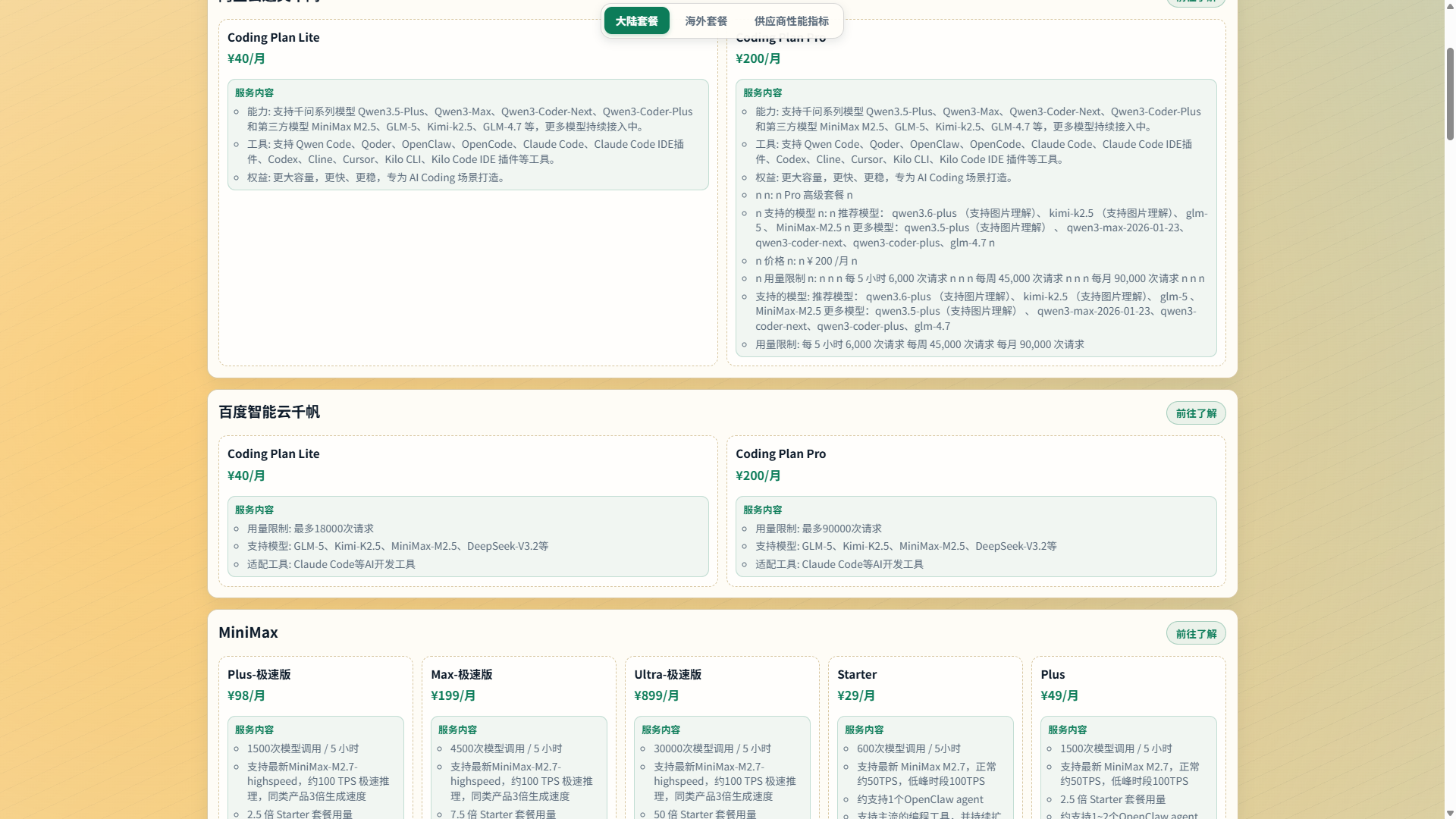
Daily Auto-Update · Multi-Dimensional Filtering · URL State Sync · Responsive Design
The Coding Plans Dashboard is a real-time data panel deployed on GitHub Pages, aggregating monthly fees and benefits from mainstream domestic AI coding plans, as well as OpenRouter vendor performance metrics. Data is automatically scraped daily via scheduled tasks — no manual maintenance required.
Dashboard Overview
| Tab |
Content |
Data Source |
Update Frequency |
| 📦 Domestic Plans |
RMB monthly plans (Zhipu, Kimi, Volcengine, etc. 20+ vendors) |
Vendor website scraping |
Daily 10:00 |
| 🌍 Overseas Plans |
USD plans (Cerebras, Synthetic, etc.) |
OpenRouter API + websites |
Daily 16:00 |
| 📊 Provider Metrics |
Availability, latency (p50/p90/p99), throughput (RPS) |
OpenRouter API |
Daily 16:00 |
Features
| Feature |
Description |
| Three-Tab Views |
Domestic Plans, Overseas Plans, and OpenRouter Performance Metrics switch independently |
| Automated Scraping |
Daily scheduled scraping of vendor pricing and performance metrics for reliable, up-to-date data |
| Multi-Dimensional Filtering |
Cross-filter by model vendor, model name, provider, cache discount, and more |
| Real-Time Metrics |
Displays vendor availability, latency percentiles (p50/p90/p99), and requests per second (RPS) over the last 30 minutes |
| Failure Tracking |
Failed scraping items displayed in a collapsible section for easy troubleshooting |
| URL State Sync |
Filter conditions automatically sync to URL hash, supporting link sharing and browser back/forward |
| Responsive Design |
Perfectly adapts to both desktop and mobile browsing |
| Zero Backend |
Pure static pages + JSON data files — simple deployment, fast loading |
Data Pipeline
graph TB
    subgraph Scheduled["⏰ Scheduled Tasks (GitHub Actions)"]
        direction LR
        T1["pricing:fetch"]
        T2["metrics:fetch"]
        T3["openrouter:plans:fetch"]
    end

    subgraph DataFiles["📁 assets/"]
        D1["provider-pricing.json"]
        D2["openrouter-provider-metrics.json"]
        D3["openrouter-provider-plans.json"]
    end

    subgraph Dashboard["🌐 GitHub Pages Dashboard"]
        P1["📦 Domestic Plans"]
        P2["🌍 Overseas Plans"]
        P3["📊 Provider Metrics"]
    end

    T1 --> D1
    T2 --> D2
    T3 --> D3
    D1 --> P1
    D2 --> P3
    D3 --> P2
Tab Details
📦 Domestic Plans
- Coverage: Zhipu, Kimi, iFLYTEK, Volcengine, MiniMax, Baidu Qianfan, Tencent Cloud, JD Cloud, Kuaishou KAT, X-AIO, Compshare, Alibaba Cloud, Infini, Xiaomi MiMo, Moore Threads, StepFun, China Unicom Cloud, National Supercomputing Internet, and 20+ more vendors
- Currency: Chinese Yuan (CNY)
- Filtering Rules: Standard monthly plans only (excluding annual, quarterly, and first-month promotional prices)
- Display: Plan name, price, included quota, validity period, purchase links
- Error Handling: Failed scraping items displayed in a collapsible section at the bottom
🌍 Overseas Plans
- Coverage: Cerebras Code, Synthetic, Chutes, Kilo Pass, and other OpenRouter vendors
- Currency: US Dollar (USD)
- Data Sources: OpenRouter API + vendor website Playwright scraping
- Display: Plan name, price, included quota, OpenRouter link, official pricing page
- Error Handling: Access-restricted or parsing-failed items placed in
Pending collapsible section
- Availability: Vendor success request ratio over the last 30 minutes
- Latency Metrics:
- p50: Median latency (50% of requests complete within this value)
- p90: 90th percentile latency
- p99: Tail latency (slowest 1% of requests)
- Throughput Metrics: Requests processed per second (RPS)
- Data Safety: Temporary all-empty performance responses are retried; persistent invalid or unauthorized responses do not overwrite the last valid metrics file.
- Filtering Dimensions:
- By model vendor (DeepSeek, Qwen, MoonshotAI, ByteDance, etc.)
- By model name (deepseek-chat, qwen-max, etc.)
- By provider (Cerebras, Chutes, Kilo, etc.)
- By cache discount (with/without prompt cache discount)
Local Development
# Install dependencies
npm install

# Fetch latest data (execute in order)
npm run pricing:fetch          # Fetch domestic vendor pricing
npm run metrics:fetch          # Fetch OpenRouter performance metrics
npm run openrouter:plans:fetch # Fetch overseas vendor plans

# Start local preview server
npm run serve:page
# Visit http://127.0.0.1:4173

# Run extension tests
npm test
# Or only run the VS Code Desktop smoke suite (downloads a test VS Code on first run)
npm run test:desktop
Data File Structure
pricing:fetch runs up to three providers concurrently, with a 120-second timeout per active provider. Rendered pricing pages wait for the required content after navigation commit; the default navigation timeout is 30 seconds. Timed-out tasks abort requests and close their browsers. Provider-specific navigation limits may override the default.
The dashboard uses the following core data files (located in the assets/ directory):
// provider-pricing.json — Domestic vendor monthly plans
{
  "generatedAt": "2026-05-06T12:00:00+08:00",
  "providers": [
    {
      "provider": "zhipu-ai",
      "sourceUrls": ["https://bigmodel.cn/glm-coding"],
      "plans": [
        { "name": "GLM Coding Plan", "price": 199, "currency": "¥", ... }
      ]
    }
  ],
  "failures": []
}
// openrouter-provider-metrics.json — Vendor performance metrics
{
  "generatedAt(Beijing)": "2026-05-06 12:00:00",
  "captureWindow": "30 minutes",
  "models": [
    {
      "id": "deepseek/deepseek-chat",
      "organization": "deepseek",
      "providers": [
        { "provider_name": "Cerebras", "uptime": 99.9, "latency_p50": 120, ... }
      ]
    }
  ]
}
// openrouter-provider-plans.json — Overseas vendor plans
{
  "providers": [ ... ],
  "pending": [ ... ],
  "summary": { "total": 12, "withPricing": 10 },
  "generatedAt(Beijing)": "2026-05-06 16:00:00"
}
"captureWindow": "30 minutes",
"models": [
{
"id": "deepseek/deepseek-chat",
"organization": "deepseek",
"providers": [
{ "provider_name": "Cerebras", "uptime": 99.9, "latency_p50": 120, ... }
]
}
]
}
---

## Development

Detailed development documentation can be found in [DEV.md](https://github.com/jqknono/coding-plans-for-copilot/blob/HEAD/DEV.md). Test layers and commands are documented in [docs/testing.md](https://github.com/jqknono/coding-plans-for-copilot/blob/HEAD/docs/testing.md).

---

## Feedback

- **Feature Suggestions**: Submit [Issue](https://github.com/jqknono/coding-plans-for-copilot/issues)
- **Usage Questions**: Include error logs and relevant `settings.json` configuration snippets (with sensitive information redacted) in the Issue
- **Vendor Integration**: Pull Requests are welcome

---

## License

MIT License

---

## Contribution Guidelines

1. Fork this repository
2. Create a feature branch (`git checkout -b feature/AmazingFeature`)
3. Commit changes (`git commit -m 'Add some AmazingFeature'`)
4. Push to the branch (`git push origin feature/AmazingFeature`)
5. Open a Pull Request

