Taskport
IDE → AI → task manager. Create detailed ClickUp, Jira, Linear, or Asana tasks from Cursor / VS Code — without putting API tokens in AI prompts.
Open VSX · VS Marketplace
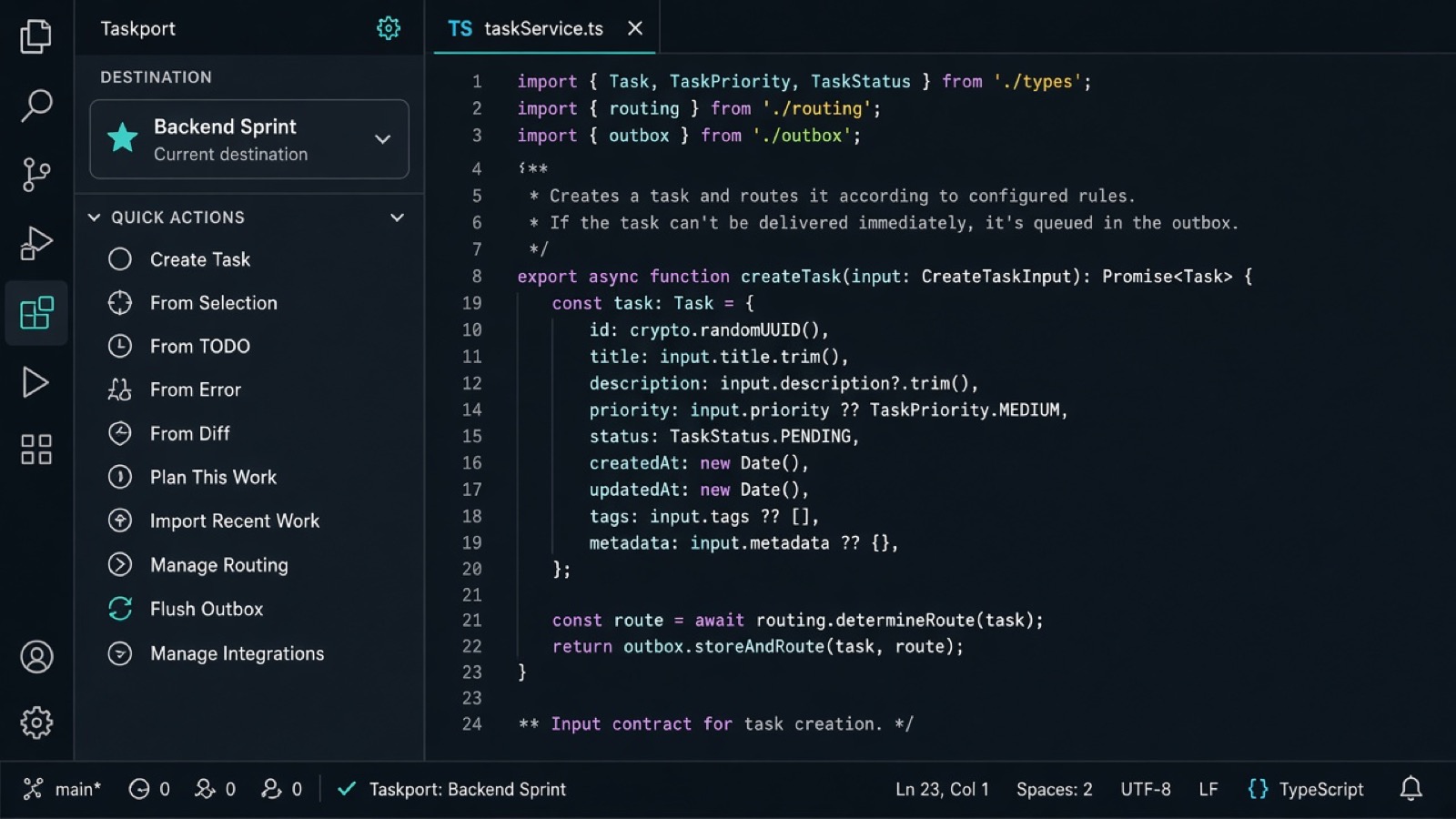
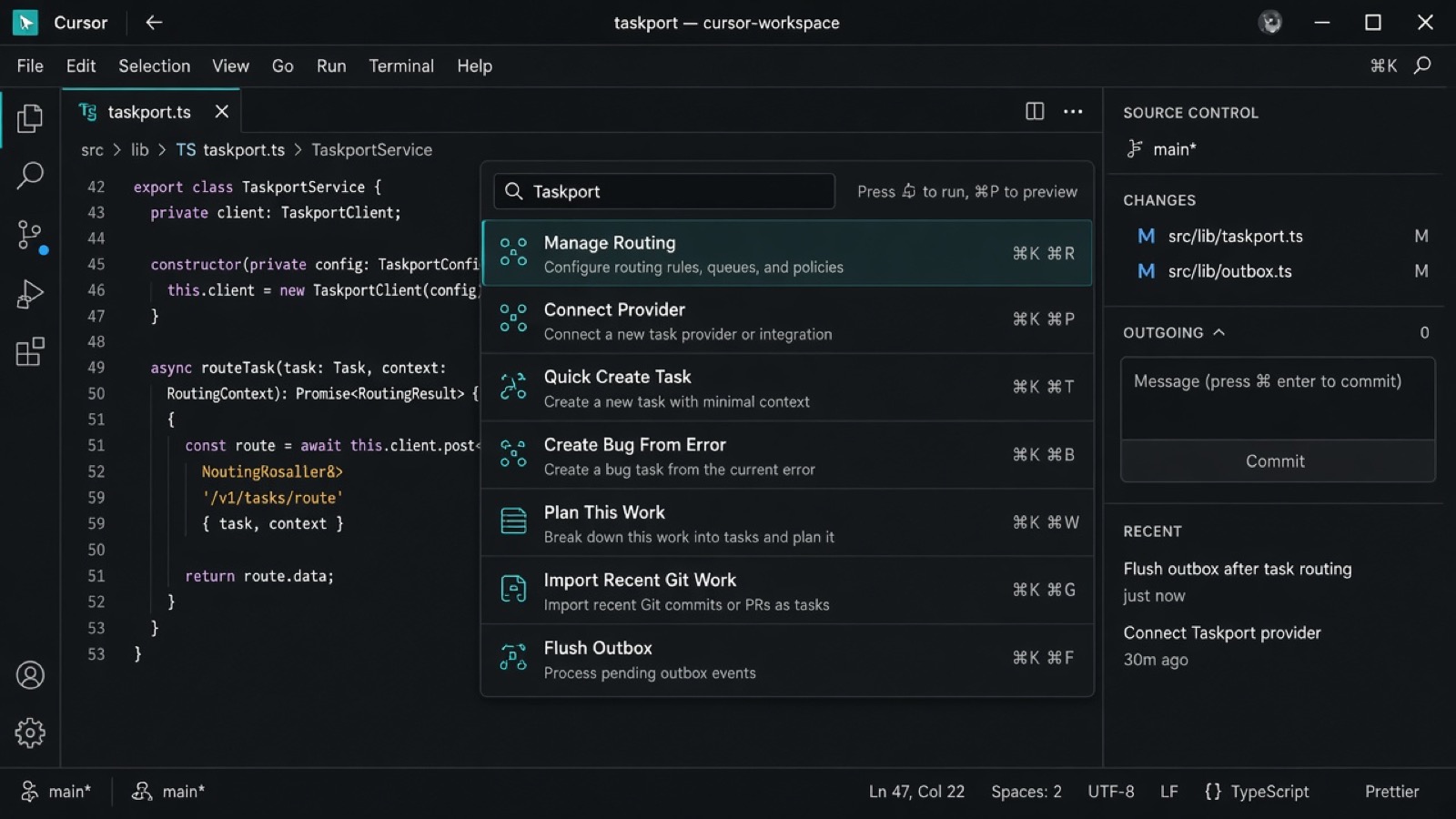
What Taskport does
Your coding agent (or you) writes the task content. Taskport:
- Stores provider tokens locally (SecretStorage)
- Remembers one destination per project (ask once)
- Creates the remote task and returns ID + URL
- Optionally uploads screenshots/files to the provider
Install
| App |
How |
| Cursor |
Extensions → search Taskport or taskport.taskport (Open VSX) |
| VS Code |
Extensions → search Taskport (Marketplace) |
| Manual |
Download the .vsix → Command Palette → Extensions: Install from VSIX… |
Reload the window after install if tools/sidebar do not appear.
Quick start (5 minutes)
1. Connect a provider
Command Palette → Taskport: Connect Provider
Tokens stay in IDE SecretStorage (mirrored under ~/.taskport for the local MCP server). They are never MCP tool arguments and are never sent to the model.
2. Pick a destination (once per project)
After connect, choose a list / project / team / section.
- First time in a workspace → Taskport asks once
- Later tasks in the same project go there automatically
- Another project → asked again only for that project
Commands: Add Destination, Switch Destination, Set Default Destination
3. Create a task
| Action |
How |
| Quick Create |
⌘⇧T / Ctrl⇧T or Taskport: Quick Create Task |
| From selection |
Select text → right-click → Create Task From Selection |
| From TODO |
Cursor on a TODO/FIXME → Create Task From TODO (writes task key back into the comment) |
| From error |
Paste / select a stack trace → Create Bug From Error |
| From diff |
Create Task From Git Diff |
| Plan work |
Plan This Work → epic + subtasks |
| Recent commits |
Import Recent Git Work as Tasks |
| Offline queue |
Flush Outbox when back online |
Sidebar (activity bar → Taskport) exposes the same actions.
Manage routing (per project)
Command Palette → Taskport: Manage Routing (also status bar click):
- Set / clear this workspace’s default destination
- Path rules (
apps/mobile/** → Mobile list)
- Task-type rules (
bug → Bugs list)
- Destination aliases for agents
- Write example
.taskport.json
- View a routing summary
Resolution order stays: explicit → path → task type → workspace default → global default → ask.
Try these scenarios
Copy-paste into Cursor chat (with Taskport MCP enabled). The agent should use git + your context, then call Taskport tools.
1. Last week → clean backlog
Review my last 7 days of work in this repo (commits + changed files). Merge with what we discussed in chat. Do not create one task per tiny commit — group related work. Each task needs a clear title, acceptance criteria, technical notes, and testing notes. Suggest sensible due dates (today / this sprint). Attach any screenshots I shared. Then create them with Taskport (get_recent_git_activity → create_tasks) in this workspace’s destination.
2. Friday wrap-up / standup notes
Look at today’s diff and my recent commits. Create 3–5 Taskport tasks I can use in tomorrow’s standup, each tagged as Done today / Still open / Blocked. Mark blockers as high priority.
3. Bug from a real failure
Turn this stack trace / test failure into a professional bug task: Observed / Expected / Steps, acceptance criteria, and a regression-test note. Include relevant file references. Create it with Taskport as type bug and return the URL.
Or use the UI: select the error → Taskport: Create Bug From Error.
4. Ship this feature as a plan
Plan the “OAuth login” feature: one parent feature plus concrete subtasks (API, UI, tests, docs). Every subtask needs acceptance criteria. Bulk-create them with Taskport (same idea as Plan This Work).
5. TODO debt cleanup
Scan TODO/FIXME comments in this file. Create a tech-debt task for each, with AC “comment can be removed when done”. After create, write the task key back into the TODO line.
UI: cursor on TODO → Create Task From TODO.
6. Review my WIP diff as a reviewable task
Read my working-tree diff. Write a reviewer-friendly task (changed files, risk, test plan). Create it with Taskport; suggest a branch name from the task key.
UI: Create Task From Git Diff.
7. Incident → tracked follow-ups
From these incident notes create three Taskport tasks with the right priorities: (1) urgent hotfix bug, (2) root-cause follow-up, (3) monitoring/alerting follow-up.
Using with Cursor Agent / MCP
Taskport registers MCP tools so the agent can create tasks for you.
Typical agent flow
taskport.get_workspace_destination with your workspace path- If not configured → ask you once which list →
taskport.set_workspace_destination
taskport.create_task (or create_tasks for bulk / “past week” imports)
For weekly import the agent should call taskport.get_recent_git_activity first (days: 7), then enrich and create_tasks.
Attachments
{
  "workspacePath": "/absolute/path/to/repo",
  "task": {
    "title": "Fix null pointer in checkout",
    "type": "bug",
    "attachments": [
      { "name": "bug.png", "relativePath": "docs/bug.png", "caption": "Repro UI" }
    ]
  }
}
Local files are uploaded to the provider (max ~10MB). Public URLs are linked where supported.
If MCP shows 0 tools: Cursor Settings → Tools & MCP → toggle Taskport off/on, then reload.
Destination resolution order
- Explicit destination (you / tool argument)
- Path / type rules (optional
.taskport.json)
- This workspace’s remembered destination
- Global default
- Ask you (
AMBIGUOUS_DESTINATION)
Invalid destinations fail closed — no silent fallback.
Optional project config
Copy examples/taskport.json → .taskport.json in a repo for aliases/routing only.
Never put tokens in the repo.
Privacy (summary)
Taskport is local-first. There is no Taskport cloud backend and no Taskport telemetry.
| Stays on your machine |
Sent only to providers you connect |
API tokens (SecretStorage / ~/.taskport) |
Task title, description, AC, notes you provide |
| Destination presets & workspace bindings |
Optional attachments you attach |
| Outbox queue |
Auth only to that provider’s API |
We do not sell data, do not pass tokens to AI models, and do not upload your repo except what you put in a task/attachment.
Provider policies still apply: ClickUp · Atlassian · Linear · Asana
Full policy ships inside the extension as PRIVACY.md.
Troubleshooting
| Problem |
Fix |
| No destinations |
Connect Provider → Add Destination |
| Agent asks every time |
Pass workspacePath and complete ask-once binding |
| Cursor can’t find extension |
Install from Open VSX; wait for index; Reload Window |
| Network errors |
Task is queued → Flush Outbox |
| Duplicate create warning |
Soft idempotency (~10 min); confirm or cancel |
Requirements
- Cursor or VS Code matching
engines.vscode (^1.93.0)
- A ClickUp, Jira Cloud, Linear, or Asana account + API token
License
MIT

