CodeLight
Shared highlights and comments for VS Code, kept beside your code instead of inside it.
Get it on the Visual Studio Marketplace

Why
We read more than we write. VS Code stopped being only a code editor long ago. People draft documents in it, read specifications in it, and work through unfamiliar repositories in it.
AI generated code tipped the balance. Code now arrives written, with its comments already attached. The typing is increasingly done for us, so what is left is reading it and deciding whether it is right.
Code comments are not notes. They document what the code does, which is a different job entirely. Nothing in them records what you noticed while reading, what looked wrong, or what you wanted a colleague to confirm.
Keep them in a layer of their own. Plenty of what you want to write down is not meant to ship. A doubt about a function, a reminder to check something later, a question for a colleague tomorrow. Put that in the source and it becomes part of the product and part of everyone's diff, and someone has to remember to take it out again.
CodeLight keeps those notes beside the code rather than inside it. Commit the CodeLight file in .vscode, either codelight.json or codelight.json.gz, and the whole team reads the layer. Add it to your .gitignore and it never leaves your machine, so you can be as blunt as you like while reading and none of it ever reaches the repository.
What it does
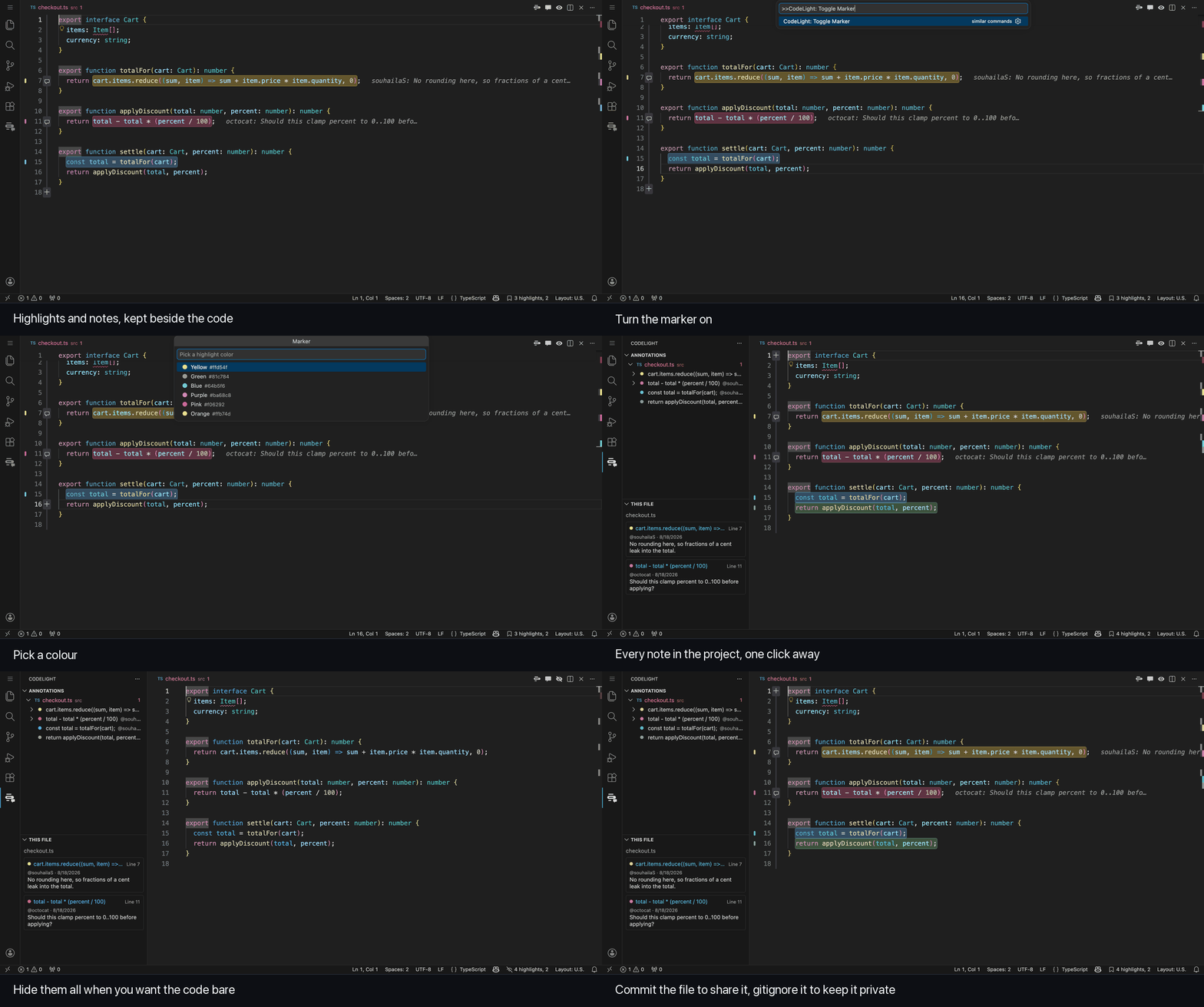
- Highlight any selection in a colour of your choice, with a palette you can redefine.
- Turn on the marker and everything you select gets highlighted until you turn it off.
- Hide every highlight and comment with one button, and bring them back with the same one.
- Attach comments to a highlight and reply to your colleagues, each one attributed to a verified GitHub account.
- Read a whole thread by hovering the highlight, with the latest note shown inline at the end of the line.
- Browse every annotation in the project from the activity bar, grouped by file, filtered by colour, and click to jump straight to the text.
- Give every folder of a multi root workspace its own annotation file, so notes follow the folder they belong to.
- Keep everything in the CodeLight file in
.vscode, so annotations travel through git exactly like the code does. Commit the file to share them, or add it to .gitignore to keep them to yourself.
Two commands decide whether the notes travel. Keep the Notes Out of Git adds the annotation file to .gitignore, and Let the Notes Go Into Git takes it back out.
Highlights follow your edits. Insert lines above one and it moves with the text. Delete the text it marks and CodeLight looks for it elsewhere in the file before giving up, and if the text comes back the highlight returns with it.
Using it
| Action |
Shortcut |
| Highlight the selection |
cmd alt K on macOS, ctrl K ctrl H elsewhere |
| Comment on the selection |
cmd alt M on macOS, ctrl K ctrl M elsewhere |
Everything else lives in the command palette under CodeLight, in the editor right click menu, and in the panel behind the CodeLight icon in the activity bar.
Settings
| Setting |
Default |
Meaning |
codelight.palette |
built in colours |
The colours offered in the picker |
codelight.highlightOpacity |
0.3 |
How strong the highlight background is |
codelight.inlineComments |
preview |
Show the latest comment, a count, or nothing |
codelight.commentGutter |
always |
Where the comment button appears in the gutter |
codelight.gutterMarks |
true |
Show a coloured mark in the gutter beside every highlight |
codelight.storage |
json |
Format used when CodeLight creates the annotation file. An existing file keeps its own format |
The compressed format writes .vscode/codelight.json.gz, which is much smaller but is a binary file that git cannot diff or merge. To move an existing store between the two formats, run CodeLight: Convert Annotation Storage Format, which writes the new file and removes the old one after you confirm.
If you commit the compressed file, add *.json.gz binary to your .gitattributes first. A repository that forces * text rewrites line endings on checkout, which corrupts the gzip stream and leaves the store unreadable.
Installing
Search for CodeLight in the Extensions view, or install it from a terminal.
code --install-extension souhailaserbout.codelight
To build it from source instead, package the repository and install the result.
npm install
npx @vscode/vsce package
code --install-extension codelight-0.5.1.vsix
License
PolyForm Noncommercial 1.0.0. Free for noncommercial use, including personal projects, research and teaching. Commercial use requires a separate licence.